
Xiaomi KWSS30
Xiaomi Mi Smart Band 7 ユーザーマニュアル
モデル: KWSS30
導入
The Xiaomi Mi Smart Band 7 is an advanced fitness and activity tracker designed to help you monitor your health and fitness activities. Featuring a large AMOLED display, comprehensive workout modes, and extensive health monitoring capabilities, it provides valuable insights into your daily well-being. This manual provides essential information for setting up, operating, maintaining, and troubleshooting your device.

Image: The Xiaomi Mi Smart Band 7, a sleek black fitness tracker with a vibrant display showing time, weather, and health metrics.
設定
1. デバイスの充電
Before first use, fully charge your Xiaomi Mi Smart Band 7. The device uses a magnetic charging cable.
- Connect the magnetic charging cable to the charging contacts on the back of the band.
- ケーブルの USB 端子を標準の USB 電源アダプタ (5V/1A を推奨) またはコンピュータの USB ポートに差し込みます。
- The band's display will show the charging progress. A full charge typically takes about 2 hours.

Image: Close-up of the Xiaomi Mi Smart Band 7 showing the magnetic charging port and the charging cable attached.
2. スマートフォンとのペアリング
To unlock the full potential of your Mi Smart Band 7, you need to pair it with the Mi Fitness app (formerly Mi Fit or Zepp Life) on your smartphone.
- ダウンロード ミフィットネス Google Play ストア (Android の場合) または Apple App Store (iOS の場合) からアプリをダウンロードします。
- Open the Mi Fitness app and log in or create a new Xiaomi account.
- スマートフォンでBluetoothが有効になっていることを確認します。
- In the app, navigate to "Devices" and select "Add device" or the "+" icon.
- Choose "Mi Smart Band 7" from the list of available devices.
- Follow the on-screen instructions in the app and on your band to complete the pairing process. You may need to confirm a pairing request on the band's screen.
Once paired, the band will synchronize data with your phone, and you can customize settings, view 詳細な健康データを確認し、アプリを通じて通知を管理できます。
デバイスの操作
ディスプレイとナビゲーション
The Xiaomi Mi Smart Band 7 features a 1.62-inch AMOLED touchscreen display for intuitive interaction.
- 上/下にスワイプ: メニューと通知をスクロールします。
- 左/右にスワイプ: クイック機能またはウィジェット (例: 音楽コントロール、天気) にアクセスします。
- タップ: 項目を選択するか、アクションを確認します。
- 長押し: ホーム画面からウォッチフェイスをカスタマイズします。

Image: A close-up of the Mi Smart Band 7's 1.62" AMOLED display, highlighting its vibrant colors and sharp text.
主な特徴と機能
ワークアウトモード
The band supports over 110 workout modes, allowing you to track a wide range of activities.
- To start a workout, swipe up or down to find the "Workout" menu, tap to select your desired activity (e.g., Outdoor Run, Cycling, Swimming), and tap "Go" to begin.
- The band will record duration, calories burned, heart rate, and other relevant metrics.
- After your workout, sync with the app to view detailed analysis, including VO2 max and training effect.

Image: A visual representation of various sports icons surrounding a person wearing the Mi Smart Band 7, illustrating the 110+ supported sports modes.
ビデオ: 公式プロモーションビデオasing the various features and capabilities of the Xiaomi Mi Smart Band 7, including its display, sports modes, and health tracking.
健康モニタリング
The Mi Smart Band 7 offers continuous monitoring of vital health metrics.
- SpO2トラッキング: Monitors blood oxygen saturation throughout the day and sends alerts for low levels.
- 心拍数モニタリング: 24 時間の心拍数追跡を提供します。
- 睡眠モニタリング: 睡眠を追跡tag睡眠レベル(深い睡眠、浅い睡眠、レム睡眠)を分析し、睡眠の質に関する洞察を提供します。
- ストレスモニタリング: Assesses your stress levels and offers guided breathing exercises.
- 月経周期の追跡: Helps women track their cycle and predict fertile windows.
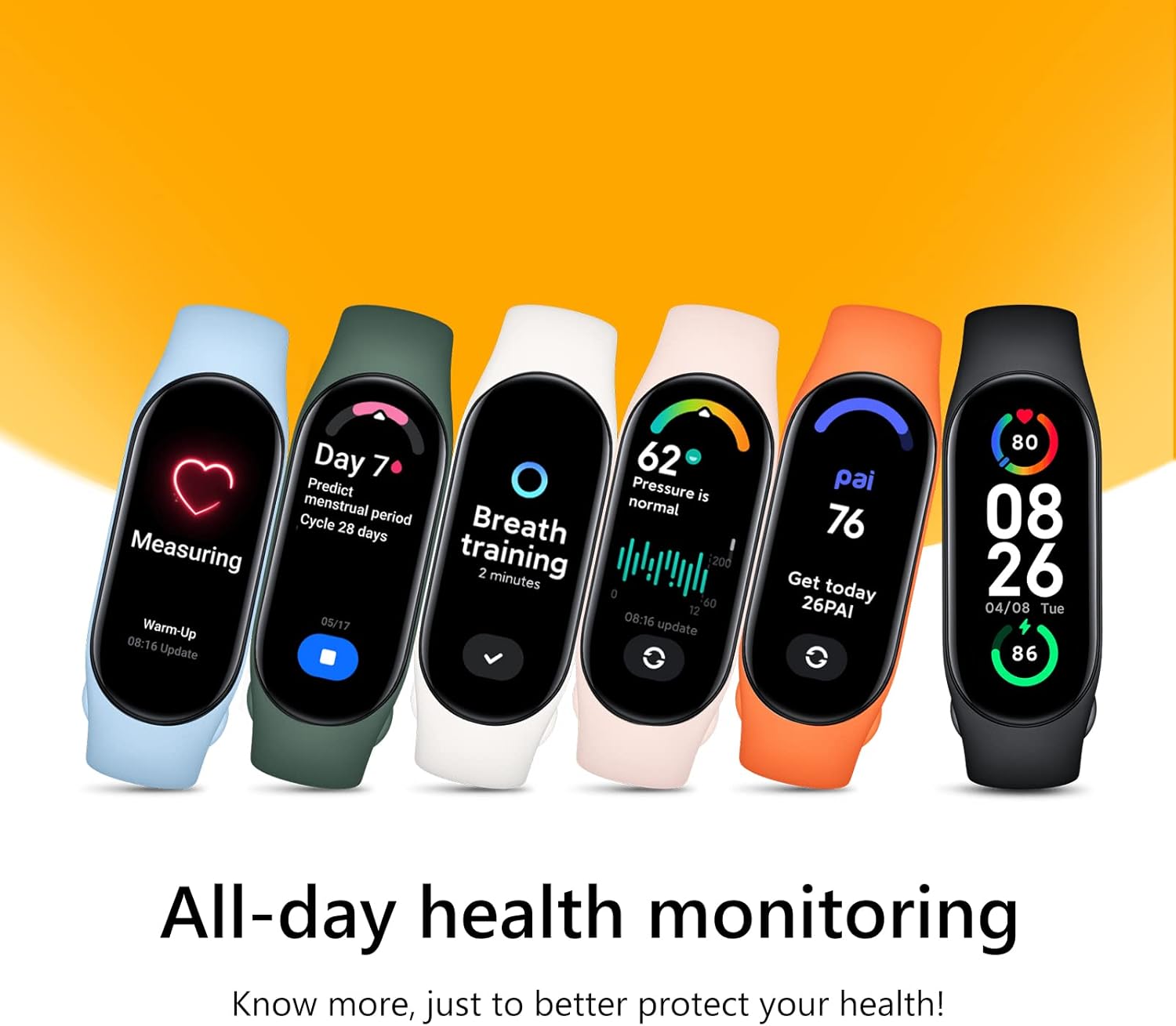
Image: A row of colorful Xiaomi Mi Smart Band 7 devices, each displaying a different health metric such as heart rate, PAI score, stress level, and breathing exercise prompts.
耐水性
The band is 5ATM water-resistant, making it suitable for swimming and showering.
- It supports pool swimming, snorkeling, and intelligent recognition of four common swimming styles.
- Avoid using the band in hot showers, saunas, or steam rooms as steam can affect the water resistance.

Image: The Xiaomi Mi Smart Band 7 submerged in water with bubbles, illustrating its 5ATM water resistance feature.
カスタマイズ
Personalize your band with over 100 new watch faces.
- Access new watch faces through the Mi Fitness app.
- The band also supports "Always-On Display" (AOD) for continuous time display.

Image: A collection of various digital watch faces displayed on the Xiaomi Mi Smart Band 7, showcasing the wide range of customization options available.
メンテナンス
Cleaning Your Band
Regular cleaning helps maintain the band's appearance and functionality.
- Wipe the band and display with a soft, damp 布。
- For the sensor area on the back, use a cotton swab lightly dampened with rubbing alcohol if necessary, then wipe dry.
- 強力な化学薬品や研磨材の使用は避けてください。
バッテリーケア
The Mi Smart Band 7 offers up to 14 days of battery life with typical usage.
- バッテリー寿命を最大限にするには、極端な温度を避けてください。
- 長期間使用しない場合は、デバイスを完全に充電してください。
- Frequent use of features like continuous heart rate monitoring, SpO2 tracking, and Always-On Display will reduce battery life.
トラブルシューティング
よくある問題と解決策
| 問題 | 考えられる解決策 |
|---|---|
| Band not pairing with phone |
|
| ディスプレイが応答しない |
|
| 不正確な健康状態 |
|
| バッテリー寿命が短い |
|
For more detailed troubleshooting or issues not listed here, please refer to the official Xiaomi support webサイトをご覧いただくか、カスタマーサービスにお問い合わせください。
仕様
| 特徴 | 詳細 |
|---|---|
| モデル番号 | KWSS30 |
| 表示タイプ | アモルファス |
| 表示サイズ | 1.62インチ |
| 寸法 | 46.5mm×20.7mm×12.25mm |
| 重さ | 13.5グラム |
| 耐水性 | 5気圧 |
| バッテリー容量 | 180 mAh(リチウムポリマー) |
| バッテリー寿命 | 最大14日間(通常の使用) |
| 接続性 | ブルートゥース |
| オペレーティングシステムの互換性 | アンドロイド、iOS |
| センサー | Heart Rate Monitor, SpO2 Sensor, Accelerometer, Gyroscope |
| GPS | No built-in GPS (uses connected smartphone GPS) |
保証とサポート
保証情報、技術サポート、またはサービスに関するお問い合わせについては、製品に付属の保証書を参照するか、Xiaomiの公式サポートをご覧ください。 webサイトでご確認ください。保証請求に備えて購入証明書を保管してください。
詳細情報と連絡先はXiaomiの公式ウェブサイトでご覧いただけます。 webサイト: www.mi.com/global/support
関連文書 - KWSS30
 |
Xiaomi Mi Smart Band 7 & 6: 包括的なユーザーガイド Xiaomi Mi Smart Band 7とMi Smart Band 6の機能、特徴、健康トラッキング機能(PAI、心拍数、睡眠、ワークアウトモードなど)を網羅した詳細なガイド。情報提供:Mealthy。 |
 |
Xiaomi Smart Band 9:高度な機能、仕様、アクセサリ 鮮やかな AMOLED ディスプレイ、高度な健康モニタリング (心拍数、SpO2)、最大 21 日間のバッテリー寿命、ストラップ、ペンダント、ランニング クリップなどのスタイリッシュで機能的なアクセサリを備えた Xiaomi Smart Band 9 をご覧ください。 |
 |
Xiaomi Band 3 ユーザーマニュアル: セットアップ、機能、仕様 Xiaomi Band 3フィットネストラッカーの包括的なユーザーマニュアル。セットアップ、スマートフォンとのペアリング、使用方法、仕様、規制情報などを網羅しています。Xiaomi Band 3の取り付け、装着、充電、使用方法を学びましょう。 |
 |
Xiaomi Mi Band 5 User Manual: Features, Specifications, and Pairing Guide Comprehensive user manual for the Xiaomi Mi Band 5, detailing its specifications, basic operations, sport modes, health monitoring features, and pairing instructions with the Mi Fit app. |
 |
Xiaomi Smart Band 7 Pro ユーザーマニュアル Xiaomi Smart Band 7 Proの包括的なユーザーマニュアル。注意事項、製品の説明、view、装着方法、アプリの接続、使用方法、充電、ストラップの調整、仕様、廃棄情報、保証の詳細などが記載されています。 |
 |
Xiaomi Mi Band 4 をダウンロード Xiaomi Mi Band 4 は、Xiaomi Mi Band 4 と互換性があり、最新の機能を備えています。必要があります。 |
Ask a question about this manual
Ask about setup, troubleshooting, compatibility, parts, safety, or missing instructions. Manuals+ will review the question and use this page’s manual context to help answer it.