
1. はじめに
The Owlet Dream Duo Gen 1 is an FDA-cleared smart baby monitoring system designed to provide caregivers with insights into their infant's well-being. This system includes the Dream Sock and the Owlet Cam 1, working together to offer real-time health readings, video monitoring, and timely notifications. It is intended for use with healthy infants between 1-18 months, weighing 6-30 lbs.
2. 含まれるもの
Your Owlet Dream Duo Gen 1 package contains the following components:
- フクロウのカメラ 1
- ドリームソックスセンサー
- 4 Fabric Socks (designed to fit babies 0-18 months, 5-30 lbs)
- 基地局
- カム取り付けキット
- 睡眠予測技術を搭載したDreamアプリへのアクセス

Figure 2.1: All components included in the Owlet Dream Duo Gen 1 package.
3.セットアップガイド
3.1 Owlet Cam 1 Setup
- Unpack the Cam: Carefully remove the Owlet Cam 1 from its packaging.
- Mount the Cam: Use the provided Cam Mounting Kit to securely install the camera in your baby's nursery. Ensure the camera has a clear view ベビーベッドの。
- 接続電源: Plug the camera into a power outlet using the provided power adapter.
- アプリをダウンロードする: Download the Owlet Dream App from your device's app store.
- アプリとペアリング: Follow the in-app instructions to pair the Owlet Cam 1 with your smartphone or tablet. The camera requires a 2.4 GHz Wi-Fi connection.
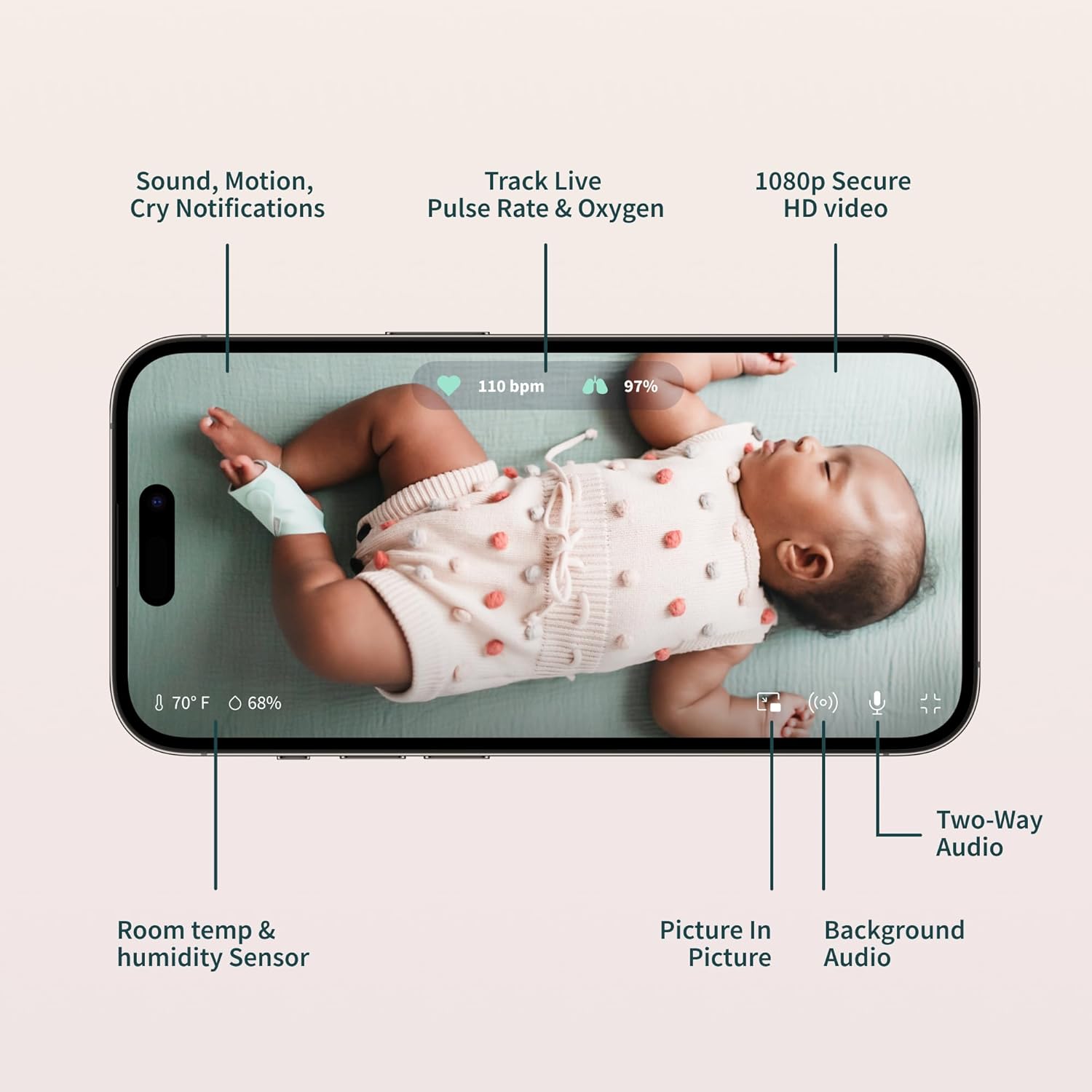
Figure 3.1: The Owlet Cam 1.
ビデオ3.1: オーバーview and unboxing of the Owlet product, demonstrating the components and initial setup steps.
3.2 Dream Sock Setup
- Charge the Sock: Place the Dream Sock sensor onto the Base Station to charge. The Base Station uses wireless charging for the sock.
- Select Fabric Sock: Choose the appropriate fabric sock size for your baby (0-18 months, 5-30 lbs). The package includes multiple sizes.
- センサーを挿入: Carefully insert the Dream Sock sensor into the designated pocket on the fabric sock.
- Apply to Baby's Foot: Securely wrap the Dream Sock around your baby's foot, ensuring the sensor is positioned correctly (e.g., behind the pinky toe, as indicated on the sock).
- アプリとペアリング: Follow the in-app instructions to pair the Dream Sock with your Owlet Dream App.
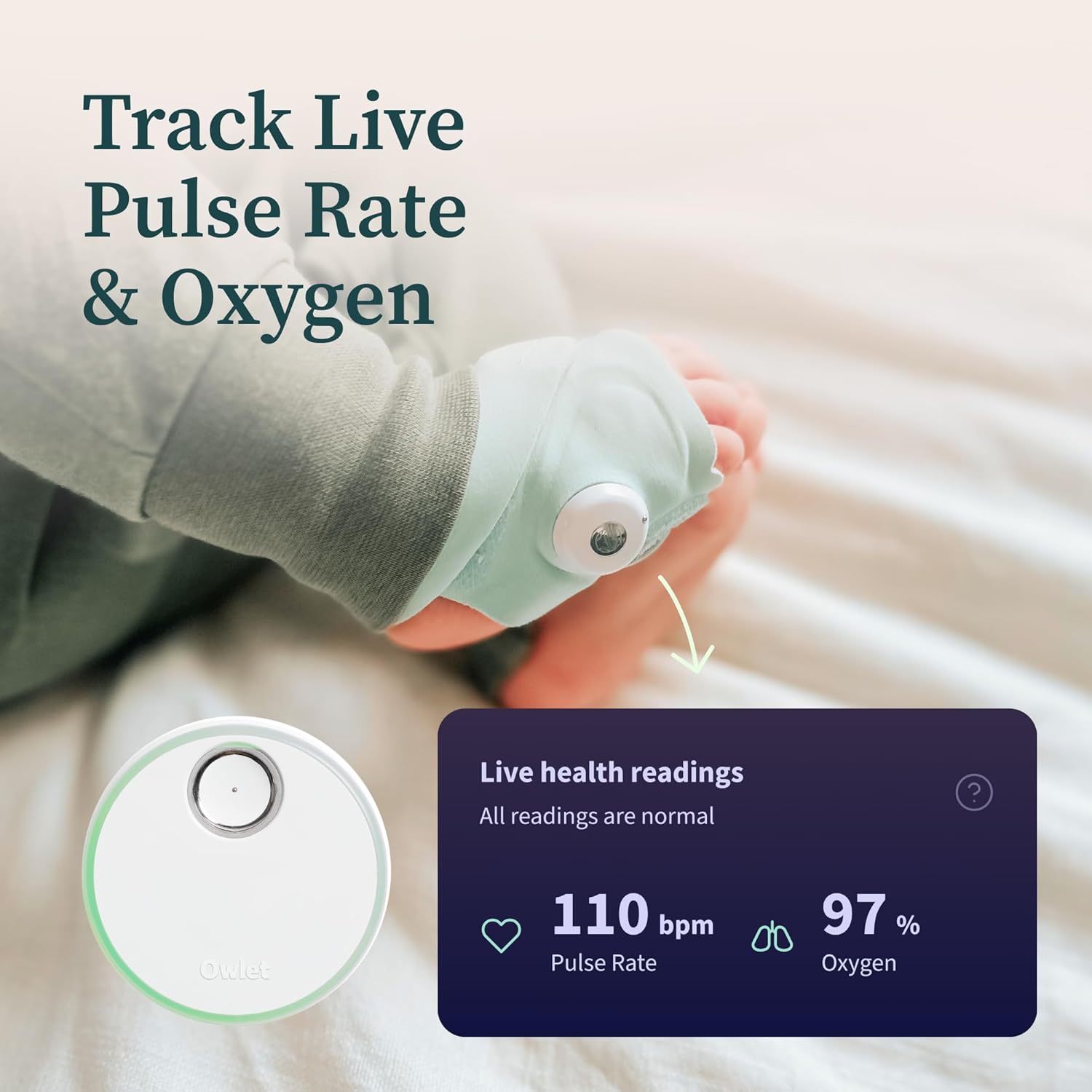
図 3.2: 赤ちゃんの足にドリームソックスを正しく装着する様子。
Video 3.2: An unboxing video of the Owlet Dream Sock, showing how to assemble and prepare the sock for use.
3.3 Owlet Dream App Setup
- ダウンロード: 検索する "Owlet Dream" in the Apple App Store (iOS OS 14+) or Google Play Store (Android OS 7+).
- アカウントを作成する: Open the app and create an Owlet account or log in if you already have one.
- プロンプトに従ってください: The app will guide you through connecting your Dream Sock and Owlet Cam 1 to your home Wi-Fi network (2.4 GHz required).

Figure 3.3: The Owlet Dream App displaying real-time monitoring data.
4. 操作手順
4.1リアルタイムモニタリング
- Pulse Rate & Oxygen: The Dream Sock continuously tracks your baby’s pulse rate and oxygen levels. These readings are displayed in real-time on the Owlet Dream App.
- 睡眠の傾向: The app provides insights into your baby's sleep patterns, including wakings and sleep quality indicators.
- 部屋の環境: The Owlet Cam 1 monitors room temperature and humidity, visible within the app.

Figure 4.1: Live health readings from the Dream Sock.
Video 4.1: An official Owlet video demonstrating the FDA-cleared features of the Dream Sock, including live health readings and notifications.
4.2 通知とアラート
- ベースステーションアラート: The included Base Station provides light and sound notifications if your infant’s health readings fall outside preset ranges.
- アプリ内通知: Receive real-time alerts directly on your smartphone via the Owlet Dream App for critical health readings or other events like motion or sound detection.

図4.2:例ample of a 'Low Oxygen' alert on the Owlet Dream App.
4.3 Video Monitoring Features
- 2K HDビデオ: View high-definition video of your baby through the Owlet Cam 1.
- HDナイトビジョン: The camera provides clear video even in low-light conditions.
- 双方向オーディオ: Speak to your baby or listen to sounds from the nursery through the app.
- Background Audio & Picture-in-Picture: Keep an ear on your baby while using other apps or view the video feed in a small window.
- Cry & Motion Alerts: Receive notifications for detected sound and motion in the nursery.

Figure 4.3: Owlet Cam 1 night vision view アプリで。
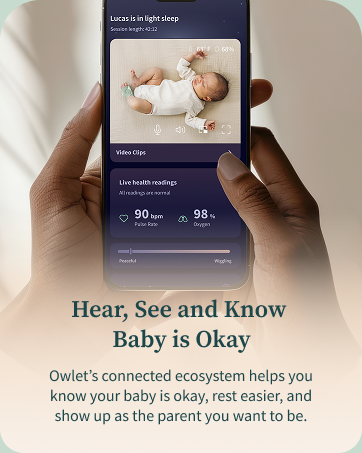
Figure 4.4: Motion and sound notifications from the Owlet Dream App.
5. メンテナンス
- Cleaning the Fabric Socks: Hand wash the fabric socks regularly to maintain hygiene and prevent odors. Allow them to air dry completely before reuse.
- センサーのクリーニング: Gently wipe the Dream Sock sensor with a dry, soft cloth. Avoid using harsh chemicals or abrasive materials.
- Cleaning the Cam: Wipe the camera lens and body with a soft, dry cloth. Do not use liquid cleaners directly on the camera.
- 充電: Ensure the Dream Sock sensor is placed on the Base Station for charging when not in use. The Base Station should remain plugged in.
6。 トラブルシューティング
- 接続の問題: Ensure your Wi-Fi network is 2.4 GHz. If experiencing frequent disconnections, check your router's signal strength in the nursery. Restarting the camera, Base Station, and your Wi-Fi router may resolve some issues.
- アプリの不具合: If the app is not displaying real-time data or video correctly, try closing and reopening the app. Ensure your app is updated to the latest version.
- 靴下の配置アラート: If you receive alerts about incorrect sock placement or poor connection, re-adjust the sock on your baby's foot, ensuring it is snug but not too tight, and the sensor is correctly positioned.
- Geographical Restrictions: This U.S. version of the Dream Duo is designed for use within the United States. Functionality may be limited or unavailable outside of the U.S.
7. 仕様
| ブランド | フクロウの子 |
| モデル名 | フクロウの夢のデュオ |
| モデル番号 | PS0DN67SBK |
| 欧州連合 | 850038861261 |
| 材料 | Plastic, Spandex |
| 色 | Gen 1 Blue |
| 対応デバイス | 2.4 Ghz Wifi, Android OS 7+, iOS OS 14+ |
| 製品寸法 | 長さ2.4インチ x 幅2.4インチ x 高さ4.4インチ |
| アイテム重量 | 2.1 ポンド |
| Battery Life (Sock) | 7 days (sensor charge) |
| センサータイプ | Auditory, Optical |
| バッテリーの説明 | リチウムイオン |
8. 保証とサポート
8.1 保証情報
The Owlet Dream Duo Gen 1 comes with a 1年間の限定保証 ご購入日から1年間有効です。本保証は、通常の使用における製造上の欠陥および故障を対象としています。保証請求の際は、購入証明書を保管してください。
8.2 カスタマーサポート
For technical assistance, troubleshooting, or warranty inquiries, please visit the official Owlet website or contact their customer support team. Detailed contact information can typically be found in the product packaging or on the Owlet webサイト。