
導入
This manual provides detailed instructions for the setup, operation, maintenance, and troubleshooting of your Audioengine A2 HD (HD3) Walnut Computer Speakers and DS1M Metal Stands. Please read this manual thoroughly before using your product to ensure optimal performance and longevity.
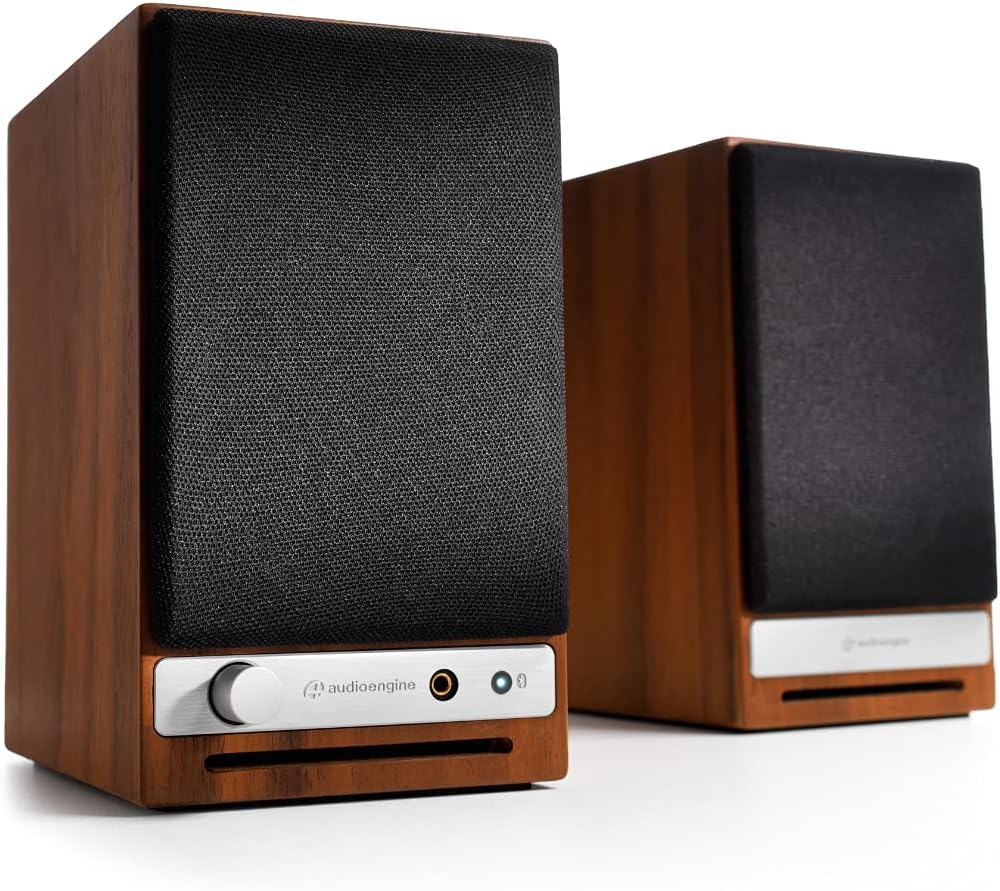
フロント view of the Audioengine A2 HD speakers in walnut finish with grilles on. The left speaker features a volume knob, headphone jack, and Bluetooth pairing button.
箱の中身
Your Audioengine A2 HD (HD3) package includes the following items:
- クイックスタートガイド
- 電源ケーブル
- 保証書
設定
スピーカーの配置
For optimal sound quality, position the speakers on a stable surface, such as a desk or bookshelf. The included DS1M Metal Stands are designed to elevate and angle the speakers towards your listening position, which can significantly enhance audio performance by directing sound more accurately. Place the left speaker (with controls) on the left side and the right speaker on the right side of your listening area.

An Audioengine A2 HD speaker is shown placed on a DS1M metal stand, positioned next to a laptop, illustrating a typical desktop setup.

This image displays the dimensions of the DS1M speaker stands, indicating a length of 6 inches (15.2 cm) and a width of 4 inches (10.2 cm).
接続
The A2 HD speakers offer multiple connectivity options:
- RCA 入力/出力: Connect audio sources using RCA cables. The RCA output can be used to connect a subwoofer.
- 補助入力: Use a 3.5mm stereo mini-jack cable for connecting devices like smartphones or tablets.
- USB入力: Connect directly to your computer for high-quality digital audio playback.
- ブルートゥース: ワイヤレスオーディオストリーミング用。
Connect the left (active) speaker to the right (passive) speaker using the provided speaker wire. Ensure correct polarity (+ to + and - to -).

後方 view of the Audioengine A2 HD speakers, highlighting the various input and output ports, including RCA, USB, and speaker wire terminals for connecting the passive speaker.
電源接続
Connect the power cable to the left speaker and then to a power outlet. The power indicator on the front of the left speaker will illuminate.
オペレーティング
電源のオン/オフ
The speakers will power on automatically when connected to a power source. To turn them off, disconnect the power cable.
ボリュームコントロール
Adjust the volume using the knob on the front of the left speaker. You can also control the volume from your connected audio source.
入力選択
The A2 HD speakers automatically detect and switch to the active input. For Bluetooth, press the Bluetooth pairing button to initiate pairing mode.
Bluetoothペアリング
- Turn on your A2 HD speakers.
- Press and hold the Bluetooth pairing button on the front of the left speaker until the indicator light flashes.
- On your device (smartphone, tablet, computer), go to Bluetooth settings and select "Audioengine A2 HD" from the list of available devices.
- Once paired, the indicator light will turn solid.
メンテナンス
スピーカーの外観とパフォーマンスを維持するには:
- Wipe the cabinets with a soft, dry cloth. Avoid using harsh chemicals or abrasive cleaners.
- スピーカーは直射日光、熱源、湿気から遠ざけてください。
- スピーカーの周囲に適切な換気を確保してください。
トラブルシューティング
音が出ない
- Check all cable connections, including power, speaker wire, and audio input cables.
- Ensure the volume knob on the speaker and your audio source is turned up.
- Verify that the correct input source is selected (if applicable, for automatic switching, ensure only one source is active).
- If using Bluetooth, ensure the speakers are properly paired and connected to your device.
Bluetooth接続の問題
- Ensure the speakers are in pairing mode (flashing Bluetooth light).
- Delete "Audioengine A2 HD" from your device's Bluetooth list and try pairing again.
- Move your device closer to the speakers to ensure it's within the 100-foot Bluetooth range.
- Restart both your device and the speakers.
仕様
| ブランド | オーディオエンジン |
| モデル番号 | 型番 |
| モデル名 | A2-HD |
| スピーカータイプ | 本棚 |
| スピーカー最大出力 | 60ワット |
| 周波数応答 | 50Hz |
| 接続技術 | 補助、Bluetooth、RCA、USB |
| オーディオ出力モード | ステレオ |
| 取り付けタイプ | 卓上マウント |
| エンクロージャ材質 | 木材 |
| 追加機能 | Hi Res Audio, Lightweight, Portable |
| コントローラータイプ | iOS、Android 対応 |
| 最大範囲 | 30メートル |
| 制御方法 | 触る |
| スピーカーサイズ | 2.75インチ |
| Bluetooth範囲 | 100フィート |
| Total USB 2.0 Ports | 1 |
| 製品の具体的な用途 | Gaming, Home Theatre, Pro Audio |
| オーディオチャンネルの数 | 3.0 |
| インピーダンス | 10000オーム |
| 信号対ノイズ比 | 95デシベル |
| 対応デバイス | スマートフォン、タブレット、ノートパソコン |
| 電源 | コード式電気 |
| 入力ボリュームtage | 110ボルト |
| ユニット数 | 2.0 カウント |
| ワイヤレステクノロジー | ブルートゥース |
| サブウーファー接続技術 | 有線 |
| 接続プロトコル | ブルートゥース |
| オーディオドライバータイプ | ダイナミックドライバ |
保証とサポート
Your Audioengine A2 HD (HD3) speakers come with a 3年間保証. For warranty claims or technical support, please refer to the contact information provided in your Warranty Card or visit the official Audioengine webサイト。
公式製品ビデオ
Audioengine - Never Settle for Less
This video highlights the Audioengine philosophy of never settling for less, showcasing various life moments enhanced by music. It features different Audioengine products in diverse settings.
20th Anniversary Video
A commemorative video celebrating 20 years of Audioengine, reflecting on the company's journey and commitment to quality audio products.
Doesn't Music Deserve it? Active Wireless Bookshelf Speakers
This video emphasizes the importance of high-quality audio for music, featuring active wireless bookshelf speakers in various home environments.