
1. はじめに
This manual provides detailed instructions for the installation, operation, and maintenance of your SriHome 3MP FHD Security Camera (Model SH039B/SP039). Please read this manual thoroughly before using the product to ensure proper functionality and safety. This camera offers 3MP Full HD resolution, color night vision, sound and light alarms, IP66 waterproofing, two-way audio, and local TF card storage.
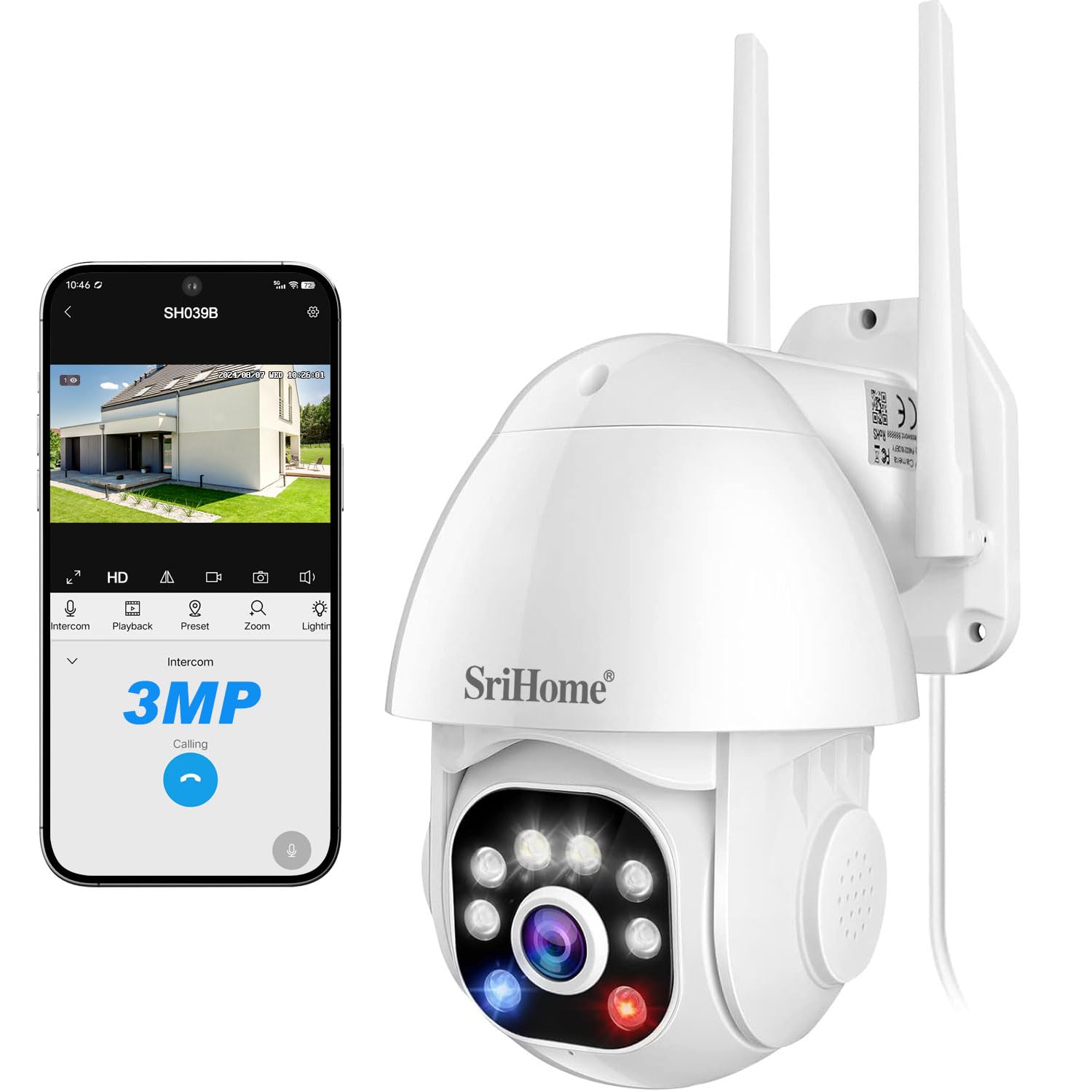
Image 1: SriHome 3MP IP Camera highlighting key features like 3MP resolution, starlight lens, two-way audio, waterproof design, human detection, motion detection, ONVIF support, color night vision, MicroSD card slot, and H.265 compression.
2. パッケージ内容
以下にリストされているすべてのアイテムがパッケージに含まれていることを確認してください。
- SriHome IP Camera (x1)
- 電源アダプター(x1)
- ユーザーマニュアル (x1)
- 取り付けネジ(1セット)
- 防水プラグ(1個)

画像 2: 製品パッケージに含まれるアイテムの視覚的表現。
3.製品図
Familiarize yourself with the components of your SriHome security camera:
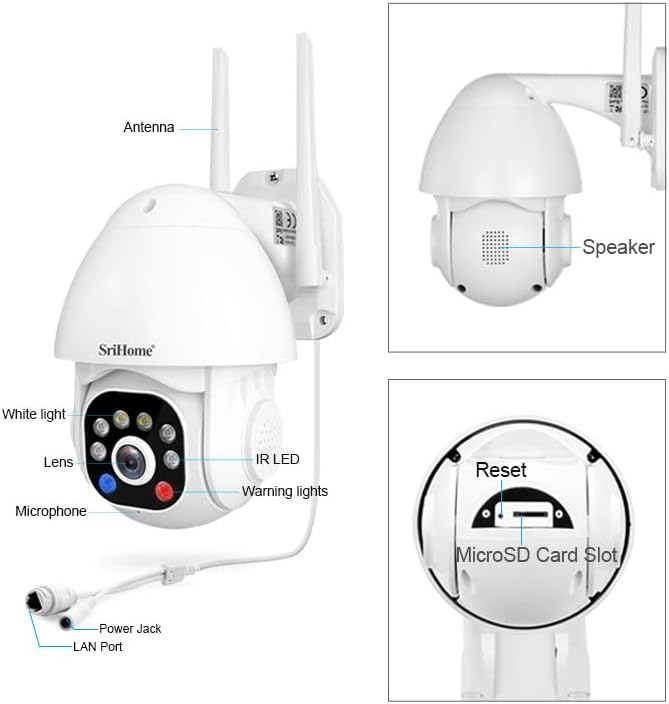
Image 3: Detailed diagram illustrating the various parts and ports of the SriHome IP Camera.
- アンテナ: Wi-Fi接続用。
- スピーカー: 双方向の音声通信と可聴アラーム用。
- 白色光: Provides illumination for color night vision and acts as a warning light.
- レンズ: The primary camera sensor.
- マイクロフォン: 双方向の音声通信用。
- 電源ジャック: 電源アダプタに接続します。
- LANポート: 有線ネットワーク接続用。
- 赤外線LED: 白黒夜間視力用の赤外線 LED。
- 警告灯: Red and blue lights for active deterrence.
- リセットボタン: カメラを工場出荷時の設定にリセットするために使用されます。
- MicroSDカードスロット: ローカルビデオストレージ用。
4. セットアップ
4.1アプリのダウンロード
Download the SriHome app to your smartphone for camera control and monitoring.
- Androidの場合: QRコードをスキャンするか、 Google Playストア.
- iOSの場合: QRコードをスキャンするか、 Apple Appストア.
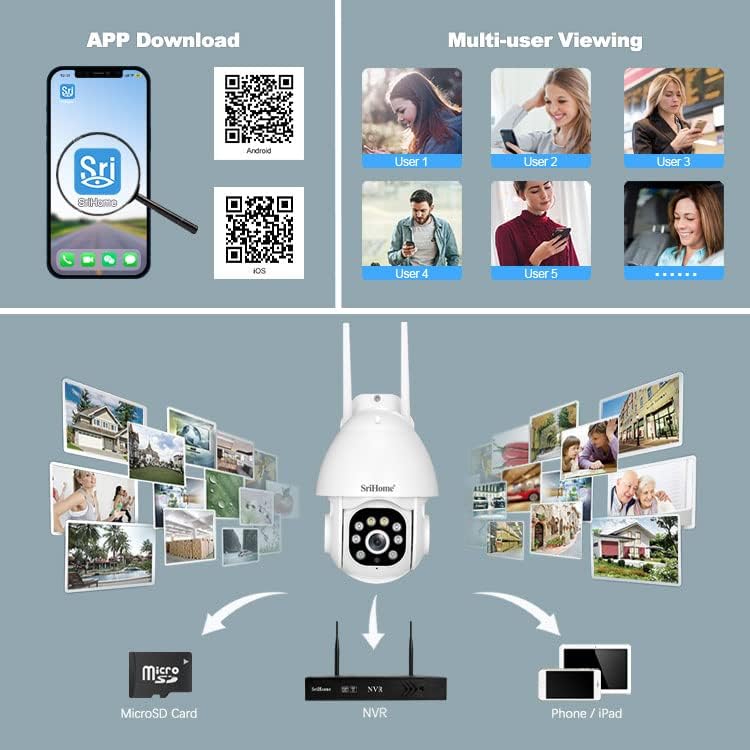
Image 4: Instructions for downloading the SriHome app and an overview of multi-user viewing およびストレージ オプション。
4.2ネットワーク接続
The camera supports both wireless (Wi-Fi) and wired connections.
- QR Code Network: Follow the in-app instructions to connect the camera to your Wi-Fi network by scanning a QR code generated by the app.
- AP ホットスポット ネットワーク: The camera can connect directly to your phone via its built-in AP hotspot without a router for initial setup or direct monitoring.
- 有線ネットワーク: Connect an Ethernet cable to the LAN port for a stable wired connection.
4.3 MicroSDカードの取り付け
To enable local storage, install a MicroSD card (up to 128GB, not included) into the designated slot. Ensure the camera is powered off before inserting or removing the card.
4.4 取り付け
The camera is designed for wall mounting. Use the provided screws and waterproof plug to secure the camera in your desired outdoor location. Ensure the mounting surface is stable and can support the camera's weight.
5. 操作手順
5.1 パン&チルト回転
カメラの viewing angle remotely through the SriHome app. The camera offers 355° horizontal pan and 90° vertical tilt for comprehensive coverage.

Image 5: Remote control of camera pan and tilt functions via the SriHome app.
5.2 ナイトビジョンモード
The camera features three night vision modes:
- Alarm Mode (Default): Provides black and white night vision. When a human figure is detected, the white light automatically turns on, switching to full-color night vision.
- ホワイトライトモード: The white light remains on, providing continuous full-color night vision. Brightness is adjustable.
- 赤外線モード: White light is off, and the camera uses IR LEDs for standard black and white night vision.
5.3 人間の検出と追跡
Equipped with AI, the camera can distinguish human motion from other movements (e.g., pets, wind, leaves) to reduce false alarms. Upon human detection, the camera sends immediate notifications to your smartphone and can track the detected person.
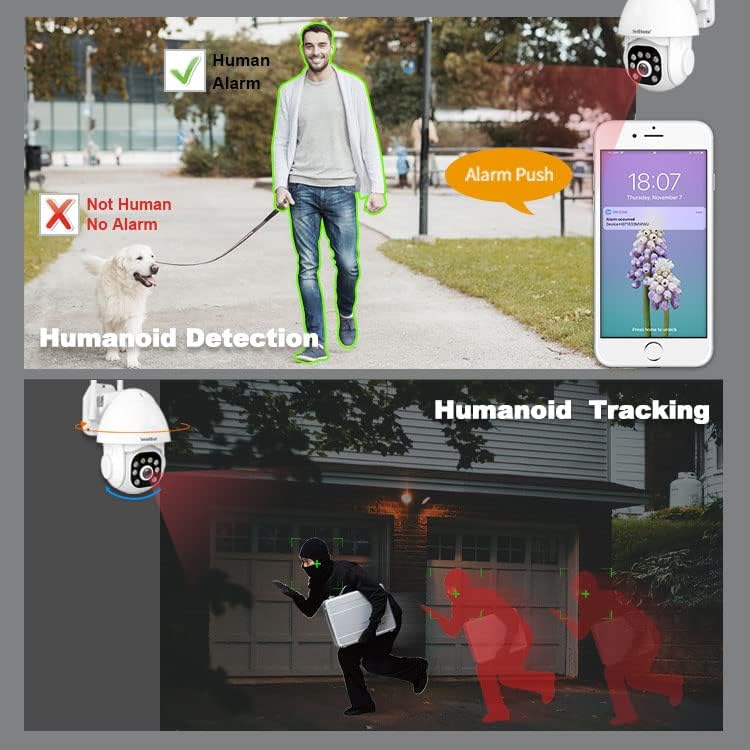
Image 6: Demonstration of the camera's ability to detect and track human figures.
5.4 双方向オーディオ
The integrated microphone and high-fidelity speaker allow for real-time two-way communication through the mobile app. You can listen to the camera's surroundings and speak through the camera.

Image 7: The camera's IP66 waterproof design and two-way audio communication capability.
5.5 Audible Alarm & Active Defense
When motion or a human is detected, the camera can actively deter intruders by emitting loud sound alarms and flashing red and blue warning lights.

Image 8: The camera activating its audible alarm and flashing lights to deter a person.
5.6 マルチユーザー Viewing
The camera supports up to 5 simultaneous viewers. The first user to set up the camera becomes the administrator. Other users require administrator authorization to access the camera feed.
5.7 ストレージオプション
録音は次の 2 つの方法で保存できます。
- MicroSDカード: Local storage on a MicroSD card (up to 128GB).
- 電話番号: Connect the camera to a Network Video Recorder (NVR) for continuous recording and extended storage (NVR not included).
6. メンテナンス
The SriHome camera is designed for outdoor use with an IP66 waterproof rating, making it resistant to dust, heat, and cold. Regular cleaning of the lens with a soft, dry cloth is recommended to ensure clear image quality. Avoid using harsh chemicals.
7。 トラブルシューティング
- カメラがWi-Fiに接続できない: Ensure the camera is within range of your Wi-Fi router. Check Wi-Fi password accuracy. Try resetting the camera using the reset button.
- 画像が表示されない、または画面が黒くなる: Verify the power adapter is correctly connected and the camera is powered on. Check network connection.
- 誤報: Adjust the motion detection sensitivity settings in the app. Utilize the human detection feature to minimize alerts from non-human movements.
- MicroSD カードに記録されない: MicroSDカードが正しく挿入され、アプリ内でフォーマットされていることを確認してください。カードの容量がいっぱいになっていないか、破損していないかご確認ください。
- 双方向オーディオの問題: Check microphone and speaker permissions for the SriHome app on your smartphone. Ensure network connection is stable.
8. 仕様
| 特徴 | 仕様 |
|---|---|
| モデル番号 | SH039B/SP039 |
| 解決 | 3メガピクセル(2304x1296) |
| 接続性 | Wired (LAN) / Wireless (Wi-Fi) |
| パン/チルト角 | パン: 355°、チルト: 90° |
| ナイトビジョン | Color Night Vision, Infrared Night Vision (up to 15 meters) |
| オーディオ | 双方向オーディオ(内蔵マイクとスピーカー) |
| ストレージ | MicroSD Card (up to 128GB), NVR |
| 耐候性 | IP66防水 |
| 特集 | Human Detection, Motion Tracking, Audible Alarm, Red/Blue Warning Lights |
| 電源 | 12V DC電源アダプタ |
| 寸法 | 16 x 16 x 11 cm |
| 重さ | 420グラム |
9. 保証とサポート
For warranty information and technical support, please refer to the contact details provided in the product packaging or visit the official SriHome webサイト。 保証請求に備えて購入時のレシートを保管しておいてください。