
1. はじめに
The CAD Audio E100SX is a large-diaphragm supercardioid condenser microphone designed for capturing vocals and instruments with clarity and detail. It features a supercardioid polar pattern for excellent off-axis rejection, a switchable 100 Hz hi-pass filter, and a 10 dB pad for versatile control in various recording environments. The microphone is housed in a robust design with an integrated shock mount to minimize handling noise and vibrations.

Image 1.1: The CAD Audio E100SX microphone, showcasing its features for studio versatility, including the 100Hz Hi-Pass Filter, High Sensitivity, Low Frequency Response, and Versatile Applications.
2. 箱の中身
Upon unpacking your CAD Audio E100SX, please ensure all components are present and in good condition:
- CAD Audio E100SX Large-Diaphragm Supercardioid Condenser Microphone with integrated shock mount
3. セットアップ
Follow these steps to set up your E100SX microphone:
- 取り付け: Secure the integrated shock mount onto a standard microphone stand. Ensure the stand is stable and capable of supporting the microphone's weight.
- 繋がり: Connect a balanced XLR cable (not included) to the XLR output connector located at the base of the microphone. Connect the other end of the XLR cable to your audio interface, mixer, or preamplifier。
- ファントムパワー: The E100SX is a condenser microphone and requires 48V phantom power to operate. Activate the 48V phantom power on your audio interface, mixer, or preamplifier. The microphone will not function without proper phantom power.
- ポジショニング: Position the microphone appropriately for your recording source. The supercardioid pattern is most sensitive directly in front of the microphone, with significant rejection from the sides and rear.
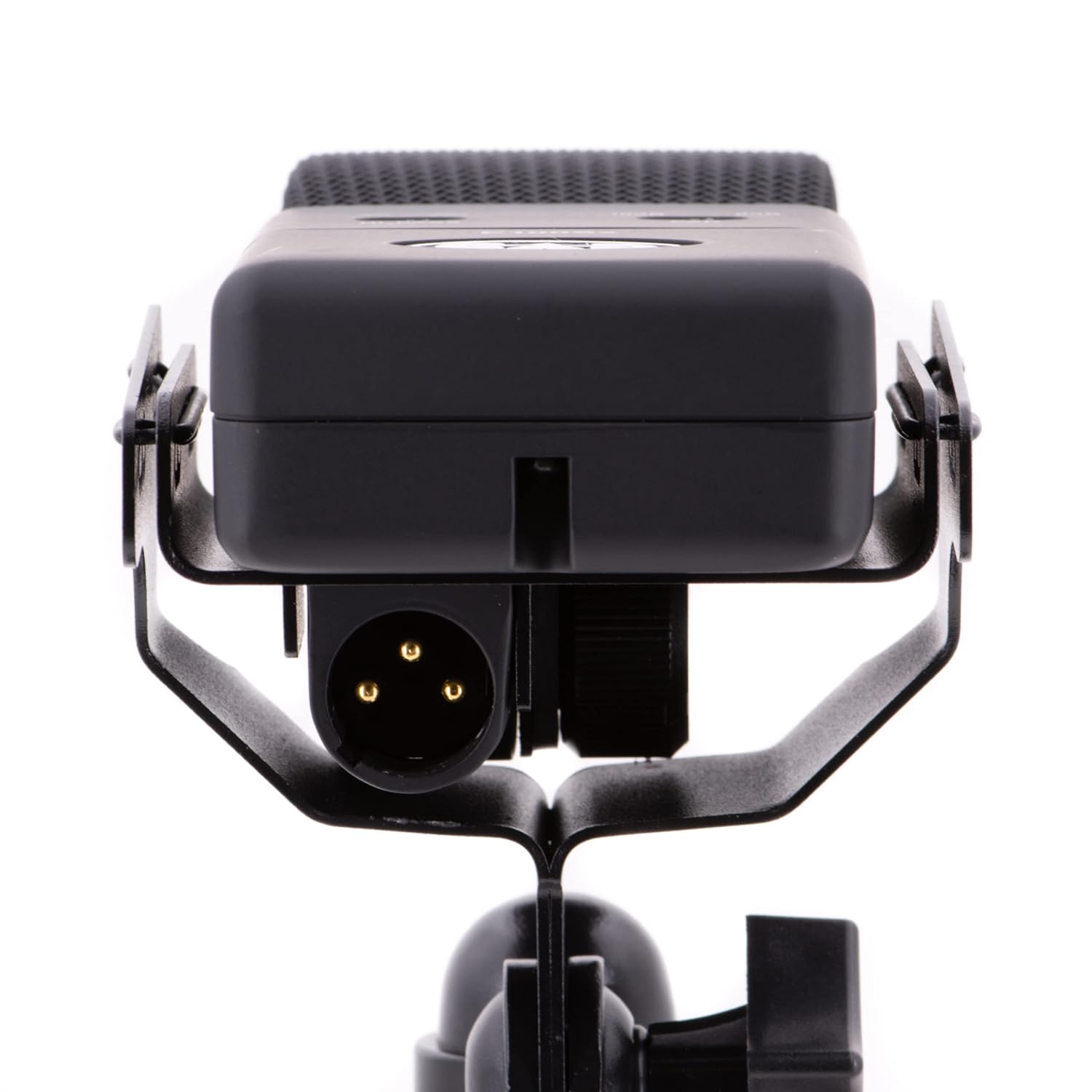
画像3.1: 下部 view of the CAD Audio E100SX, illustrating the XLR output connector for audio signal transmission.

画像3.2:正面 view of the CAD Audio E100SX microphone, showing its grille and integrated shock mount for stable positioning.
4. 操作手順
The E100SX features two important switches for sound control:
- Hi-Pass Filter (100 Hz): This switch activates a low-cut filter at 100 Hz. Engage this filter to reduce unwanted low-frequency rumble, stage noise, or proximity effect when close-miking. This helps to clean up the low end of your recordings.
- Pad (10 dB): The 10 dB pad attenuates the input signal by 10 decibels. Engage this switch when recording very loud sound sources (e.g., drums, loud guitar amplifiers) to prevent overloading the microphone's capsule or your preampライターの入力。
極性パターン: The E100SX utilizes a supercardioid polar pattern. This pattern offers a tight pickup area directly in front of the microphone, providing excellent isolation from sounds originating from the sides and rear. This is beneficial for minimizing bleed from other instruments in a live setting or untreated room, and for focusing on a single sound source.

画像4.1: クローズアップ view of the CAD Audio E100SX, showing the Hi-Pass filter and 10 dB Pad switches for audio control.
5. メンテナンス
Proper maintenance ensures the longevity and optimal performance of your E100SX microphone:
- クリーニング: Use a soft, dry cloth to wipe the microphone body. Avoid using liquid cleaners, solvents, or abrasive materials, as these can damage the finish or internal components. Do not attempt to clean the microphone grille with liquids.
- ストレージ: When not in use, store the microphone in a protective case or pouch to shield it from dust, moisture, and physical impact. Avoid exposing the microphone to extreme temperatures or high humidity.
- 取り扱い: Always handle the microphone with care. Avoid dropping it or subjecting it to strong vibrations, which can affect the sensitive capsule.
6。 トラブルシューティング
If you encounter issues with your E100SX microphone, refer to the following common problems and solutions:
- サウンド出力なし:
- Ensure 48V phantom power is activated on your audio device.
- Check all XLR cable connections for proper seating and integrity. Try a different XLR cable if available.
- オーディオ インターフェイスまたはミキサーの入力ゲインが上がっていることを確認します。
- 音量が小さい、または信号が弱い:
- Confirm that the 10 dB pad switch is not engaged unless necessary for a very loud source.
- Increase the input gain on your audio interface or mixer.
- Ensure the microphone is positioned correctly towards the sound source.
- 歪んだ音:
- If the sound source is very loud, engage the 10 dB pad switch.
- オーディオ インターフェイスまたはミキサーの入力ゲインを下げます。
- Ensure the microphone is not positioned too close to an extremely loud source.
- Excessive Low-Frequency Noise/Rumble:
- Engage the 100 Hz hi-pass filter switch to reduce unwanted low-end frequencies.
- Ensure the microphone stand is stable and isolated from floor vibrations.
7. 仕様
Detailed technical specifications for the CAD Audio E100SX microphone:

Image 7.1: The CAD Audio E100SX microphone with a visual representation of its key specifications.
| 仕様 | 価値 |
|---|---|
| 極性パターン | スーパーカーディオイド |
| 動作原理 | コンデンサー |
| 周波数応答 | 20 Hz – 18 kHz |
| 感度 | 32 dBV (25mV) @ 1 Pa |
| インピーダンス | 150オーム |
| 最大音圧レベル | 136 dB (with pad engaged) |
| ハイパスフィルター | 100 Hz、6 dB /オクターブ |
| パッド | 10デシベル |
| 電力要件 | 48V Phantom Power (1.6mA) |
| セルフノイズ | 9.5dBA |
| 信号対ノイズ比 | 32デシベル |
| 材料 | ニッケルメッキ |
| アイテム重量 | 1.41ポンド(0.64kg) |
| 製品寸法(長さ x 幅 x 高さ) | 7.28 x 5.12 x 4.72インチ |
| 欧州連合 | 631922109351 |
8. 保証情報
CAD Audio products are designed for reliability and performance. For specific warranty terms and conditions applicable to your E100SX microphone, please refer to the warranty card included with your purchase or visit the official CAD Audio webサイトでご確認ください。保証請求に備えて購入証明書を保管してください。
9. サポート
For further assistance, technical support, or inquiries regarding your CAD Audio E100SX microphone, please contact CAD Audio customer service or visit their official webサイト:
- Webサイト: www.cadaudio.com
- 連絡先セクションを参照してください web電話番号またはメールによるサポートについては、こちらのサイトをご覧ください。


