
1. はじめに
The Sunshine DT-17N Digital Multimeter is a versatile and reliable tool designed for accurate electrical measurements. It is particularly suitable for phone repair technicians and general electronics work, capable of measuring various electrical parameters including voltage, current, resistance, capacitance, and temperature. Its compact design and user-friendly features make it an essential tool for diagnosing and repairing electronic devices.

Figure 1: The Sunshine DT-17N Digital Multimeter, demonstrating its compact size for portability.
2. 安全情報
To ensure safe operation and prevent damage to the meter, please read and follow all safety instructions carefully. This multimeter features double insulation protection for enhanced user safety.
- Always ensure the test leads are in good condition and properly connected before taking measurements.
- ボリュームを適用しないtage or current that exceeds the maximum rated values for each range.
- Never use the multimeter if it appears damaged or if the test leads are frayed.
- ボリュームを扱うときは注意してくださいtag30V AC RMS、42V ピーク、または 60V DC を超える電圧では感電の危険がありますので、使用しないでください。
- 必ず回路の電源を切り、高電圧を放電してください。tag抵抗、導通、またはダイオードを測定する前に、コンデンサをテストします。
- 正確な測定を保証するために、電池残量低下インジケーターが表示されたら、すぐに電池を交換してください。
3.製品オーバーview
3.1. Multimeter Components

図2: 前面 view of the DT-17N Multimeter, highlighting its main display and controls.
3.2. 表示機能
The DT-17N features a large LCD display with a backlight, ensuring clear readability in various lighting conditions.

Figure 3: The multimeter's LCD display with its backlight feature, improving visibility in low-light environments.
- 大型LCDディスプレイ: Provides clear numerical readings.
- バックライト: Improves visibility in dark or low-light conditions. Activated by pressing and holding the HOLD button.
- 測定単位: Displays the appropriate unit (e.g., V, A, Ω, °C/°F).
- バッテリーの状態: 現在のバッテリーレベルを示します。
- Automatic Polarity Display: Shows positive or negative polarity automatically.
3.3. Controls and Input Ports
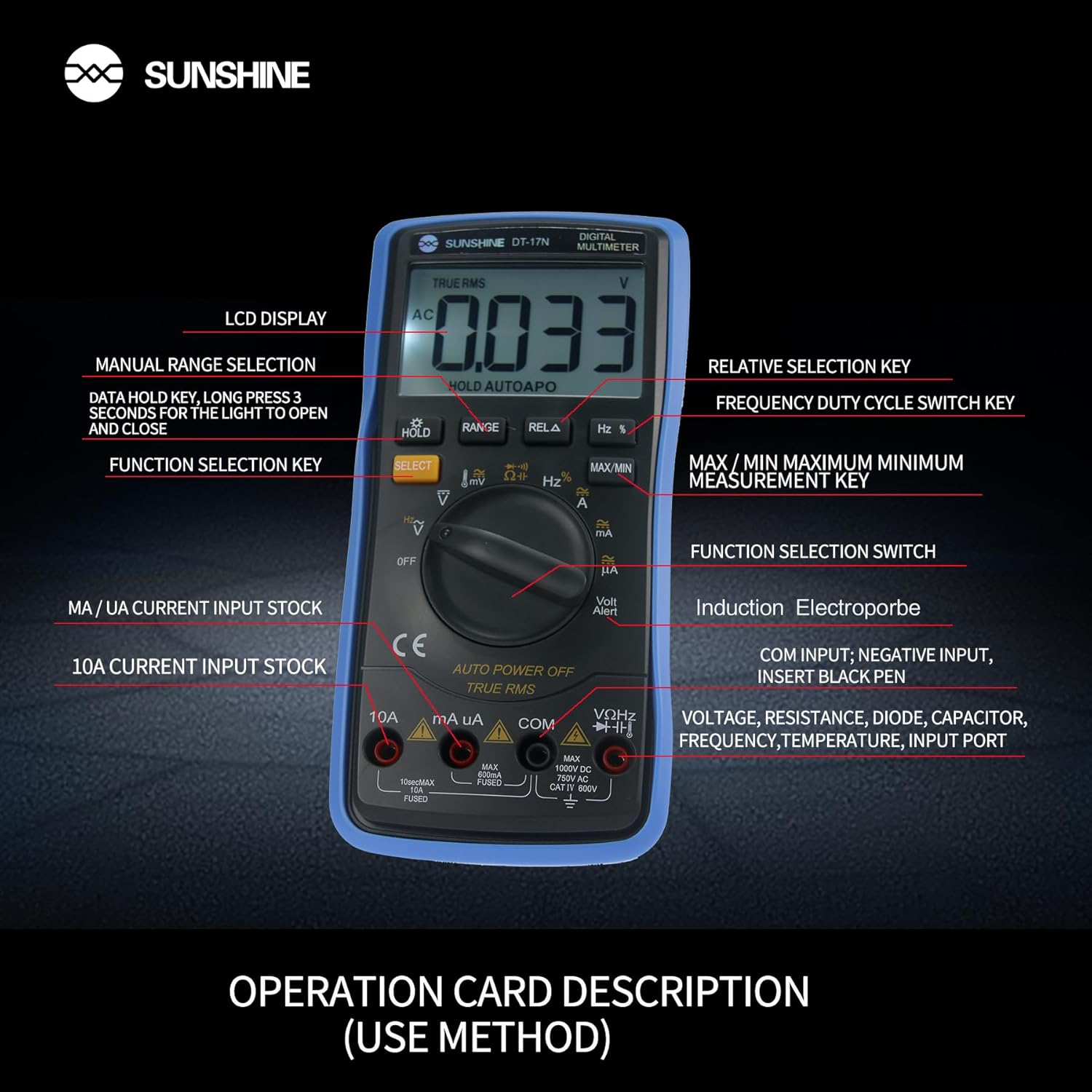
図4:詳細 view of the multimeter's controls and input ports with their respective functions.
- ロータリーファンクションスイッチ: 希望する測定機能を選択するために使用します(例:Voltage、電流、抵抗、温度)。
- 選択ボタン: ロータリースイッチの1つの位置で異なる測定モードを切り替えます(例:AC/DC電圧tage、ダイオード/導通)。
- ホールドボタン: Freezes the current reading on the display. Press and hold to activate/deactivate the backlight.
- レンジボタン: Allows manual selection of measurement ranges, overriding the automatic ranging feature.
- RELA Button (Relative Selection Key): 保存された基準値と現在の読み取り値の差を測定します。
- Hz % Button (Frequency Duty Cycle Switch Key): 周波数とデューティ サイクルの測定を切り替えます。
- MAX/MINボタン: Displays the maximum or minimum measured value during a measurement session.
- VΩHz Input Port: Connect the red test lead for voltag例えば、抵抗、周波数、静電容量、ダイオード、温度の測定などです。
- COM入力ポート: Connect the black test lead (common ground) for all measurements.
- mA/uA Input Port: Connect the red test lead for measuring small currents (milliamperes and microamperes)。
- 10A入力ポート: Connect the red test lead for measuring large currents (up to 10 Amperes)。
- Volt Alert (NCV): 非接触巻tag検出機能。
4. セットアップ
4.1. バッテリーの取り付け
The DT-17N is battery-powered. To install or replace the battery:
- マルチメーターがオフになっていることを確認します。
- ユニットの背面にある電池ボックスのカバーを見つけます。
- 固定ネジを外してカバーを取り外します。
- Insert the new battery, observing correct polarity (+ and -).
- 電池ボックスのカバーを元に戻し、ネジで固定します。
4.2. テストリードの接続
Always connect the black test lead to the COM input jack. Connect the red test lead to the appropriate input jack based on the measurement you intend to perform:
- ボリューム用tage, Resistance, Capacitance, Frequency, Diode, and Temperature measurements: Connect the red test lead to the VΩHz ジャック。
- For Current measurements (mA/uA): Connect the red test lead to the mA/uA ジャック。
- For High Current measurements (10A): Connect the red test lead to the 10A ジャック。
5. 操作手順
The Sunshine DT-17N features automatic identification for most ranges, simplifying operation. Use the rotary switch to select the primary function and the SELECT button to toggle sub-functions.
5.1. ボリュームの測定tage(AC/DC)
- ロータリースイッチをに回します V 位置。
- 必要に応じて、 選択 button to toggle between AC (~) and DC (—) voltage.
- 黒のテストリードをに接続します コム ジャックと赤いテストリードは VΩHz ジャック。
- 測定する回路またはコンポーネントにテストプローブを並列に接続します。
- 巻を読むtagディスプレイ上のe値。

Figure 5: The multimeter showing a DC millivolt measurement on its display.
5.2. Measuring Current (AC/DC)
注意: Never connect the multimeter in parallel when measuring current, as this can damage the meter and the circuit. Always connect in series.
- ロータリースイッチをに回します mA/uA or 10A 予想される電流に応じて位置を決定します。
- 必要に応じて、 選択 button to toggle between AC (~) and DC (—) current.
- 黒のテストリードをに接続します コム ジャック。赤いテストリードを mA/uA or 10A jack accordingly.
- 回路を開き、テストプローブを負荷と直列に接続します。
- ディスプレイ上の現在の値を読み取ります。
5.3. 抵抗の測定
- ロータリースイッチをに回します Ω 位置。
- 黒のテストリードをに接続します コム ジャックと赤いテストリードは VΩHz ジャック。
- 回路の電源が切れ、すべてのコンデンサが放電されていることを確認します。
- テスト プローブをコンポーネントに接続して抵抗を測定します。
- ディスプレイの抵抗値を読み取ります。
5.4. 静電容量の測定
- ロータリースイッチをに回します キャパシタンス symbol (often shared with diode/continuity).
- を押す 選択 button until the capacitance mode is active.
- 黒のテストリードをに接続します コム ジャックと赤いテストリードは VΩHz ジャック。
- テストプローブを接続する前に、コンデンサが完全に放電されていることを確認してください。
- コンデンサの両端にテストプローブを接続します。
- ディスプレイの静電容量値を読み取ります。
5.5. Measuring Frequency / Duty Cycle
- ロータリースイッチをに回します Hz% 位置。
- を押す Hz% 周波数 (Hz) とデューティ サイクル (%) を切り替えるボタン。
- 黒のテストリードをに接続します コム ジャックと赤いテストリードは VΩHz ジャック。
- テストプローブを信号源に並列に接続します。
- ディスプレイ上の周波数またはデューティ サイクル値を読み取ります。
5.6.温度測定
The DT-17N can measure temperature using a K-type thermocouple (not always included, check package contents).

図6:例ample of temperature measurement using the DT-17N Multimeter with a thermocouple.
- ロータリースイッチをに回します °C /°F 位置。
- 必要に応じて、 選択 button to choose between Celsius or Fahrenheit.
- K型熱電対を VΩHz そして コム ジャック、極性を観察します。
- 熱電対の先端を、温度を測定したい物体の上または中に置きます。
- ディスプレイ上の温度値を読み取ります。
5.7. ダイオードテストと導通
- ロータリースイッチをに回します ダイオード/導通 シンボル。
- を押す 選択 ダイオード テストと導通テストを切り替えるボタン。
- 黒のテストリードをに接続します コム ジャックと赤いテストリードは VΩHz ジャック。
- For Diode Test: Connect the probes across the diode. The display will show the forward voltag電圧低下。プローブを逆向きにして、断線がないか確認してください。
- For Continuity Test: Connect the probes across the circuit or component. A beep indicates continuity (low resistance).
5.8.非接触Voltage (NCV) 検出
NCV機能によりAC電圧の検出が可能tag導体に直接接触することなく。
- ロータリースイッチをに回します 非定常 position (often indicated by a Volt Alert symbol).
- Move the top part of the multimeter near the conductor.
- The meter will beep and/or flash an indicator light if AC voltageが検出されました。
5.9. データ保持とバックライト
- データ保持: を押す 所有 ボタンを短く押すと、ディスプレイの現在の表示が固定されます。もう一度押すと解除されます。
- バックライト: を押し続けます 所有 button for approximately 3 seconds to turn the display backlight ON or OFF.
5.10. 最大/最小測定
This function records the maximum and minimum values measured during a session.
- 希望する測定機能を選択します(例:Voltage)。
- を押す 最大/最小 button. The display will show 'MAX' and the maximum value recorded.
- プレス 最大/最小 again to cycle to 'MIN' and view the minimum value.
- 押し続ける 最大/最小 このモードを終了します。
6. メンテナンス
適切なメンテナンスを行うことで、マルチメーターの寿命と精度が確保されます。
6.1. 清掃
広告でケースを拭くamp 布と中性洗剤を使用してください。研磨剤や溶剤は使用しないでください。使用前にメーターが完全に乾いていることを確認してください。
6.2. バッテリーの交換
Refer to Section 4.1 for battery replacement instructions. Always use the specified battery type.
6.3. Holster Care
The multimeter is protected by a thick rubber shockproof holster, designed for durability and a non-slip grip. Keep the holster clean and free from debris.

Figure 7: The durable rubber holster provides protection and a comfortable grip for the multimeter.
7。 トラブルシューティング
If you encounter issues with your DT-17N multimeter, refer to the table below for common problems and solutions.
| 問題 | 考えられる原因 | 解決 |
|---|---|---|
| 画面が表示されない、または画面が暗い | Low or dead battery; Poor battery contact | Replace battery; Check battery contacts |
| 誤った測定値 | Wrong function selected; Improper test lead connection; Damaged test leads; Out of range | Select correct function; Ensure leads are in correct jacks; Replace leads; Select higher range or check specifications |
| 導通ビープ音なし | Circuit resistance too high; Continuity mode not selected | Ensure resistance is below threshold; Press SELECT to enter continuity mode |
| Fuse blown (for current measurements) | Overcurrent applied | Replace fuse with specified type and rating; Ensure correct current measurement procedure |
8. 仕様
Technical specifications for the Sunshine DT-17N Digital Multimeter.
| 特徴 | 仕様 |
|---|---|
| モデル | DT-17N |
| 測定タイプ | マルチメーター |
| 画面 | 5999 (5 5/6) counts, Automatic Polarity Display, Backlit LCD |
| Sampリンレート | 3秒間に約XNUMX回 |
| 電源 | 電池駆動 |
| 最小稼働量tage | 3 ボルト (DC) |
| 温度測定範囲 | 0°C ~ 1000°C (32°F ~ 1832°F) |
| Induction Electroprobe Function | Yes (NCV) |
| 二重積分A/D変換 | はい |
| アイテムの寸法 | 5.51 x 2.76 x 1.18インチ |
| アイテム重量 | 0.55キログラム |
| 色 | 青 |
9. 保証とサポート
9.1. 保証情報
This product comes with a warranty of 購入日から3ヶ月保証請求の際は、購入証明書を保管してください。保証は通常の使用における製造上の欠陥に適用されます。
9.2. カスタマーサポート
For technical assistance or inquiries regarding your Sunshine DT-17N Digital Multimeter, please contact your retailer or the manufacturer's customer service department. Refer to your purchase documentation for specific contact details.