
導入
This manual provides detailed instructions for the UGREEN USB Audio Adapter and the accompanying 4-Pole 3.5mm Audio Cable. This product is designed to enhance your audio experience by providing an external sound card solution and a versatile audio cable for various devices. Please read this manual thoroughly before use to ensure proper operation and longevity of your device.
製品終了view
The UGREEN USB Audio Adapter serves as an external sound card, replacing a faulty internal sound card or adding audio ports to your computer. It features a mono microphone-in port and a stereo audio-out port, connecting via a standard USB port. The bundle includes a 4-Pole 3.5mm Audio Cable, designed for both listening and microphone functions.

Image: The UGREEN USB Audio Adapter connected to a laptop, providing an alternative sound card solution for headphones.

画像: クローズアップ view of the UGREEN USB Audio Adapter, highlighting its microphone and headphone ports, alongside two 4-pole 3.5mm audio jacks.
The 4-Pole 3.5mm Audio Cable is engineered for high-fidelity stereo sound transmission. Its robust shielding, including a silver-plated copper conductor, TPE jacket, and nylon braid, minimizes electromagnetic interference and ensures stable, noise-free audio. The 24K gold-plated plugs facilitate faster signal conduction and prevent audio delay.

Image: The UGREEN 4-Pole 3.5mm Audio Cable, designed to deliver outstanding, noise-free sound quality.
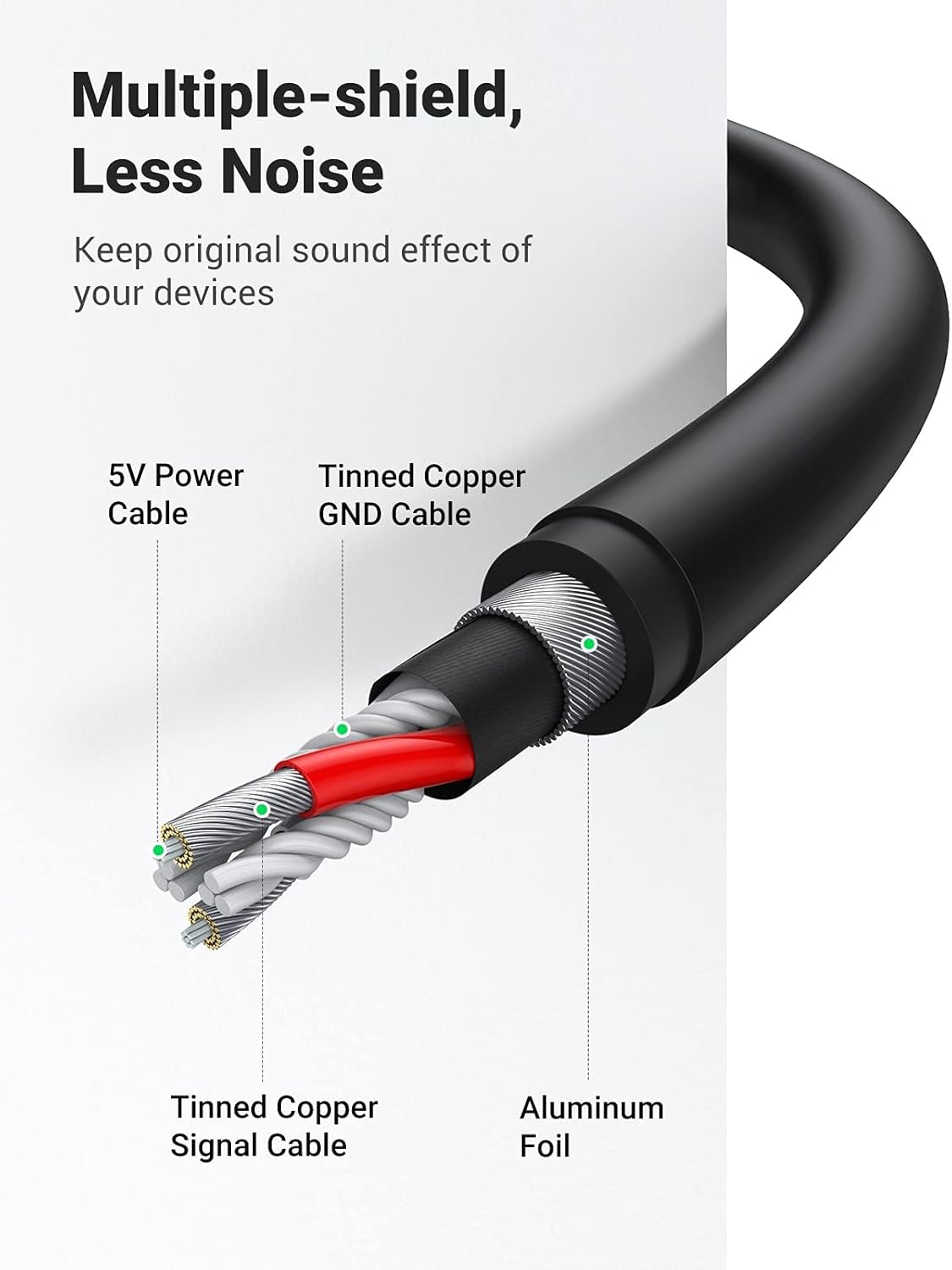
Image: A cutaway diagram illustrating the multiple shielding layers of the UGREEN cable, designed to reduce noise and preserve original sound quality.
設定
- Connect the USB Audio Adapter: Insert the USB-A connector of the UGREEN USB Audio Adapter into an available USB port on your computer (PC, laptop, PS4/PS5, Google Chromebook, Raspberry Pi, etc.). No drivers are required; the device is plug-and-play.
- ヘッドフォン/スピーカーを接続する: Plug your headphones or speakers with a 3.5mm jack into the stereo audio-out port (typically marked with a headphone icon or green color) on the USB Audio Adapter.
- マイクを接続する(オプション): If using a separate microphone, plug its 3.5mm jack into the mono microphone-in port (typically marked with a microphone icon or pink color) on the USB Audio Adapter.
- Connect 4-Pole 3.5mm Audio Cable: For devices requiring a 4-pole connection, use the provided UGREEN 4-Pole 3.5mm Audio Cable. Connect one end to your device (e.g., smartphone, laptop with a combined audio jack) and the other end to your headset or external microphone.
- システムオーディオ設定: After connecting, your operating system should automatically detect the new audio device. You may need to select the UGREEN USB Audio Device as your default playback and recording device in your system's sound settings.
操作手順
Using the USB Audio Adapter
- オーディオ再生: Once connected and selected as the default output device, audio from your computer will be routed through the adapter to your connected headphones or speakers.
- マイク入力: If a microphone is connected to the adapter's microphone-in port and selected as the default input device, it will function for voice chat, recording, or other applications.
- 同時操作: The adapter supports simultaneous operation of loudspeakers and headphones, making it suitable as a second sound source.
Using the 4-Pole 3.5mm Audio Cable
The 4-Pole 3.5mm Audio Cable supports both audio output and microphone input through a single jack, ideal for headsets with integrated microphones.

Image: A user demonstrating the use of a headset connected with the 3.5mm audio mic cable, enabling simultaneous listening and talking.
- ヘッドセット接続: Connect your 4-pole TRRS headset directly to devices like laptops, smartphones, or gaming consoles that support a combined audio/mic jack.
- 外部マイク: Use the cable to connect a 3.5mm external microphone to compatible devices.
- Stereo Audio Streaming: The cable streams Hi-Fi stereo audio from output devices (e.g., laptop, phone) to input devices (e.g., speakers, headphones, car stereo).
互換性
The UGREEN USB Audio Adapter and 4-Pole 3.5mm Audio Cable offer broad compatibility with various devices and operating systems.
USB Audio Adapter Compatibility
- オペレーティング システム: Windows 10/98SE/ME/2000/XP/Server 2003/Vista/7/8, Linux, Mac OSX, Google Chromebook.
- デバイス: PC, Laptops, PS5, PS4, Windows Surface Pro 3, Raspberry Pi.
- オーディオ出力モード: Mono, Stereo.
- 注記: Only supports mono microphone TRS. Does not support TS or TRRS microphones directly through its microphone input. Not compatible with PS3.

Image: The UGREEN USB Audio Adapter demonstrating universal compatibility with devices like PCs, laptops, Nintendo Switch, and PS5, across Windows, Linux, Mac OS, and Android operating systems.
4-Pole 3.5mm Audio Cable Compatibility
- デバイス: Headphones, headsets, speakers, microphones, laptops, PCs, smartphones, TV, soundbars, car stereo systems, DVD players, PS4/Xbox, Nintendo Switch Lite, amplifiers。
- ジャックタイプ: Features dual 4-pole TRRS jacks for microphone function.
- 注記: The cable features ultra-slim aux plugs to ensure a snug fit with standard auxiliary ports.
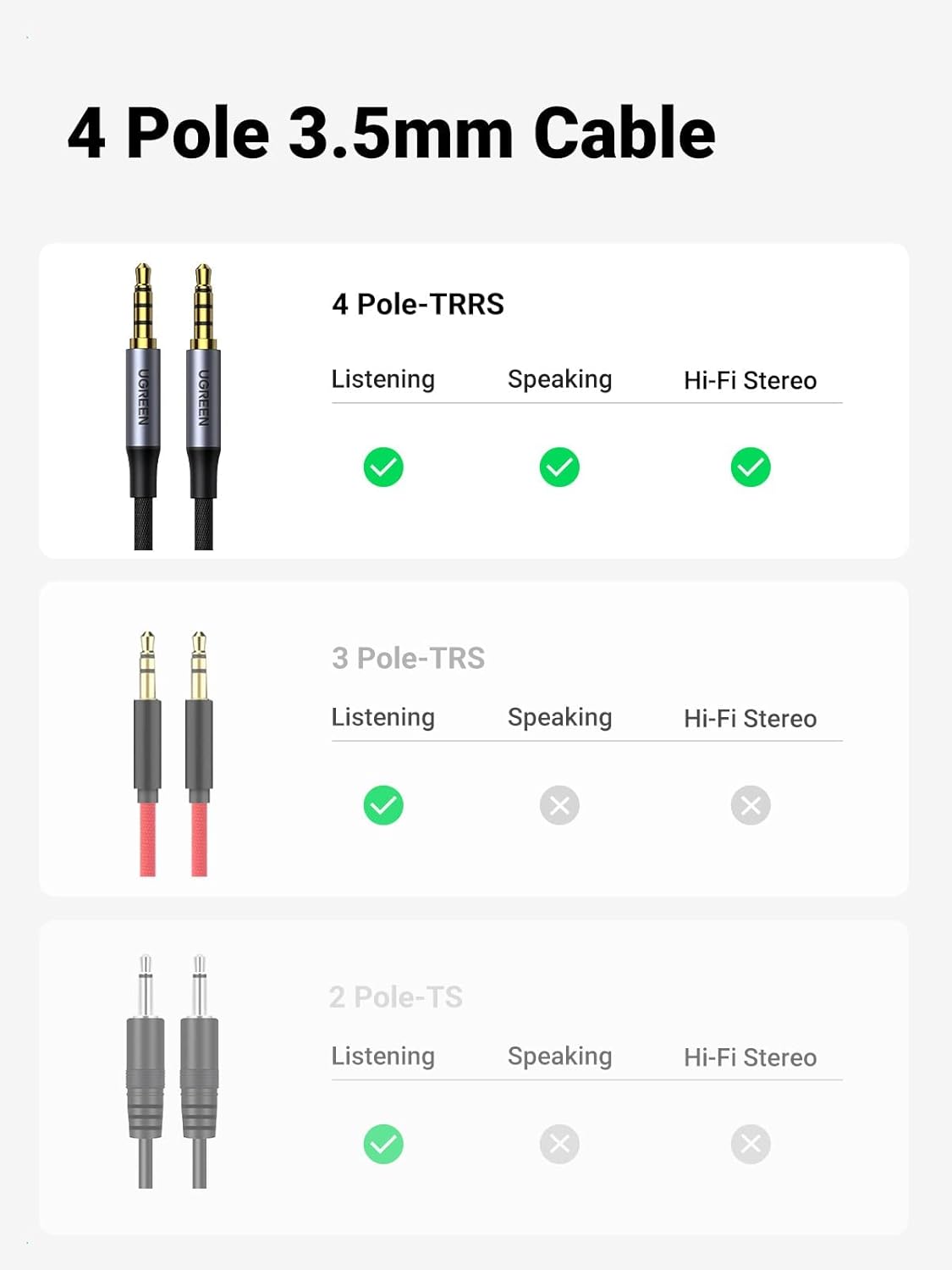
Image: A visual comparison of 4-pole (TRRS), 3-pole (TRS), and 2-pole (TS) 3.5mm audio jacks, indicating their listening, speaking, and Hi-Fi stereo capabilities.
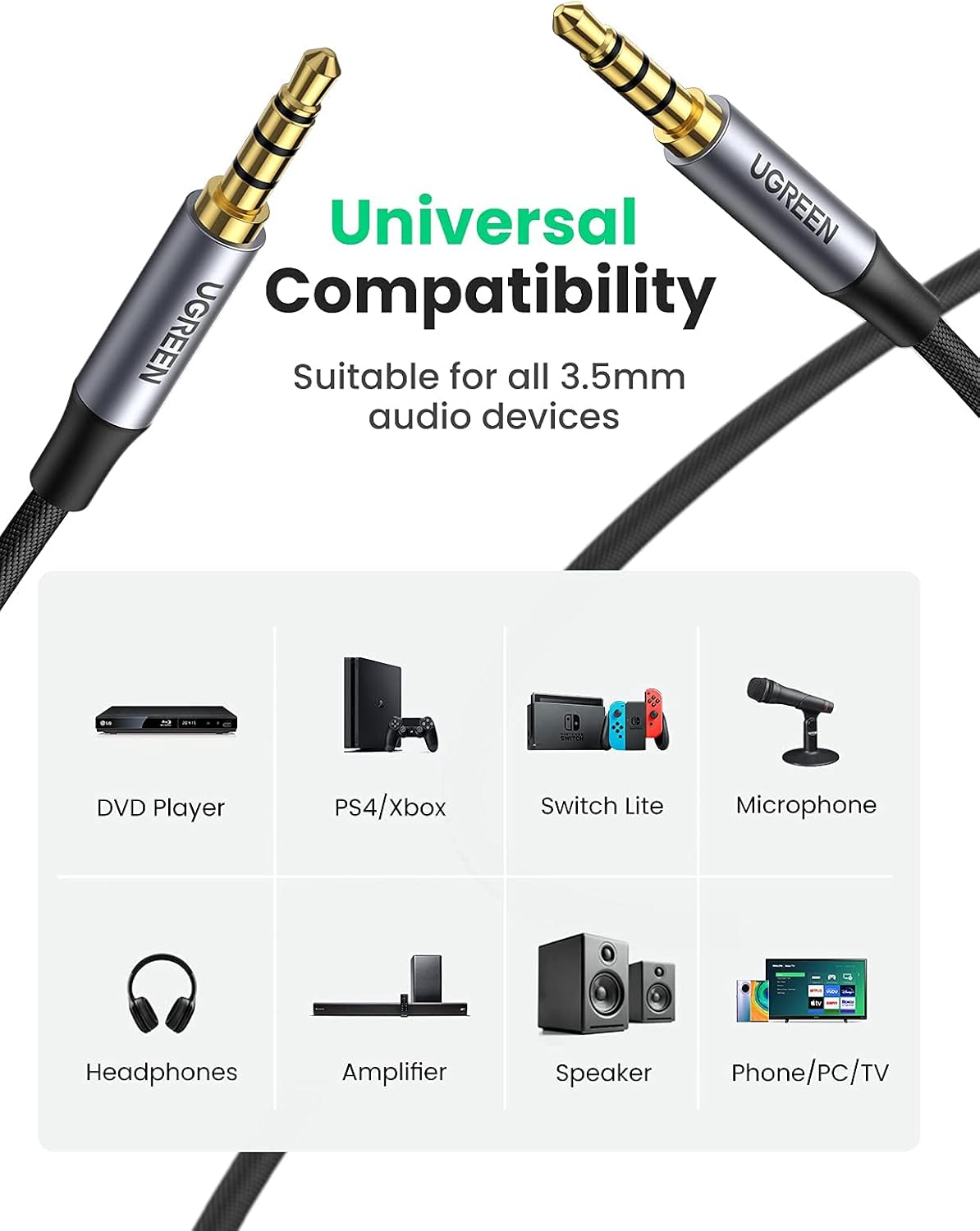
Image: The UGREEN 3.5mm Audio Cable illustrating its universal compatibility with a range of audio devices including DVD players, gaming consoles, microphones, headphones, amplifiers, speakers, and phones/PCs/TVs.
メンテナンス
To ensure the longevity and optimal performance of your UGREEN USB Audio Adapter and 4-Pole 3.5mm Audio Cable, follow these maintenance guidelines:
- クリーニング: Use a soft, dry cloth to clean the adapter and cable. Avoid using liquid cleaners or solvents, as they may damage the product.
- ストレージ: Store the product in a cool, dry place away from direct sunlight and extreme temperatures. When not in use, coil the cable loosely to prevent kinks and damage.
- 取り扱い: Avoid pulling the cable by the wire; always grasp the connector when plugging or unplugging. Do not bend the connectors excessively.
- 環境保護: Keep the product away from water, moisture, and dust to prevent internal damage.
トラブルシューティング
If you encounter issues with your UGREEN USB Audio Adapter or 4-Pole 3.5mm Audio Cable, refer to the following common solutions:
- サウンド出力なし:
- Ensure the USB Audio Adapter is securely plugged into a working USB port.
- Verify that your headphones/speakers are correctly plugged into the adapter's output port.
- Check your computer's sound settings to confirm that the UGREEN USB Audio Device is selected as the default playback device.
- Adjust the volume levels on your computer and connected audio device.
- マイクが機能しない:
- Confirm the microphone is plugged into the correct input port on the USB Audio Adapter.
- In your computer's sound settings, ensure the UGREEN USB Audio Device is selected as the default recording device.
- オペレーティング システムのマイクのプライバシー設定を確認してください。
- Ensure your microphone is a mono TRS type if connecting to the adapter's dedicated mic port. TRRS microphones should be used with the 4-Pole 3.5mm Audio Cable directly to a compatible device.
- 音質が悪い/ノイズ:
- すべての接続が安全であり、破片がないことを確認してください。
- アダプタをコンピューターの別の USB ポートに接続してみてください。
- Avoid placing the adapter or cable near sources of strong electromagnetic interference.
- Test with different headphones/speakers or cables to isolate the issue.
- デバイスが認識されません:
- アダプタを別の USB ポートに接続してみてください。
- コンピュータを再起動します。
- Ensure your operating system is compatible with the device (refer to Compatibility section).
仕様
| 特徴 | 詳細 |
|---|---|
| ブランド | ユーグリーン |
| モデル番号 | B09PMYJNDF |
| ハードウェアインターフェイス | USB |
| オーディオ出力モード | モノラル、ステレオ |
| 互換性のあるオペレーティングシステム | Windows 10/98SE/ME/2000/XP/Server 2003/Vista/7/8, Linux, Mac OSX, PlayStation 4, PlayStation 5, Google Chromebook |
| 対応デバイス | Laptop, Personal Computer, Speaker, Headphone, Gaming Console, Smartphone |
| Microphone Support (Adapter) | Mono microphone TRS (TS, TRRS not supported) |
| ケーブルタイプ | 4-Pole 3.5mm Audio Cable (TRRS) |
| ケーブルの特徴 | Silver-plated copper conductor, 3-layer robust shielding (tinned copper, TPE jacket, nylon braid), 24K gold-plated plugs |
保証とサポート
UGREEN製品は信頼性と性能を重視して設計されています。具体的な保証情報については、製品に付属の保証書を参照するか、UGREENの公式ウェブサイトをご覧ください。 website. If you require technical assistance or have questions regarding your UGREEN USB Audio Adapter and 4-Pole 3.5mm Audio Cable, please contact UGREEN customer support through their official channels.
- オンラインサポート: UGREENの公式ウェブサイトをご覧ください webFAQ、ドライバーのダウンロード(該当する場合)、およびサポートの連絡先情報が記載されたサイトです。
- メールサポート: Contact UGREEN customer service via email for detailed inquiries.