
1. はじめに
Thank you for choosing the Nakamichi NQ821B Bluetooth CD/USB/AUX Tuner. This manual provides essential information for the proper installation, operation, and maintenance of your car stereo receiver. Please read this manual thoroughly before using the product to ensure correct usage and to prevent damage.
2. 安全情報
- 電源: This unit is designed to operate on a DC 12V power supply. Ensure your vehicle's electrical system meets this requirement.
- 専門家による設置: For optimal performance and safety, professional installation by a qualified technician is highly recommended. Incorrect wiring can cause damage to the unit or the vehicle.
- 湿気を避ける: ユニットを水や過度の湿気にさらさないでください。
- 温度: Operate the unit within normal vehicle operating temperatures.
- 安全運転: 運転の妨げになるような操作はしないでください。常に道路の安全を最優先にしてください。
3.製品オーバーview
The Nakamichi NQ821B is a versatile car stereo receiver featuring multiple audio sources and connectivity options. Below are images illustrating the main unit and its key components.

図3.1: フロント view of the Nakamichi NQ821B unit, showing the display, control knob, and various buttons for source selection and playback.
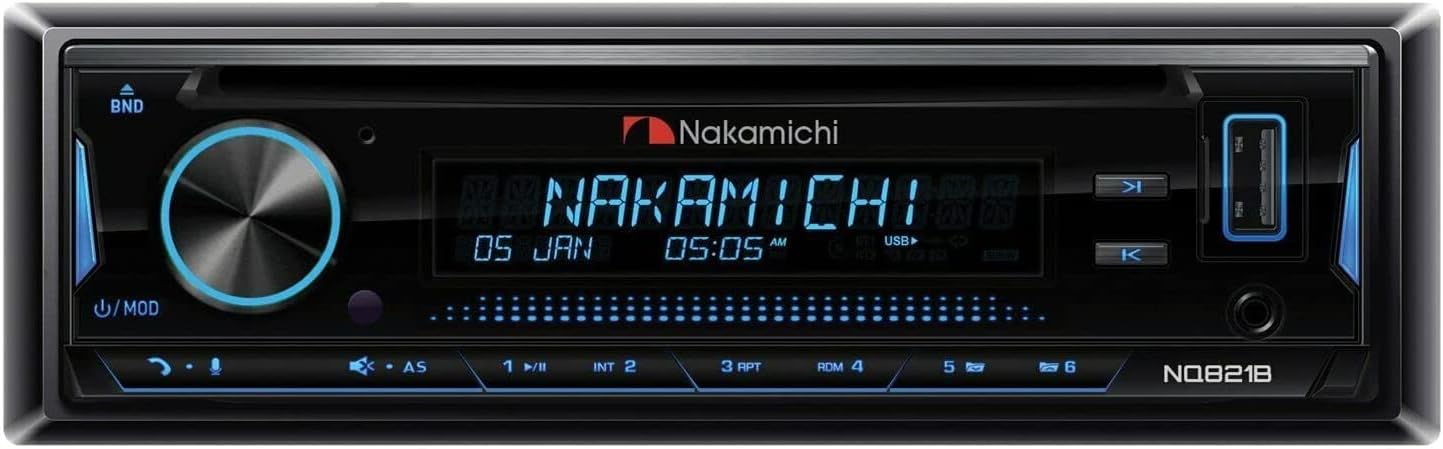
図3.2: 詳細 view of the front panel, highlighting the digital display showing time and source information, along with the main control knob and function buttons.

図3.3: Close-up of the right side of the unit, showing the USB port, display details, and media control buttons.
4. セットアップとインストール
Proper installation is crucial for the performance and longevity of your NQ821B tuner. It is strongly recommended that installation be performed by a professional.
4.1配線接続
- 力: Connect the yellow wire to a constant 12V power source, the red wire to an accessory 12V switched power source, and the black wire to ground.
- 講演者: Connect speaker wires to the corresponding positive (+) and negative (-) terminals. Ensure correct polarity for optimal sound. The unit supports a 4.0 surround sound channel configuration.
- アンテナ: 車両のアンテナ ケーブルをユニット背面のアンテナ入力に接続します。
- 補助入力: 外部オーディオデバイスの場合は、3.5mm オーディオ ケーブルを AUX 入力に接続します。
- USBポート: For USB media playback or charging compatible devices, use the front USB port.
4.2初期電源オン
After all connections are securely made, turn on your vehicle's ignition. Press the power button on the unit to turn it on. The display should illuminate.
5. 操作手順
5.1 電源のオン/オフと音量調節
- を押す パワー/モード ユニットの電源をオンまたはオフにするボタン。
- 回転する VOL / SEL 音量レベルを調整するためのノブ。
5.2 ソースの選択
を押す モード button repeatedly to cycle through available audio sources: Tuner (AM/FM), CD, USB, AUX, and Bluetooth.
5.3Bluetoothの操作
- 選択 ブルートゥース MODE ボタンを使用してモードを選択します。
- 互換性のあるデバイス(スマートフォン、タブレットなど)で Bluetooth を有効にし、利用可能なデバイスを検索します。
- Select "NQ821B" from the list of devices to pair. A confirmation tone or message may appear.
- Once paired, you can stream audio from your device to the NQ821B. Use the unit's controls or your device to manage playback.
5.4 CD/USB再生
- Insert a CD into the disc slot or a USB drive into the USB port. The unit will automatically switch to the corresponding source and begin playback.
- 使用 再生/一時停止, スキップ、 そして FOLDER 再生を制御するボタン。
5.5 Radio Tuner (AM/FM)
- 選択 チューナー モード。
- を押す バンド FM1、FM2、FM3、AM バンドを切り替えるボタン。
- 使用 求める buttons to automatically search for strong stations.
- 押し続ける 求める 手動で調整するためのボタン。
- To save a station as a preset, tune to the desired station, then press and hold one of the numeric preset buttons (1-6) until you hear a confirmation beep.
5.6 オーディオ設定
を押す VOL / SEL knob briefly to access audio settings such as Bass, Treble, Balance, Fader, and Equalizer presets. Rotate the knob to adjust values and press again to confirm or move to the next setting.
6. メンテナンス
- ユニットのクリーニング: フロントパネルを拭く際は、柔らかく乾いた布を使用してください。研磨剤入りの洗剤や溶剤は使用しないでください。
- CDケア: CDは端を持って扱ってください。傷がつかず、清潔な状態を保ってください。破損したディスクや変形したディスクは使用しないでください。
- USBポート: USB ポートにほこりやごみが付かないようにしてください。
7。 トラブルシューティング
| 問題 | 考えられる原因 | 解決 |
|---|---|---|
| 電源なし | 配線が間違っている、ヒューズが切れている、車両の点火装置がオフになっている。 | 電源接続(黄、赤、黒の配線)を確認してください。車両のヒューズを点検してください。イグニッションがオンになっていることを確認してください。 |
| 音が出ない | Volume too low; Mute function active; Incorrect speaker wiring; Source not selected. | Increase volume. Deactivate mute. Verify speaker connections. Select correct audio source. |
| Bluetoothペアリングが失敗する | Device too far; Bluetooth not enabled on device; Incorrect pairing procedure. | Ensure device is within range. Enable Bluetooth on your device. Repeat pairing steps (Section 5.3). |
| CD/USBが再生されない | ディスク/USB が破損しているか互換性のないフォーマットです。間違ったソースが選択されました。 | Try a different disc/USB. Ensure media format is supported. Select CD or USB source. |
8. 仕様
| 特徴 | 詳細 |
|---|---|
| モデル番号 | NQ821B |
| 電源 | DC12V |
| 出力電力 | 50ワット |
| オーディオ出力モード | ステレオ |
| サラウンドサウンドチャンネル構成 | 4.0 |
| 接続技術 | 補助、Bluetooth、USB |
| コントローラータイプ | iOS |
| 特集 | AMチューナー |
| 対応デバイス | ノートパソコン、スマートフォン、タブレット |
| コネクタタイプ | 3.5mmジャック、USB |
| 製品寸法 | 6 x 6 x 6インチ |
| アイテム重量 | 1ポンド |
9. 保証とサポート
For warranty information, technical support, or service inquiries, please refer to the official Nakamichi web購入サイトをご覧いただくか、カスタマーサービスに直接お問い合わせください。購入証明書としてレシートを保管してください。
詳しい情報とサポートについては、 Amazonのナカミチストア.