
1. はじめに
The Manfrotto PRO Light Multiloader Camera Backpack MB PL2-BP-ML-M is a professional camera bag meticulously designed for photographers and filmmakers. It integrates advanced protection, versatile access, and ergonomic carrying options to safeguard your valuable gear in various environments.
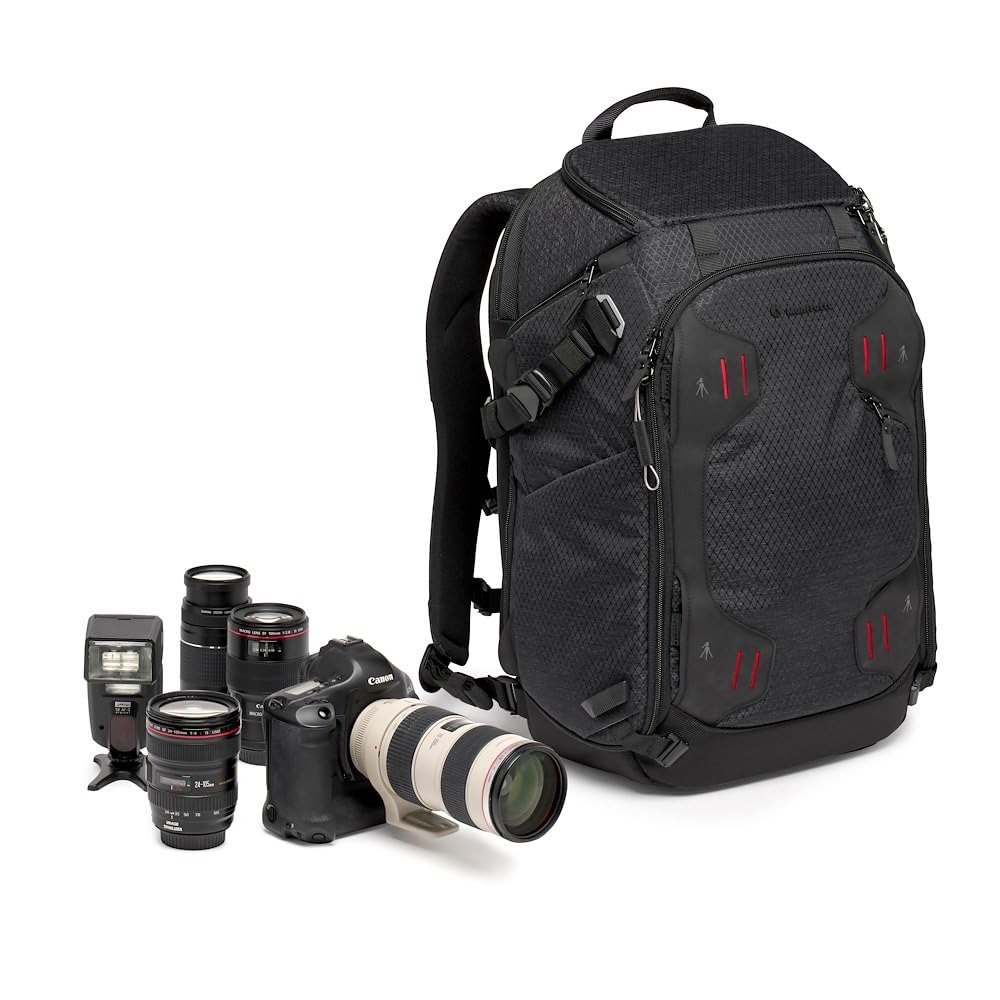
図1.1: 前面 view of the Manfrotto PRO Light Multiloader Camera Backpack.
主な特徴:
- M-Guard Protection System: High-density EVA foam dividers provide superior shock absorption and gear protection.
- Enhanced Impact Resistance: Structural reinforcement with SAS-TEC material in the backpack's base.
- Secure Main Compartment: Steel wire pullers compatible with a TSA padlock for added security.
- 4-Point Access: Offers flexible access to gear from the front, two sides, and the top.
- Integrated Laptop Compartment: Padded compartment designed for a 15-inch laptop.
- Ergonomic Carrying Options: Adjustable torso, double chest strap, and padded waist belt for comfortable load distribution.
- 耐久性のある構造: Made from water-repellent ripstop nylon/polyester fabric with reinforced threads, Duraflex hardware, YKK zippers, and Hypalon reinforcements.
- DuoFace Sun/Rain Cover: Provides additional weather protection and helps keep the bag cool by reflecting sunlight.
2. セットアップ
2.1 Adjusting the Harness System
The backpack features an adjustable harness system to ensure a comfortable fit for various body types. Adjust the shoulder straps, chest strap, and padded waist belt to distribute the load evenly and reduce strain during extended use.
- ショルダーストラップ: Loosen or tighten the straps to position the backpack correctly on your back. The top of the shoulder straps should align with the top of your shoulders.
- チェストストラップ: Adjust the chest strap across your sternum for stability. It can be moved up or down to find the most comfortable position.
- 腰ベルト: Secure the padded waist belt around your hips. This transfers a significant portion of the weight from your shoulders to your hips, improving comfort.
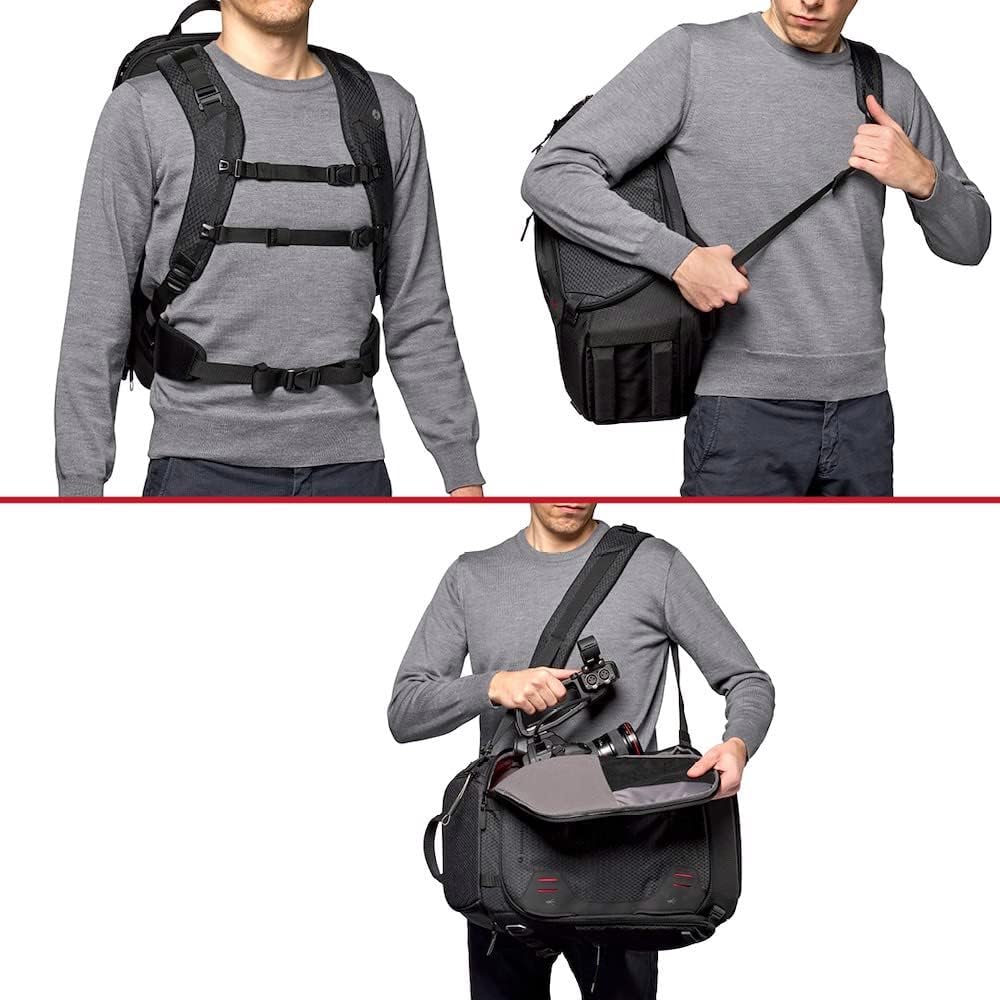
Figure 2.1: Illustration of the adjustable harness system and various carrying modes.
2.2 Customizing Internal Dividers (M-Guard System)
The M-Guard Protection System utilizes high-density EVA foam dividers that can be reconfigured to fit your specific camera gear. This allows for optimal organization and protection.
- Access Main Compartment: Open the main front access door to reveal the padded interior.
- Reconfigure Dividers: The dividers attach with hook-and-loop fasteners. Carefully detach and reattach them to create custom compartments for your cameras, lenses, and accessories.
- 安全なギア: Ensure all gear is snugly fitted within the compartments to prevent movement during transport.

図2.2: View of the main compartment with customizable M-Guard dividers and side access points.
2.3 Attaching External Gear (Tripods)
The backpack is designed to carry multiple tripods or support gear externally using its strap system.
- Front Attachment: Utilize the front straps and pocket to secure a tripod vertically.
- サイドアタッチメント: Use the side straps and pockets for horizontal tripod attachment, allowing quick access.
- 安全なファスナー: Ensure all straps are tightly fastened to prevent movement and maintain balance.
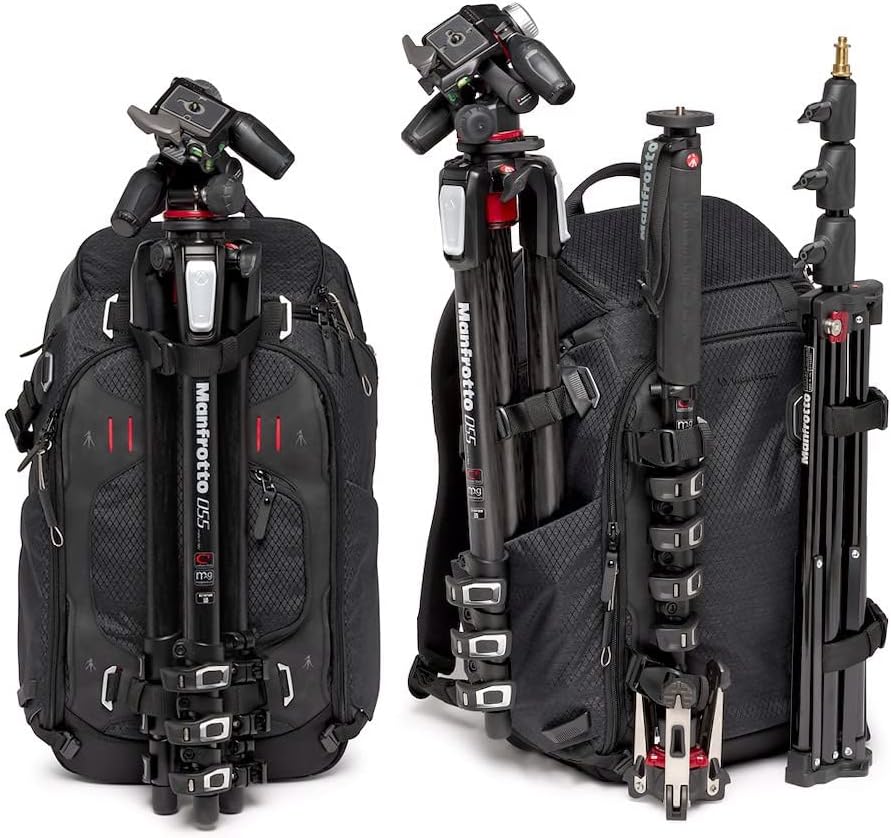
Figure 2.3: The backpack demonstrating options for attaching tripods to the front and side.
3. バックパックの操作
3.1 Accessing Your Gear (4-Point Access)
The PRO Light Multiloader offers four distinct access points to your camera gear, providing flexibility and speed.
- フロントアクセス: The main front door opens fully to the padded camera compartment, ideal for packing, unpacking, and accessing the entire kit.
- Side Access (Left & Right): Two strategically placed side doors allow quick retrieval of cameras or lenses without fully opening the backpack or removing it from one shoulder.
- トップアクセス: A dedicated top opening provides rapid access to your most frequently used camera or lens.
3.2 ラップトップコンパートメントの使用
A dedicated, padded compartment is available for a 15-inch laptop, accessible from the top rear of the backpack.
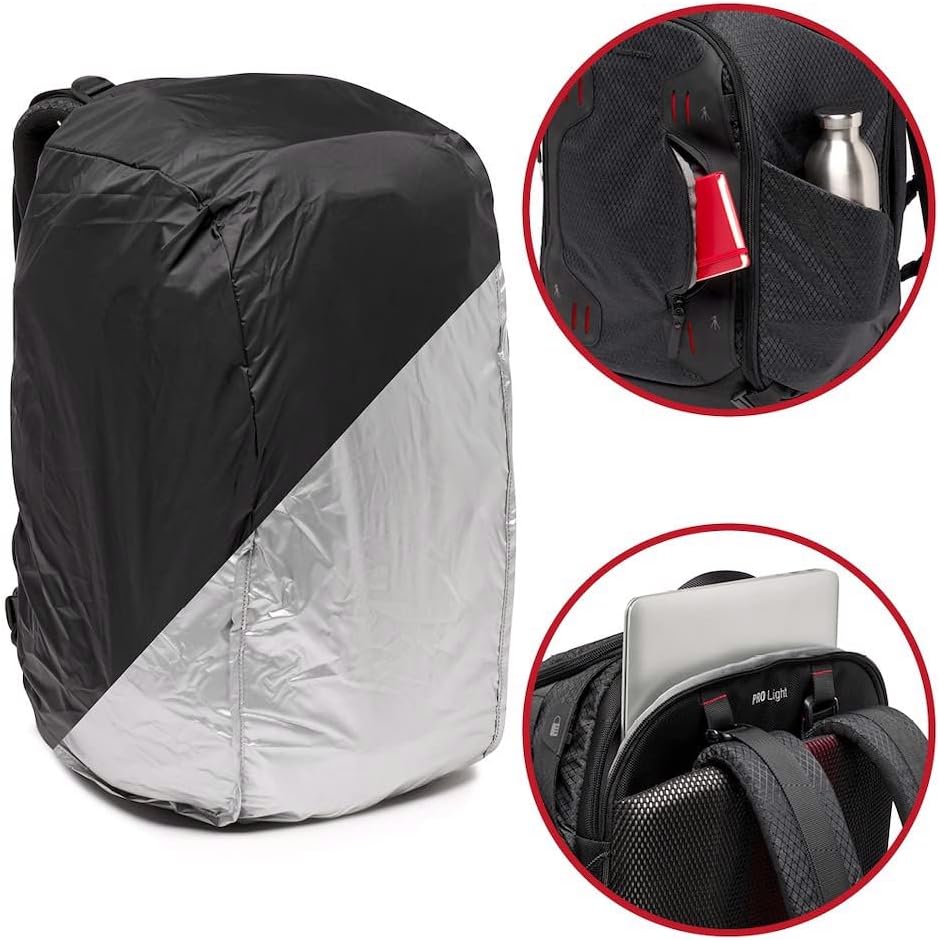
Figure 3.1: Details showing the DuoFace rain cover, side utility pocket, and laptop compartment access.
3.3 Carrying Modes
The Multiloader can be configured for three ergonomic carrying modes:
- Backpack Mode: Traditional two-shoulder carry for maximum comfort and load distribution.
- Sling Mode: Carry over one shoulder for quick rotation and access to side compartments.
- Video Duffle Bag Mode: Ideal for carrying video gear, offering a different weight distribution and access style.
4. メンテナンス
4.1クリーニング手順
- 外観: Wipe the water-repellent ripstop nylon/polyester fabric with a damp 必要に応じて布と中性洗剤を使用してください。刺激の強い化学薬品は使用しないでください。
- インテリア: Remove all gear. Use a soft brush or vacuum cleaner to remove dust and debris from the interior and dividers. Spot clean with a damp 布。
- 乾燥: Always air dry the backpack completely in a shaded, well-ventilated area. Do not machine wash or tumble dry.
4.2 Using the DuoFace Sun/Rain Cover
The included DuoFace cover provides enhanced protection against harsh weather and sunlight.
- レインプロテクション: Deploy the silver side outwards for maximum water resistance during rain.
- 日焼け止め: Deploy the black side outwards to reflect sunlight, helping to keep your gear cool in hot conditions.
4.3 ジッパーのお手入れ
The backpack uses durable YKK zippers. Keep them clean and free of dirt or sand to ensure smooth operation. Lubricate with a zipper lubricant if they become stiff.
5。 トラブルシューティング
このセクションでは、バックパックで発生する可能性のある一般的な問題について説明します。
5.1 Gear Feels Unprotected or Shifts
- 解決: Re-adjust the M-Guard dividers to create snug compartments for each item. Ensure no empty spaces allow gear to move freely. Add extra padding if necessary.
5.2 Discomfort While Carrying
- 解決: Ensure the harness system (shoulder straps, chest strap, waist belt) is properly adjusted for your body. Distribute the weight evenly. Heavy items should be placed closer to your back.
5.3 Zippers Sticking or Difficult to Close
- 解決: Check for any fabric caught in the zipper teeth. Clean the zipper teeth with a small brush to remove dirt or debris. Apply a zipper lubricant if needed.
5.4 Backpack Exterior Appears Wet After Rain
- 解決: While the fabric is water-repellent, it is not fully waterproof on its own. For heavy rain, always deploy the DuoFace rain cover to provide complete protection for your gear.
6. 仕様
| モデル番号 | MB PL2-BP-ML-M |
| ブランド | マンフロット |
| 色 | 黒 |
| アイテム重量 | Approximately 2.16 kg (Note: Original data listed as 2.16 grams, which is likely a unit error. Assumed kilograms for a backpack.) |
| ストレージ容量 | 17リットル |
| コンパートメントの数 | 4 |
| Max Compatible Device Size | 15 inches (for laptop) |
| 材料 | Nylon, Polyester (Ripstop) |
| 外側素材 | Ethylene Vinyl Acetate, Nylon, Polyester |
| 裏地タイプ | ナイロン |
| シェルタイプ | ソフトシェル |
| 特集 | Lightweight, Adjustable Straps, Water-Repellent (with included rain cover for full protection) |
| 閉鎖タイプ | Fastener (YKK Zippers) |
| 含まれるコンポーネント | Backpack x1 |
7. 保証情報
Manfrotto products typically come with a standard warranty. For detailed information regarding the warranty period, coverage, and terms and conditions for your PRO Light Multiloader Camera Backpack, please consult the official Manfrotto website or contact your authorized retailer directly. Keep your proof of purchase for warranty claims.
8. サポート
Should you require technical assistance, have questions about product features, or need to report an issue, please refer to the following support channels:
- マンフロット公式 Webサイト: 訪問 www.manfrotto.com 製品マニュアル、FAQ、サポート リソースについては、こちらをご覧ください。
- 顧客サービス: Contact Manfrotto customer service through the contact information provided on their official web直接支援のためのサイト。
- 正規販売店: Your point of purchase can also provide support and guidance regarding your product.