
1. はじめに
This manual provides detailed instructions for assembling, operating, and maintaining your Gikfun Mini Amplifier Electronic Stereo Speaker Box DIY Kit. This kit is designed for enthusiasts to build a functional stereo speaker system, offering both an educational experience in electronics and a practical audio device. Please read all instructions carefully before beginning assembly.
2. 安全情報
組み立ておよび操作中は、次の安全上の注意事項を守ってください。
- 成人の監督: This kit contains small parts and requires soldering. Adult supervision is recommended for younger users.
- はんだ付けの安全性: Use appropriate ventilation when soldering. Wear safety glasses to protect your eyes from solder splatter. Avoid touching hot soldering iron tips or recently soldered components.
- 電気安全: Ensure all connections are correct before applying power. Incorrect wiring can damage components or pose a fire hazard.
- コンポーネントの取り扱い: Handle electronic components carefully to avoid damage from static electricity or physical stress.
- 電源: Use only the specified USB power source. Do not exceed the recommended voltage または現在。
- 配置: Place the assembled speakers on a stable, dry surface, away from water or excessive heat.
3. パッケージ内容
Verify that all components listed below are present in your kit before starting assembly. Refer to the image below for a visual representation of the kit contents.

画像: 上view of all components included in the DIY kit. This includes circuit boards, speakers, acrylic panels, resistors, capacitors, LEDs, wires, screws, and a USB cable.
- 2x PCB (Printed Circuit Boards)
- 2x 4Ohm 3W 40mm Diameter Full Range Audio Speakers
- Acrylic panels for speaker enclosures
- Various resistors, capacitors, and diodes
- LEDs for music spectrum display
- 集積回路 (IC)
- USB電源ケーブル
- 3.5mm audio input cable
- 接続ワイヤ
- Nuts, screws, and standoffs for assembly
- その他の小型電子部品
4. セットアップと組み立て手順
Follow these steps carefully to assemble your stereo speaker kit. Basic soldering skills are required.
4.1. Component Identification and Preparation
Before soldering, identify all components. Resistors are color-coded, and capacitors have values printed on them. Ensure you have a clean workspace and your soldering iron is heated to the appropriate temperature.

Image: Technical drawing showing the dimensions of one of the 40mm speakers.

Image: Two 4Ohm 3W 40mm diameter full-range audio speakers.
4.2. Soldering Components to PCBs
Carefully solder all resistors, capacitors, diodes, ICs, and other small components onto the two provided PCBs according to the circuit diagram. Pay attention to component polarity where applicable (e.g., electrolytic capacitors, diodes, LEDs, ICs).
- Insert each component into its designated holes on the PCB.
- Bend the leads slightly to hold the component in place.
- Solder each lead, ensuring a good, shiny solder joint.
- Trim excess leads with flush cutters.
4.3. 配線接続
Connect the speakers, USB power cable, and 3.5mm audio input cable to the PCBs as shown in the wiring diagram. Ensure secure and correct connections to avoid malfunction.
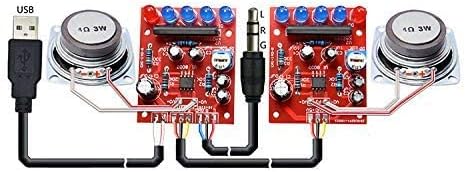
Image: Detailed wiring diagram illustrating how to connect the USB power, 3.5mm audio input, circuit boards, and speakers.
- Connect the speaker wires to the designated speaker output terminals on each PCB.
- Connect the USB power cable to the power input on one of the PCBs.
- Connect the 3.5mm audio input cable to the audio input on the appropriate PCB.
- Connect the two PCBs together using the provided interconnecting wires, ensuring correct left (L) and right (R) channel connections.
4.4. Enclosure Assembly
Assemble the transparent acrylic enclosures for each speaker. The PCBs and speakers will fit into these enclosures.
- Peel off any protective film from the acrylic panels.
- Mount the speakers into the front panel of each enclosure using the provided screws and nuts.
- Mount the assembled PCBs into the enclosure, aligning them with the designated standoffs.
- Secure all acrylic panels together using the remaining screws and nuts to form the complete speaker boxes.

Image: Fully assembled stereo speakers with transparent acrylic enclosures and illuminated LEDs.
5. 操作手順
Once assembled, your Gikfun Mini Amplifier speakers are ready for use.
- 接続電源: Plug the USB cable into a standard USB power source (e.g., computer USB port, USB wall adapter). The LEDs on the circuit boards should illuminate.
- オーディオソースを接続: Plug the 3.5mm audio jack into the headphone output of your audio device (e.g., smartphone, tablet, laptop, MP3 player).
- オーディオを再生: Start playing music or audio on your connected device. The speakers will output sound, and the LEDs will react to the music spectrum.

Image: Assembled speakers connected to a smartphone, illustrating typical usage.
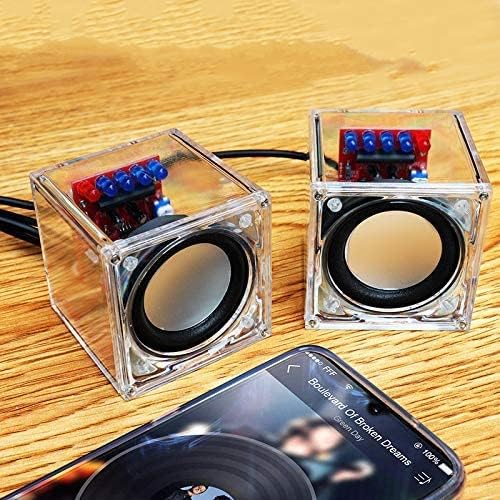
Image: The speakers in operation, connected to a mobile device.
6. メンテナンス
To ensure the longevity and optimal performance of your Gikfun Mini Amplifier speakers, follow these simple maintenance guidelines:
- クリーニング: Use a soft, dry cloth to wipe the acrylic enclosures. Avoid abrasive cleaners or solvents that could scratch or damage the plastic.
- ほこり: Keep the speakers free from dust. A soft brush or compressed air can be used to clean crevices.
- ストレージ: 長期間使用しない場合は、スピーカーを涼しく乾燥した場所に保管してください。
- 湿気を避ける: Do not expose the speakers to water or high humidity, as this can damage the electronic components.
7。 トラブルシューティング
If you encounter issues with your Gikfun Mini Amplifier speakers, refer to the following troubleshooting tips:
| 問題 | 考えられる原因 | 解決 |
|---|---|---|
| 音声出力なし |
|
|
| Distorted or low sound |
|
|
| LEDが点灯しない |
|
|
8. 仕様
Key technical specifications for the Gikfun Mini Amplifier Electronic Stereo Speaker Box DIY Kit:
- ブランド: ギクフン
- モデル名: ミニ Ampリファイアー
- スピーカーの最大出力: スピーカーあたり 3 ワット
- スピーカータイプ: Woofer (Full Range Audio Speaker)
- スピーカーサイズ: 40 Millimeters Diameter
- オーディオチャンネルの数: 2.0(ステレオ)
- オーディオ出力モード: ステレオ
- 接続技術: USB (for power), 3.5mm Audio Jack (for input)
- 接続プロトコル: USB
- 電源: コード式電気(USB経由)
- 制御方法: Touch (refers to the nature of the DIY kit, not a physical touch control on the device)
- 対応デバイス: デスクトップ、ノートパソコン、MP3プレーヤー、スマートフォン、タブレット、テレビ
- 取り付けタイプ: Plug Mount (refers to component mounting on PCB)
- 防水性: 間違い
9. 保証情報
This Gikfun product comes with a limited warranty. The warranty typically covers individual components prior to assembly for a specified period from the date of purchase. Damage resulting from improper assembly, misuse, or modification is not covered. For specific warranty terms and conditions, please refer to the product packaging or contact Gikfun customer support.
10. カスタマーサポート
For further assistance, technical support, or inquiries regarding your Gikfun Mini Amplifier Electronic Stereo Speaker Box DIY Kit, please contact Gikfun customer service. You can typically find contact information on the Gikfun official webサイトまたは製品を購入した小売店を通じて購入できます。
オンラインリソース: 訪問する Gikfun Store on Amazon 製品情報およびアップデートについてはこちらをご覧ください。