
1. はじめに
Thank you for choosing the OUILA 36 LED Motion Sensor Cabinet Light. This manual provides essential information for the safe and efficient use of your new lighting product. Please read these instructions carefully before installation and operation, and retain them for future reference.
2. 安全情報
- Do not expose the light to extreme temperatures, direct sunlight, or high humidity.
- デバイスを水やその他の液体から遠ざけてください。
- Do not attempt to disassemble, repair, or modify the light. This will void the warranty and may cause damage or injury.
- 充電には付属の USB ケーブルのみを使用してください。
- 接着剤を塗布する前に、取り付け面が清潔で乾燥していることを確認してください。
- この製品は屋内使用のみを目的としています。
3. パッケージ内容
パッケージにすべてのアイテムが含まれていることを確認します。
- OUILA 36 LED Motion Sensor Cabinet Light (x2)
- USB充電ケーブル(x2)
- Strong Nano Sticker / 3M Adhesive Magnetic Strip (x4)
- ユーザーマニュアル (x1)
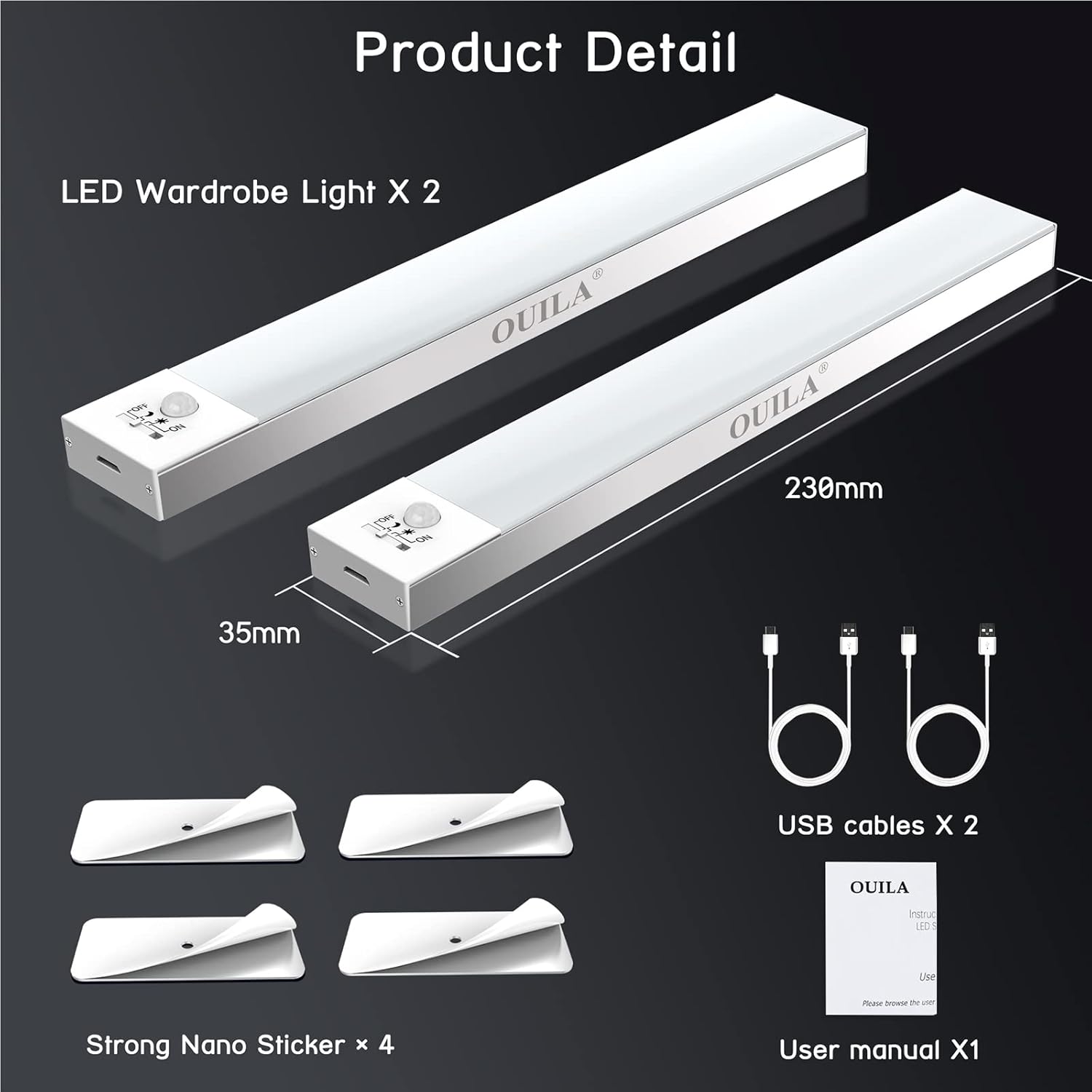
The package includes two LED wardrobe lights, two USB charging cables, and four strong nano stickers for installation.
4.製品オーバーview
The OUILA 36 LED Motion Sensor Cabinet Light is designed to provide convenient and efficient illumination with its integrated motion sensor and versatile installation options.
主な特徴:
- 36個の明るいLED: Provides 5000K cool white light with a high color rendering index (>80 Ra).
- Built-in Magnetic Design: 金属表面に簡単に取り付けられます。
- PIRモーションセンサー: Detects human movement within 3-5 meters at a 120° angle.
- 4つの照明モード: Offers flexibility for various lighting needs (Night Sensing, Daytime Sensing, Always ON, OFF).
- USB充電式: Equipped with a 1000mAh battery for long-lasting use.
- Eye-Care Illumination: Designed to provide soft, non-glaring light.

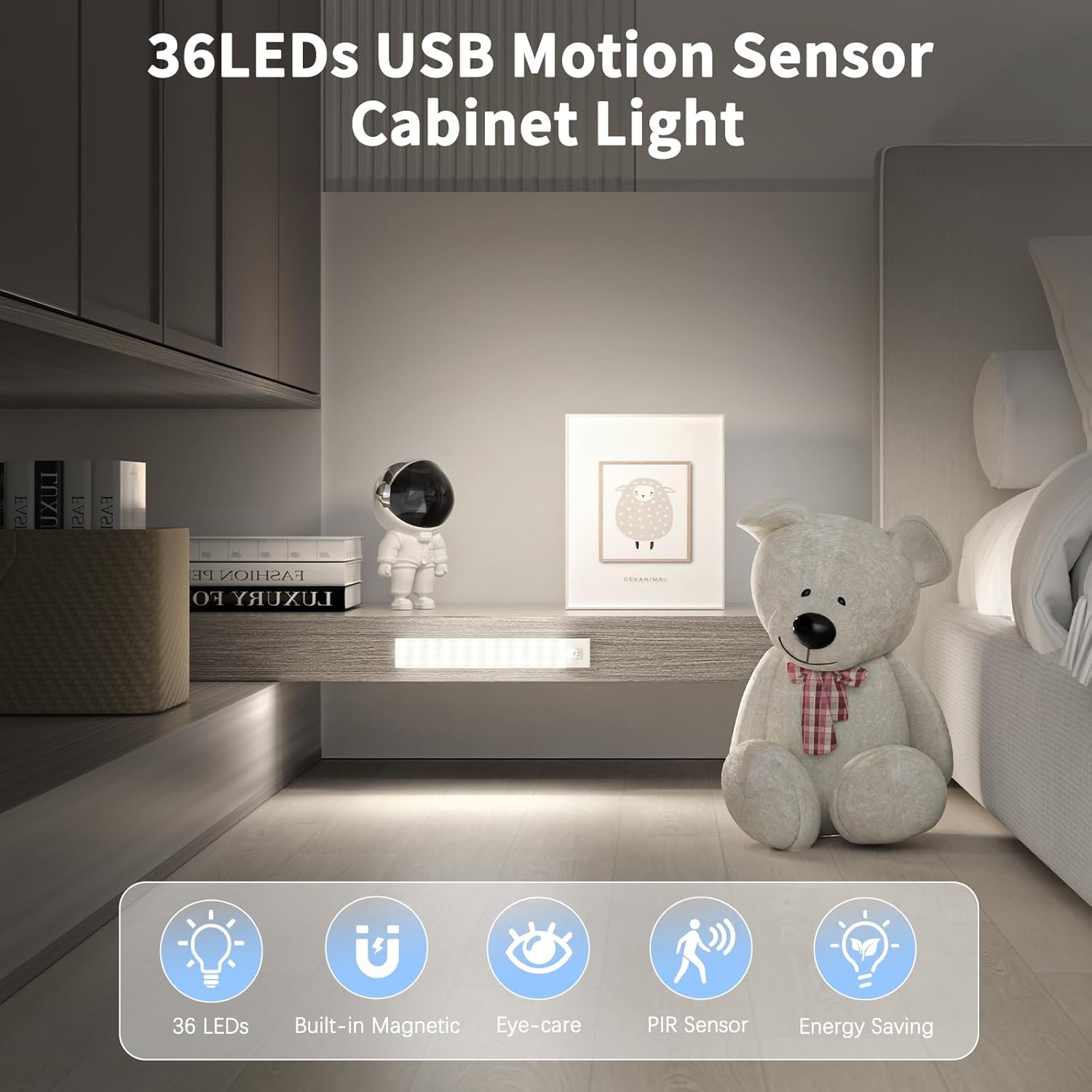
The OUILA 36 LED Motion Sensor Cabinet Light features 36 LEDs, a built-in magnetic design, eye-care illumination, a PIR motion sensor, and energy-saving operation.
5. セットアップとインストール
The OUILA cabinet light offers two primary installation methods:
Method 1: Magnetic Attachment (for Iron Surfaces)
- Ensure the iron surface is clean and dry.
- Simply place the light directly onto the iron surface. The built-in magnets will secure it in place.
Method 2: Adhesive Magnetic Strips (for Non-Iron Surfaces)
- Clean and dry the desired installation surface thoroughly.
- Peel off the protective film from one side of the 3M adhesive magnetic strip.
- Firmly press the adhesive side onto the clean surface and hold for a few seconds.
- Attach the light to the magnetic strip. The light can be easily removed for charging or repositioning.
The light can be installed directly on iron surfaces using its built-in magnets. For non-iron surfaces, use the included 3M adhesive magnetic strips.
6. 操作手順
ライトの充電:
The light is equipped with a 1000mAh rechargeable battery. To charge:
- ライトの側面にある USB 充電ポートを見つけます。
- Connect the provided USB charging cable to the light and to a USB power source (e.g., USB adapter, computer, power bank).
- A 赤いインジケーターライト will illuminate, indicating that the light is charging.
- 完全に充電されると、インジケータライトが点灯します 緑.
Charging typically takes 3-4 hours. A full charge can provide up to 30 days of use in motion sensor mode, depending on usage frequency.

Connect the included USB cable to the charging port. A red indicator light signifies charging, and a green light indicates a full charge. Charging takes approximately 3-4 hours. The 1000mAh battery provides up to 30 days of use in motion sensor mode.
照明モードの選択:
The light features a switch to cycle through four operating modes:
- 1. Night Sensing Mode (Moon Icon): The light will only turn on automatically when human motion is detected in a dark environment. It will turn off after 15-18 seconds if no further motion is detected.
- 2. Daytime Sensing Mode (Sun Icon): The light will turn on automatically when human motion is detected, regardless of the ambient light conditions. It will turn off after 15-18 seconds if no further motion is detected.
- 3. Always ON Mode (ON): The light will remain continuously on, functioning as a constant light source.
- 4. OFF Mode (OFF): The light is turned off and will not activate.

The light offers four modes: Daytime Sensing (auto-on when motion detected, regardless of ambient light), Night Sensing (auto-on when motion detected in dark conditions), ON Mode (light stays on continuously), and OFF Mode (light is off).
7. メンテナンス
- クリーニング: ライトは柔らかく乾いた布で拭いてください。研磨剤入りの洗剤や溶剤は使用しないでください。
- バッテリーのケア: To prolong battery life, avoid fully discharging the battery frequently. Charge the light regularly, especially if it has not been used for an extended period.
- センサーのメンテナンス: Keep the motion sensor clear of obstructions to ensure optimal performance.
8。 トラブルシューティング
| 問題 | 考えられる原因 | 解決 |
|---|---|---|
| ライトが点灯しません。 | Battery is low or depleted. Incorrect mode selected. | Charge the light fully. Ensure the light is not in OFF mode. |
| モーションセンサーが動作しません。 | Light is in Always ON or OFF mode. Ambient light is too bright (for Night Sensing mode). Sensor is obstructed. | Switch to Night Sensing or Daytime Sensing mode. Ensure the environment is dark enough for Night Sensing. Clear any obstructions from the sensor. |
| バッテリー寿命が短い。 | Frequent activation. Light is in Always ON mode. | Consider using Night Sensing mode in frequently used areas. Avoid using Always ON mode for extended periods if battery life is a concern. Ensure the light is fully charged. |
| Light falls off surface. | Adhesive not properly applied or surface not clean. | Clean the surface thoroughly and reapply the adhesive magnetic strip firmly. Ensure the surface is suitable for adhesive mounting. |
9. 仕様
| 特徴 | 仕様 |
|---|---|
| モデル番号 | GLS-C002 |
| 光源 | 36個のLED電球 |
| 色温度 | 5000ケルビン(クールホワイト) |
| 演色評価数(CRI) | > 80 Ra |
| 電池のタイプ | リチウムポリマー電池2個(付属) |
| バッテリー容量 | 1000mAh |
| 充電時間 | 3~4時間 |
| Usage Time (Motion Sensor Mode) | 最長30日間 |
| モーションセンサー範囲 | 3〜5メートル |
| モーションセンサー角度 | 120° |
| 自動オフ遅延 | 15-18 seconds (after no motion) |
| 寸法(長さ×幅×高さ) | 23 cm x 3.5 cm x 1.4 cm |
| 重さ | 約280.66グラム(9.9オンス) |
| 材料 | アルミニウム |
| 入力ボリュームtage | 5ボルト |
| ワットtage | 2ワット |
| 欧州連合 | 650380990738 |
10. 保証とサポート
OUILA products are designed for reliability and performance. For warranty information or technical support, please refer to the contact details provided with your purchase or visit the official OUILA website. Please have your model number (GLS-C002) and purchase information ready when contacting support.