
1. はじめに
This manual provides essential information for the safe and efficient use of your HP Envy x360 13.3-inch 2-in-1 laptop. Please read this manual thoroughly before operating your device to ensure optimal performance and longevity. This device combines the functionality of a traditional laptop with the versatility of a tablet, featuring a responsive touchscreen and a 360-degree hinge.
2 製品の特徴
- 13.3-inch Full HD IPS Touch-Screen Display: Experience vibrant visuals and intuitive interaction with the responsive touch display.
- 11th Generation Intel Core i5-1135G7 Processor: Delivers efficient performance for multitasking, productivity, and entertainment.
- 8GB DDR4 メモリ: Provides substantial memory for smooth operation of multiple applications.
- 256GB PCIe NVMe SSD: Offers fast boot-up times and quick data access with solid-state storage.
- バックライト付きキーボード: Enables comfortable typing in various lighting conditions.
- 指紋リーダー: Enhances security and provides quick, convenient login.
- Windows 10 Home Operating System: Pre-installed for a familiar and productive user experience.
- 360度ヒンジ: デバイスをラップトップ、テント、スタンド、タブレット モード間で変換できます。
- Intel Iris Xe グラフィックス: Integrated graphics for clear visuals and light creative tasks.
- Bang & Olufsen Audio with Three Speakers: Delivers rich and immersive sound.
- HP Wide Vision HD Camera with Camera Shutter: For video calls and privacy.
3. フィジカルオーバーview
Familiarize yourself with the various components and ports of your HP Envy x360 laptop.

図3.1: 角度付き view of the HP Envy x360 laptop in traditional laptop mode, displaying the keyboard and screen.
ポートとコネクタ:
- USB 3.0 タイプA ポート (x2): USB ドライブ、マウス、キーボードなどの外部デバイスを接続します。
- HDMIポート(x1): 外部ディスプレイやプロジェクターに接続します。
- Micro SD Card Reader (x1): For reading and writing data to Micro SD cards.
- ヘッドフォン/マイクコンボジャック(x1): For connecting headphones or an external microphone.
- USB-Cポート(x1): For data transfer, charging, and display output (Thunderbolt compatible).
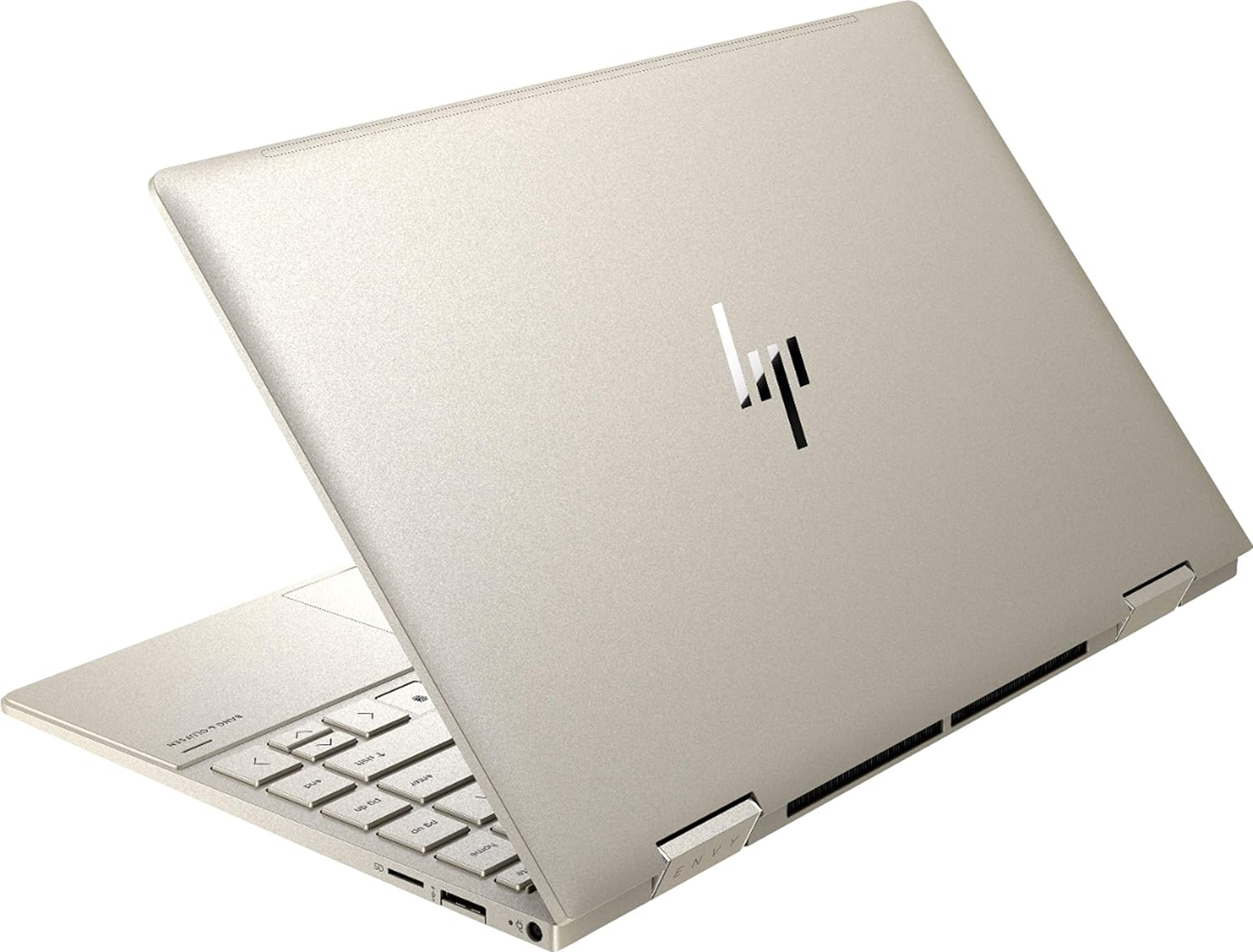
図3.2:背面 view of the HP Envy x360 laptop, highlighting the sleek design and port placement on the sides.
4. セットアップ
4.1 初回電源投入
- Unpack your HP Envy x360 laptop and included accessories.
- 電源アダプターをノートパソコンの充電ポートに接続し、電源コンセントに接続します。
- Press the power button, typically located on the side or keyboard deck, to turn on the laptop.
- 画面上の指示に従って、言語の選択、ネットワーク接続、ユーザー アカウントの作成などの Windows 10 Home のセットアップを完了します。
4.2 周辺機器の接続
Connect your mouse, external display, or other USB devices to the available ports as described in Section 3. For wireless devices, enable Bluetooth in Windows settings and pair your devices.
5. 操作手順
5.1 Using the 2-in-1 Modes
Your HP Envy x360 features a versatile 360-degree hinge, allowing for multiple usage modes:
- ラップトップモード: Traditional laptop orientation for typing and productivity.
- テントモード: 画面を折り返して逆「V」字型にすると、限られたスペースでビデオやプレゼンテーションを見るのに最適です。
- スタンドモード: Fold the screen back further, resting the keyboard face down, to use the display for media consumption or touch-based applications.
- タブレットモード: Fold the screen completely back against the base, transforming the device into a tablet for touch interaction.

Figure 5.1: The HP Envy x360 laptop configured in tent mode, suitable for media viewing。

Figure 5.2: The HP Envy x360 laptop fully folded into tablet mode, ready for touch input.
5.2 タッチスクリーンとキーボードの使用
- タッチスクリーン: Use gestures similar to a smartphone or tablet for navigation, zooming, and interaction with applications.
- バックライト付きキーボード: Press the function key (Fn) and the appropriate F-key (usually F5 or F4, check keyboard icons) to toggle the keyboard backlight on/off or adjust brightness.
- 指紋リーダー: Enroll your fingerprint through Windows Hello settings for secure and fast login.
6. メンテナンス
Regular maintenance helps prolong the life of your laptop.
- クリーニング: 画面と筐体の清掃には、柔らかく糸くずの出ない布を使用してください。頑固な汚れには、amp布を水またはスクリーンに安全なクリーナーで拭いてください。刺激の強い化学薬品は避けてください。
- ソフトウェアアップデート: Regularly update Windows and HP drivers to ensure optimal performance and security.
- バッテリーのケア: バッテリーを頻繁に完全に放電することは避けてください。長期保管する場合は、バッテリーを50~70%程度まで充電してください。
- 換気: Ensure the laptop's vents are not obstructed to prevent overheating. Use on a hard, flat surface when possible.
7。 トラブルシューティング
このセクションでは、発生する可能性のある一般的な問題について説明します。
7.1 電源の問題
- ノートパソコンが起動しない: Ensure the power adapter is securely connected and the outlet is functional. Try a different outlet or power adapter if available.
- バッテリーが充電されない: 電源アダプターの接続を確認してください。ケーブルやポートに損傷がないか確認してください。
7.2 表示の問題
- 画面が空白です: Connect an external monitor to check if the issue is with the laptop's display. Try restarting the laptop.
- タッチスクリーンが反応しない: Restart the laptop. Ensure all drivers are up to date via Windows Update or HP Support Assistant.
7.3 パフォーマンスの問題
- パフォーマンスが遅い: 不要なアプリケーションを閉じてください。タスクマネージャーでリソースを大量に消費するプロセスがないか確認してください。SSDに十分な空き容量があることを確認してください。
- 過熱: Clean vents. Ensure proper airflow. Reduce workload if consistently hot.
8. 仕様
| 特徴 | 詳細 |
|---|---|
| ブランド | HP |
| モデル名 | HP Envy x360 |
| 画面サイズ | 13.3インチ |
| ディスプレイ解像度 | 1920 x 1080 (フルHD) |
| 表示タイプ | LED IPS Touch Screen |
| プロセッサ | 11th Generation Intel Core i5-1135G7 (2.4 GHz, up to 4.2 GHz with Turbo Boost) |
| RAMメモリ | 8GB DDR4 |
| ストレージ | 256GB SSD |
| オペレーティング·システム | Windows 10 ホーム |
| グラフィックス | Intel Iris Xe グラフィックス(統合型) |
| 特集 | バックライトキーボード、指紋リーダー |
| オーディオ | Bang & Olufsen Audio with Three speakers |
| 接続性 | Wireless-AX, Bluetooth, USB, HDMI |
| ポート | 2x USB 3.0 Type-A, 1x HDMI, 1x Micro SD Card Reader, 1x Headphone/Microphone Combo, 1x USB-C |
| 寸法(長さ×幅×高さ) | 12.07インチ x 7.66インチ x 0.65インチ |
| 重さ | 2.92ポンド |
| 色 | 淡いゴールド |
9. 箱の中身
The following items are included with your HP Envy x360 laptop:
- HP Envy x360 13.3-inch 2-in-1 Laptop
- 電源アダプター
- マウスパッド

Figure 9.1: The HP Envy x360 laptop shown alongside the included mouse pad.
10. 保証とサポート
Your HP Envy x360 laptop comes with a standard manufacturer's warranty. For detailed warranty information, please refer to the warranty card included in your product packaging or visit the official HP support website. For technical assistance, driver downloads, or service requests, please contact HP Customer Support.
HPサポート Webサイト: サポート