
次の8000
NEXT 8000 フルHD衛星放送受信機 ユーザーマニュアル
モデル: 8000
導入
Thank you for choosing the NEXT 8000 Full HD Satellite Receiver. This manual provides detailed instructions for the proper installation, operation, and maintenance of your device. Please read this manual thoroughly before using the receiver to ensure optimal performance and safety.
The NEXT 8000 is designed to deliver a high-quality viewing experience with its Full HD capabilities, multi-satellite search, and media playback features. It supports various languages and offers convenient software upgrades via USB.
パッケージ内容
パッケージにすべてのアイテムが揃っていることを確認してください:
- NEXT 8000 Satellite Receiver Unit
- リモートコントロール
- HDMIケーブル
- USBケーブル
- 電源アダプター

Image: The NEXT 8000 Full HD Satellite Receiver unit shown alongside its remote control.
セットアップガイド
1. 受信機の接続
Follow these steps to connect your satellite receiver to your television and satellite dish:
- 衛星IN: Connect the coaxial cable from your satellite dish to the 'LNB IN' port on the back of the receiver.
- HDMI接続: Use the provided HDMI cable to connect the 'HD OUT' port on the receiver to an available HDMI input on your television. Note the HDMI input number on your TV (e.g., HDMI 1, HDMI 2).
- AV Connection (Optional): If your TV does not have an HDMI input, use an AV cable (not included) to connect the 'AV' port on the receiver to the corresponding AV inputs on your television.
- 電源接続: Connect the power adapter to the 'DC 12V' input on the receiver, then plug the adapter into a power outlet.
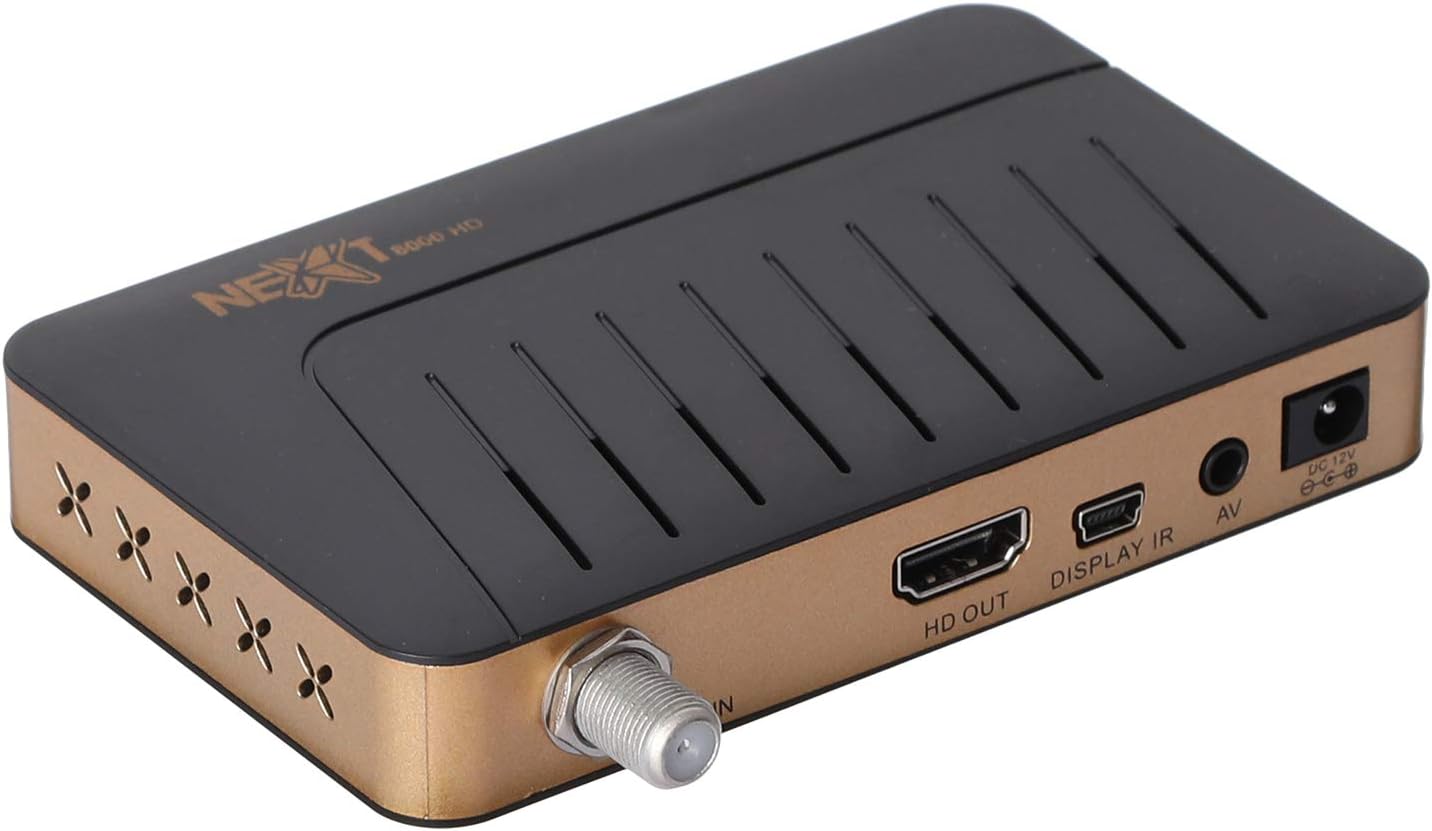
画像: 背面 view of the NEXT 8000 receiver, highlighting the LNB IN, HD OUT (HDMI), AV, and DC 12V power input ports.
2. 初回電源投入とセットアップ
すべてのケーブルを接続した後:
- Turn on your television and select the correct HDMI or AV input source.
- The receiver will power on automatically. The initial setup wizard should appear on your screen.
- Follow the on-screen instructions to select your preferred language, time zone, and perform a channel scan. Refer to the 'Operating Instructions' section for details on channel scanning.
3. リモートコントロールview
リモコンの機能について理解しておきましょう。

Image: The remote control for the NEXT 8000 satellite receiver, showing various buttons for power, navigation, volume, channel, and special functions.
- 電源ボタン: 受信機の電源をオン/オフにしたり、スタンバイ モードにしたりします。
- メニュー: 設定と機能のメイン メニューにアクセスします。
- OK: Confirms selections or displays channel list.
- 矢印ボタン(上/下/左/右): メニューとオプションをナビゲートします。
- EXIT: 前の画面に戻るか、メニューを終了します。
- VOL +/-: 音量を調整します。
- CH +/-: チャンネルを変更します。
- 番組表: 電子番組ガイドを表示します。
- 土: Selects satellite.
- USB: Accesses USB media playback.
- タイムシフト: Activates the Timeshift function (requires USB storage).
操作手順
1. Channel Search and Management
To find and organize channels:
- を押す メニュー リモコンのボタン。
- Navigate to 'Installation' or 'Channel Search' using the arrow buttons and press OK.
- Select 'Multi-satellite search' or 'Network search' based on your setup.
- Follow the on-screen prompts to initiate the scan. The receiver will automatically detect available channels.
- After the scan, you can access options to 'Program lock', 'Delete', 'Move', or 'Rename' channels within the channel management menu.
2. USB経由のメディア再生
The receiver supports media playback from a USB flash drive.
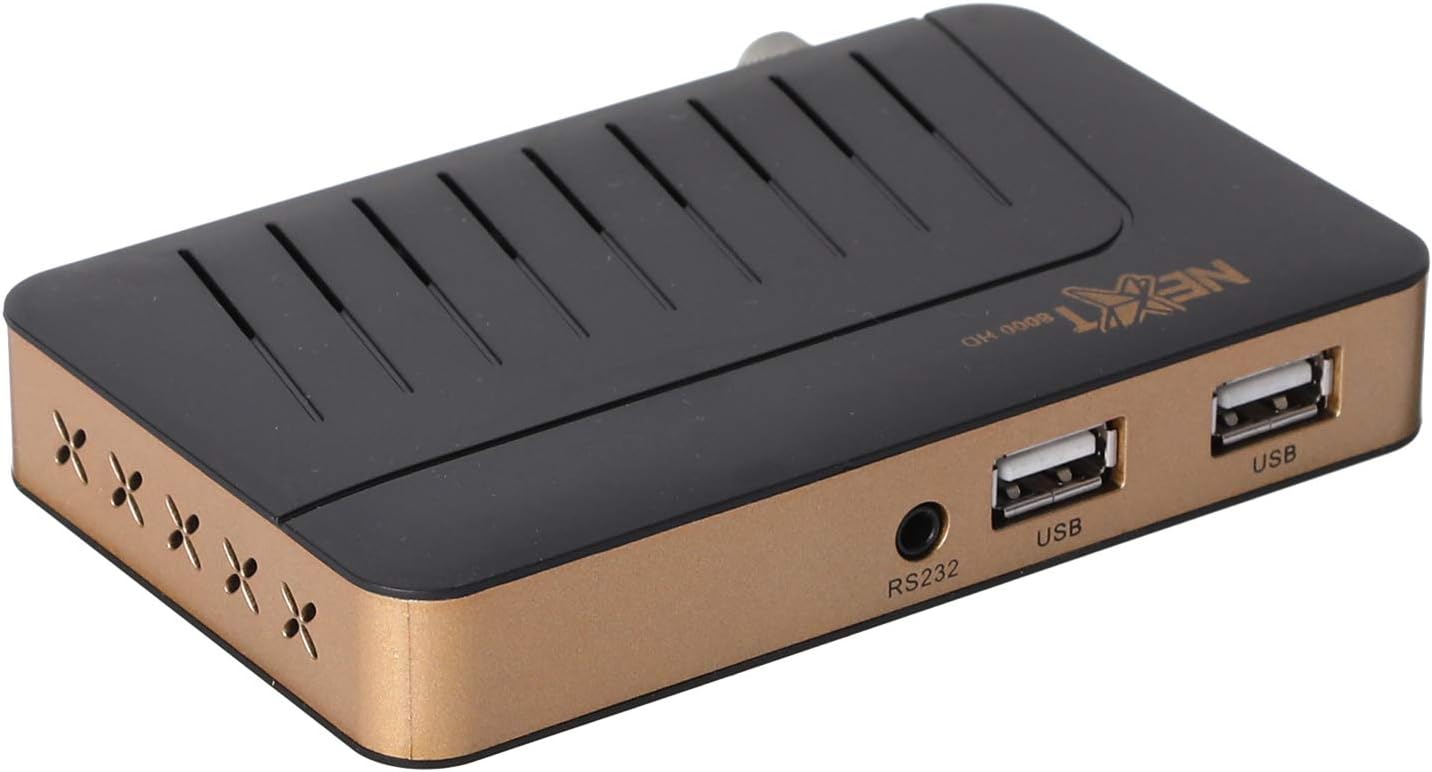
画像: 正面 view of the NEXT 8000 receiver, showing the two USB ports available for connecting external storage devices.
- Insert a USB flash drive into one of the USB ports on the receiver.
- を押す USB button on the remote control or navigate to the 'Media' menu.
- 再生したいメディアの種類(例:ビデオ、音楽、写真)を選択します。
- Browse your USB drive content and select the desired file. The receiver supports AVI, MKV, TS, TP, TRP, MPG, and MP4 files.
3. 録画とタイムシフト
To record programs or use the Timeshift function, a USB storage device must be connected.
- 録音: 番組を視聴中に、 記録 button (usually a red circle) on the remote control to start recording. Press it again to stop. Recorded content will be saved to the connected USB drive.
- タイムシフト: を押す タイムシフト button on the remote control to pause live TV. You can then fast-forward or rewind within the buffered content.
4. 電子番組ガイド(EPG)
を押す 電子ブック リモコンのボタンを view the 7-day electronic program guide. This allows you to see upcoming programs and set reminders or recordings.
5. Parental Lock
To restrict access to certain channels or menus, navigate to the 'System Settings' or 'Parental Control' menu. You can set a password to lock programs or specific functions.
メンテナンス
1. Software Upgrade via USB
To ensure your receiver has the latest features and bug fixes, you can upgrade its software:
- 最新のソフトウェアをダウンロードする file from the official NEXT website to a USB flash drive. Ensure the file is placed in the root directory of the USB drive.
- Insert the USB flash drive into the receiver's USB port.
- へ移動 メニュー > 'System Settings' > 'Software Upgrade' (or similar option).
- Select 'Upgrade by USB' and choose the software file.
- Confirm the upgrade. The receiver will restart automatically after the upgrade is complete. Do not power off the receiver during the upgrade process.
2. 清掃
To clean the receiver, disconnect it from the power supply. Use a soft, dry cloth to wipe the exterior surfaces. Do not use liquid cleaners or abrasive materials.
トラブルシューティング
If you encounter issues with your NEXT 8000 receiver, refer to the following table:
| 問題 | 考えられる原因 | 解決 |
|---|---|---|
| 画像も音声も出ない | Incorrect TV input selected; Loose HDMI/AV cable; Receiver not powered on. | Select correct TV input; Check all cable connections; Ensure receiver is powered on. |
| チャンネルが見つかりません | Satellite dish not aligned; Incorrect LNB settings; Channel scan not performed. | Check satellite dish alignment; Verify LNB settings in menu; Perform a channel scan. |
| リモコンが動作しない | 電池切れ。リモコンと受信機の間に障害物がある。リモコンセンサーがブロックされている。 | Replace batteries; Remove obstructions; Ensure receiver's IR sensor is clear. |
| USBメディアが再生されない | サポートされていません file フォーマット; USBドライブが正しく挿入されていない; 破損している file. | チェック file format compatibility; Re-insert USB drive; Try a different USB drive or file. |
これらの解決策を試しても問題が解決しない場合は、カスタマー サポートにお問い合わせください。
仕様
Key technical specifications for the NEXT 8000 Full HD Satellite Receiver:
- モデル: 8000
- ビデオ出力解像度: 576i、576p、720p、1080i、1080p(50/60 Hz)
- 接続性: HDMI, USB (2 ports), RS232, AV
- サポートされているオーディオ形式: Dolby Digital, DTS, AAC, PCM
- Supported Video/Media Formats: AVI, MKV, TS, TP, TRP, MPG, MP4
- ストレージメモリ: 100 satellites, 4000 frequencies, 8000 channels
- プロセッサ: サンプラス
- 特徴: Recording by USB flash, Screen enlargement, Multi-satellite search, Network search, Media playback, 7-day Electronic Program Guide (EPG), Teletex, Timeshift, Parental lock.
- 寸法: 19.6 x 17.4 x 6.6 cm
- 重さ: 396グラム
保証とサポート
For warranty information and technical support, please refer to the documentation provided with your purchase or visit the official NEXT product support webサイトでご確認ください。保証請求の際は購入証明として領収書を保管してください。
Ask a question about this manual
Ask about setup, troubleshooting, compatibility, parts, safety, or missing instructions. Manuals+ will review the question and use this page’s manual context to help answer it.