
JETBeam MINI ONE SE
JETBEAM MINI ONE SE Keychain Flashlight User Manual
Model: MINI ONE SE
ブランド: JETBeam
導入
The JETBEAM MINI ONE SE is a compact and versatile keychain flashlight designed for everyday carry. It features a powerful CREE XP-G3 LED for main illumination, along with auxiliary RGB and UV lights for various applications, including fluorescent whitening agent detection. Its durable plastic construction, USB Type-C rechargeable battery, and IPX8 waterproof rating make it a reliable tool for diverse needs.
特徴
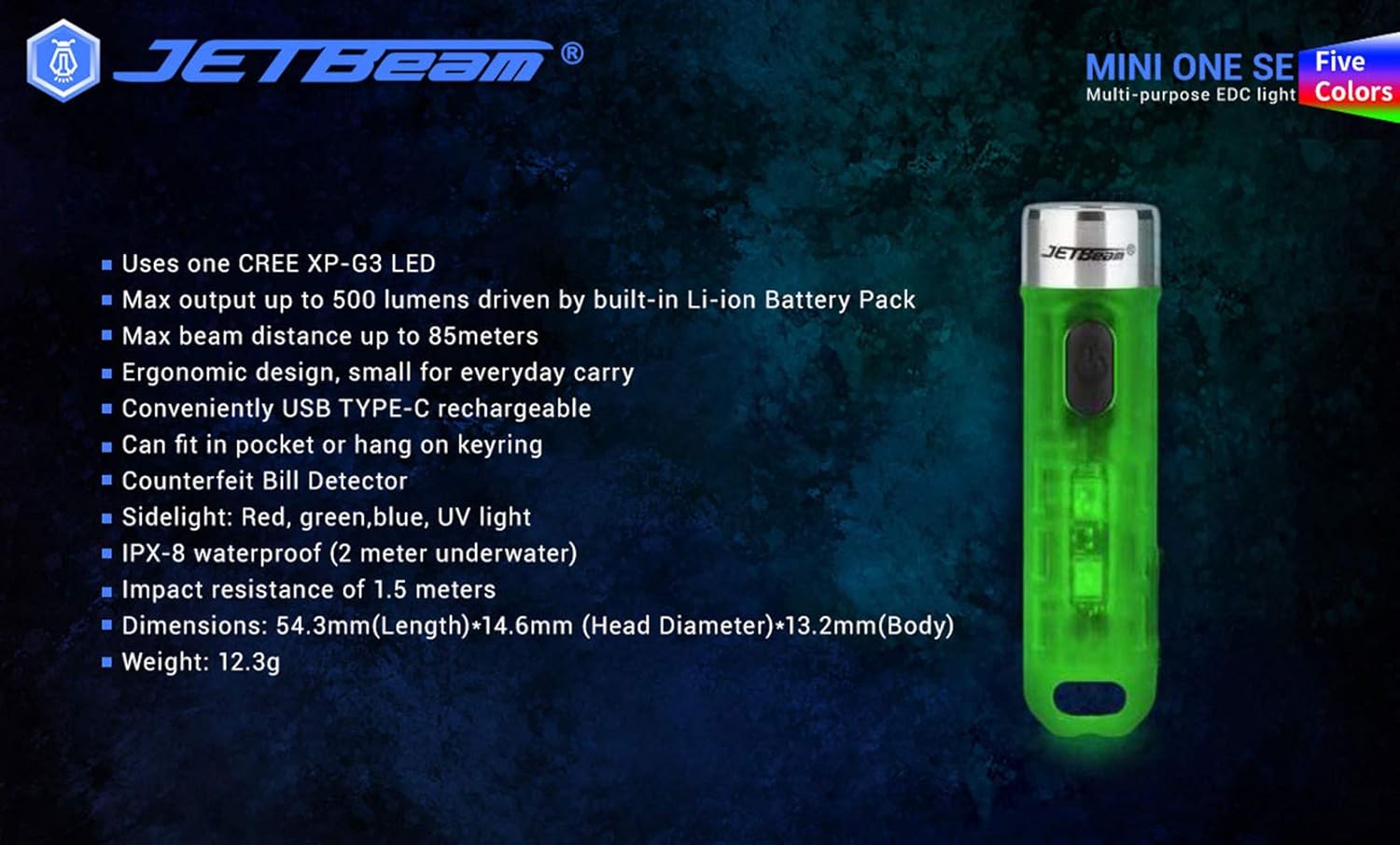
- Utilizes one CREE XP-G3 LED for main light.
- Equipped with auxiliary RGB LED and 365nm UV light for fluorescent whitening agent detection.
- Maximum output of 500 Lumens, powered by a built-in Li-ion battery pack.
- Achieves a maximum beam distance of up to 85 meters.
- Ergonomic design for comfortable everyday carry.
- Conveniently rechargeable via USB Type-C.
- Compact size allows it to fit easily in a pocket or attach to a keyring.
- 耐久性のあるプラスチック素材で作られています。
- Sidelight functions include Red, Green, Blue, and UV light.
- IPX8 waterproof rating (submersible up to 2 meters underwater).
- Impact resistance of 1.5 meters.
- Features various light modes for diverse applications, including identifying counterfeits.
- Lightweight design, weighing approximately 29g.
- All light modes include a memory function.
パッケージ内容
開梱したらパッケージの内容を確認し、すべてのアイテムが揃っていることを確認してください。
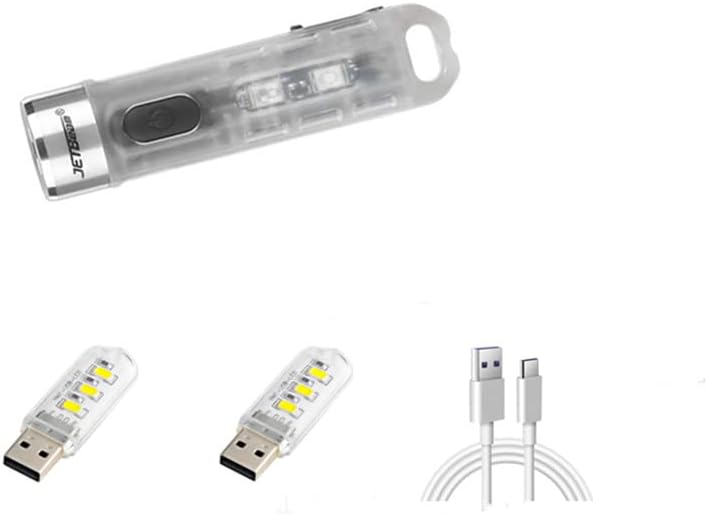
- 1 x JETBEAM MINI ONE SE Flashlight
- 1 x USB Type-C充電ケーブル
設定
デバイスの充電
The JETBEAM MINI ONE SE features a built-in Li-ion battery and is conveniently USB Type-C rechargeable. Before first use, it is recommended to fully charge the device.
- 懐中電灯の側面にある USB Type-C 充電ポートを見つけます。
- 付属のType-C充電ケーブルを懐中電灯のポートに接続します。
- Plug the other end of the USB Type-C charging cable into a compatible USB power source (e.g., computer USB port, wall adapter, power bank).
- The charging indicator light will illuminate to show the charging status. (Specific indicator behavior, e.g., red for charging, green for full, may vary slightly but generally indicates progress).
- Once fully charged, disconnect the charging cable and ensure the port cover (if any) is securely closed to maintain water resistance.

操作手順
The JETBEAM MINI ONE SE features a single side switch for all operations. All modes have a memory function, meaning the flashlight will turn on in the last used mode.
Main Light (White Light) Operation
- オン/オフ: 電源ボタンを短く押します。
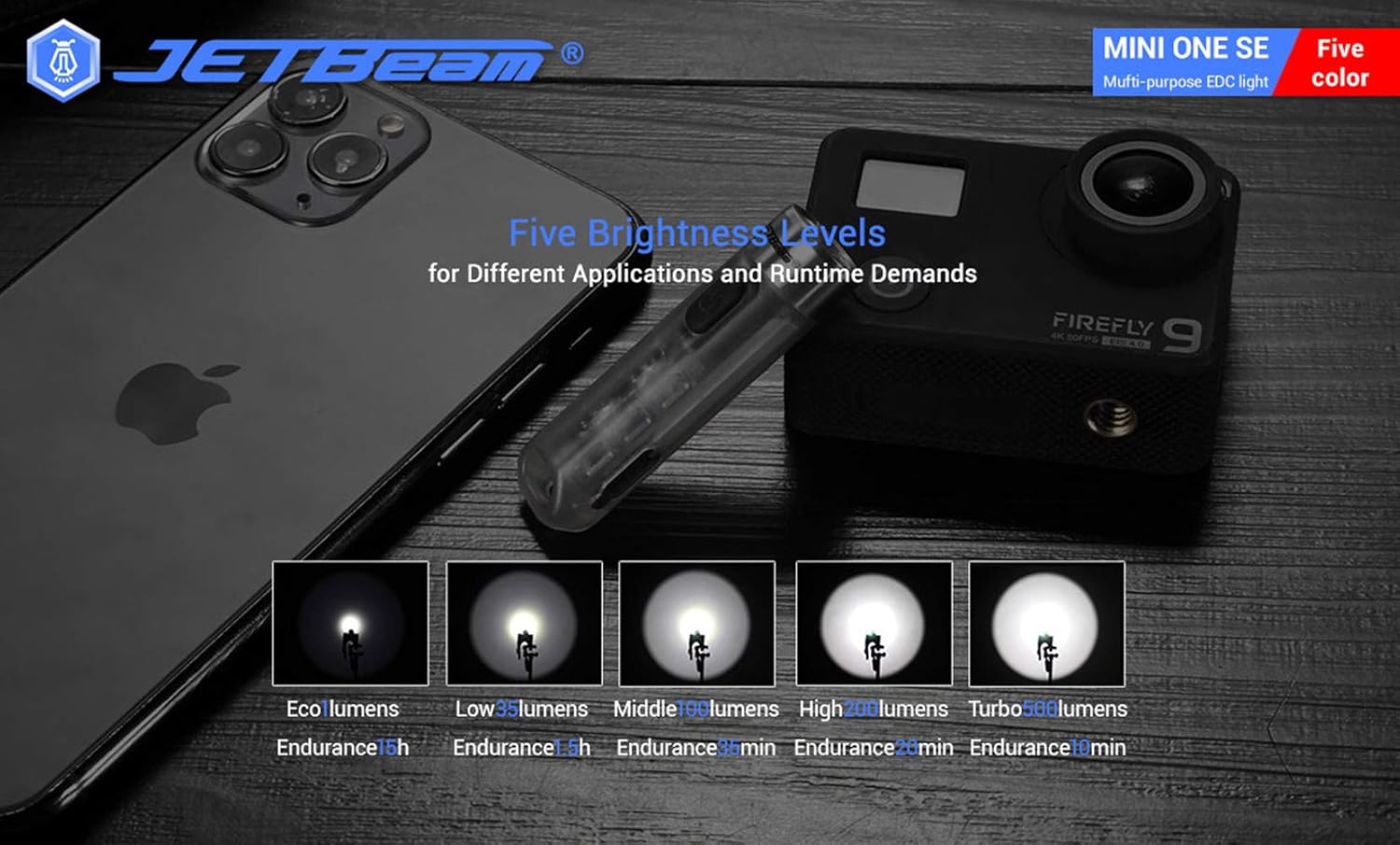
- 明るさの変更: When the main light is ON, a long press of the power button will cycle through the brightness modes: Eco → Low → Middle → High. Release the button at your desired brightness.
- Access Turbo Mode (from OFF): When the main light is OFF, press and hold the power button to instantly access Turbo mode. Release the button to turn it off. (Note: Turbo mode automatically shuts down after approximately 30 seconds to prevent overheating).

サイドライト操作
- オン/オフ: Double press the power button to turn the side lights ON. Press the power button again to turn them OFF.
- 色/モードの変更: When the side light is ON, a long press of the power button will cycle through the side light colors and modes: Red → Green → Blue → Red Flash → Flowing Light → Beacon. Release the button at your desired mode.
UVライト操作
- オン/オフ: Triple press the power button to turn the UV light ON. Press the power button again to turn it OFF.

メンテナンス
To ensure optimal performance and longevity of your JETBEAM MINI ONE SE, follow these maintenance guidelines:
- クリーニング: 懐中電灯本体を柔らかくて乾いた布で拭いてください。amp 布で拭いてください。研磨剤入りの洗剤や溶剤は使用しないでください。レンズを清潔に保つことで、光出力を最大限に高めることができます。
- ストレージ: Store the flashlight in a cool, dry place away from direct sunlight and extreme temperatures. If storing for extended periods, ensure the battery is partially charged (around 50%) to preserve battery health.
- バッテリーのケア: The built-in Li-ion battery does not require removal. Recharge the device regularly, especially if it has not been used for a long time, to prevent deep discharge.
- 耐水性: While the device is IPX8 waterproof, ensure the USB port cover is securely closed before exposing it to water.
トラブルシューティング
If you encounter issues with your JETBEAM MINI ONE SE, please refer to the following common problems and solutions:
- 懐中電灯が点灯しない:
- Ensure the battery is charged. Connect the flashlight to a USB Type-C charger and check the charging indicator.
- Verify that the power button is being pressed correctly (short press for main light, double press for side lights, triple press for UV light).
- 光出力が暗い:
- 電池残量が少なくなっている可能性があります。懐中電灯を充電してください。
- The lens might be dirty. Clean the lens gently with a soft cloth.
- Side lights or UV light not working:
- Ensure you are using the correct button press sequence (double press for side lights, triple press for UV light).
- 充電の問題:
- Check if the USB Type-C cable is properly connected to both the flashlight and the power source.
- 別の USB ポートまたは電源アダプタを試してください。
- 充電ポートにゴミがないことを確認してください。
これらの手順を試しても問題が解決しない場合は、カスタマー サポートにお問い合わせください。
仕様
| 特徴 | 仕様 |
|---|---|
| ブランド | ジェットビーム |
| モデル | MINI ONE SE |
| 光源 | 1*CREE XP-G3 LED (Main), RGB LED, 365nm UV LED (Auxiliary) |
| 最大出力 | 500ルーメン |
| 最大ビーム距離 | 85メートル |
| 電源 | Built-in Li-ion battery pack |
| 充電 | USBタイプC |
| 材料 | プラスチック |
| 耐水性 | IPX8 (2 meters underwater) |
| 耐衝撃性 | 1.5メートル |
| Dimensions (L x Head D x Body D) | 54.3mm x 14.6mm x 13.2mm(2.14 x 0.57 x 0.52インチ) |
| 重さ | 29g(1.06オンス) |
| 含まれるコンポーネント | 充電ケーブル |
| 欧州連合 | 644925520009 |
| 初回利用可能日 | 3年2020月XNUMX日 |
保証情報
Warranty information for the JETBEAM MINI ONE SE is not provided in this manual. Please refer to the product packaging or the manufacturer's official web保証範囲および条件の詳細については、サイトをご覧ください。
サポート
For further assistance, technical support, or inquiries regarding your JETBEAM MINI ONE SE, please visit the official JETBeam website or contact their customer service department. Contact details may also be found on the product packaging or purchase receipt.