
導入
Thank you for choosing the FLEXISPOT EN2 Electric Height Adjustable Standing Desk. This manual provides essential information for the proper assembly, operation, and maintenance of your new workstation. Please read it thoroughly before use to ensure optimal performance and safety.

Figure 1: The FLEXISPOT EN2 60x24 Inch Electric Height Adjustable Standing Desk.
セットアップと組み立て
Your FLEXISPOT EN2 desk will arrive in two separate packages, which may be shipped independently. Ensure all components are present before beginning assembly.
含まれるコンポーネント:
- デスクフレーム
- モーター
- 6-Button Digital Controller
- ケーブル管理システム
- デスクClamp 電源コード
- 60x24 Inch Whole-Piece Desktop (White)
Assembly may require an electric drill, which is not included in the package. Please refer to the detailed assembly instructions provided in the box for step-by-step guidance. Avoid using a power drill for all screws to prevent stripping, especially for pre-drilled holes. Hand tools are often sufficient and recommended for certain steps.

図2:以上view 組み立てに必要なすべてのコンポーネントが含まれています。

Figure 3: The desk components are shipped in two separate packages.
組み立てビデオ:
Video 1: Official FLEXISPOT Standing Desk Frame Installation Guide. This video provides visual instructions for assembling the desk frame.
操作手順
高さ調整:
The FLEXISPOT EN2 desk features a 6-button digital controller with 4 programmable memory presets. The motorized system allows for smooth height adjustments from 28.1 inches to 45.7 inches. The motor operates quietly, producing less than 50 dB of noise.
- 使用 Up そして 下 arrow buttons to manually adjust the desk height.
- のいずれかを長押しします 4 memory preset buttons (1, 2, 3, 4) to save your preferred sitting or standing heights.
- Tap a saved preset button to automatically move the desk to your desired height.
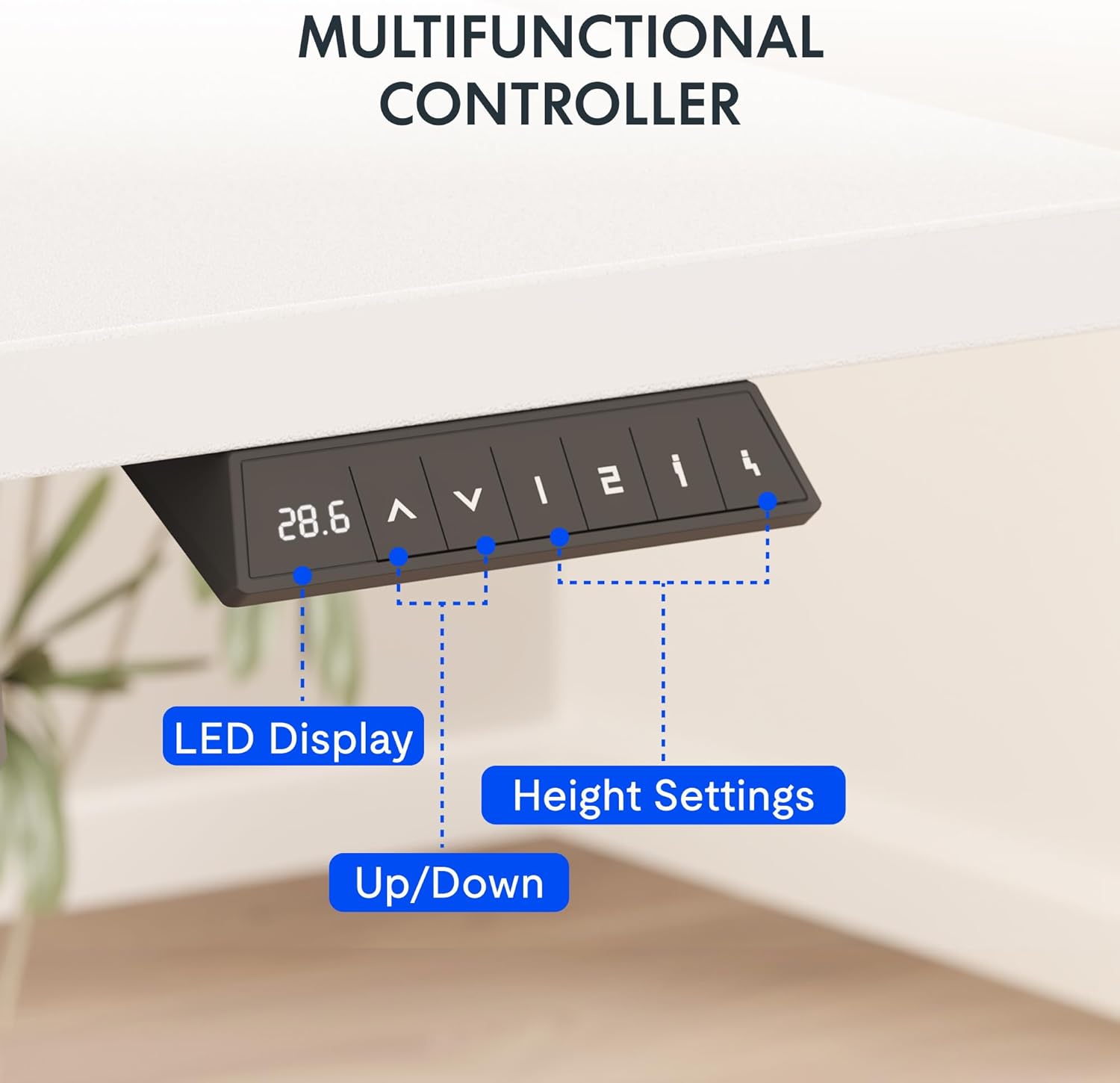
Figure 4: The multifunctional digital controller for height adjustment.
統合電源コンセント:
The desktop includes a removable clamp power strip with 3 AC outlets (125V/12A) and 2 USB charging ports (5V/2A). This allows for convenient charging of electronic devices directly from your desk. The power strip can be clipped to the back or side of the desk.

Figure 5: The built-in power outlet for convenient charging.
ケーブル管理
Utilize the included cable management system to keep your workspace tidy and organized, preventing cable clutter.

Figure 6: Effective cable management for a clean workspace.
操作ビデオ:
Video 2: Showcase of the FLEXISPOT EN1 Electric Stand Up Desk. This video demonstrates the desk's operation, including height adjustment and features.
メンテナンスとケア
重量容量:
The desk is constructed with an industrial-grade steel frame and a solid FSC-Certified wood tabletop, capable of holding up to 176 pounds (69.9 kilograms). Ensure the desk is not loaded with more than 176 lbs to maintain stability and structural integrity.
クリーニング:
一般的な清掃には、デスクトップとフレームを柔らかくて乾いた布で拭いてください。amp 布で拭いてください。仕上げを傷める可能性のある、刺激の強い化学薬品や研磨剤入りの洗剤の使用は避けてください。
トラブルシューティング
Desk Stability:
The desk is designed for high stability. If you experience any wobbling, ensure all assembly screws are tightened correctly. Avoid overloading the desk beyond its 176 lbs weight capacity.
高さ調整の問題:
If the desk does not adjust smoothly or encounters an obstruction, the built-in Smart Anti-Collision System will stop movement to prevent damage. Clear any obstructions and try again. If issues persist, refer to the full troubleshooting guide on the FLEXISPOT webサイトをご覧いただくか、カスタマー サポートにお問い合わせください。
Stripped Screws during Assembly:
To prevent stripped screws, it is recommended to use hand tools for assembly, especially for attaching components to the desktop. An electric drill may apply too much torque, leading to damage. If a pre-drilled hole is not present, a thin nail and lightweight hammer can be used to create a starter hole before inserting the screw manually.
仕様
| 特徴 | 詳細 |
|---|---|
| ブランド | フレキシポット |
| モデル番号 | 0002873円 |
| 製品寸法 | 奥行き24インチ x 幅60インチ x 高さ28インチ |
| デスクトップサイズ | 60x24" |
| デスクトップ素材 | FSC認証木材 |
| フレーム素材 | 合金鋼 |
| 色 | ホワイトトップ + ホワイトフレーム |
| 最小高さ | 28.1インチ |
| 最大高さ | 45.7インチ |
| 最大重量の推奨 | 176ポンド(69.9キログラム) |
| 騒音レベル | 50dB未満 |
| 電源コンセント | ACコンセント3個(125V/12A)、USB充電ポート2個(5V/2A) |
| 昇降機構 | 電気 |
| コントローラ | 6-button digital with 4 memory presets |
保証情報
FLEXISPOT provides the following warranty for your peace of mind:
- 5年間保証: フレーム、モーター、その他の機械装置をカバーします。
- 2年間保証: コントローラー、スイッチ、電子機器をカバーします。
カスタマーサポート
For any questions, assistance, or warranty claims, please contact FLEXISPOT customer support. You can find more information and contact details on the official FLEXISPOT webサイト。
訪問する AmazonのFLEXISPOTストア 追加の製品とサポート リソースについては、こちらをご覧ください。