
導入
This manual provides essential information for the proper setup, operation, and maintenance of your NEC DTZ-12D-3 DT400 12-Button Display Phone. Please read these instructions carefully to ensure optimal performance and longevity of your device. This phone is designed for business communication environments, offering a range of features to enhance productivity.
製品終了view
The NEC DTZ-12D-3 DT400 is a corded 12-button display phone, featuring a clear LCD screen for call information and menu navigation. It is designed for efficient communication in a professional setting.
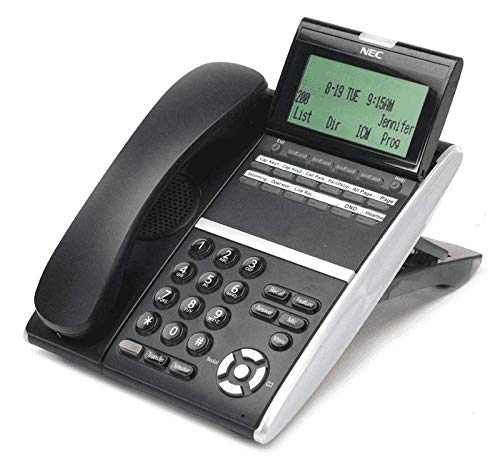
図1: NEC DTZ-12D-3 DT400 12-Button Display Phone. This image shows the black corded desk phone with its adjustable display unit. The display shows time, date, and soft-key options. The phone features a standard dial pad, 12 programmable function keys, and dedicated buttons for speaker, transfer, redial, and navigation.
主要コンポーネント:
- 携帯電話: プライベートな会話用。
- 表示画面: Shows call status, time, date, and menu options.
- Programmable Feature Keys (12): Customizable buttons for speed dials, line access, or specific functions.
- ダイヤルパッド: Standard numeric keys (0-9, *, #) for dialing.
- ナビゲーションキー: For scrolling through menus and lists.
- スピーカーボタン: Activates the speakerphone function.
- 転送ボタン: Used to transfer an active call to another extension.
- リダイヤルボタン: 最後にかけた番号をダイヤルします。
- DND (Do Not Disturb) Button: Activates/deactivates the Do Not Disturb feature.
設定
1. 開梱
- パッケージからすべてのコンポーネントを慎重に取り出します。
- Verify that all items are present: phone unit, handset, coiled handset cord, and telephone line cord.
2. ハンドセットの接続
Connect one end of the coiled handset cord to the handset and the other end to the handset jack located on the side or back of the phone unit.
3. 電話回線への接続
Plug one end of the telephone line cord into the LINE jack on the phone unit and the other end into a standard telephone wall jack.
4. 電源の接続
This phone is designed for corded electric operation. Ensure it is connected to a compatible telephone system that provides power, or use the appropriate power adapter if supplied separately (check your system's requirements).
操作手順
電話をかける
- 受話器を持ち上げるか、 スピーカー ボタン。
- Dial the desired telephone number using the dial pad.
- 呼び出しが接続するのを待ちます。
電話に出る
- 電話が鳴ったら、受話器を上げるか、 スピーカー ボタン。
Using Programmable Feature Keys
The 12 programmable keys can be configured for various functions such as speed dialing, line access, or system features. Consult your system administrator for specific programming details and assigned functions.
Caller Identification (Caller ID)
If subscribed to Caller ID service, the incoming caller's number and name (if available) will be displayed on the screen before you answer the call.
通話の転送
- 通話中に、 移行 ボタン。
- Dial the extension or number to which you want to transfer the call.
- Wait for the recipient to answer, then announce the call and hang up. Alternatively, you may hang up immediately for an unsupervised transfer.
最後の番号にリダイヤルする
受話器を持ち上げるか、 スピーカー ボタンを押し、 リダイヤルする 最後にダイヤルした番号に電話をかけるボタン。
邪魔しないで (DND)
を押す 寝る前 button to activate or deactivate the Do Not Disturb feature. When active, incoming calls may be redirected to voicemail or a busy signal, depending on system configuration.
メンテナンス
クリーニング
- 携帯電話の外側を柔らかくて乾いた布で拭いてください。amp 布。
- 強力な化学薬品、研磨剤入りの洗剤、過度の湿気は使用しないでください。
- クリーニングする前に、携帯電話が電源から切断されていることを確認してください。
ストレージ
長期間使用しない場合は、携帯電話を直射日光や極端な温度を避け、涼しく乾燥した場所に保管してください。
トラブルシューティング
ダイヤルトーンなし
- Check all cable connections, especially the telephone line cord.
- Ensure the phone system is operational.
- Test with another phone if available to rule out line issues.
ディスプレイが機能しない
- Verify the phone is properly connected to the system and receiving power.
- Adjust the display contrast if applicable (refer to system administrator).
Cannot Make or Receive Calls
- Check if the DND feature is accidentally activated.
- Ensure the telephone line is active.
- Contact your system administrator for assistance with line configuration.
仕様
| 特徴 | 詳細 |
|---|---|
| モデル | DTZ-12D-3 DT400 |
| ブランド | NEC Co |
| 電話の種類 | 有線 |
| 色 | 黒 |
| 材料 | プラスチック |
| アイテム重量 | 2.9ポンド |
| パッケージ寸法 | 12.28 x 9.21 x 4.61インチ |
| 電源 | コード式電気 |
| ダイヤラの種類 | Single Keypad (tone dialing) |
| 留守番電話システムの種類 | デジタル |
| 複数行操作 | 単線操作 |
| 発信者識別 | はい |
| 対応デバイス | Traditional telephone networks (PSTN, ISDN), potential integration with other communication devices. |
保証とサポート
For warranty information and technical support, please refer to the documentation provided by your system vendor or contact your NEC authorized dealer. As this product may be a renewed item, specific warranty terms may vary from new products. Please consult your purchase agreement for details.
For further assistance, it is recommended to contact your IT department or the telecommunications system administrator responsible for your NEC phone system.