
1. はじめに
This manual provides detailed instructions for the setup, operation, maintenance, and troubleshooting of your FILCO Majestouch Minila R Convertible mechanical keyboard. Please read this manual thoroughly before using the product to ensure proper functionality and longevity.
The FILCO Majestouch Minila R Convertible is a compact 60% mechanical keyboard featuring Cherry MX Red switches and durable double-shot PBT keycaps. It offers versatile connectivity options, supporting both wired USB and wireless Bluetooth 5.1 connections.
2. パッケージ内容
セットアップを進める前に、パッケージにすべてのアイテムが揃っていることを確認してください。
- FILCO Majestouch Minila R Convertible Keyboard
- USBケーブル
- キーキャッププーラー
- Replacement Keycaps (e.g., Esc, Del, Ctrl, Win)
- 単三電池 2 本 (プリインストールまたは別途付属)
- ユーザーマニュアル(このドキュメント)

Image: The retail packaging box for the FILCO Majestouch Minila R Convertible keyboard, displaying the product name and key features like Bluetooth and MX switches.
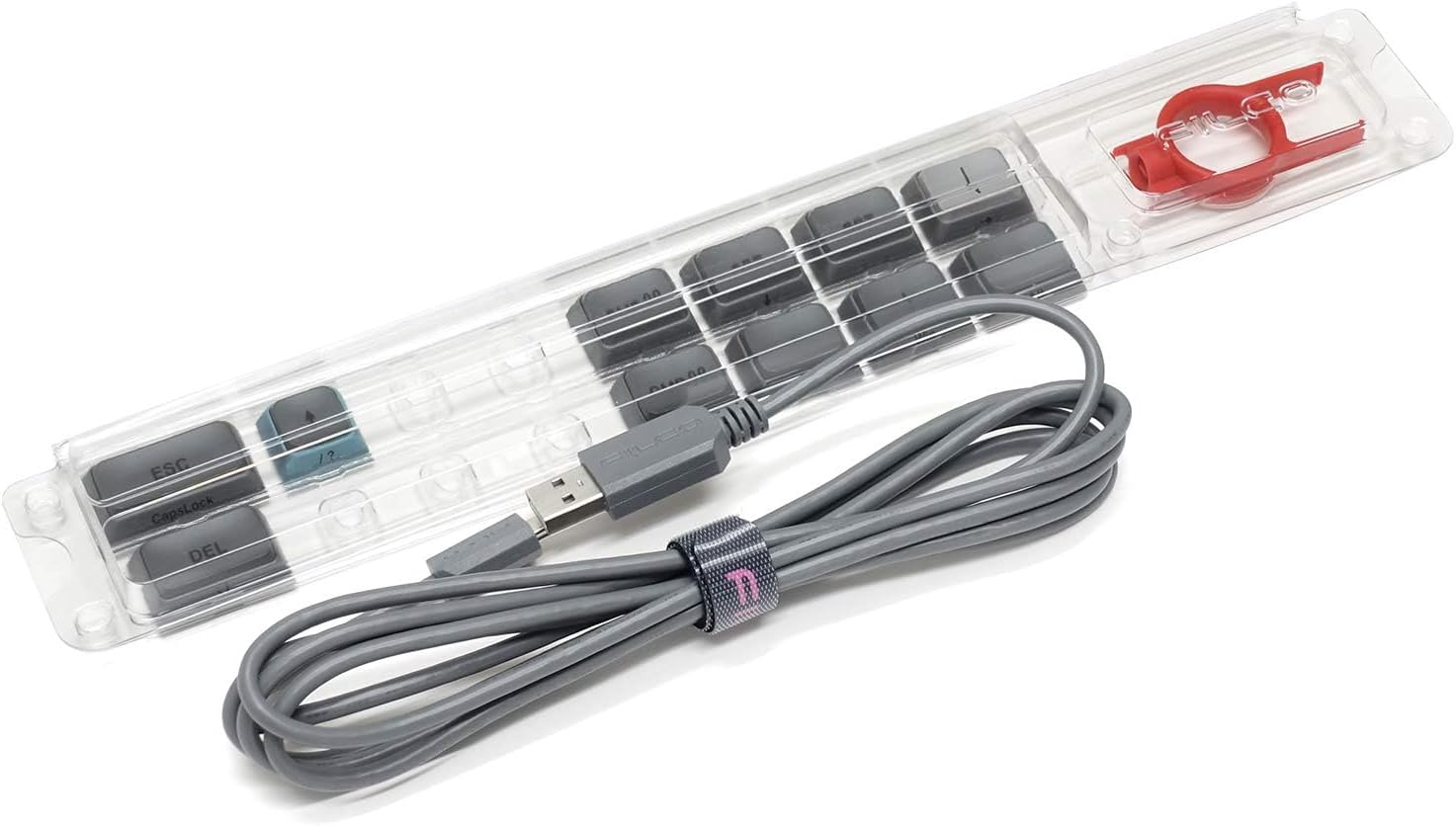
Image: A clear plastic tray containing the gray USB cable, a red keycap puller, and several gray replacement keycaps (e.g., Esc, Del, Ctrl, Win).
3. セットアップ
3.1 バッテリーの取り付け
The keyboard operates wirelessly using two AA batteries. These are typically included with your purchase. To install or replace batteries:
- キーボードの裏側にある電池ボックスを見つけます。
- 電池ボックスのカバーを開きます。
- 極性 (+/-) が正しいことを確認して、単三電池 2 本を挿入します。
- 電池カバーをしっかりと閉じてください。
3.2 有線接続
For a wired connection, use the provided USB cable:
- Connect the smaller end of the USB cable to the USB port on the back of the keyboard.
- USB ケーブルの大きい方の端をコンピュータの利用可能な USB ポートに接続します。
- キーボードはオペレーティング システムによって自動的に認識されます。
3.3 Bluetooth接続
The keyboard supports Bluetooth 5.1 for wireless connectivity. It can pair with up to four devices.
- Ensure the keyboard is powered on and in wireless mode (refer to Section 4.1).
- を押し続けます Fn key and one of the Bluetooth device keys (1, 2, 3, or 4) for approximately 3 seconds until the corresponding LED indicator above the number key flashes rapidly. This indicates pairing mode.
- デバイス(コンピューター、スマートフォン、タブレット)で Bluetooth 設定を開き、新しいデバイスを検索します。
- Select "FILCO Minila R Convertible" from the list of available devices.
- プロンプトが表示されたら、画面に表示されているペアリングコードをキーボードで入力し、 入力.
- Once paired, the LED indicator will stop flashing and remain solid for a few seconds, then turn off. The keyboard is now connected.
- Repeat these steps for up to four different devices, assigning each to a different Bluetooth device key (1-4).
4. 操作手順
4.1 Switching Between Wired and Wireless Modes
To switch between wired and wireless (Bluetooth) modes, use the switch located on the underside or back of the keyboard. Ensure the keyboard is in the correct mode for your desired connection type.
4.2 Switching Between Paired Bluetooth Devices
To switch between previously paired Bluetooth devices, simply press the Fn key along with the corresponding Bluetooth device key (1, 2, 3, or 4) that the device is assigned to. The keyboard will attempt to connect to that device.
4.3 Using Function Keys and Special Commands
Due to its 60% compact layout, many standard keys (like F1-F12, navigation keys, etc.) are accessed via the Fn (Function) key combinations. Refer to the keycap legends for specific functions. Typically, these are printed on the front or side of the keycaps.

画像: 完全なトップダウン view of the FILCO Majestouch Minila R Convertible keyboard, showcasing its compact 60% layout with Sky Grey and light blue keycaps.
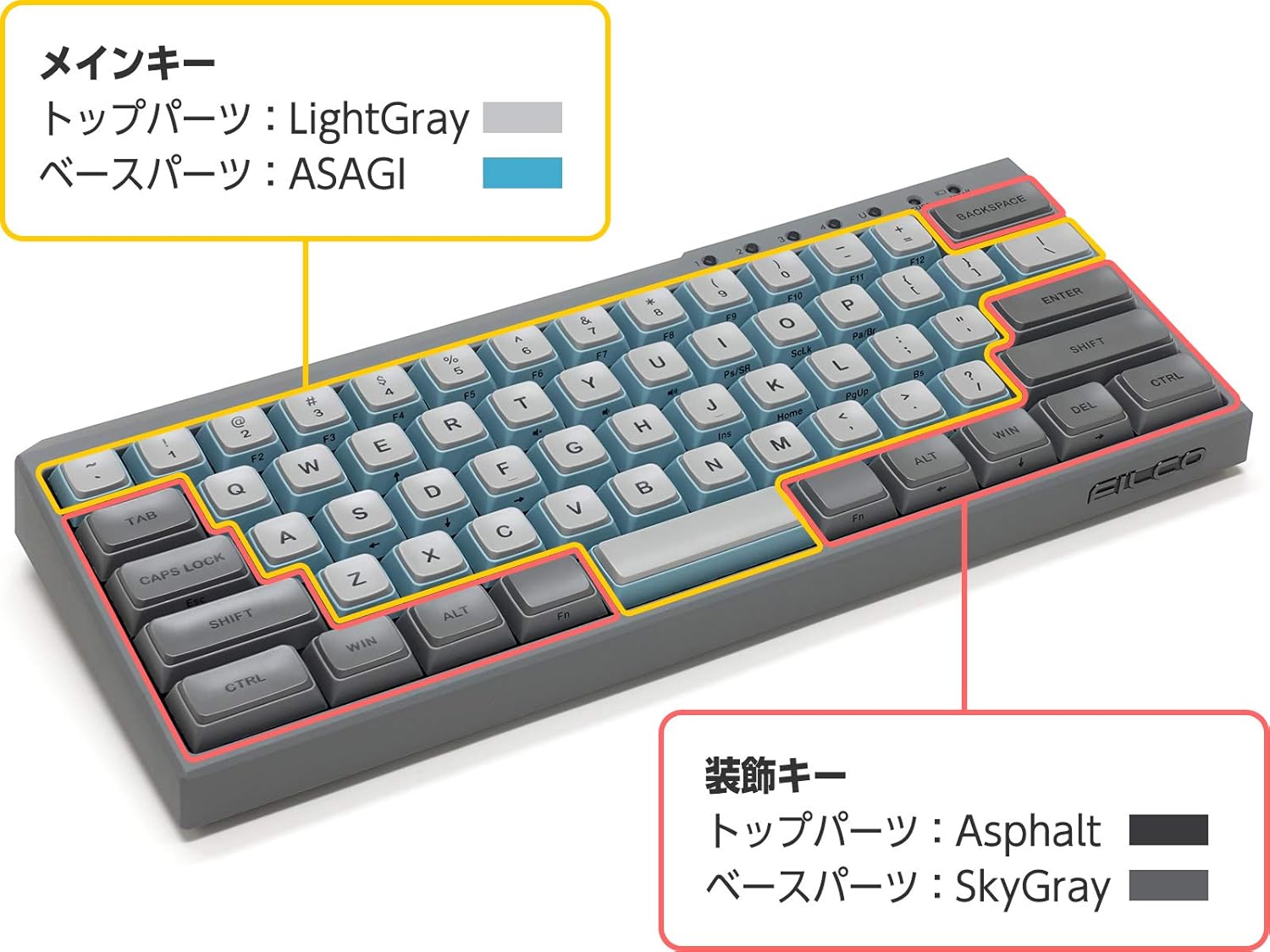
Image: A diagram of the keyboard layout, highlighting the main keys in light gray and light blue, and accent keys (like Ctrl, Win, Alt) in a darker gray. This illustrates the keycap color scheme.

画像: クローズアップ view of the top-right section of the keyboard, showing the 'scroll' and 'caps' lock indicator lights, and the number keys 1, 2, 3, 4, which also serve as Bluetooth device indicators.

画像:側面 view of the keyboard, prominently featuring the metallic FILCO logo embedded on the gray casing.
5. メンテナンス
5.1 キーボードのクリーニング
最適なパフォーマンスと外観を維持するには:
- Disconnect the keyboard from your computer (wired) or turn off (wireless).
- 柔らかく糸くずの出ない布で軽く拭き取ってください。ampキーキャップとcを水または中性洗浄液で拭きますasing.
- キーキャップ間のほこりやゴミを取り除くには、圧縮空気を使用してください。
- 刺激の強い化学薬品、溶剤、研磨材の使用は避けてください。
5.2 キーキャップの取り外しと交換
The keyboard features durable PBT double-shot keycaps. You can remove and replace keycaps using the included keycap puller:
- 取り外したいキーキャップの上にキーキャップ プーラーをゆっくりと置きます。
- 均等に圧力をかけ、キーキャップがスイッチステムから外れるまで上方に引きます。
- 交換するには、キーキャップをスイッチ ステムに合わせて、カチッと音がするまでしっかりと押し下げます。

画像: クローズアップ view of individual keycaps, showcasing their double-shot PBT construction. One keycap is shown from the top (letter 'A'), another from the bottom (showing the stem mount), and a larger keycap (Ctrl) is also visible.

画像: 詳細な view of a Cherry MX Red mechanical switch, characterized by its red stem, indicating a linear, non-tactile, and non-clicky switch type.
6。 トラブルシューティング
キーボードで問題が発生した場合は、次の一般的な解決策を参照してください。
- キーボードが応答しない(有線):
USBケーブルがキーボードとコンピュータの両方にしっかりと接続されていることを確認してください。別のUSBポートまたはケーブルを試してください。コンピュータを再起動してください。 - キーボードが応答しない(ワイヤレス):
Check if the keyboard is powered on and has sufficient battery charge. Ensure the keyboard is in wireless mode. Re-pair the keyboard with your device (refer to Section 3.3). Ensure Bluetooth is enabled on your device. - Bluetooth Connection Drops Frequently:
Ensure the keyboard is within range of your device. Minimize interference from other wireless devices. Check and replace batteries if low. - 特定のキーが機能しない:
Remove the keycap and check for any debris obstructing the switch. Re-seat the keycap firmly. If the issue persists, contact support. - キー出力が正しくありません:
Ensure the correct keyboard layout is selected in your operating system settings.
7. 仕様
| モデル名 | FFBTR63MRL/ESG |
| 製品寸法 | 4.92 x 11.81 x 1.38インチ |
| アイテム重量 | 1.63ポンド |
| メーカー | Filco |
| バッテリー | 単三電池2本(付属) |
| 対応デバイス | スマートフォン、ノートパソコン、タブレット |
| 接続技術 | ブルートゥース |
| キーボードの説明 | 機械 |
| 推奨用途 | Business, Education, Everyday Use |
| 特集 | Bluetooth, USB-A passthrough port (for wired connection) |
| 色 | Cherry MX Red (switch type) |
| スタイル | モダンな |
| 材料 | ポリブチレンテレフタレート(PBT) |
8. 保証とサポート
8.1 保証情報
FILCO products are manufactured to high-quality standards. For specific warranty terms and conditions, please refer to the warranty card included with your product or visit the official FILCO webサイトでご確認ください。保証請求に備えて購入証明書を保管してください。
8.2 カスタマーサポート
If you require further assistance, have questions, or encounter issues not covered in this manual, please contact FILCO customer support through their official webサイトまたは製品を購入した小売店にお問い合わせください。