
1. はじめに
The Epomaker Ajazz i610T is a compact 61-key mechanical keyboard designed for versatility and performance. It supports both Bluetooth wireless and wired (Type-C) dual-mode connectivity, allowing connection to up to three devices simultaneously. Featuring N-key rollover and 17 distinct backlight effects, this keyboard is suitable for various applications, including gaming and professional work environments.
This manual provides detailed instructions for setting up, operating, maintaining, and troubleshooting your Ajazz i610T keyboard.
2. パッケージ内容
パッケージに以下の項目が含まれているか確認してください。
- 1 x Ajazz i610T Mechanical Keyboard
- タイプCケーブル x 1
- ユーザーマニュアル x 1
3. セットアップ
3.1 有線モード接続
- Locate the Type-C port on the keyboard, typically on the side or back.
- 付属のType-Cケーブルの一方の端をキーボードに接続します。
- Type-C ケーブルのもう一方の端をコンピューターの使用可能な USB ポートに接続します。
- The keyboard will automatically be recognized and function in wired mode. The keyboard will also charge its internal battery while connected via USB.
3.2 Bluetooth Wireless Mode Connection
The Ajazz i610T supports connecting to up to three different Bluetooth devices.
- Ensure the keyboard is powered on. The power switch is usually located on the back or side of the keyboard.
- プレス Fn + Q, Fn + W、 または Fn + E to select one of the three Bluetooth device channels. The corresponding key (Q, W, or E) will flash to indicate pairing mode.
- デバイス(コンピューター、タブレット、スマートフォン)で Bluetooth を有効にし、新しいデバイスを検索します。
- Select "Ajazz i610T" (or similar name) from the list of available devices to pair.
- Once paired, the flashing light on the selected key will become solid, indicating a successful connection.
- ペアリングしたデバイスを切り替えるには、 Fn + Q, Fn + W、 または Fn + E 希望のチャンネルに。

画像: サイド view of the Epomaker Ajazz i610T keyboard, highlighting the Type-C port for wired connection and charging.
4. 操作手順
4.1 Function Key (Fn) Combinations
Due to its compact 61-key layout, many functions are accessed via the Fn key in combination with other keys. Refer to the keycaps for specific markings indicating secondary functions.
- Fn + [数字行]: Access F1-F12 functions (e.g., Fn + 1 = F1, Fn + 2 = F2, etc.).
- Fn + P: Print Screen (PrtSc).
- Fn +;: Scroll Lock (ScrlK).
- Fn + ': 一時停止。
- Fn + J: 入れる。
- Fn + K: 家。
- Fn + L: Page Up (PgUp).
- fn+m: Delete (Del).
- Fn + ,: 終わり。
- Fn + .: Page Down (PgDn).
- Fn + 矢印キー: Navigate (Up, Down, Left, Right).
- Fn + Spacebar (hold for 3 seconds): Reset to default mode or exit special modes.
4.2 バックライトコントロール
The keyboard features 17 monochrome backlight effects. Specific key combinations are used to cycle through these effects and adjust brightness.
- Fn + \|: さまざまなバックライト効果を切り替えます。
- Fn+[: バックライトの明るさを下げます。
- Fn +]: バックライトの明るさを上げます。
4.3 Nキーロールオーバー(NKRO)
The Ajazz i610T supports N-Key Rollover, meaning all keys pressed simultaneously will be registered accurately. This feature is particularly beneficial for fast typists and gamers, preventing ghosting or missed key presses.
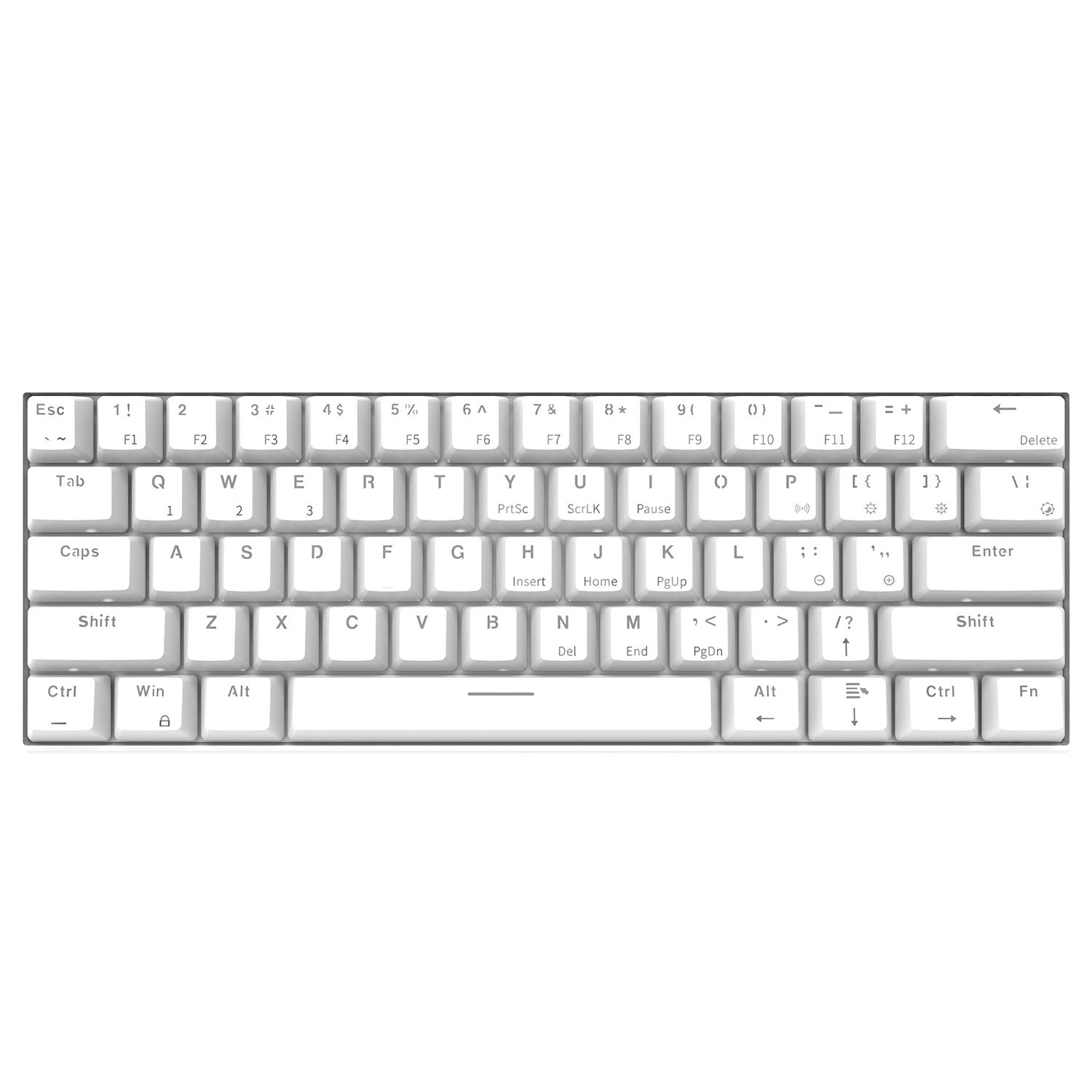
画像: 上から斜めに撮影 view of the Epomaker Ajazz i610T keyboard, showcasing its compact 61-key layout and keycap legends.
5. メンテナンス
適切なメンテナンスを行うことで、キーボードの寿命が長くなり、最適なパフォーマンスが確保されます。
- クリーニング: Use a soft, dry cloth to wipe the keyboard surface. For deeper cleaning, use a can of compressed air to remove dust and debris from between the keycaps. For stubborn stains, a slightly damp キーボードに液体が入らないように、中性洗剤を含ませた布を使用してください。
- ストレージ: キーボードは、直射日光や極端な温度を避け、涼しく乾燥した場所に保管してください。
- こぼれを避ける: 内部コンポーネントの損傷を防ぐため、キーボードに液体がかからないようにしてください。
- ケーブルのお手入れ: Avoid bending or twisting the Type-C cable excessively to prevent internal wire damage.
6。 トラブルシューティング
If you encounter issues with your Ajazz i610T keyboard, refer to the following common solutions:
| 問題 | 考えられる解決策 |
|---|---|
| 有線モードではキーボードが応答しません。 |
|
| キーボードが Bluetooth 経由で接続されません。 |
|
| バックライトが機能しない、または点灯しません。 |
|
| Some keys are not responding. |
|
7. 仕様
| 特徴 | 詳細 |
|---|---|
| ブランド | EPOMAKER / Ajazz |
| モデル | i610T |
| レイアウト | 61キー(60%コンパクト) |
| 接続性 | Bluetooth 3.0 Wireless / USB Type-C Wired Dual Mode |
| バックライト | Monochrome Backlight (17 effects) |
| キーロールオーバー | Nキーロールオーバー(NKRO) |
| スイッチタイプ | Mechanical (Black Switch, White color variant) |
| 材料 | アブソリュート |
| バッテリー容量 | 1000mAhリチウムイオン |
| ケーブル長さ | 約 1.5m |
| オペレーティング システムのサポート | Windows 2000/XP/Vista/7/8/10 |
| 製品寸法(長さ×幅×高さ) | 29.1のx 10.1のx 4センチ(11.46のx 3.98のx 1.57中) |
| 製品重量 | 約580g(20.46オンス) |

画像: 斜め view of the Epomaker Ajazz i610T keyboard, demonstrating its compact form factor.
8. 保証とサポート
For warranty information and technical support, please refer to the documentation provided with your purchase or contact the manufacturer directly through their official webサイトでご確認ください。保証請求に備えて購入証明書を保管してください。