1. はじめに
Thank you for choosing the PETWANT F1-C Smart Pet Feeder with Camera. This device is designed to provide convenience and peace of mind by allowing you to manage your pet's feeding remotely and monitor their well-being through a dedicated smartphone application. This manual provides detailed instructions for setup, operation, and maintenance to ensure optimal performance and a positive experience for both you and your pet.
2.製品オーバーview
主な特徴:
- Remote Feeding Control: Schedule feeding times and portion sizes via the smartphone app.
- 内蔵カメラ: Monitor your pet with a 1-megapixel camera, including night vision capabilities.
- 双方向オーディオ: Speak to and hear your pet through the built-in speaker and microphone.
- Wi-Fi接続: Seamless connection to your home network for remote access.
- お手入れ簡単: Detachable food tray for simple hand washing.
含まれるコンポーネント:
- PETWANT F1-C Feeder Unit
- Power Adapter (Wired Electric)
- ユーザーマニュアル
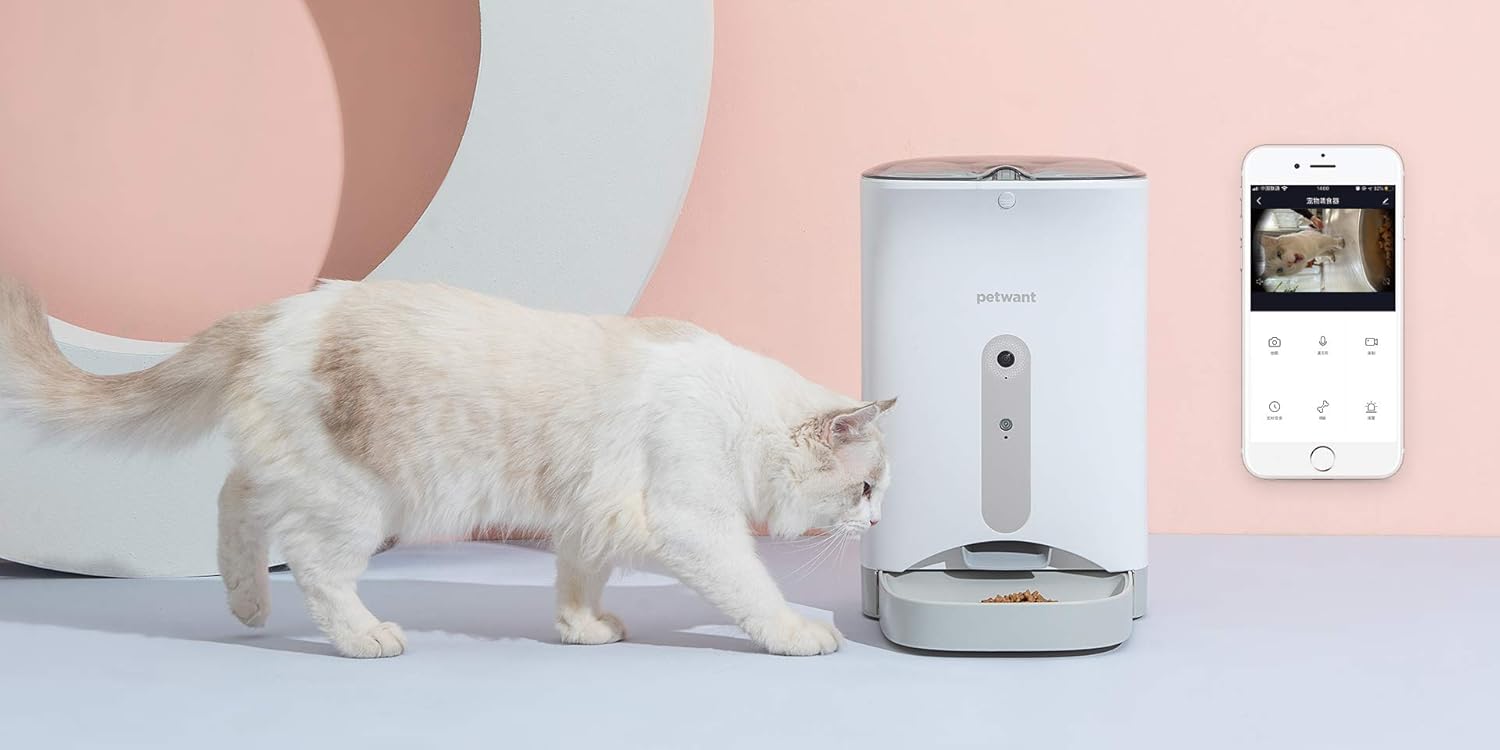
製品 Views:




3.セットアップガイド
- フィーダーを開梱します。 パッケージからすべてのコンポーネントを慎重に取り出します。
- フィーダーを配置します。 Position the feeder on a flat, stable surface in a location accessible to your pet and within Wi-Fi range.
- 接続電源: Plug the power adapter into the feeder's power port and then into a standard electrical outlet. Ensure the power switch on the bottom of the unit is in the 'ON' position.
- フードリザーバーに餌を補充する: Open the lid and pour dry pet food into the reservoir. Ensure the food size is appropriate for the dispenser mechanism.
- アプリをダウンロード: 検索する the "PETWANT" app on your smartphone's app store (compatible with iOS and Android devices). Download and install the application.
- Wi-Fiに接続します: Follow the in-app instructions to connect your feeder to your home Wi-Fi network. This typically involves creating an account, adding the device, and entering your Wi-Fi credentials.
4. 操作手順
スマートフォンアプリの使用:
- フィードのスケジュール設定: Access the "Schedule" function in the app to set specific feeding times and portion sizes for your pet. You can program multiple meals per day.
- 手動給紙: Use the "Feed" button in the app to dispense a meal instantly, outside of the scheduled times.
- ライブビデオ監視: Tap on the camera icon to view a live video feed of your pet. The camera features night vision for clear view暗い場所での撮影。
- 双方向オーディオ: Use the microphone icon to speak to your pet, and the speaker icon to hear sounds from the feeder's location.
- 録画とスクリーンショット: Capture video recordings or still images of your pet directly from the live view.
Manual Controls (on feeder):
- RECボタン: Press to record a short voice message that will play during scheduled feeding times.
- 再生ボタン: Press to play the recorded voice message.
- SETボタン: Used for initial setup or resetting certain functions (refer to app for detailed instructions).
5. メンテナンス
Regular cleaning of your PETWANT F1-C feeder is essential for hygiene and optimal performance.
- フードトレイ: The food tray is detachable and should be hand washed regularly with mild soap and water. Rinse thoroughly and dry completely before reattaching.
- 食料貯蔵庫: Periodically empty the food reservoir and wipe it clean with a dry or slightly damp cloth. Ensure no moisture remains before refilling with dry food.
- 外観: フィーダーの外側は、柔らかく乾いた布で拭いてください。研磨剤入りの洗剤を使用したり、本体を水に浸したりしないでください。
- カメラレンズ: Gently clean the camera lens with a soft, lint-free cloth to ensure clear video quality.
6。 トラブルシューティング
- フィーダーの電源が入らない: Ensure the power adapter is securely plugged into both the feeder and the wall outlet. Check that the power switch on the bottom of the unit is in the 'ON' position.
- Wi-Fiに接続できません: Ensure your Wi-Fi network is 2.4GHz (5GHz networks are not supported). Check your Wi-Fi password and network stability. Try restarting your router and the feeder.
- 食べ物が出ない: Check if the food reservoir is empty. Ensure the food is not clumped or jammed in the dispenser. Verify that the scheduled feeding times and portions are correctly set in the app.
- Poor camera quality/no image: Ensure the camera lens is clean. Check your internet connection speed. If the issue persists, try restarting the feeder.
- アプリが応答しません: Close and reopen the app. Ensure your smartphone's operating system is up to date. Check for app updates in your app store.
7. 仕様
| 特徴 | 仕様 |
|---|---|
| ブランド | ペットウォント |
| モデル | F1-C |
| 製品カテゴリー | Monitoring Camera / Pet Feeder |
| Targeted Species | 猫、犬(小型犬~中型犬) |
| 接続技術 | ワイヤレス(Wi-Fi) |
| 電源 | Wired Electric (100 Watts) |
| 対応デバイス | Smartphone, Tablets |
| 特集 | Night Vision, Two-Way Audio |
| カメラ解像度 | 1メガピクセル |
| お手入れ方法 | 手洗いのみ(取り外し可能な部分) |
| アイテム重量 | 2.96キログラム |
| 寸法(配送) | 40 x 31.4 x 21.2 cm |
8. 安全情報
- この機器は屋内専用です。
- 本体を水などの液体に浸さないでください。
- 使用していないときや清掃中は、子供やペットの手の届かないところに保管してください。
- 付属の電源アダプターのみを使用してください。
- 電源コードがペットに噛まれないように注意してください。
- Do not use with wet food or treats. Only suitable for dry pet food.
- 清掃する前、または長期間使用しない場合は、フィーダーのプラグを抜いてください。
9. 保証とサポート
For warranty information, please refer to the warranty card included with your product or contact the retailer where you purchased the PETWANT F1-C feeder. For technical support, troubleshooting assistance, or general inquiries, please visit the official PETWANT webメーカーのウェブサイトをご覧いただくか、カスタマーサービス部門にお問い合わせください。連絡先は通常、製品のパッケージまたはメーカーのウェブサイトに記載されています。 webサイト。