
導入
The PWAY PW-HT226P2 is a 1x2 Port HDMI Splitter Extender designed to distribute a single HDMI source to two remote displays over Cat5/5e/6/7 Ethernet cables, extending the signal up to 50 meters (165 feet). It supports Full HD 1080P resolution at 60Hz and features Power over Cable (POC) for simplified power management and EDID copy functionality for enhanced compatibility.

Image: The PWAY PW-HT226P2 HDMI Splitter Extender system, showing the main transmitter unit and two receiver units.
製品の特徴
- 延長伝送: Transmits HDMI video and audio signals without latency up to 50 meters (165 feet) over a single Cat5/5e/6/7 Ethernet cable.
- Dual Local Outputs: The transmitter unit includes two local HDMI outputs for connecting displays directly, in addition to the two RJ45 ports for extended connections.
- 高解像度サポート: Supports resolutions up to 1920x1080P at 60Hz, and is backward compatible with 1080i, 720P, and 720i.
- パワーオーバーケーブル(POC): Only one power adapter is required to power both the transmitter and receiver units, simplifying installation and reducing cable clutter.
- EDIDコピー機能: Equipped with EDID (Extended Display Identification Data) copy functionality to ensure optimal compatibility between the source device and connected displays.
- HDMI 1.3 Compliant: Ensures compatibility with a wide range of HDMI devices.

画像: 上view of the PWAY HDMI Extender Splitter 1x2, highlighting key features such as 3D support, 1080P resolution, 50m extension, and POC.
パッケージ内容
開梱後、パッケージの内容をご確認ください。不足品や破損品がございましたら、販売店までご連絡ください。
- 1x HDMI Splitter Extender Transmitter (TX)
- 2x HDMI Splitter Extender Receiver (RX)
- DC 1V電源アダプター x 5
- ユーザーマニュアル (本書) x 1

Image: The complete packing list, including the transmitter, two receivers, and the power adapter.
製品図
送信機(TX)ユニット
The transmitter unit connects to your HDMI source and distributes the signal.
- DC 5V: 電源入力ポート。
- HDMI入力: Connect to your HDMI source (e.g., DVD player, game console).
- HDMI OUT (Loop): Two local HDMI outputs for connecting displays directly to the transmitter.
- Cat5/6/7: Two RJ45 output ports for connecting to the receiver units via Ethernet cable.
- ステータスLED: 動作ステータスを示します。
- EDID LED: Indicates EDID status.
- 電源LED: 電源の状態を示します。
受信(RX)ユニット
The receiver units connect to your displays and receive the extended HDMI signal.
- Cat5/6/7: RJ45 input port for connecting to the transmitter unit via Ethernet cable.
- HDMI出力: Connect to your display device (e.g., TV, monitor).
- STA LED: 信号の状態を示します。
- PWR LED: 電源の状態を示します。

Image: A detailed connection diagram illustrating how to connect the video source, transmitter, Cat5e/6 cables, receivers, and multiple display devices.
セットアップ手順
- デバイスの電源を切ります: Ensure all devices, including the HDMI source, displays, and the PWAY extender units, are powered off before beginning installation.
- HDMIソースを接続: Connect your HDMI source device (e.g., Blu-ray player, PC, game console) to the HDMI IN port on the Transmitter (TX) unit using a high-quality HDMI cable.
- ローカルディスプレイを接続する(オプション): If you wish to use local displays, connect them to the HDMI OUT (Loop) ports on the Transmitter (TX) unit using HDMI cables.
- イーサネット ケーブルを接続します。 Connect Cat5e/6/7 Ethernet cables from the Cat5/6/7 output ports on the Transmitter (TX) unit to the Cat5/6/7 input ports on each Receiver (RX) unit. Ensure the cables are properly terminated and meet the specified length requirements for your desired resolution (up to 50m for 1080P).
- リモートディスプレイを接続する: Connect your remote display devices (e.g., TV, monitor) to the HDMI出力 port on each Receiver (RX) unit using HDMI cables.
- 電力を供給します: 付属のDC 5V電源アダプターを DC5V port on the Transmitter (TX) unit. Due to the POC function, the receiver units will be powered via the Ethernet cable.
- デバイスの電源をオンにします: Power on the HDMI source device, then the displays, and finally the PWAY extender units.
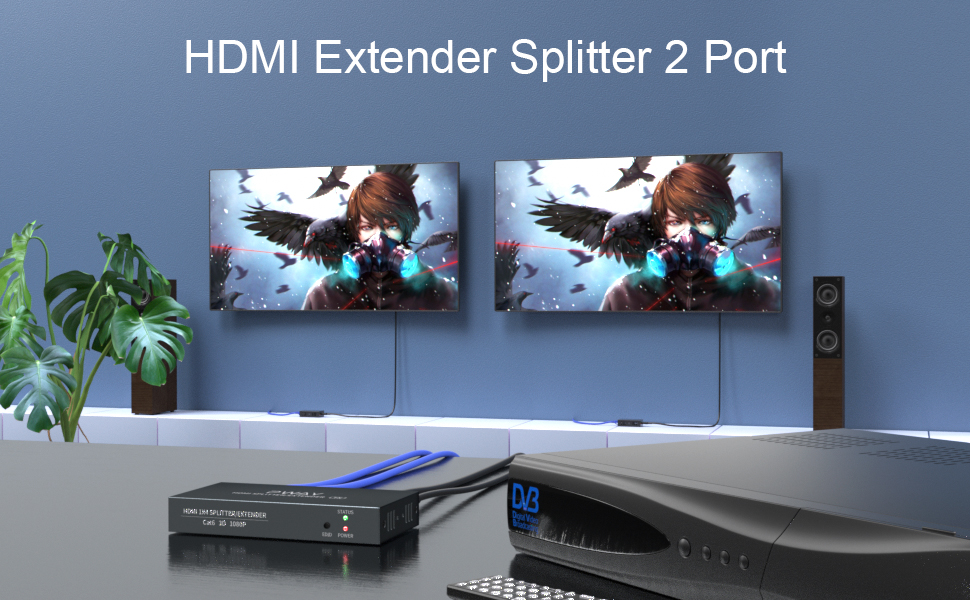
画像: 元ample setup showing the transmitter connected to a source and two remote displays via receiver units.

Image: A chart indicating the maximum transmission distances based on the type of network cable used: Cat5 up to 40m, Cat5e up to 45m, and Cat6/7 up to 50m.
操作手順
Once all connections are made and power is applied, the system should operate automatically.
- 信号検出: The extender units will automatically detect the HDMI input signal and transmit it to the connected displays.
- LEDインジケーター:
- 送信機(TX): The POWER LED should be lit when power is supplied. The STATUS LED and EDID LED will indicate active signal and EDID status respectively.
- レシーバー(RX): The PWR LED should be lit, indicating power received via POC. The STA LED will indicate active signal reception.
- EDID管理: The EDID copy function ensures the source device outputs a compatible resolution and audio format for the connected displays. No manual configuration is typically required.
メンテナンス
To ensure optimal performance and longevity of your PWAY HDMI Splitter Extender, follow these maintenance guidelines:
- クリーニング: ユニットの清掃には、柔らかく乾いた布をご使用ください。液体洗剤やエアゾール洗剤は使用しないでください。
- 換気: 過熱を防ぐため、ユニットは換気の良い場所に設置してください。通気口を塞がないでください。
- ケーブル管理 Keep cables organized and avoid sharp bends or excessive tension, which can damage cables and ports.
- 環境条件: ユニットを極端な温度、湿度、または直射日光にさらさないでください。
トラブルシューティング
HDMI スプリッター エクステンダーで問題が発生した場合は、次の一般的な問題と解決策を参照してください。
| 問題 | 考えられる原因 | 解決 |
|---|---|---|
| ビデオもオーディオも表示されません。 |
|
|
| 画質が悪い、またはちらつく。 |
|
|
| Receiver unit not powering on. |
|
|
仕様
| モデル | PW-HT226P2 |
| ブランド | PWAY |
| HDMI準拠 | HDMI 1.3 |
| HDCP準拠 | 1.2 の |
| サポートされている解像度 | Up to 1080P@60Hz (1920x1080), 1080i, 720P, 720i |
| 伝送距離 | Up to 50m (165ft) over Cat5e/6/7 cable |
| イーサネットケーブルの要件 | Cat5/5e/6/7 (UTP/STP) |
| 電源 | DC 5V(付属のアダプター経由) |
| 特徴 | POC (Power over Cable), EDID Copy, Dual Local HDMI Outputs |
安全情報
- デバイスを分解したり改造したりしないでください。
- 付属の電源アダプターのみを使用してください。
- デバイスを水、湿気、極端な温度から遠ざけてください。
- 落としたり、強い衝撃を与えないでください。
- 過熱を防ぐために適切な換気を確保してください。
保証とサポート
PWAY products are designed for reliability and performance. For warranty information or technical support, please refer to the warranty card included with your product or visit the official PWAY webサイトをご覧ください。また、販売店にお問い合わせの上、サポートを受けることもできます。
保証請求のために購入証明書を保管してください。