
導入
ご購入ありがとうございますasing the LEXiBOOK Cyber Arcade Mini Handheld Game Console. This manual provides essential information for the safe and efficient use of your device. Please read it thoroughly before operation and retain it for future reference.

画像: 正面 view of the LEXiBOOK Cyber Arcade Mini handheld game console, showing the screen, directional pad, and action buttons.
パッケージ内容
- 1 x LEXiBOOK Cyber Arcade Mini Handheld Game Console (Model JL1890)
- ユーザーマニュアル x 1

Image: The LEXiBOOK Cyber Arcade Mini handheld game console in its retail packaging, highlighting the "8-in-1" games and 1.8" LCD screen.
設定
1. バッテリーの取り付け
The LEXiBOOK Cyber Arcade Mini requires 3 x LR03/AAA alkaline batteries (not included) for operation.
- Locate the battery compartment cover on the back of the console.
- Using a small screwdriver, carefully unscrew the battery compartment cover.
- Insert 3 new LR03/AAA alkaline batteries, ensuring correct polarity (+/-).
- 電池カバーを取り付けて、ネジで固定します。
重要: Do not mix old and new batteries. Do not mix alkaline, standard (carbon-zinc), or rechargeable (nickel-cadmium) batteries. Remove batteries if the device will not be used for an extended period.
操作手順
1. 電源のオン/オフ
- コンソールの電源を入れるには、 電源ボタン (usually marked with a circle and a vertical line) located on the top left of the console.
- To power off the console, press and hold the 電源ボタン 画面が消えるまで。
2. ゲームの選択
- 電源を入れると、メイン メニューに利用可能なゲームのリストが表示されます。
- 使用 方向パッド (D-Pad) on the left side of the console to navigate through the game list.
- を押す スタートボタン or a designated action button (e.g., 'A' or 'B') to select and launch a game.
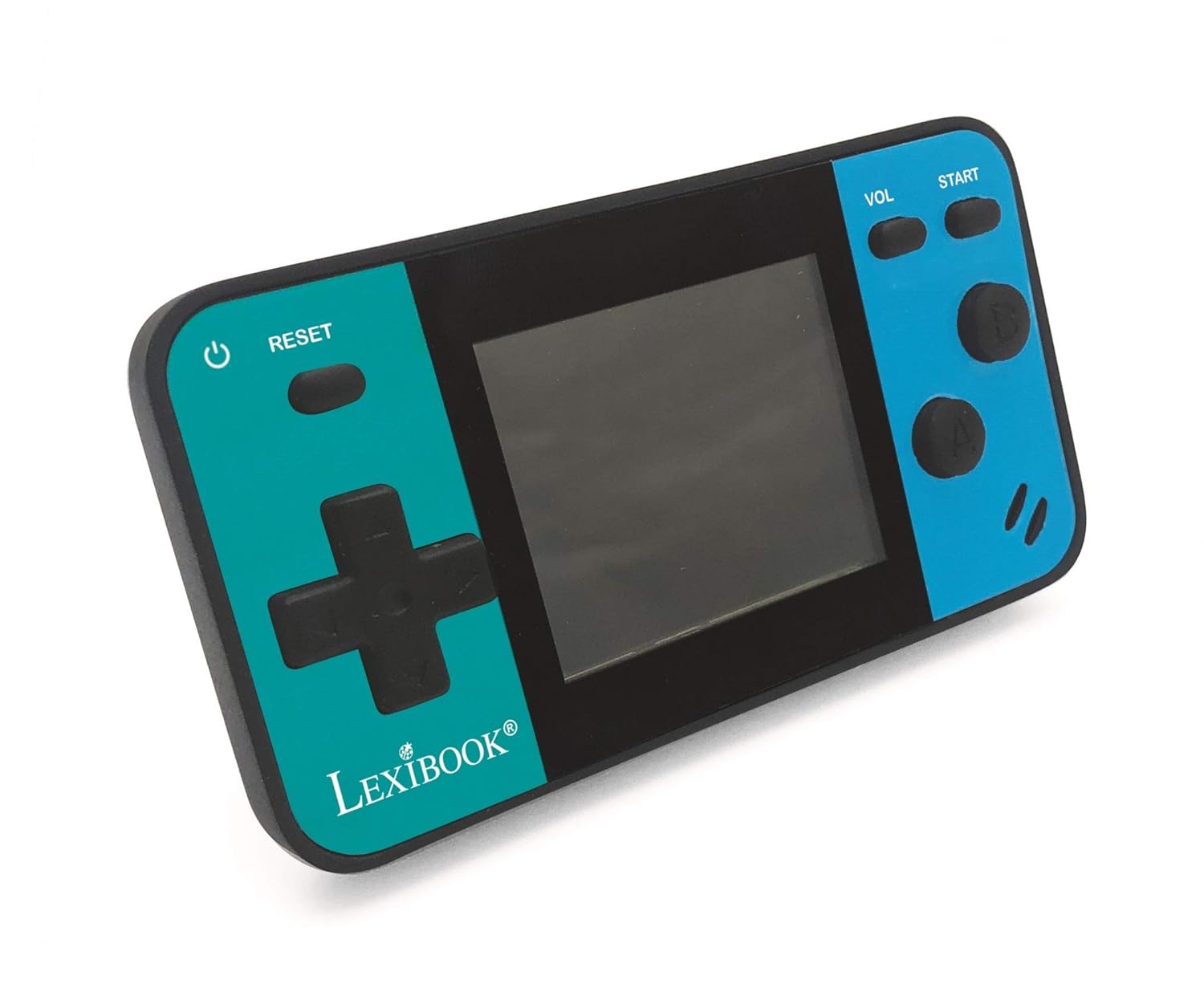
Image: A person holding the LEXiBOOK Cyber Arcade Mini, actively playing one of the built-in games on its 1.8-inch color LCD screen.
3. ゲームプレイコントロール
- 方向パッド(Dパッド): Used for movement and navigation within games.
- Action Buttons (A, B, etc.): Used for jumping, shooting, interacting, and other in-game actions. Specific functions vary by game.
- スタートボタン: Typically used to start games, pause, or confirm selections.
- VOLボタン: 内蔵スピーカーの音量レベルを調整します。
- リセットボタン: Resets the current game or returns to the main menu.
4. 音量調整
を押す VOLボタン repeatedly to cycle through different volume levels or mute the sound.
メンテナンス
- Keep the console dry. Avoid exposure to moisture or liquids.
- Clean the console with a soft, dry cloth. Do not use abrasive cleaners or solvents.
- コンソールは、直射日光や極端な温度を避け、涼しく乾燥した場所に保管してください。
- Do not attempt to disassemble or modify the console, as this will void the warranty and may cause damage.
トラブルシューティング
| 問題 | 考えられる原因 | 解決 |
|---|---|---|
| コンソールの電源が入りません。 | 電池が切れているか、正しく取り付けられていません。 | Replace batteries with new LR03/AAA alkaline batteries, ensuring correct polarity. |
| 画面が空白またはちらつきます。 | Low battery power; internal connection issue. | 電池を交換してください。問題が解決しない場合は、カスタマーサポートにお問い合わせください。 |
| 音が出ない、または音量が低い。 | 音量がミュートされているか、低く設定されすぎています。 | を押す VOLボタン to increase volume or unmute. |
| ゲームがフリーズしたりクラッシュしたりします。 | ソフトウェアの不具合。 | を押す リセットボタン to restart the game or return to the main menu. If frequent, replace batteries. |
仕様
- モデル: JL1890
- 画面: 1.8" (4.5 cm) Color LCD
- ゲーム: 8 built-in games (8-bit graphics)
- 電源: 3 x LR03/AAA batteries (not included)
- 寸法: 約3.7 x 2.01 x 0.91インチ(9.4 x 5.1 x 2.3 cm)
- 重さ: 約0.08kg(0.18ポンド)
- 材料: プラスチック
- 推奨年齢: 3歳以上
保証とサポート
保証情報やテクニカルサポートについては、製品パッケージに記載されている連絡先を参照するか、公式LEXiBOOKをご覧ください。 webサイトでご確認ください。購入証明として購入レシートを保管してください。
オンラインサポート: www.lexibook.com