
マグナソニック FS81
Magnasonic FS81 Super 8/8mm Film Scanner
取扱説明書
導入
The Magnasonic FS81 Super 8/8mm Film Scanner is designed to convert your cherished 3-inch, 5-inch, and 7-inch Super 8 and 8mm film reels into digital MP4 video files. This device offers a convenient way to preserve old home movies without the need for a computer during the scanning process. It features a built-in 2.3-inch LCD screen for immediate playback and allows for direct saving to an SD card.
1. セットアップ
1.1 含まれるもの
始める前に、パッケージにすべてのコンポーネントが揃っていることを確認してください。
- Super 8/8mm Film Scanner (FS81 unit)
- 7-inch Take-up Reel
- TV出力ケーブル(RCA)
- 電源アダプター
- USBケーブル
- Reel Adapter (x2)
- クリーニングクロス

Image: All components included with the Magnasonic FS81 Film Scanner, laid out for inspection.
1.2 Connecting Power and SD Card
Connect the power adapter to the DC 12V port on the rear of the scanner and plug it into a power outlet. Insert an SD card (up to 32GB, not included) into the SD card slot on the rear panel. This card will store your digitized videos.

Image: The SD card slot on the back of the scanner, ready for video storage.
1.3 フィルムの装填
Place your film reel onto the left spindle and an empty take-up reel onto the right spindle. Thread the film through the scanner's film path, ensuring it passes through the gate and under the rollers as indicated by the diagram on the scanner. Use the provided reel adapters if necessary for smaller reels.

画像: 詳細 view of the film path and scanning area on the Magnasonic FS81.

Image: The Magnasonic FS81 scanner set up with a film reel, demonstrating its capability to handle 3-inch, 5-inch, and 7-inch Super 8/8mm movie reels.
2. 操作手順
2.1 スキャンプロセス
Once the film is loaded, power on the scanner. The device will automatically scan your film frame-by-frame, converting it into a digital MP4 video file. The scanning time varies depending on the reel size:
- 3-inch reel: Approximately 20 minutes scan time for 3 minutes of film.
- 5-inch reel: Approximately 60 minutes scan time for 7 minutes of film.
- 7-inch reel: Approximately 180 minutes scan time for 20 minutes of film.
The scanner digitizes video only; it does not capture audio.
2.2 設定の調整
Use the control buttons on the scanner to adjust settings such as exposure, sharpness, and framing. These adjustments can be made directly on the device without needing a computer.
2.3 Viewing Scanned Videos
You can playback your scanned videos directly on the built-in 2.3-inch LCD screen. For a larger viewing experience, connect the scanner to a TV or monitor using the included RCA video out cable.

Image: The scanner's TV OUT port connected to a television for viewing digitized films.
2.4 転送 Files
After scanning, the MP4 video files are saved to the inserted SD card. To transfer these files to your computer, you can either remove the SD card and insert it into a card reader, or connect the scanner directly to your computer using the USB cable.
3. メンテナンス
Regular maintenance ensures optimal performance and longevity of your film scanner.
3.1 Cleaning the Film Path
Dust and debris can accumulate on film reels, potentially affecting scan quality. Use the provided cleaning cloth or a soft brush to gently clean the film path and the scanning area before and after each use, especially when handling older films.
4。 トラブルシューティング
If you encounter issues with your Magnasonic FS81 Film Scanner, refer to the following common solutions:
- 電源なし: 電源アダプタがスキャナと正常な電源コンセントの両方にしっかりと接続されていることを確認します。
- Film Not Feeding: Check that the film is correctly threaded through the film path and that the reels are properly seated. Ensure the film is not damaged or excessively brittle.
- 画質が悪い: Clean the film path and the scanner's lens. Adjust the exposure and sharpness settings via the scanner's menu. Ensure the original film is in good condition.
- SDカードエラー: Verify the SD card is inserted correctly. Ensure the SD card is not full and is formatted to a compatible file system (e.g., FAT32). Try a different SD card if the issue persists.
- No Video on TV: Confirm the RCA cable is securely connected to both the scanner's TV OUT port and the TV's video input. Select the correct input source on your television.
For further assistance, please contact Magnasonic customer support.
5. 仕様
| 特徴 | 詳細 |
|---|---|
| スキャナタイプ | 膜 |
| ブランド | マグナソニック |
| モデル名 | FS81 |
| 接続技術 | USB, Video Out TV cable |
| 製品寸法 | 奥行き5.1インチ x 幅12.1インチ x 高さ7.5インチ |
| 解決 | 1080p(1440は1080をX) |
| アイテム重量 | 4.4 ポンド |
| ワットtage | 5ワット |
| 最小システム要件 | ウィンドウズ7 |
| 欧州連合 | 061783270448 |
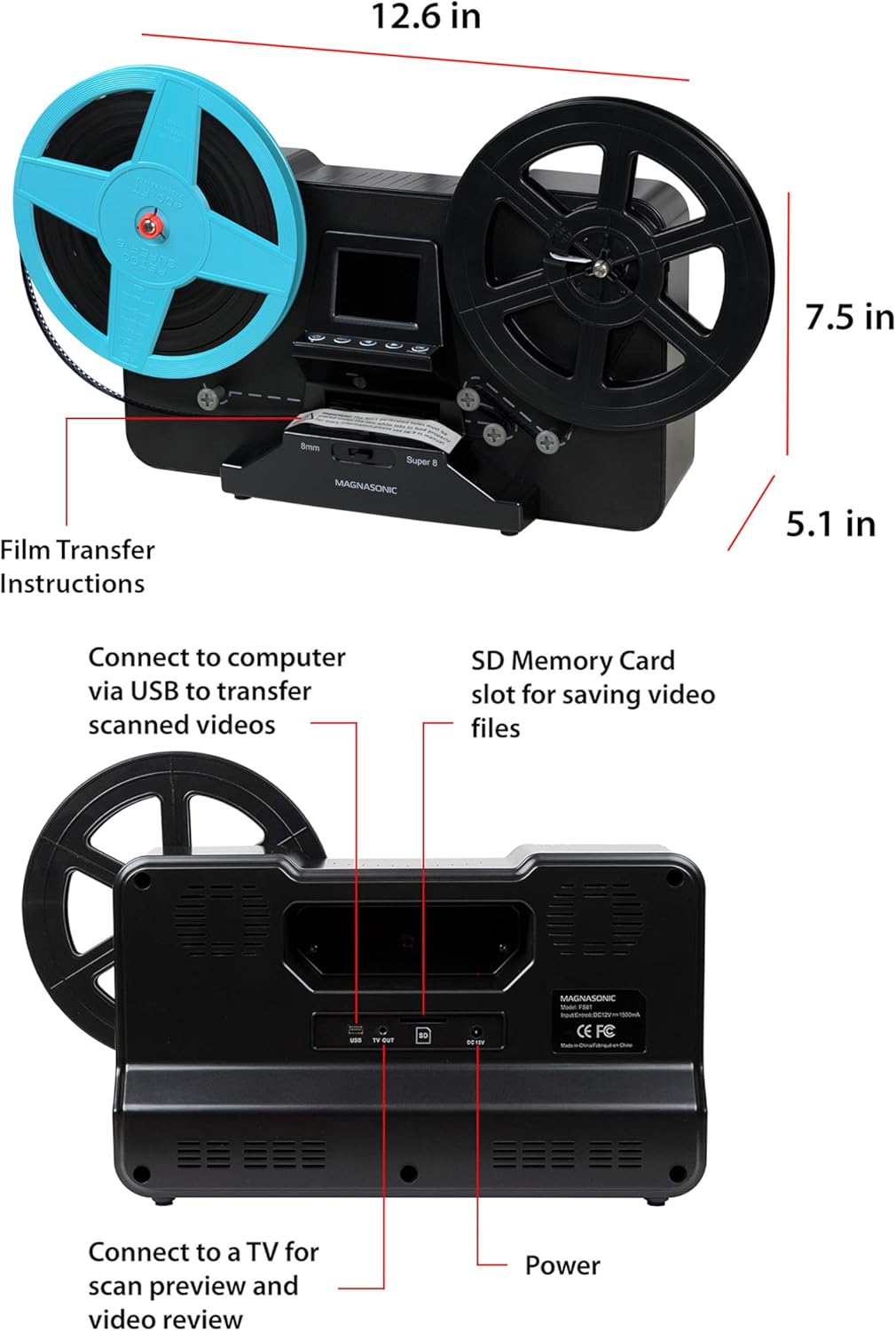
画像: 上部と背面 views of the Magnasonic FS81 scanner, highlighting its dimensions and connectivity ports like USB, TV OUT, SD card slot, and DC 12V power input.
6. 保証とサポート
Magnasonic products come with a manufacturer's warranty. Please refer to the warranty card included in your product packaging for specific terms and conditions. For technical support, troubleshooting, or warranty claims, visit the official Magnasonic webサイトまたは顧客サービス部門に連絡してください。
関連文書 - FS81
 |
Magnasonic FS81 スーパー8/8mmフィルムスキャナー ユーザーマニュアル このユーザー マニュアルには、Magnasonic FS81 Super 8/8mm フィルム スキャナーのセットアップ、操作、スキャン、再生、ダウンロード、トラブルシューティング、仕様、保証情報など、包括的な手順が記載されています。 |
 |
Super 8 Converter F880: ユーザーマニュアルと説明書 Coopers of Stortford スーパー 8 コンバーター F880 の包括的な手順書。スーパー 8 および 8mm フィルムをデジタル化するための設定、操作、安全ガイドライン、メンテナンスについて詳しく説明しています。 |
 |
KODAK REELS フィルムデジタイザー ユーザーマニュアル KODAK REELS フィルム デジタイザーの包括的なユーザー マニュアルです。8mm およびスーパー 8 フィルムをデジタル形式に変換するための機能、仕様、インストール、操作、メンテナンスについて詳しく説明しています。 |
 |
Kodak REELZ フィルム デジタイザー ユーザー マニュアル Kodak REELZ フィルム デジタイザーのユーザー マニュアル。8mm およびスーパー 8 フィルムをデジタル化するためのセットアップ、操作、メンテナンスの手順を説明します。 |
 |
Magnasonic FS50 Film Scanner User Manual - Digital Conversion Guide Comprehensive user manual for the Magnasonic FS50 All-In-One 24MP Film Scanner. Learn how to set up, operate, scan, and transfer your film and slides to digital format. Includes safety instructions, troubleshooting, and warranty information. |
 |
Magnasonic FS71 ユーザーマニュアル: HDMI 搭載 22MP オールインワンフィルムスキャナー Magnasonic FS71 オールインワン 22MPフィルムスキャナーの包括的なユーザーマニュアル。設定、操作、画像のスキャン方法などを学びます。 viewダウンロード、SDカードのフォーマット、デバイスのトラブルシューティング。仕様、保証、安全に関する情報も含まれています。 |
Ask a question about this manual
Ask about setup, troubleshooting, compatibility, parts, safety, or missing instructions. Manuals+ will review the question and use this page’s manual context to help answer it.