
ご購入ありがとうございますasing the PWAY PW-HT225PIR HDMI Extender. This manual provides detailed instructions for the proper installation, operation, and maintenance of your device. Please read this manual thoroughly before use to ensure optimal performance and safety.
パッケージ内容
パッケージにすべてのアイテムが含まれていることを確認します。
- 1 x PWAY PW-HT225PIR HDMI Extender Transmitter Unit
- 1 x PWAY PW-HT225PIR HDMI Extender Receiver Unit
- 電源アダプター(DC 5V/1A)×1
- 1 xIRブラスターケーブル
- 1 x IRレシーバーケーブル
- ユーザーマニュアル x 1
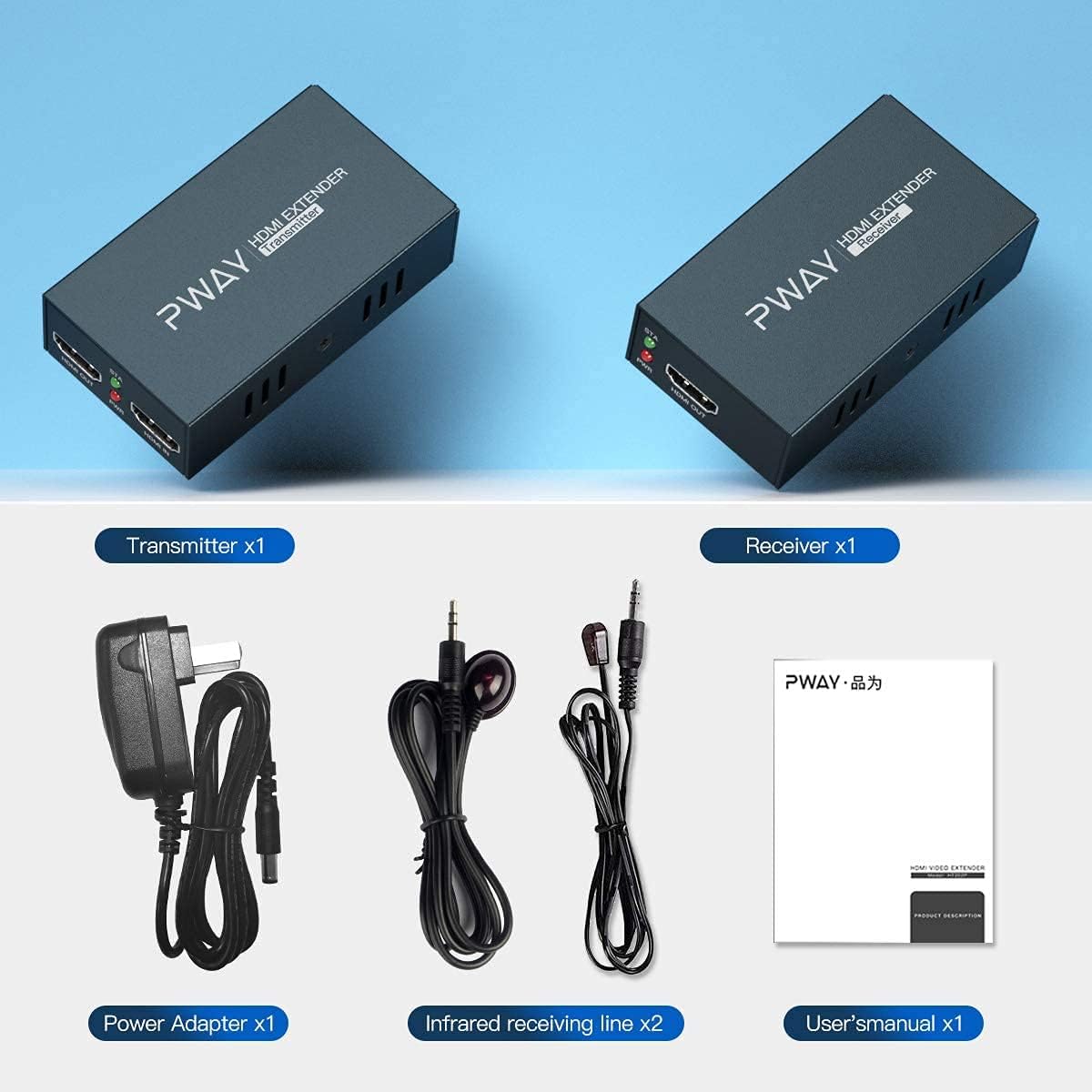
The image displays the complete package contents for the PWAY HDMI Extender, including the transmitter and receiver units, power adapter, IR blaster and receiver cables, and the user manual.
製品終了view
The PWAY PW-HT225PIR HDMI Extender allows for the transmission of HDMI audio and video signals over a single Cat5e/6/7 cable up to 60 meters (195 feet). It supports Full HD 1080P resolution, IR control, and features an HDMI loop-out on the transmitter unit, along with EDID management for enhanced compatibility.
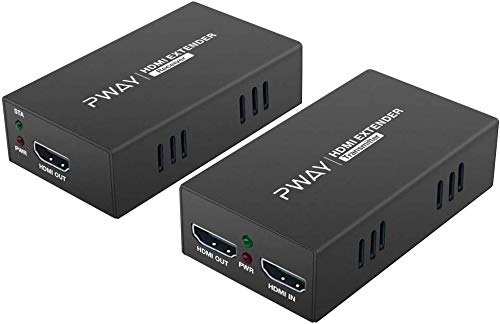
This image shows the PWAY HDMI Extender transmitter and receiver units, highlighting their compact design and port labels.
主な特徴
- 延長伝送: Transmits HDMI signals up to 60 meters (195 feet) over a single Cat5e/6/7 cable.
- 高解像度サポート: Supports resolutions up to 1920x1080@60Hz, compatible with 1080i, 720P, 720i, 480P, and 480i.
- パワーオーバーケーブル(POC): Requires power connection only at the receiving end, simplifying installation.
- IR制御: Allows remote control of the source device from the display location (20-60KHz).
- HDMIループ出力: Transmitter unit includes an HDMI loop-out port for a local display.
- EDID管理: Built-in EDID functionality for optimal display compatibility.
- 堅牢な設計: Features automatic equalization and ESD electrostatic protection for stable performance.

This image illustrates the high-definition visual quality supported by the extender, showcasing the clarity of 1080P resolution.
セットアップ手順
- HDMIソースを接続します。 Connect your HDMI source device (e.g., DVD player, PC, TV box, PS4) to the HDMI IN port of the Transmitter unit using an HDMI cable.
- ローカルディスプレイを接続する(オプション): If you wish to have a local display near the source, connect it to the HDMI OUT (Loop Out) port of the Transmitter unit using an HDMI cable.
- Connect Cat5e/6/7 Cable: Connect one end of a Cat5e/6/7 network cable to the UTP port on the Transmitter unit and the other end to the UTP port on the Receiver unit. Ensure the cable is properly terminated and meets the specified length requirements for optimal performance (Cat5-30m; Cat5e-40m; Cat6/7-60m).
- Connect Remote Display: Connect your remote display (e.g., UHDTV) to the HDMI OUT port of the Receiver unit using an HDMI cable.
- IRケーブルを接続する(オプション):
- Connect the IR Blaster cable to the IR OUT port on the Transmitter unit and position the IR emitter near the IR sensor of your source device.
- Connect the IR Receiver cable to the IR IN port on the Receiver unit and position the IR receiver in a location where it can receive signals from your remote control.
- 電源オン: Connect the provided power adapter to the DC 5V/1A port on the Receiver unit. Due to the POC function, only the Receiver unit requires external power.
- 接続を確認します: Once all connections are made and power is supplied, check the status indicators on both units. The PWR indicator should be lit, and the STA indicator should show a stable connection.

This diagram illustrates the typical connection setup, showing how to connect the HDMI source, transmitter, Cat5e/6/7 cable, receiver, and displays.
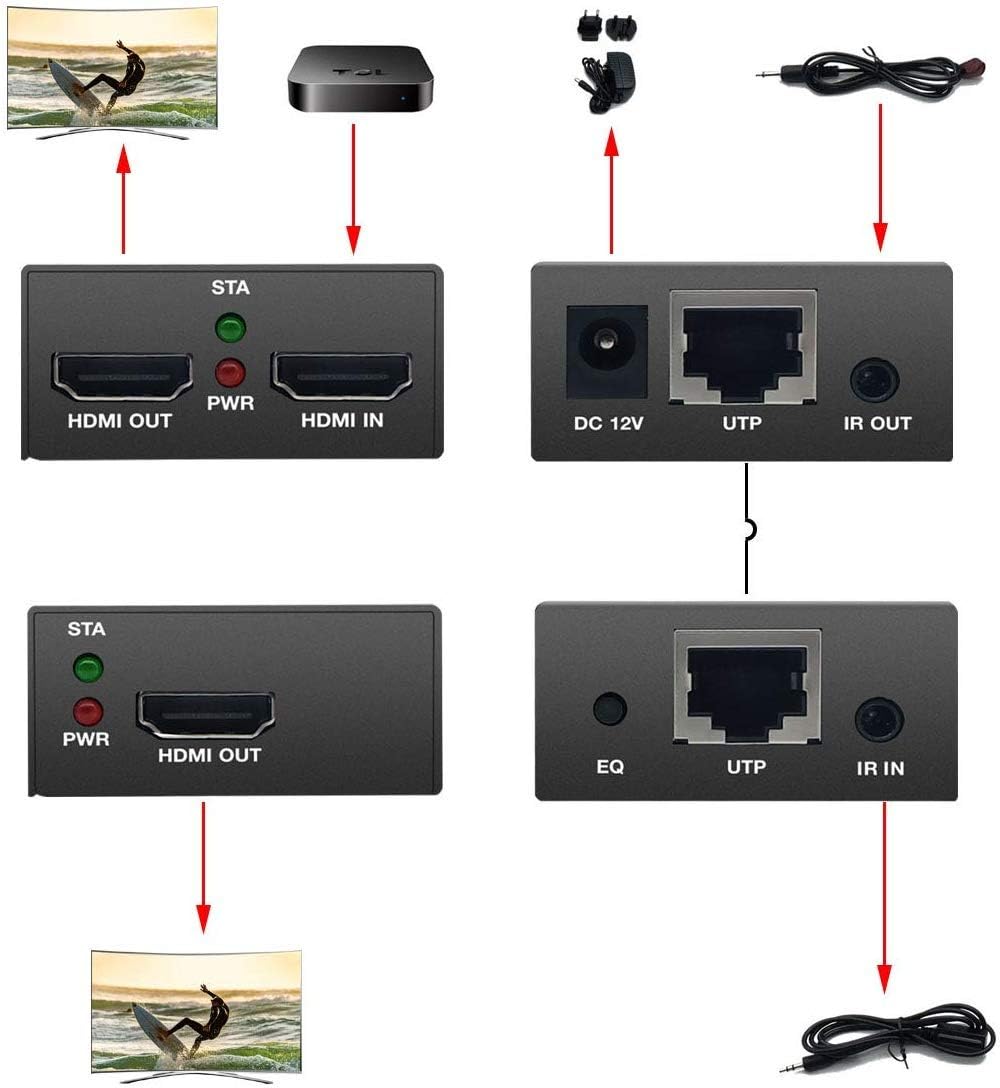
A detailed connection diagram showing the various ports and their connections, including DC 5V, UTP, HDMI, and IR IN/OUT.
操作手順
EDID管理
The PWAY PW-HT225PIR HDMI Extender features EDID management to ensure compatibility with various displays. The EDID DIP switch on the transmitter unit allows you to select different EDID modes. Refer to the EDID Management Table below to choose the appropriate setting for your display configuration.
注記: Changes to the EDID DIP switch settings require a power cycle of the transmitter unit to take effect.

This image shows a DIP switch, which is used for EDID settings on the transmitter unit.
| DIP Switch ON ↓ | 1 | 2 | 3 | 4 | EDID Info |
|---|---|---|---|---|---|
| モード1 | ↑ | ↑ | ↑ | ↑ | Copy HDMI output1 TV's EDID |
| モード2 | ↓ | ↑ | ↑ | ↑ | Fixed EDID FULL HD(1080p/60Hz)-24bit 2D video 7.1ch AUDIO |
| モード3 | ↑ | ↓ | ↑ | ↑ | Fixed EDID FULL HD(1080p/60Hz)-24bit 2D video 2ch AUDIO |
| モード4 | ↓ | ↓ | ↑ | ↑ | Fixed EDID FULL HD(1080p/60Hz)-36bit 2D video 7.1ch AUDIO |
| モード5 | ↑ | ↑ | ↓ | ↑ | Fixed EDID FULL HD(1080p/60Hz)-36bit 2D video 2ch AUDIO |
| モード6 | ↓ | ↑ | ↓ | ↑ | (1080p/30Hz)[(1080i/60Hz)][(720P/60Hz)]-24bit 2D video 7.1ch AUDIO |
| モード7 | ↑ | ↓ | ↓ | ↑ | Fixed EDID[1080p/30Hz][(1080i/60Hz)][(720P/60Hz)]-24bit 2D video 2ch AUDIO |
| モード8 | ↓ | ↓ | ↓ | ↑ | Fixed EDID HD(1080p/60Hz)-24bit 3D video 2ch AUDIO |
IR Control Function
The IR control function allows you to control your HDMI source device (e.g., DVD player, set-top box) from the location of your remote display. Ensure the IR Blaster and IR Receiver cables are correctly connected as described in the Setup section.
- The IR Blaster cable transmits IR signals from the transmitter unit to your source device.
- The IR Receiver cable receives IR signals from your remote control at the receiver unit.
Point your remote control at the IR Receiver connected to the extender's receiver unit to send commands to your source device.
メンテナンス
- デバイスは涼しく、乾燥した、換気の良い場所に保管してください。
- デバイスを直射日光、高温、湿気にさらさないでください。
- 柔らかく乾いた布でデバイスを拭いてください。液体クリーナーやエアゾールクリーナーは使用しないでください。
- 信号の損失や損傷を防ぐために、すべてのケーブルがしっかりと接続されていることを確認してください。
- ご自身でデバイスを開けたり、修理したりしないでください。修理はすべて資格のある担当者にご依頼ください。
トラブルシューティング
- 画像なしまたは断続的な信号:
- Check all HDMI and Cat5e/6/7 cable connections. Ensure they are secure and not damaged.
- Verify that the Cat5e/6/7 cable length is within the specified limits (Cat5-30m; Cat5e-40m; Cat6/7-60m).
- Ensure the power adapter is correctly connected to the Receiver unit and the power indicator is on.
- Try a different HDMI cable or Cat5e/6/7 cable.
- Adjust the EDID DIP switch settings on the transmitter unit to match your display's capabilities. Power cycle the transmitter after changing EDID settings.
- If using a local display, try disconnecting it to see if the remote display works.
- Reset the receiving unit if experiencing flickering or signal drops.
- IRコントロールが機能しない:
- Ensure the IR Blaster and IR Receiver cables are correctly plugged into their respective ports (IR OUT on transmitter, IR IN on receiver).
- Verify that the IR Blaster emitter is positioned directly over the IR sensor of your source device.
- Ensure the IR Receiver is positioned to receive signals from your remote control.
- Check if your remote control batteries are working.
- Note that some older satellite boxes or specific devices may not be compatible with the IR extender function.
- 画質が悪い:
- Ensure you are using a high-quality Cat6 or Cat7 cable for longer distances.
- Check for any kinks or damage in the Cat5e/6/7 cable.
- Verify that the source and display devices are set to compatible resolutions.
仕様
| 特徴 | 詳細 |
|---|---|
| モデル | PW-HT225PIR |
| ブランド | PWAY |
| 伝送距離 | Up to 60m (195ft) over Cat5e/6/7 cable (Cat5-30m; Cat5e-40m; Cat6/7-60m) |
| サポートされている解像度 | 1920x1080@60Hz, compatible with 1080i/720P/720i/480P/480i |
| IR周波数 | 20-60KHz |
| 電源 | DC 5V/1A (POC function, power only at Receiver) |
| 対応デバイス | Monitor, Projector, Television |
| コネクタタイプ | HDMI, RJ45 (UTP), 3.5mm (IR) |
| 寸法(単位あたり) | 約14 x 10.8 x 6.6 cm(小包寸法) |
| 重さ | 約300g(小包重量) |
| ASIN | B08398BLMN |
| 欧州連合 | 778836223923 |
保証とサポート
For warranty information or technical support, please refer to the contact details provided with your purchase or visit the official PWAY webサイト。 保証請求に備えて購入時のレシートを保管しておいてください。