
1. 導入と製品の説明view
This manual provides comprehensive instructions for the assembly, operation, and maintenance of your Hemudu HT07B-002P Universal Swivel Tabletop TV Stand. This stand is designed to securely hold televisions ranging from 19 to 39 inches, with a maximum weight capacity of 35 kg (77 lbs). It features a 90-degree swivel capability (45 degrees left and 45 degrees right) and 4 levels of height adjustment to optimize your viewing experience. The robust construction includes a durable steel elliptical panel and an 8mm tempered glass base, ensuring stability and safety for your television.

Figure 1: Hemudu HT07B-002P Universal Swivel Tabletop TV Stand.
2. 安全情報
- 重量容量: 最大重量35kg(77ポンド)を超えないようにしてください。テレビの重量がこの制限内であることを確認してください。
- テレビサイズの互換性: This stand is suitable for TVs between 19 and 39 inches. Verify your TV's screen size and VESA mounting pattern before assembly.
- VESAの互換性: The stand supports VESA patterns from 75x75mm to 200x200mm. Check your TV's VESA pattern.
- 安定した表面: 転倒を防ぐため、テレビスタンドは常に平らで安定した水平な場所に設置してください。
- 子供とペット: Keep children and pets away from the TV stand during assembly and ensure the TV is securely mounted to prevent accidents.
- 適切な組み立て: Follow all assembly instructions carefully. Incorrect assembly can lead to product failure and injury.
- ファスナーを締めます: すべてのネジと留め具がしっかりと締められていることを確認してください。締めすぎないでください。
- ケーブル管理 Utilize the integrated cable management system to prevent tripping hazards and maintain a tidy setup.
3. パッケージ内容
組み立てを進める前に、すべての部品が揃っていて損傷がないことを確認してください。部品が不足または損傷している場合は、カスタマーサポートにお問い合わせください。
- 強化ガラスベース
- メインサポートコラム
- VESAマウントプレート
- VESA延長アーム(より大きなVESAパターンに該当する場合)
- ハードウェアキット(テレビ取り付け用の各種ネジ、ワッシャー、スペーサー)
- 組み立て工具(例:六角レンチ)
- Anti-slip Rubber Feet for Base
- ケーブル管理クリップ/タイ
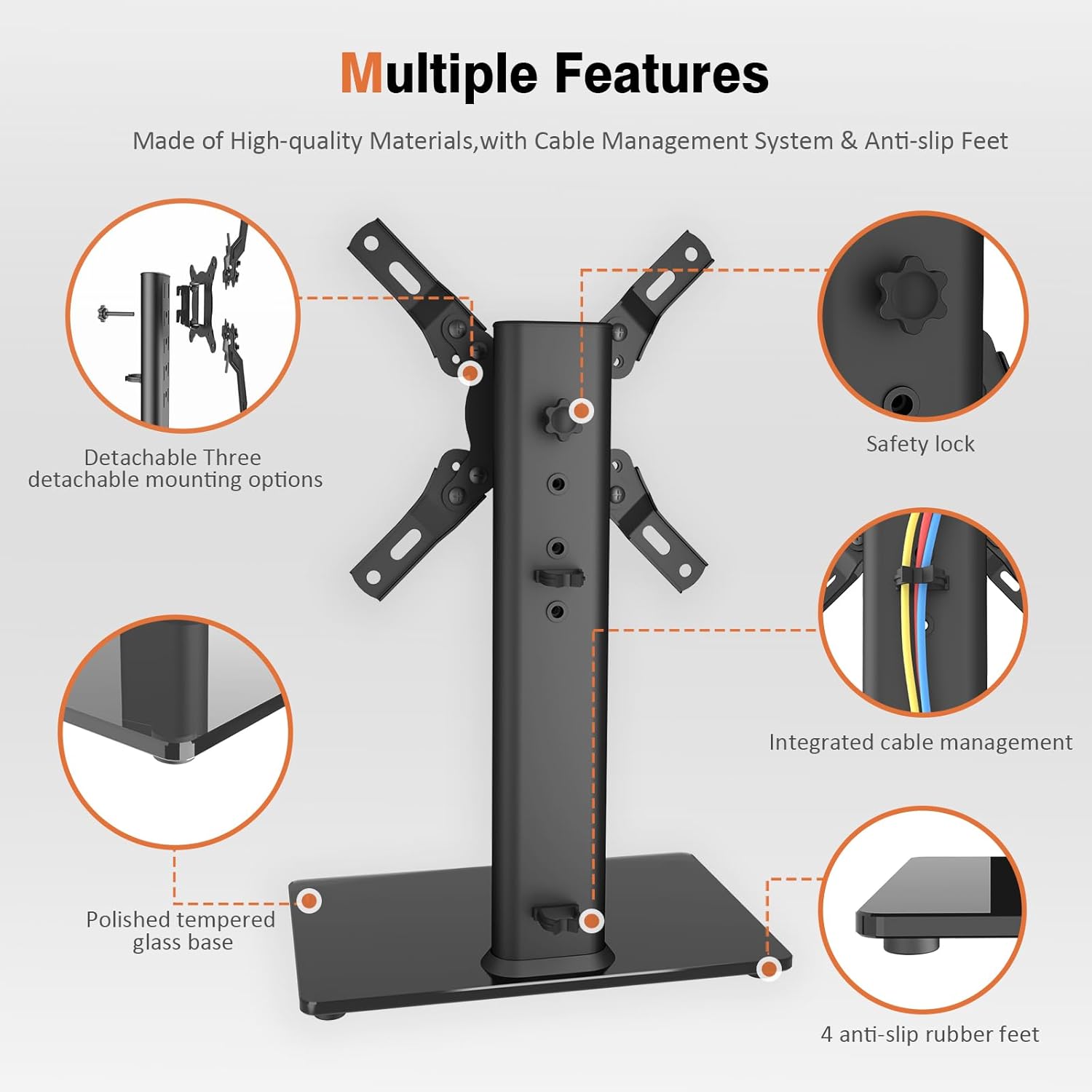
Figure 2: Key components of the TV stand, including the polished tempered glass base, safety lock, integrated cable management, and anti-slip rubber feet.
4. セットアップと組み立て手順
Follow these steps carefully to assemble your Hemudu HT07B-002P TV Stand. It is recommended to have a second person assist with mounting the TV.
- メインサポート柱をベースに取り付けます。
Place the tempered glass base (A) on a soft, clean surface to prevent scratches. Align the main support column (B) with the holes on the base. Secure it using the provided screws and washers. Ensure the column is oriented correctly for cable management access.

Figure 3: Illustration of attaching the main support column to the tempered glass base.
- Assemble the VESA Mounting Plate:
Attach the VESA arms to the central VESA plate using the designated screws. Ensure the arms are configured to match your TV's VESA pattern (e.g., 75x75mm, 100x100mm, 200x100mm, 200x200mm). The stand supports various VESA patterns.

Figure 4: Different configurations for the VESA mounting plate to accommodate various VESA patterns.
- Attach the VESA Mounting Plate to Your TV:
Carefully place your TV face down on a soft, clean surface. Align the assembled VESA mounting plate with the mounting holes on the back of your TV. Select the appropriate screws, washers, and spacers from the hardware kit that fit your TV's specific requirements. Securely fasten the VESA plate to the TV. Do not overtighten.
- Mount the TV onto the Stand:
With assistance, carefully lift the TV with the attached VESA plate. Hook the VESA plate onto the main support column. Ensure it is properly seated and engaged. Secure the TV to the column using the safety lock mechanism (typically a screw or knob) to prevent accidental dislodgement.
- ケーブル管理
Route your TV cables through the integrated cable management system on the main support column. Use the provided clips or ties to keep cables neat and organized, preventing tangles and improving aesthetics.


