
導入
This manual provides instructions for the Dino-Lite AF4115ZT USB Digital Microscope. This device offers 20x to 220x optical magnification, 1.3MP image resolution, and features such as polarized light and measurement capabilities. It is designed for various applications including industrial, scientific, medical, educational, and hobbyist needs.
製品終了view
The Dino-Lite AF4115ZT is a compact and versatile digital microscope. Key components and features are detailed below:
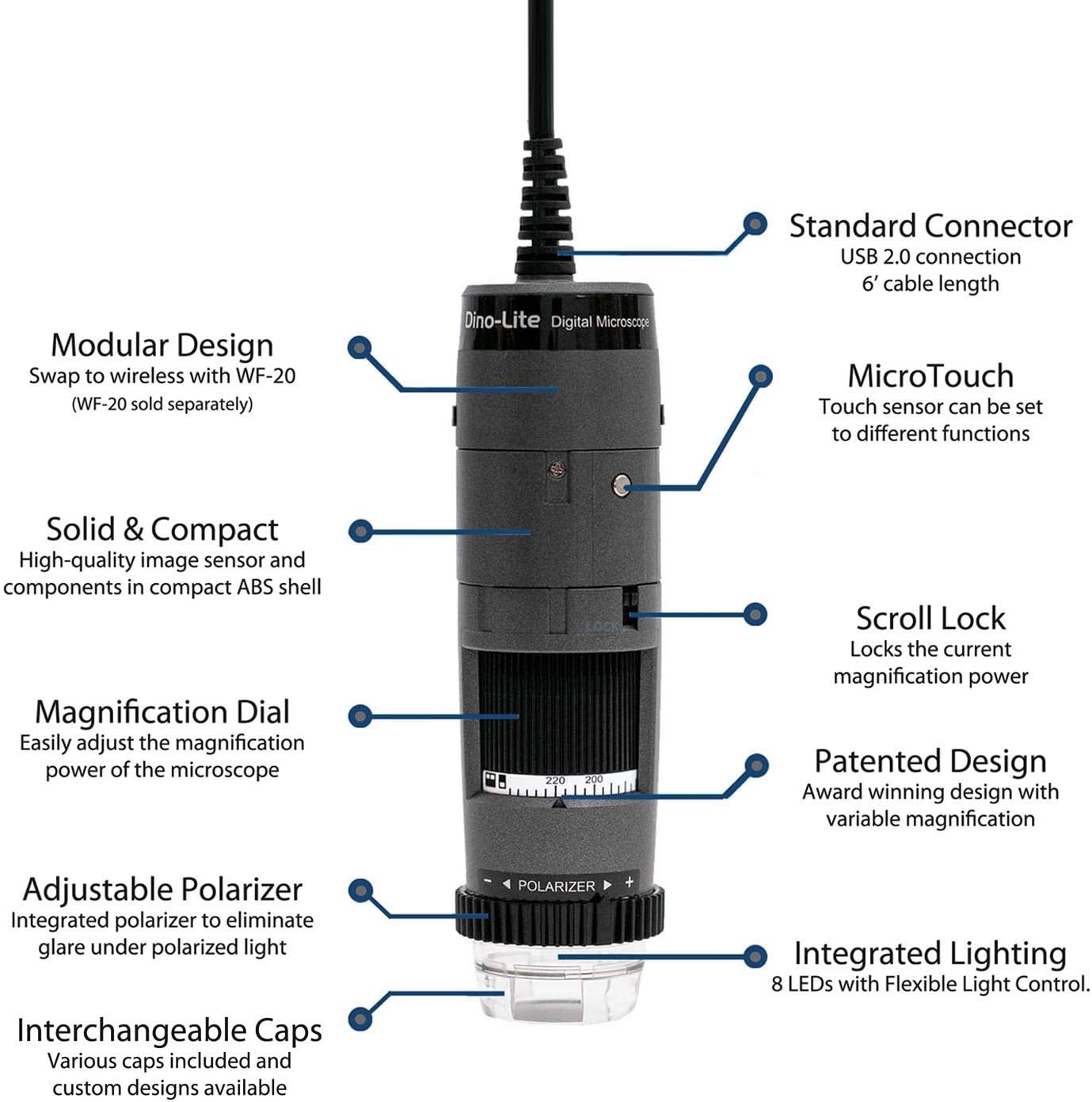
画像: 上view of the Dino-Lite AF4115ZT microscope with its main features labeled, including the standard USB 2.0 connection, MicroTouch button, modular design, compact ABS shell, scroll lock, magnification dial, adjustable polarizer, integrated lighting, and interchangeable caps.
- Standard USB 2.0 Connection: Provides a reliable connection to your computer with a 6-foot cable length.
- モジュラー設計: Allows for wireless operation with the separately sold WF-20 adapter.
- Solid & Compact: High-quality image sensor and components housed in a durable ABS shell.
- マイクロタッチ: A touch-sensitive area that can be programmed to capture images, record video, or toggle LEDs.
- スクロールロック: 誤って変更されないように、現在の拡大率をロックします。
- 倍率ダイヤル: Easily adjust the optical magnification from 20x to 220x.
- 調整可能な偏光板: Integrated to eliminate glare and reflections under polarized light.
- 統合照明: 最適な照明を実現するフレキシブル ライト コントロール (FLC) を備えた 8 個の LED を備えています。
- 交換可能なキャップ: Various caps are included and custom designs are available for different applications.

Image: The Dino-Lite AF4115ZT microscope, illustrating its compact dimensions (4.65 inches length) and its modular design, showing how it can be adapted for wireless use with the WF-20 module (sold separately), which increases its length to 5.5 inches.
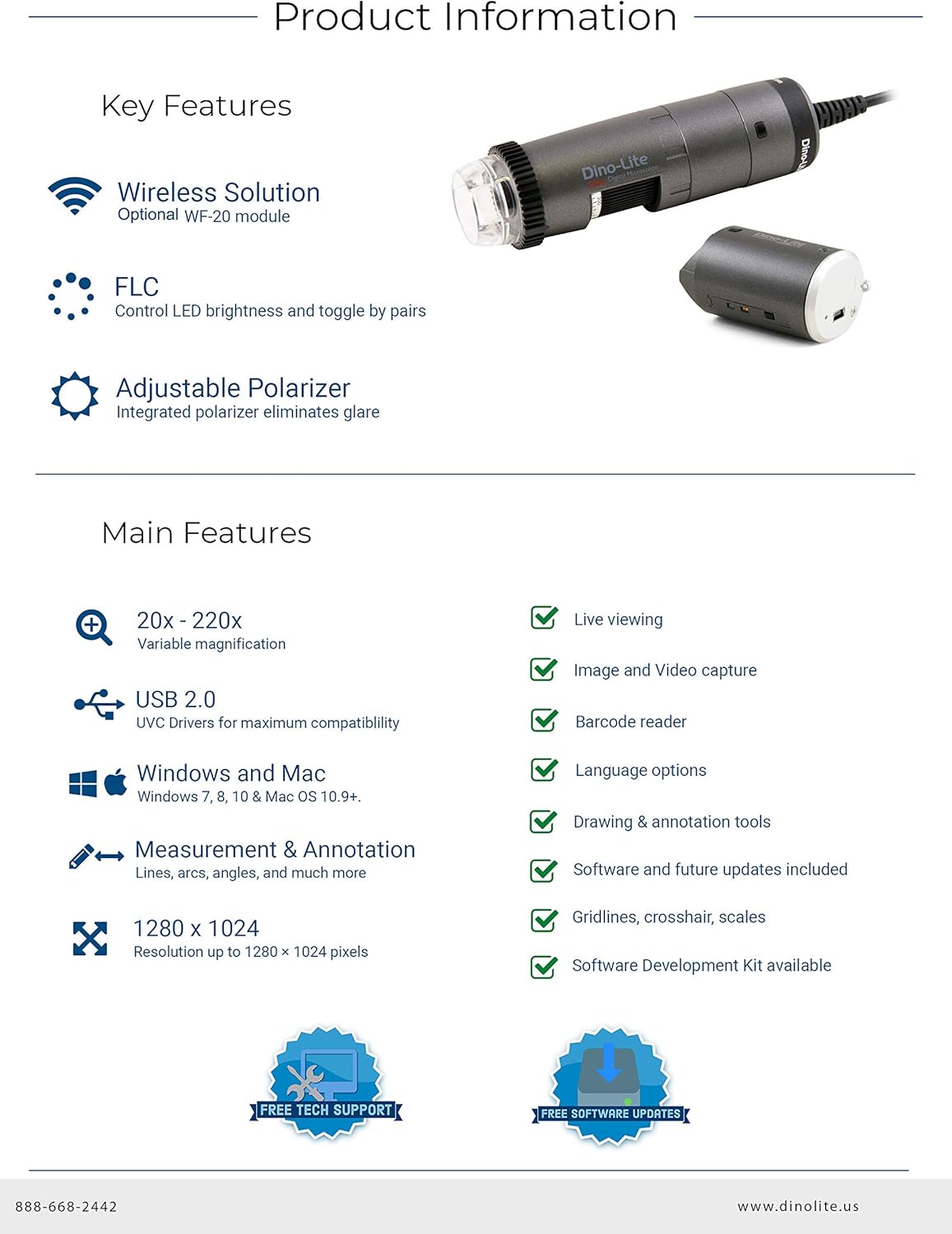
Image: A summary of the Dino-Lite AF4115ZT's key features, including wireless solution compatibility, Flexible Light Control (FLC), adjustable polarizer, 20x-220x variable magnification, USB 2.0, Windows and Mac compatibility, measurement and annotation tools, 1280x1024 resolution, live viewing, image and video capture, barcode reader, language options, drawing and annotation tools, software updates, gridlines, crosshairs, scales, and Software Development Kit (SDK) availability.
セットアップ手順
- ソフトウェアのインストール:
Insert the included CD-ROM into your computer's drive. Follow the on-screen instructions to install DinoCapture 2.0 for Windows or DinoXcope for Mac. Alternatively, download the latest software version from the official Dino-Lite webサイト。

Image: The Dino-Lite AF4115ZT package contents, showing the microscope unit, USB cable, software CD (DinoCapture 2.0), quick guide, various interchangeable caps, and a carrying pouch.
- 顕微鏡を接続します。
Plug the USB connector of the Dino-Lite microscope into an available USB 2.0 port on your computer. The device should be automatically recognized by the installed software.
- Optional Wireless Setup (WF-20 Adapter):
If using the optional WF-20 wireless adapter (sold separately), attach it to the microscope as per its instructions. This enables wireless connectivity to compatible devices like smartphones and tablets.
Video: This video demonstrates the key features and setup of the Dino-Lite AF4115ZT digital microscope, including its working distance at various magnifications, the magnification dial, scroll lock, adjustable polarizer, Flexible Light Control (FLC), interchangeable caps, programmable MicroTouch for photo/video capture and LED toggling, software features like measurements and auto-calibration, and the optional wireless capability.
操作手順
- 倍率の調整:
回転する 拡大ダイヤル on the microscope body to change the optical magnification. The current magnification level is indicated on the dial. For stable viewing, use an optional stand (sold separately).
Image: The Dino-Lite AF4115ZT microscope, showing the magnification dial used to adjust optical zoom. The image also highlights the scroll lock feature, which secures the chosen magnification.
- Using the Adjustable Polarizer:
回転する 調整可能な偏光板 ring located at the bottom of the microscope to reduce glare and reflections from shiny surfaces. This feature can be adjusted for full or half polarization.
- 画像とビデオのキャプチャ:
を押す マイクロタッチ button on the microscope body to capture a still image. This button can be programmed within the software to also initiate video recording or toggle the integrated LEDs.
- Software Features (DinoCapture/DinoXcope):
The included software provides advanced functionalities:
- ライブ Viewing: View real-time images from the microscope on your computer screen.
- 画像とビデオのキャプチャ: Save high-resolution images and videos.
- 測定ツール: Perform various measurements (lines, circles, angles, etc.) in different units (inch/mil/mm/um).
- 注釈: Add text, drawings, and other annotations directly onto captured images for detailed analysis.
- 自動キャリブレーション: Calibrate the microscope for accurate measurements using a calibration target.

Image: The DinoCapture 2.0 software interface displaying an image of a circuit board with various measurements and annotations applied, demonstrating the software's analytical capabilities.
メンテナンス
- レンズの掃除: Use a soft, lint-free cloth and a specialized lens cleaning solution to gently clean the optical lens. Avoid abrasive materials or harsh chemicals.
- 本体のクリーニング: Wipe the microscope body with a dry or slightly damp cloth. Do not immerse the device in water or use excessive moisture.
- ストレージ: Store the microscope in a clean, dry place, away from direct sunlight and extreme temperatures. Use the provided pouch for protection when not in use.
- ソフトウェアアップデート: Regularly check the Dino-Lite web最適なパフォーマンスと新機能へのアクセスを確保するために、ソフトウェア更新サイトにアクセスしてください。
トラブルシューティング
- 画像表示なし:
Ensure the USB cable is securely connected to both the microscope and the computer. Verify that the Dino-Lite software is running and the correct device is selected. Check if the computer's USB drivers are up to date.
- 不鮮明またはぼやけた画像:
調整する 拡大ダイヤル to focus the image. Ensure the object is within the microscope's working distance. Clean the optical lens if smudges or dust are present. Adjust the integrated lighting for better illumination.
- Glare or Reflections:
回転する 調整可能な偏光板 ring to minimize glare from reflective surfaces. Adjust the angle of the microscope relative to the object.
- ソフトウェアがデバイスを認識しない:
Reinstall the Dino-Lite software. Try connecting the microscope to a different USB port. Restart your computer. Ensure your operating system meets the software requirements.
仕様
| 特徴 | 詳細 |
|---|---|
| モデル番号 | AF4115ZT |
| 倍率 | 20x - 220x Optical |
| 画像解像度 | 1280 x 1024(1.3 MP) |
| ビデオフレームレート | 30FPS |
| 接続性 | USB 2.0 (WF-20 compatible for wireless) |
| 偏光 | 調整可能 |
| 点灯 | Integrated 8 LEDs with Flexible Light Control (FLC) |
| マイクロタッチ | Programmable touch-sensitive button |
| ソフトウェアの互換性 | Windows (XP/Vista/7/8/10), Mac OS 10.5 and above, Android, iOS (with WF-20) |
| 製品寸法 | 1.3 x 1.3 x 4.49インチ |
| アイテム重量 | 12オンス |
| 材料 | ガラス、金属、プラスチック |
| 巻tage | 5ボルト |
保証とサポート
Dino-Lite provides comprehensive support for its products. Users benefit from free technical support and regular software updates to enhance functionality and compatibility.
- テクニカルサポート: For assistance with setup, operation, or troubleshooting, contact Dino-Lite customer support.
- ソフトウェアアップデート: Ensure your software is up-to-date by visiting the official Dino-Lite website for the latest versions of DinoCapture 2.0 (Windows) and DinoXcope (Mac).
- 保証情報: Refer to the product packaging or the official Dino-Lite web詳細な保証条件については、サイトをご覧ください。