
導入
This manual provides essential instructions for the proper setup, operation, and maintenance of your Sports Afield Home Defense Quick Access Single Gun Vault, Model SA-HD2. Please read this manual thoroughly before using the vault to ensure safe and effective operation. Keep this manual for future reference.
The SA-HD2 vault is designed for quick access to a single handgun, featuring a durable construction, an electronic keypad, and a protective foam interior. It is equipped with red interior illumination for visibility in low-light conditions and a spring-loaded door for immediate access.
安全情報
- Always store firearms unloaded and secured within the vault.
- Keep override keys in a secure location away from the vault and out of reach of unauthorized individuals.
- Do not store the override keys inside the vault.
- Ensure the vault is securely mounted to prevent unauthorized removal.
- This vault is not fireproof or waterproof.
パッケージ内容
- スポーツアフィールド SA-HD2 クイックアクセス シングルガンボールト
- オーバーライドキー (2)
- 取り付け金具
- 取扱説明書(本書)
設定
1. 開梱と初期検査
Carefully remove the vault from its packaging. Inspect the vault for any signs of damage. If damage is found, contact customer support immediately.
2. バッテリーの取り付け
The electronic lock requires batteries for operation. Locate the battery compartment, typically on the inside of the door or on the back of the keypad. Insert the required batteries (usually AA or AAA, not included) according to the polarity markings. Close the battery compartment securely.
3. Mounting the Vault
For optimal security, it is recommended to secure the vault to a fixed surface. The vault includes pre-drilled bolt-down holes and mounting hardware.
- Choose a suitable location for the vault, ensuring it is level and stable.
- Mark the drilling points through the bolt-down holes on the vault's base or back.
- Drill pilot holes into the surface using an appropriate drill bit.
- Position the vault over the holes and secure it using the provided mounting hardware. Tighten all fasteners firmly.

4. Setting Your Personal Access Code
The electronic lock allows for a programmable access code between 3 and 8 digits.
- With the vault door open, locate the programming button (often a small red button) on the inside of the door or near the battery compartment.
- Press the programming button. The keypad will typically beep, and an indicator light will illuminate.
- キーパッドで希望する 3 ~ 8 桁のコードを入力します。
- Press the programming button again to confirm the new code. The keypad should beep to confirm successful programming.
- Test the new code with the door open before closing it. If the code works, close the door and test it again.
操作手順
1. Opening the Vault with Your Access Code
- Enter your personal 3-8 digit access code on the backlit illuminated touch pad.
- If the code is correct, the vault will unlock, and the spring-loaded door will open automatically, providing quick access.


2. Opening the Vault with Override Keys
In case of battery failure or forgotten code, the vault can be opened using the provided override keys.
- Locate the keyhole, typically concealed near the keypad or on the front panel.
- Insert one of the override keys and turn it to unlock the vault.
- The door will open, providing access.

3. Interior Illumination
The vault features red interior illumination for easy visibility in low-light conditions. This light activates automatically when the door is opened.

4. Silent Entry Mode
The vault may feature a silent entry mode to disable keypad beeps. Refer to the specific instructions provided with your vault for activating or deactivating this feature, as it can vary by model revision.
メンテナンス
1. バッテリーの交換
When the batteries are low, the keypad may emit a warning signal (e.g., multiple beeps or a specific light pattern) during operation. Replace batteries promptly to ensure continuous functionality. Use high-quality alkaline batteries.
2. 清掃
金庫の外側を柔らかい布で拭いてください。amp cloth. Avoid using abrasive cleaners or solvents, as these can damage the finish. The interior foam can be gently wiped with a dry cloth.

3. Key Storage
Always store the override keys in a secure, separate location from the vault. Do not store them inside the vault or in an easily accessible place where unauthorized persons might find them.
トラブルシューティング
- キーパッドが反応しない: Check battery installation and replace batteries if necessary. Ensure the keypad is clean and free of debris.
- ドアが開かない: If using the access code, re-enter the code carefully. If the issue persists, use the override keys. Check for any obstructions preventing the door from opening.
- 低バッテリーインジケーター: If the keypad emits a warning signal, replace the batteries immediately.
- Tamperアラーム: The vault may feature a tamper indicator or alarm. If activated, it suggests an attempt at unauthorized access. Check the vault for signs of forced entry.
仕様
| 特徴 | 詳細 |
|---|---|
| モデル番号 | SA-HD2 |
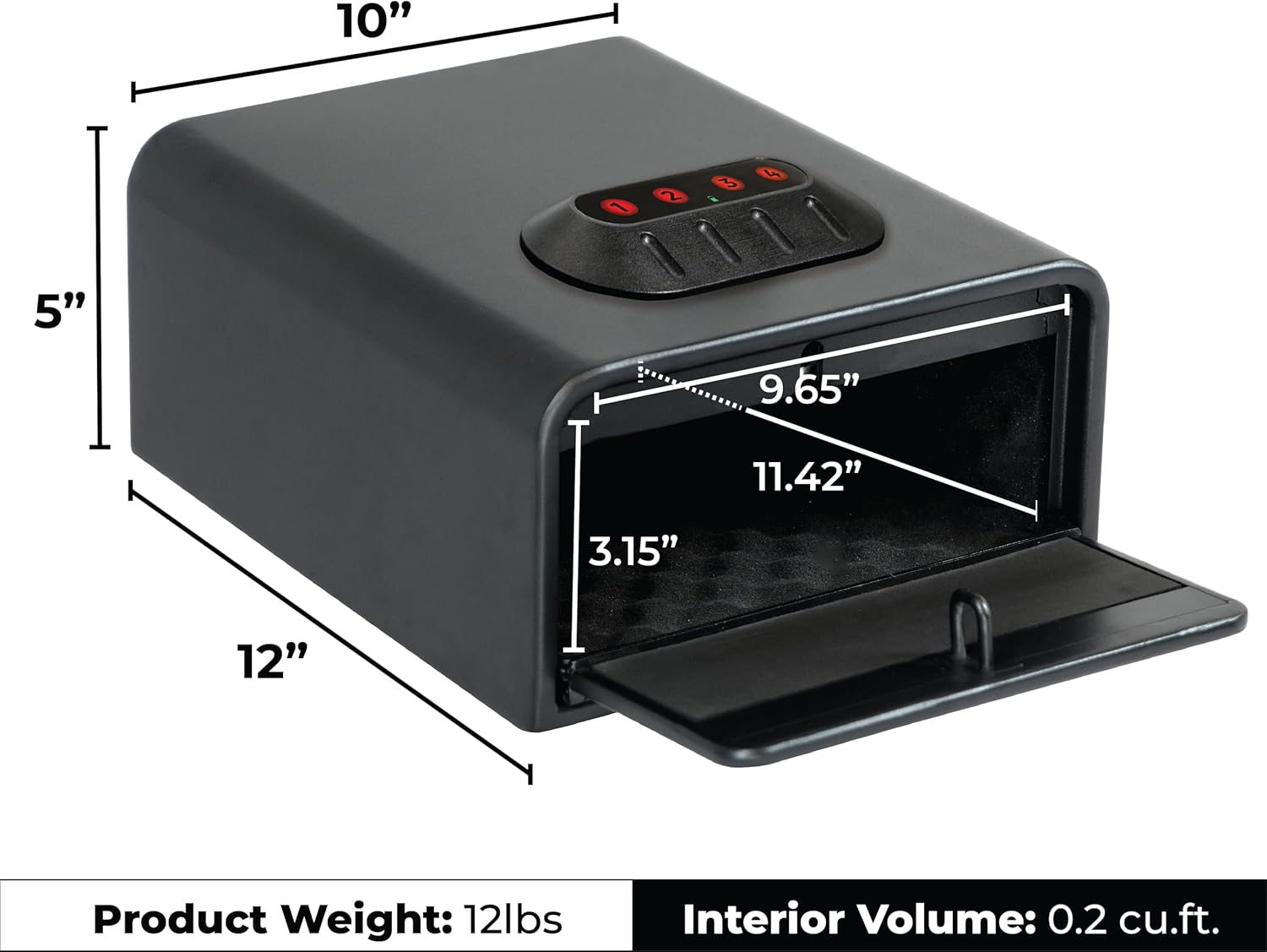
| 外形寸法(H x W x D) | 5インチ x 10インチ x 12インチ |
| 重さ | 18ポンド |
| 容量 | シングルハンドガン |
| ロック機構 | Electronic Keypad (3-8 digit code) with Override Keys |
| インテリアの特徴 | Full Foam Interior, Red Interior Illumination |
| 仕上げる | Durable Black Matte |
保証情報
Your Sports Afield SA-HD2 Quick Access Single Gun Vault is protected by a Three Year Hassle-Free Warranty. This warranty covers product defects, including issues with locks, parts, and paint. In the event of a covered defect, free freight is provided for the shipment of a replacement unit within the continental United States.
カスタマーサポート
For further assistance, technical support, or warranty claims, please contact Sports Afield customer service. Refer to the contact information provided on the Sports Afield official webサイトまたは製品登録カードをご覧ください。