
ペットワント PF-102
PETWANT PF-102 自動ペットフィーダー ユーザーマニュアル
モデル: PF-102
導入
Thank you for choosing the PETWANT PF-102 Automatic Pet Feeder. This device is designed to provide scheduled and portion-controlled meals for your cats and dogs, ensuring they are fed consistently even when you are away. Please read this manual thoroughly before operating the feeder to ensure proper setup and optimal performance.

Image: The PETWANT PF-102 Automatic Pet Feeder, showing its main body, food hopper, and feeding tray.
パッケージ内容
始める前に、パッケージにすべてのアイテムが揃っていることを確認してください。
- PETWANT PF-102 Automatic Pet Feeder Unit
- フードトレイ
- 電源アダプター
- ユーザーマニュアル(このドキュメント)
設定
1. 電源接続
Connect the power adapter to the feeder's power input port and plug it into a standard wall outlet. For backup power during outages, install three D-size batteries (not included) into the battery compartment located at the bottom of the unit. The feeder will automatically switch to battery power if AC power is interrupted.
2. Attaching the Food Tray
Align the food tray with the base of the feeder. Gently slide the tray into place until it clicks securely. Ensure it is firmly attached to prevent accidental detachment by your pet.
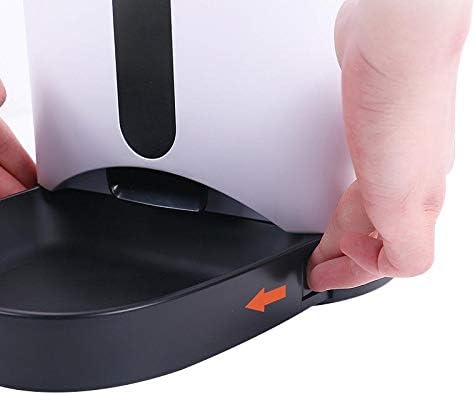
Image: Hands demonstrating how to slide and secure the food tray to the main unit of the feeder.
3. フードホッパーへの充填
Open the lid of the food hopper by pressing the release button located at the top of the feeder. Pour dry pet food into the hopper. Ensure the food kibble size is appropriate for the feeder mechanism (typically 5-15mm in diameter) to prevent jamming. Close the lid securely after filling.
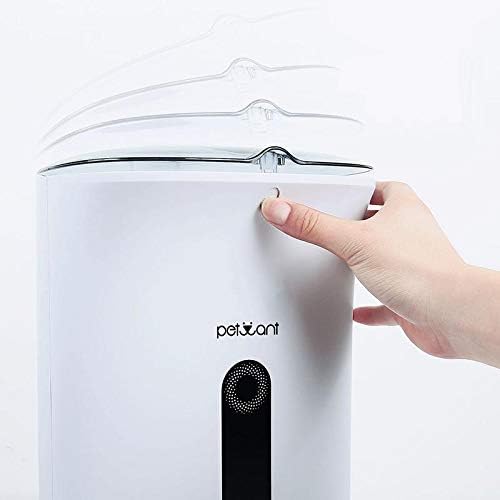
Image: A hand pressing the release button to open the top lid of the feeder, revealing the food hopper opening.
操作手順
コントロールパネルオーバーview

画像: 詳細な view of the feeder's control panel, showing the LCD screen and buttons labeled REC, PLAY, SET, and arrow keys.
- SETボタン: プログラミングモードに入り、設定を確認します。
- 上/下矢印ボタン: Navigates through options and adjusts values.
- RECボタン: 音声録音を開始します。
- 再生ボタン: Plays back recorded voice message.
1. 現在の時刻を設定する
- を押し続けます セット 時間の数字が点滅するまでボタンを 3 秒間押し続けます。
- 使用 上/下 arrow buttons to adjust the hour.
- プレス セット to confirm and move to the minute setting.
- 使用 上/下 arrow buttons to adjust the minute.
- プレス セット to save the time and exit.
2. 食事の時間と量のプログラミング
The feeder supports up to 4 meals per day. Each meal can be set with a specific time and portion size.
- を押す セット button once to enter meal setting mode. "MEAL 1" will appear on the display.
- 使用 上/下 arrow buttons to select the meal number (MEAL 1-4) you wish to program.
- プレス セット to set the time for the selected meal. The hour digit will flash.
- 時間を調整するには 上/下を押して セット 分に移動します。
- 分を調整します 上/下を押して セット to move to portion size.
- Adjust the portion size (typically 1-9 portions, where 1 portion is approximately 10g-12g depending on kibble size) using 上/下.
- プレス セット この食事の設定を保存します。
- Repeat for other meals as desired. To disable a meal, set its portion size to 0.
3. 音声メッセージの録音
You can record a 10-second voice message that will play at each scheduled meal time to call your pet.
- を押し続けます 記録 button. The recording indicator will appear on the display.
- Speak clearly into the microphone located near the control panel.
- リリース 記録 button when finished. The recording will automatically stop after 10 seconds if not released.
- を押す 遊ぶ button to listen to your recorded message.
4. 手動給餌
To dispense food immediately, press and hold the Up arrow button for 3 seconds. One portion of food will be dispensed. Repeat as needed for additional portions.
メンテナンス
フィーダーの清掃
Regular cleaning is essential to maintain hygiene and ensure proper operation.
- フードトレイ: The food tray is detachable and can be washed with mild soap and water. Rinse thoroughly and dry completely before reattaching.
- フードホッパー: The food hopper can be wiped clean with a damp cloth. Do not submerge the main unit in water. Ensure the hopper is completely dry before refilling with food.
- 本体: Wipe the exterior of the main unit with a soft, dry cloth. Avoid using abrasive cleaners or solvents.
清掃する前に必ずフィーダーのプラグを抜き、電池を取り外してください。
バッテリー交換
If using battery backup, replace the D-size batteries when the low battery indicator appears on the display or if the feeder fails to operate during a power outage. 新しい電池を挿入するときは、極性が正しいことを確認してください。
トラブルシューティング
| 問題 | 考えられる原因 | 解決 |
|---|---|---|
| 給餌器が餌を配給しません。 |
|
|
| Feeder beeps continuously but no food dispenses. |
|
|
| Display is blank or feeder is unresponsive. |
|
|
| 音声メッセージが再生されません。 |
|
|
仕様
| ブランド | ペットウォント |
| モデル | PF-102 |
| 容量 | 4.2リットル |
| 材料 | プラスチック |
| パッケージ寸法 | 41.5 x 28.1 x 21.5 cm |
| アイテム重量 | 2.91キログラム |
| 特集 | Automatic Feeding Schedule, Portion Control |
| 対象種 | 猫、犬 |
保証とサポート
For warranty information and technical support, please refer to the documentation provided with your purchase or visit the official PETWANT webサイトでご確認ください。保証請求の際は購入証明として領収書を保管してください。
For further assistance, you may contact PETWANT customer service directly.