
導入
This manual provides comprehensive instructions for the Mitel Wireless DECT Headset, designed for use with Mitel MiVoice 6930 and 6940 phones. It covers product components, setup procedures, operational guidelines, maintenance tips, and technical specifications to ensure optimal performance and user experience. This headset offers wireless connectivity, allowing users freedom of movement during calls.
箱の中身
Carefully unpack your Mitel Wireless DECT Headset and verify that all components are present. The package typically includes the following items:
- Mitel Wireless DECT Headset
- Integrated Headset Charging Cradle
- ヘッドバンド
- インストールガイド
- Necessary connection cables/adapters
- Small tools (e.g., screwdriver) for installation
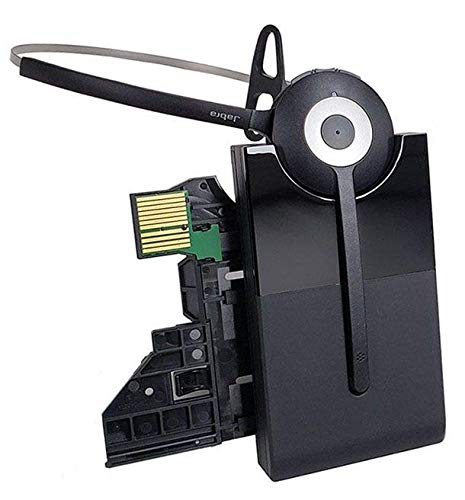
Image: All components included in the Mitel Wireless DECT Headset package. This includes the headset, charging cradle, headband, installation guide, and various small accessories for setup.
セットアップ手順
Follow these steps to set up your Mitel Wireless DECT Headset with your compatible Mitel MiVoice phone.
- 互換性チェック: Ensure your Mitel MiVoice phone is a 6930 or 6940 model. The system requires MiVoice Business Release 8.0 SP1 or higher.
- Connect Charging Cradle: The integrated headset charging cradle connects directly to your MiVoice 6930 or 6940 phone via its expansion port or a PKM expansion port. Refer to the included installation guide for specific connection diagrams.
- ヘッドセットの充電: Place the wireless DECT headset into the charging cradle. The headset battery requires initial charging. A full charge provides up to 8 hours of talk time.
- ペアリング: The headset is designed for simplified deployment. Once connected and charged, the headset should automatically pair with the compatible Mitel phone. Consult the phone's user manual or the headset's installation guide for specific pairing instructions if automatic pairing does not occur.

Image: Detail from the installation guide, illustrating the connection process for the Mitel Integrated DECT charging base to the MiVoice 6930/6940 phone.
操作手順
Once your headset is set up, you can begin using it for calls. The headset offers crystal clear HD audio and a noise-cancelling microphone for effective communication.
- 通話の発信/受信: Use the call control features on the headset to answer, end, or reject calls. Refer to the headset's specific buttons and their functions in the installation guide.
- 音量調整: Adjust the call volume using the dedicated controls on the headset.
- ミュート機能: Activate the mute function on the headset's microphone when you need privacy during a call.
- ローミング: Enjoy a roaming range of up to 300 feet (100 meters) from your desk phone, allowing you to move freely while on a call.
メンテナンス
適切なメンテナンスを行うことで、ヘッドセットの寿命が長くなり、最適なパフォーマンスが確保されます。
- 充電: Always return the headset to its charging cradle when not in use to ensure it is fully charged for your next call. The headset provides up to 8 hours of talk time on a full charge.
- クリーニング: Use a soft, dry cloth to clean the headset and charging cradle. Avoid using harsh chemicals or abrasive materials.
- ストレージ: ヘッドセットは、直射日光や極端な温度を避け、涼しく乾燥した場所に保管してください。
- バッテリー: The headset contains a Lithium Polymer battery. Do not attempt to replace the battery yourself. Contact qualified service personnel if battery issues arise.
トラブルシューティング
If you encounter issues with your Mitel Wireless DECT Headset, refer to the following common troubleshooting steps:
- 音声が出ない/音質が悪い:
- ヘッドセットが完全に充電されていることを確認してください。
- Verify the headset is properly paired with the phone.
- Check the volume settings on both the headset and the phone.
- Confirm the charging cradle is securely connected to the phone's expansion port.
- ヘッドセットが充電されない:
- Ensure the headset is correctly seated in the charging cradle.
- Check the connection of the charging cradle to the phone.
- Verify the phone itself is powered on.
- Limited Roaming Range:
- Ensure there are no major obstructions (e.g., thick walls, large metal objects) between the headset and the phone.
- 強力な電磁干渉の発生源を避けてください。
- Headset Not Responding:
- Perform a soft reset by turning the headset off and then on again.
- If issues persist, consult the detailed troubleshooting section in the full installation guide or contact Mitel support.
仕様
| 特徴 | 詳細 |
|---|---|
| モデル名 | Mitel Wireless DECT Headset |
| 商品型番 | 930-65-509-105-MIT |
| 対応デバイス | Mitel MiVoice 6930, 6940 Phones |
| 接続技術 | ワイヤレス(DECT) |
| 無線通信技術 | DECT (also lists Bluetooth 4.0 with 100m range in source data) |
| 騒音制御 | Active Noise Cancellation, Noise Cancelling Microphone |
| オーディオドライバータイプ | ダイナミックドライバ |
| バッテリー寿命 | 最大8時間(通話時間) |
| 充電時間 | 8時間 |
| ローミング範囲 | 最大300フィート(100メートル) |
| コントロールタイプ | Call Control (Remote) |
| アイテム重量 | 11.2オンス |
| 電源 | 1 リチウムポリマー電池 (付属) |
| メーカー | ジャブラ |
公式製品ビデオ
Watch these official videos for additional guidance on your Mitel Wireless DECT Headset.
ビデオ: 詳細はview of the Mitel Wireless DECT Headset features and functionality. (Duration: 12:45)
Video: Quick guide to setting up and using the Mitel Wireless DECT Headset. (Duration: 1:24)
保証とサポート
For warranty information, technical support, or service inquiries, please refer to the documentation included with your product or visit the official Mitel webサイト。 保証請求に備えて購入時のレシートを保管しておいてください。