
DEVIA 311031
DEVIA Dual Point Smart Bluetooth 4.2 Handsfree Headset User Manual
モデル: 311031
導入
ご購入ありがとうございますasing the DEVIA Dual Point Smart Bluetooth 4.2 Handsfree Headset. This manual provides essential information for setting up, operating, and maintaining your new headset. Please read it carefully before use and retain it for future reference.
重要な安全情報
- ヘッドセットを極端な温度、湿度、腐食性物質にさらさないでください。
- ヘッドセットを落としたり、強い衝撃を与えたりしないでください。
- ヘッドセットを分解または改造しないでください。保証が無効になります。
- ヘッドセットを子供やペットの手の届かないところに保管してください。
- 付属の充電ケーブルまたは認定された同等品のみを使用してください。
- 大きな音に長時間さらされると、聴覚に障害が生じる可能性があります。安全な音量に調整してください。
パッケージ内容
以下の項目のボックスにチェックを入れてください。
- DEVIA Dual Point Smart Bluetooth 4.2 Handsfree Headset
- 保護ケース
- ユーザーマニュアル(このドキュメント)
- USB充電ケーブル

Image: The retail packaging for the DEVIA Smart Bluetooth 4.2 Earphone, displaying the headset and product information on both the front and back of the box.
製品終了view
The DEVIA Dual Point Smart Bluetooth 4.2 Handsfree Headset is designed for clear audio communication and music playback. It features Bluetooth 4.2 connectivity for stable wireless performance and Active Noise Cancellation for an improved listening experience.

画像: 副業file of the DEVIA Dual Point Smart Bluetooth 4.2 Handsfree Headset, showcasing its sleek black design and in-ear component.
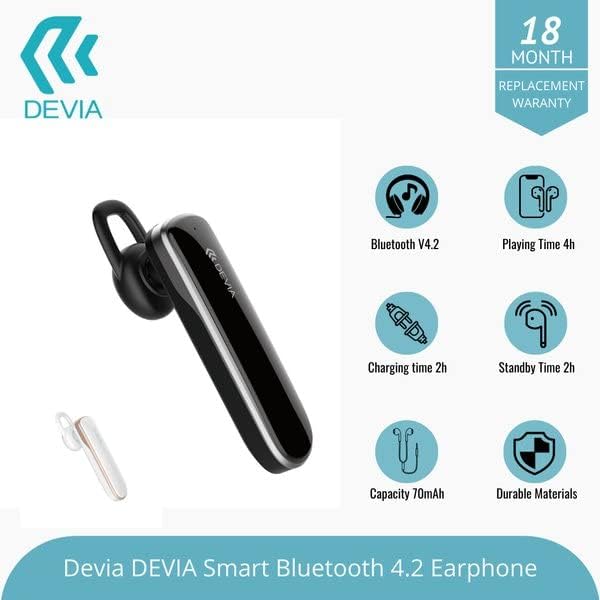
Image: The DEVIA Smart Bluetooth 4.2 Earphone displayed alongside graphical icons detailing its key features: Bluetooth V4.2, 4 hours playing time, 2 hours charging time, 70mAh battery capacity, and durable construction materials.
設定
1. ヘッドセットの充電
- USB充電ケーブルをヘッドセットの充電ポートに接続します。
- USB ケーブルのもう一方の端を互換性のある USB 電源 (コンピューターの USB ポート、USB 壁アダプターなど) に差し込みます。
- 通常、充電中はインジケーター ライトが赤く点灯し、完全に充電されると青に変わるか消灯します。
- A full charge takes approximately 2 hours. The headset provides up to 6 hours of battery life for calls/music.
2. Bluetoothデバイスとのペアリング
- ヘッドセットが完全に充電されていることを確認してください。
- 電源オン: Press and hold the Multi-function button (usually the main button) on the headset until the indicator light flashes red and blue alternately. This indicates pairing mode.
- Bluetooth を有効にする: スマートフォンまたはその他の Bluetooth デバイスで、Bluetooth 設定に移動し、Bluetooth を有効にします。
- 検索する デバイス: Your device will scan for available Bluetooth devices. Look for "DEVIA" or a similar name in the list.
- 接続する: Select "DEVIA" from the list to pair. Once successfully paired, the indicator light on the headset will usually flash blue slowly or turn off, and you may hear a confirmation tone.
- パスワードの入力を求められた場合は、「0000」(ゼロ 4 つ)を入力します。
Note: The headset supports dual-point connection, allowing it to be connected to two Bluetooth devices simultaneously. To use this feature, pair with the first device, then disable Bluetooth on the first device. Put the headset back into pairing mode and pair with the second device. Finally, re-enable Bluetooth on the first device, and the headset should connect to both.
操作手順
電源オン/オフ
- 電源オン: Press and hold the Multi-function button for approximately 3 seconds until the blue indicator light flashes.
- 電源を切る: Press and hold the Multi-function button for approximately 5 seconds until the red indicator light flashes and then turns off.
通話管理
- 通話に応答: 多機能ボタンをXNUMX回押します。
- 通話終了: 通話中にマルチファンクションボタンを1回押します。
- 通話を拒否: Press and hold the Multi-function button for about 2 seconds.
- 最後の番号にリダイヤル: 多機能ボタンをXNUMX回押します。
音楽再生に
- 再生/一時停止: 多機能ボタンをXNUMX回押します。
- 次のトラック: 音量アップボタンを長押しします。
- 前のトラック: 音量ダウンボタンを押し続けます。
ボリュームコントロール
- 音量を上げる: 音量アップボタンを押します。
- 音量を下げる: 音量ダウンボタンを押します。
Note: The headset features Active Noise Cancellation. This function is typically activated automatically or via a dedicated button (if present, not specified in product details). Refer to the device's specific button layout for ANC control.
メンテナンス
- クリーニング: ヘッドセットのクリーニングには、柔らかく乾いた糸くずの出ない布をご使用ください。研磨剤入りの洗剤、アルコール、化学溶剤は使用しないでください。
- ストレージ: When not in use, store the headset in its protective case in a cool, dry place, away from direct sunlight and extreme temperatures.
- バッテリーのケア: バッテリー寿命を延ばすには、ヘッドセットを頻繁に完全に放電させないでください。長期間使用しない場合でも、定期的に充電してください。
トラブルシューティング
| 問題 | 考えられる原因 | 解決 |
|---|---|---|
| ヘッドセットの電源が入りません。 | バッテリー残量が少なくなりました。 | ヘッドセットを少なくとも 30 分間充電してください。 |
| デバイスとペアリングできません。 | ヘッドセットがペアリング モードになっていません。デバイスの Bluetooth がオフになっています。デバイスが遠すぎます。 | ヘッドセットがペアリングモード(赤/青点滅)になっていることを確認してください。デバイスのBluetoothをオンにしてください。ヘッドセットをデバイスに近づけてください(10メートル以内)。 |
| 音が出ない、または音量が低い。 | 音量が低すぎる、ヘッドセットが接続されていない、選択したオーディオ出力が正しくない。 | Increase volume on both headset and connected device. Re-pair the headset. Check audio output settings on your device. |
| 通話品質が悪いです。 | Bluetooth信号が弱い、干渉がある。 | 接続されたデバイスに近づいてください。Wi-Fiやその他の無線干渉が強い環境は避けてください。 |
| ヘッドセットが充電されません。 | ケーブルまたは電源の故障、充電ポートの問題。 | 別のUSBケーブルと電源をお試しください。充電ポートが清潔でゴミなどがないことを確認してください。 |
仕様
| ブランド | デビア |
| モデル番号 | 311031 |
| 接続技術 | ワイヤレス(Bluetooth 4.2) |
| 耳の位置 | On Ear (Form factor: In Ear) |
| 騒音制御 | アクティブノイズキャンセリング |
| ヘッドホンジャック | USB(充電用) |
| バッテリーの平均寿命 | 6時間 |
| プレイ時間 | 4時間 |
| 充電時間 | 2時間 |
| バッテリー容量 | 70mAh |
| コントロールタイプ | 音量コントロール、タッチ |
| 対応デバイス | スマートフォン |
| 原色 | 黒 |
| エンクロージャ材質 | プラスチック |
| アイテム重量 | 1 Kilograms (Note: This weight may include packaging and is unusually high for a headset. Refer to actual product for accurate weight.) |
保証とサポート
本製品にはメーカー標準保証が付いています。保証期間や保証内容など、具体的な条件については、パッケージに同梱されている保証書をご覧ください。
For technical support or customer service, please contact your retailer or visit the official DEVIA web連絡先情報のサイト。
Ask a question about this manual
Ask about setup, troubleshooting, compatibility, parts, safety, or missing instructions. Manuals+ will review the question and use this page’s manual context to help answer it.