
導入
This manual provides comprehensive instructions for the installation, operation, and maintenance of your EBTOOLS Elerose Motorcycle Speedometer. Please read this manual thoroughly before use to ensure proper function and longevity of the product. This device is a general-purpose round digital LCD tachometer and odometer designed for motorcycles.
製品終了view
特徴
- Integrated speedometer, odometer, and tachometer.
- Digital LCD display for clear readings.
- Round design suitable for various motorcycle styles, including Cafe Racers.
- Includes indicator lights for turn signals, neutral gear, and headlights.
- 耐久性のある金属とプラスチックの構造。
パッケージ内容
- 1 x EBTOOLS Elerose Motorcycle Speedometer

Figure 1: EBTOOLS Elerose Motorcycle Speedometer. The top image shows the speedometer mounted on a motorcycle handlebar, while the bottom image displays the speedometer unit itself with its wiring harness.
仕様
| 材料 | 金属 + プラスチック |
| 色 | 黒 |
| 巻tage | 12V直流 |
| 寸法(L x W) | 95 x 105 mm(3.7インチ x 4.1インチ) |
| 取付穴距離 | 95 mm(3.7インチ) |
| パッケージ重量 | 約734グラム |
| メーカー | EBTOOLS |
| モデル番号 | Elerose35kfiqxhsp |
| 欧州連合 | 792117031618 |
| 原産国 | 中国 |

Figure 2: Speedometer unit displaying operating voltage (DC 12V) and material (Metal + Plastic).
セットアップとインストール
Before beginning installation, ensure the motorcycle's power is off and the battery is disconnected. Professional installation is recommended.
配線手順
The speedometer features two main wiring interfaces:
7-Wire Interface (Main Functions)
- Orange Line: Connect to Left Turn Signal
- Light Blue Line: Connect to Right Turn Signal
- 黒線: Connect to Ignition Power (Positive)
- Green Line: Connect to Negative (Ground)
- Brown Line: Connect to Fog Light
- 青線: Connect to Headlights
- Red Light Green Line: Connect to Neutral Gear Position Indicator
5-Wire Gear Interface (Gear Position Indicators)
- Blue/Red Line: Connect to Gear 1 Indicator
- Blue/Black Line: Connect to Gear 2 Indicator
- Blue/Yellow Line: Connect to Gear 3 Indicator
- Red/White Line: Connect to Gear 4 Indicator
- Brown/Yellow Line: Connect to Gear 5 Indicator
Ensure all connections are secure and properly insulated to prevent short circuits. After wiring, reconnect the battery and test all functions.
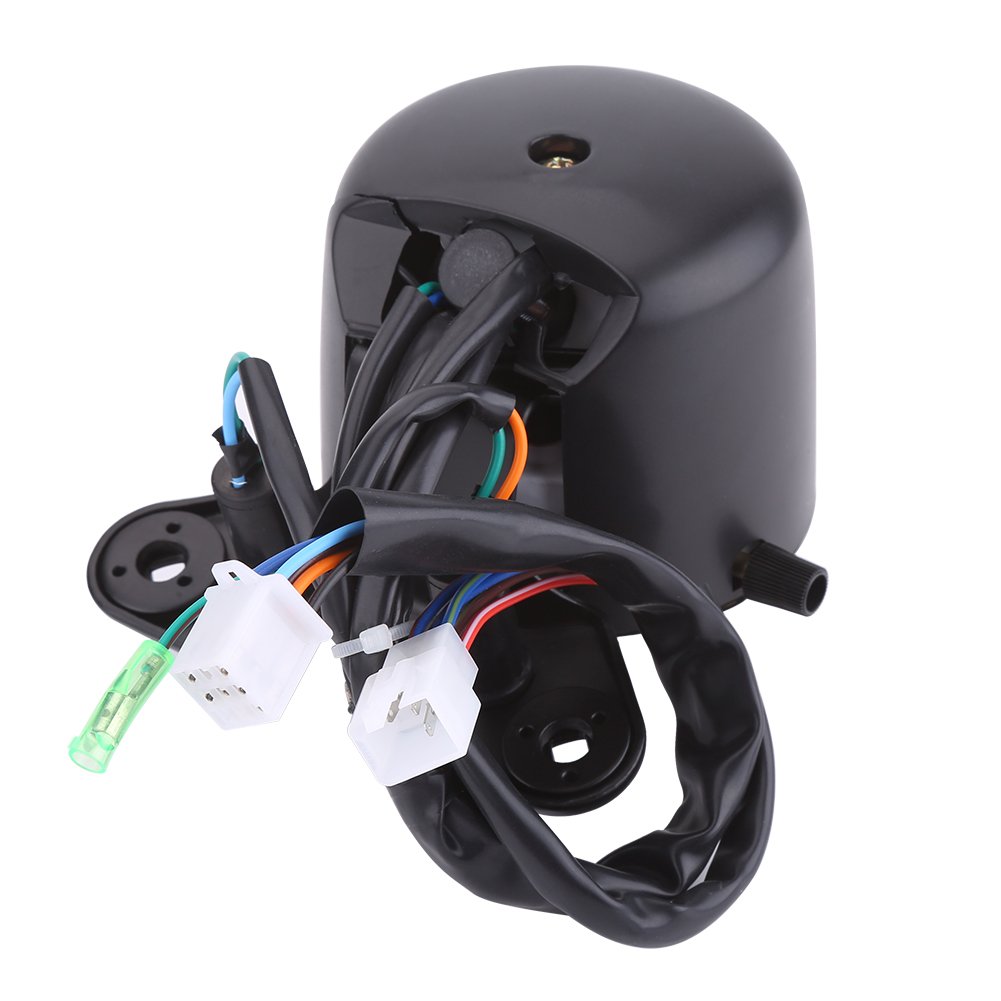
図3:背面 view of the speedometer unit, illustrating the various wiring connections for installation.
操作手順
Once installed and powered on, the speedometer will display various information. Familiarize yourself with the display components:

図4: 前面 view of the speedometer with key components labeled for identification.
ディスプレイコンポーネント
- Speed Pointer: Indicates current speed in km/h and mph.
- 走行距離表示: Shows total distance traveled (odometer).
- Neutral Gear Light Display: Illuminates when the motorcycle is in neutral gear (labeled 'N').
- ヘッドライトディスプレイ: ヘッドライトが点灯しているときに点灯します。
- ギア表示: Shows the current gear engaged (1-5).
- Turn Signal Indicators: Left and Right indicators illuminate when corresponding turn signals are active.
- Odometer Reset Knob: Located on the side, used to reset trip mileage (if applicable).
The digital LCD screen provides clear readings for all functions. Ensure the display is visible and not obstructed during operation.
メンテナンス
To ensure optimal performance and longevity of your speedometer, follow these maintenance guidelines:
- クリーニング: ディスプレイを拭いてasingを柔らかく、damp 布で拭いてください。表面を傷つける可能性のある研磨剤入りの洗剤や溶剤は使用しないでください。
- 検査: Periodically check all wiring connections for looseness or corrosion. Ensure the mounting is secure.
- 環境保護: While designed for outdoor use, prolonged exposure to extreme weather conditions (heavy rain, direct sunlight) may affect performance. Consider using a motorcycle cover when parked for extended periods.
- Tを避けるamp鳴る: Do not attempt to open or modify the speedometer unit, as this may void any potential warranty and could cause damage.
トラブルシューティング
If you encounter issues with your speedometer, refer to the following common troubleshooting steps:
- 電源/ディスプレイなし:
- Check all power connections (Black line for positive, Green line for negative).
- Ensure the motorcycle battery is charged and properly connected.
- Inspect fuses in the motorcycle's electrical system.
- Incorrect Speed/Mileage Reading:
- Verify the speedometer cable connection (if applicable, this model is digital, so check sensor connection if external sensor is used, though not specified in wiring).
- Ensure the speedometer is correctly calibrated for your wheel size (if adjustable, this model does not specify calibration options).
- インジケーターライトが機能しない:
- Check the specific wiring for the affected indicator (e.g., Orange for left turn, Light Blue for right turn).
- Ensure the corresponding function on the motorcycle (turn signal, headlight, neutral) is operational.
- Gear Display Issues:
- Inspect the 5-wire gear interface connections.
- Ensure the motorcycle's gear position sensor is functioning correctly.
If problems persist after attempting these steps, consult a qualified motorcycle technician or contact customer support.
保証情報
Specific warranty details for the EBTOOLS Elerose Motorcycle Speedometer are not provided in the product information. Please refer to the retailer or your purchase documentation for any applicable warranty terms and conditions.
カスタマーサポート
For further assistance, technical support, or inquiries regarding your EBTOOLS Elerose Motorcycle Speedometer, please contact the retailer from whom you purchased the product. Have your model number (Elerose35kfiqxhsp) and purchase details ready when contacting support.