
導入
The Plugable UD-3900H USB 3.0 Universal Docking Station offers flexible expandability for both modern and legacy laptops. This DisplayLink-powered docking station provides 12 port expansion, including dual video outputs, Gigabit Ethernet, audio, and six USB ports. It is designed for broad compatibility across Windows, macOS, and ChromeOS environments, making it ideal for mixed laptop setups in home offices, corporate environments, and educational settings.
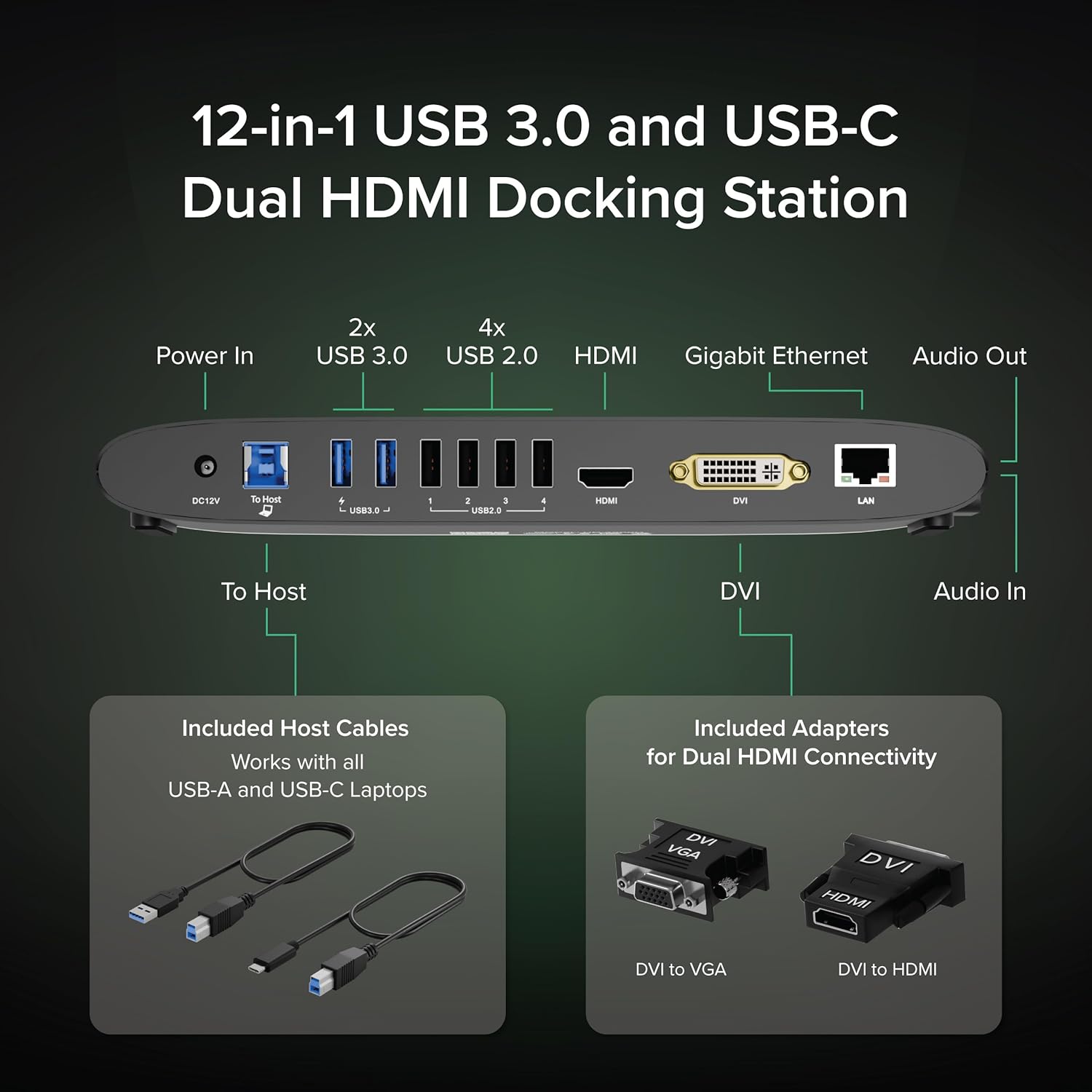
Image: The Plugable UD-3900H docking station, showcasinコンパクトなデザインと多様な接続オプションを備えています。
設定
1. 箱の中身
Your Plugable UD-3900H package includes the following items:
- Plugable UD-3900H Docking Station
- Power Adapter (UL Listed)
- USB-B to USB-C Cable
- USB-B - USB-Aケーブル
- DVI-HDMIアダプタ
- DVI-VGAアダプタ
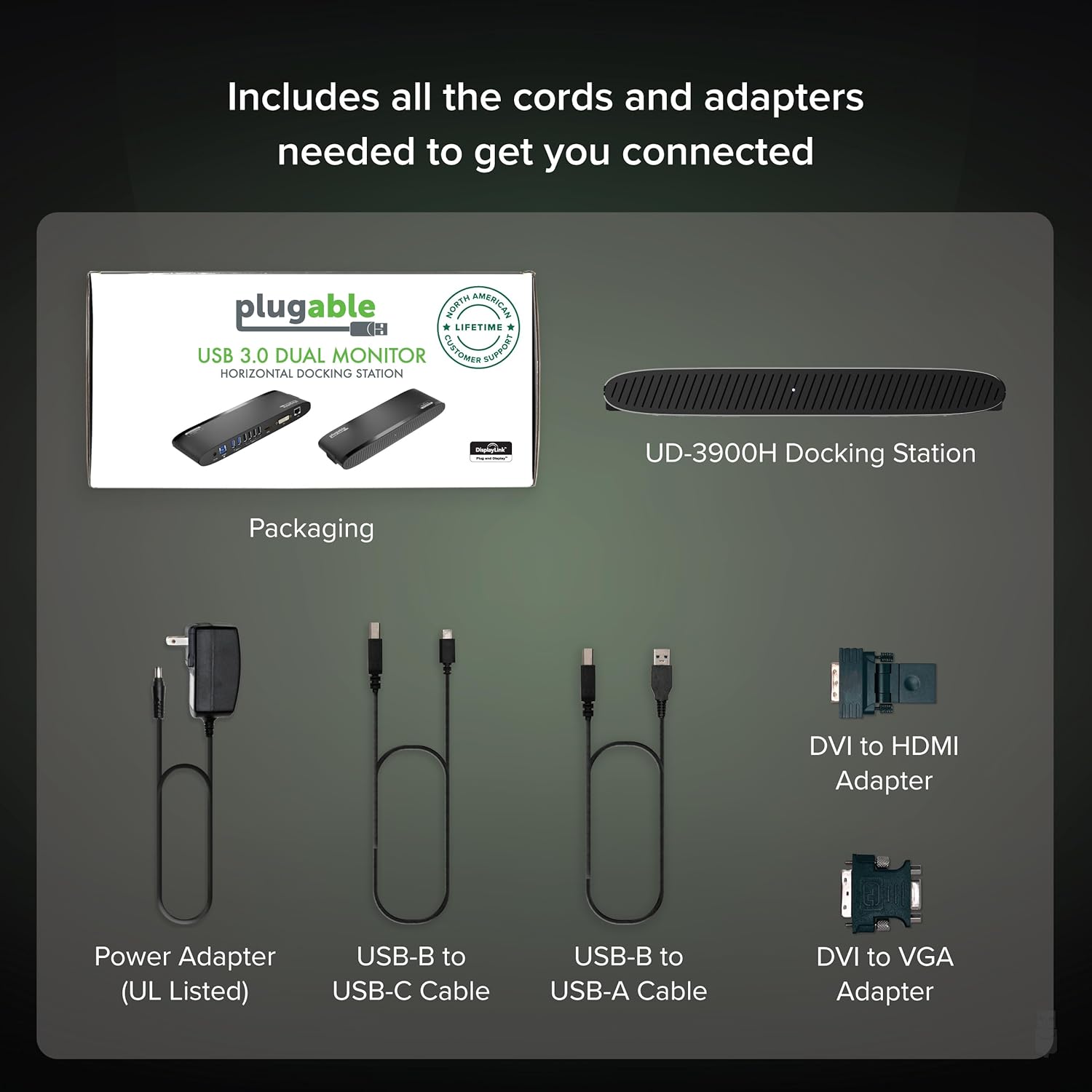
Image: All included components of the Plugable UD-3900H docking station: the unit, power adapter, USB cables, and DVI adapters.
2. ドックの接続
- 接続電源: Plug the included power adapter into the DC 12V port on the back of the docking station, then plug it into a wall outlet.
- ホスト ラップトップに接続します。 Use either the USB-B to USB-C cable or the USB-B to USB-A cable to connect the docking station to your laptop's available USB port.
- ディスプレイを接続する:
- For the first display, use an HDMI cable to connect your monitor to the HDMI port on the docking station.
- For the second display, use the DVI port. You can connect a DVI monitor directly, or use the included DVI to HDMI adapter for an HDMI monitor, or the DVI to VGA adapter for a VGA monitor.
- 周辺機器を接続します。 Plug your USB devices (keyboard, mouse, printer, etc.) into the available USB 3.0 or USB 2.0 ports. Connect your Ethernet cable to the LAN port for a wired network connection. Connect headphones/speakers to the audio out port and a microphone to the audio in port.
画像: 詳細 view of the rear ports on the UD-3900H, including power, host connection, USB 3.0, USB 2.0, HDMI, DVI, and LAN.
3. ドライバーのインストール
The Plugable UD-3900H utilizes DisplayLink technology for video output. Drivers are essential for proper functionality.
- ウィンドウズ: Drivers are typically installed automatically via Windows Update when the dock is first connected to an internet-enabled system. If not, or for corporate deployments, manual installation is available.
- MacOSの: Manual driver installation is required. Download the DisplayLink Manager App from the Plugable website. Follow the on-screen instructions, including granting 'Screen Recording' permission in System Settings for display functionality.
- ChromeOS: No driver installation is typically needed.

Image: Step-by-step guide for installing the DisplayLink driver on macOS, highlighting the necessary security permissions.
Video: A Plugable Technologies video demonstrating how to install the DisplayLink Manager App, particularly useful if displays are not working.
操作手順
1. ディスプレイ設定
The UD-3900H supports dual external displays up to 1920x1200 @ 60Hz. This includes systems like Apple M1, M2, M3, M4, or M5, which natively support only one external display.
- プライマリディスプレイ: Connects via the HDMI port.
- 二次ディスプレイ: Connects via the DVI port, which can be adapted to HDMI or VGA using the included adapters.
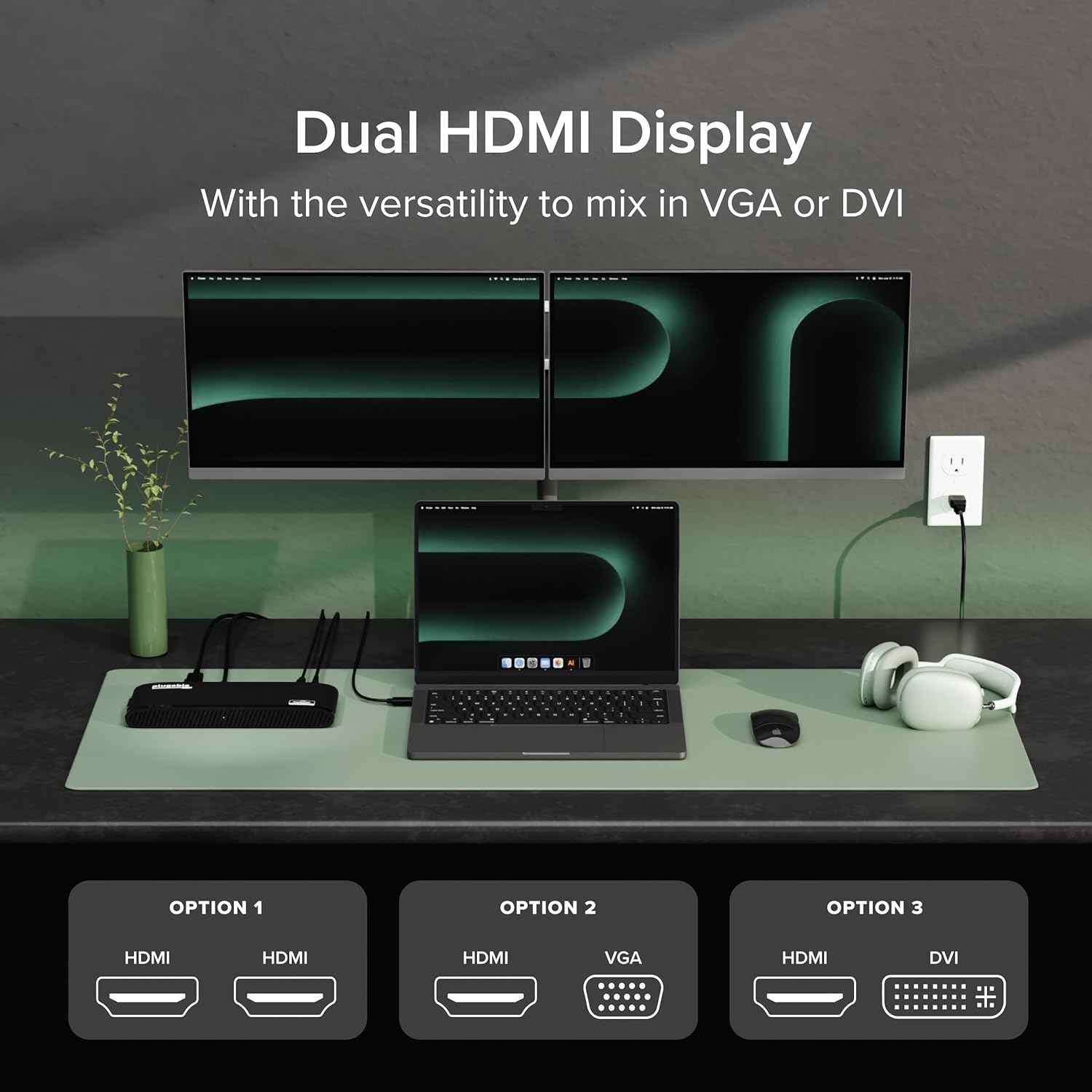
Image: A laptop connected to two external monitors, demonstrating the dual display capability of the docking station.

Image: Visual representation of the flexible dual display options, including HDMI, DVI, and VGA connections with adapters.
2.USBポート
The docking station provides a total of six USB ports:
- 2x USB 3.0 ポート: 高速データ転送と対応機器の充電に。
- 4x USB 2.0 ポート: Ideal for connecting keyboards, mice, and other standard peripherals.
3. Network and Audio
- ギガビットイーサネット: Provides a stable and fast wired network connection, superior to Wi-Fi for critical tasks.
- オーディオ入力/出力: Dedicated 3.5mm jacks for connecting headphones/speakers and a microphone.
4. ユニバーサルな互換性
The UD-3900H is compatible with a wide range of operating systems and laptop types:
- ウィンドウズ: 7から11まで。
- MacOSの: 10.14+ (Mojave and later), including Apple Silicon M1, M2, M3, M4, and M5 systems.
- ChromeOS: 100.x以降。

Image: Icons representing Windows, macOS, and ChromeOS, indicating the broad operating system compatibility of the docking station.
メンテナンス
To ensure the longevity and optimal performance of your Plugable UD-3900H docking station, follow these maintenance guidelines:
- クリーニング: Use a soft, dry, lint-free cloth to gently wipe the exterior of the docking station. Avoid using liquid cleaners, aerosols, or solvents.
- 換気: 過熱を防ぐため、ドッキングステーションは必ず換気の良い場所に設置してください。通気口を塞がないでください。
- ストレージ: 長期間使用しない場合は、ドッキング ステーションを直射日光や極端な温度を避け、涼しく乾燥した場所に保管してください。
- ケーブル管理 Avoid excessive bending or tugging on connected cables to prevent damage to the ports and cables themselves.
トラブルシューティング
発生する可能性のある一般的な問題に対する解決策は次のとおりです。
- Displays Not Working:
- Ensure all display cables are securely connected to both the docking station and your monitors.
- Verify that the DisplayLink drivers are correctly installed. For macOS, this often requires manual installation and granting 'Screen Recording' permissions. Refer to the 'Driver Installation' section.
- コンピュータとドッキング ステーションを再起動してみてください。
Video: A Plugable Technologies video demonstrating how to install the DisplayLink Manager App, particularly useful if displays are not working.
- ノートパソコンの充電なし: This docking station does not provide power delivery to charge your laptop. Your laptop will require its own power adapter connected directly.
- Intermittent USB Device Connection: Ensure the USB cable connecting the dock to your laptop is secure. Try connecting the device to a different USB port on the dock.
- ネットワーク接続の問題: イーサネットケーブルの接続を確認してください。ルーター/モデムが正常に動作していることを確認してください。
- オーディオの問題: Verify that your audio devices are correctly plugged into the audio jacks. Check your computer's sound settings to ensure the DisplayLink audio output is selected.

Image: A visual reminder that the Plugable UD-3900H docking station does not provide laptop charging.
仕様
| ブランド | プラグ可能 |
| モデル番号 | UD-3900H |
| オペレーティングシステムの互換性 | Chrome OS, Windows 10, Windows 11, Windows 8.1, macOS 10.14 Mojave+ |
| アイテム重量 | 11.4オンス |
| 製品寸法(長さx幅x高さ) | 9.4インチ x 3.1インチ x 1.2インチ (23.88 x 7.87 x 3.05 cm) |
| 色 | 黒 |
| ハードウェアインターフェイス | USB Type C、USB 3.0 |
| USBポート合計 | 6 (USB 3.0 x 2、USB 2.0 x 4) |
| ビデオ出力 | Dual HDMI (up to 1920x1200 @ 60Hz), DVI (with HDMI/VGA adapters) |
| イーサネット | Gigabit Ethernet (LAN) |
| オーディオ | 3.5mm Audio In (Microphone), 3.5mm Audio Out (Headphones/Speakers) |
| ワットtage | 24W |
保証とサポート
The Plugable UD-3900H is designed for reliability and comes with comprehensive support:
- 生涯サポート: Includes lifetime support from Plugable's North American team of connectivity experts.
- 2年間の保証: Backed by a 2-year warranty, certified to exceed industry standards.
For further assistance, please visit the official Plugable webサイトをご覧いただくか、サポート チームに直接お問い合わせください。