
1. はじめにview
The Goal Zero Lighthouse Micro Charge Flashlight is a compact, versatile lighting solution designed for various applications, including emergency preparedness, outdoor activities, and everyday use. This device functions as both a flashlight and a power bank for small USB-compatible devices. It features adjustable light settings and can be recharged via USB or a compatible solar panel.
The package includes one Lighthouse Micro Charge Lantern.
主な機能は次のとおりです。
- Integrated USB charging port for device charging.
- Multiple light modes and adjustable brightness.
- IPX6 weatherproof rating.
- コンパクトで持ち運びに便利なデザイン。
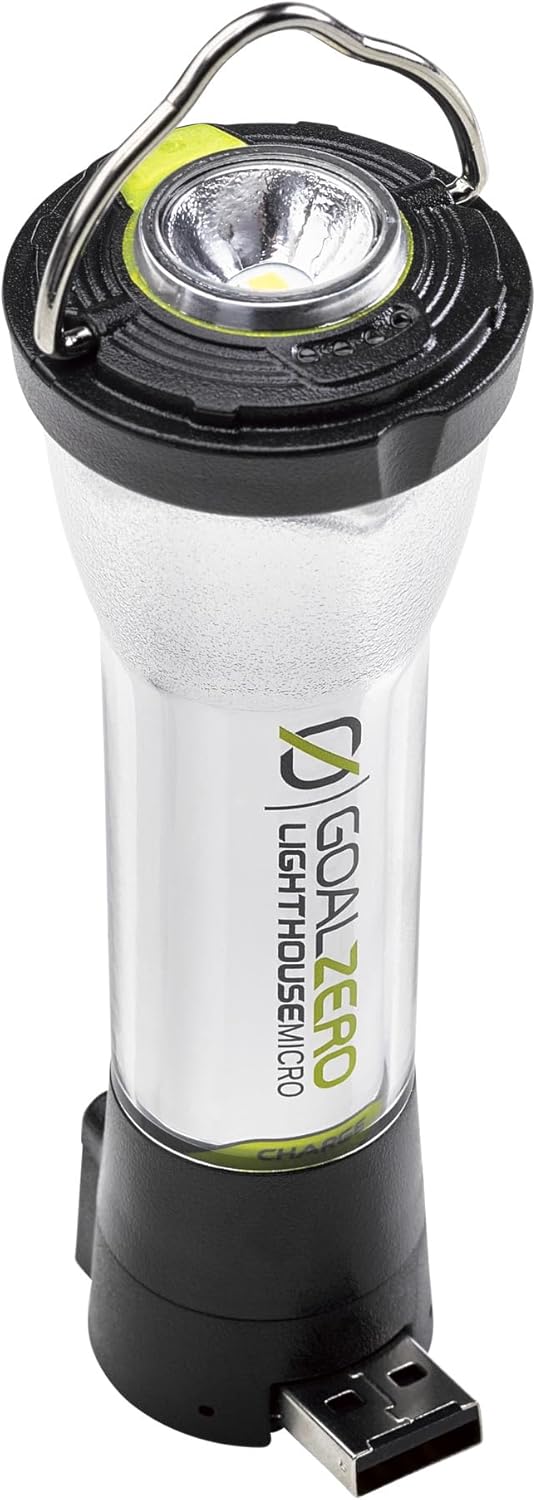
Image: The Goal Zero Lighthouse Micro Charge Flashlight, showing its compact design and integrated USB port.
2. セットアップ
2.1 初期充電
Before first use, fully charge your Lighthouse Micro Charge Flashlight. This ensures optimal battery performance and longevity.
- Locate the integrated USB charging port at the base of the flashlight.
- Connect the flashlight to any standard USB power source (e.g., wall adapter, computer USB port, or compatible solar panel) using a USB-A cable.
- The LED indicator lights will show charging progress. The flashlight is fully charged when all indicator lights are solid.
Charging time is approximately 3.5 hours when connected to a USB source or compatible solar panel.

Image: The Lighthouse Micro Charge with its integrated USB charging connector extended, ready for charging.
3. 操作手順
3.1 Powering On/Off and Light Modes
The Lighthouse Micro Charge features a single button for controlling power and cycling through light modes.
- 電源ボタンを1回押すと懐中電灯が点灯します。
- Subsequent presses will cycle through the available light modes:
- Flashlight mode (top LED).
- One-sided lantern mode (half of the side LEDs).
- Both-sided lantern mode (all side LEDs).
- To turn off the device, press the power button until the light turns off, or hold the button down for a few seconds in any mode.
3.2 明るさの調整
To adjust the brightness in any active light mode:
- Once a light mode is active, press and hold the power button. The brightness will gradually increase or decrease.
- 希望の明るさレベルに達したらボタンを放します。

Image: The Lighthouse Micro Charge illuminating an area, demonstrating its lantern functionality.
3.3 パワーバンクの機能
The Lighthouse Micro Charge can provide emergency power to small USB devices.
- Ensure the Lighthouse Micro Charge has sufficient battery life.
- Extend the integrated USB-A port from the base of the flashlight.
- Connect your small USB device (e.g., smartphone, GPS) to the USB-A port using its charging cable.
- The Lighthouse Micro Charge will begin charging your device.
Note: Using the power bank feature will deplete the flashlight's battery, reducing its light runtime.
4. Charging the Lighthouse Micro Charge
The Lighthouse Micro Charge offers flexible charging options:
- USBソース: Connect the integrated USB-A plug directly into any powered USB port (e.g., computer, wall adapter, car charger). Full charge in approximately 3.5 hours.
- ソーラーパネル: Connect to a compatible Goal Zero solar panel (sold separately). Charging time varies depending on solar intensity. Full charge in approximately 3.5 hours under optimal sunlight.
The battery indicator LEDs will illuminate during charging, showing the current charge level. All LEDs will be solid when fully charged.

Image: A Lighthouse Micro Charge flashlight being charged by a Goal Zero solar panel, set up next to a camper in a natural outdoor setting.
5. 仕様
| 特徴 | 詳細 |
|---|---|
| モデル番号 | 32008 |
| 寸法 | 4.4"L x 1.5"W (112 x 37.75 mm) |
| 重さ | 3.07オンス(87グラム) |
| 輝度 | 最大135ルーメン |
| 電池のタイプ | 18650リチウムイオン(付属) |
| Battery Life (Lantern - Both Sides) | 7時間(高)、80時間(低) |
| Battery Life (Lantern - One Side) | 15時間(高)、170時間(低) |
| 電池寿命(懐中電灯) | 8.5時間(高)、100時間(低) |
| Charging Time (USB/Solar) | 約3.5時間 |
| 耐水性 | IPX6防水 |
| 出力ポート | USB-A (5V, 1A, 5W max) |
6. メンテナンス
To ensure the longevity and optimal performance of your Lighthouse Micro Charge Flashlight, follow these maintenance guidelines:
- クリーニング: 外側は柔らかくて乾いた布で拭いてください。amp cloth. Avoid using harsh chemicals or abrasive cleaners. Ensure the USB port is free of dust and debris.
- ストレージ: Store the flashlight in a cool, dry place away from direct sunlight and extreme temperatures. For long-term storage, ensure the battery is charged to approximately 50-70% to preserve battery health. Recharge every 3-6 months if not in use.
- バッテリーのケア: The integrated battery is not user-replaceable. Do not attempt to open the device.
- 水への露出: While IPX6 weatherproof, avoid submerging the device in water. Dry thoroughly if it gets wet.
7。 トラブルシューティング
If you encounter issues with your Lighthouse Micro Charge Flashlight, refer to the following common solutions:
| 問題 | 考えられる原因 | 解決 |
|---|---|---|
| ライトが点灯しません。 | 電池が消耗しています。 | Charge the flashlight using a USB source or solar panel. |
| 光が暗かったりちらついたりします。 | バッテリーの充電量が少ない。 | 懐中電灯を充電してください。 |
| Device not charging from flashlight. | 懐中電灯の電池残量が少ないか、ケーブルに不具合があります。 | Ensure flashlight is charged. Try a different USB cable. Ensure the device being charged is compatible with 5V, 1A output. |
| 懐中電灯が充電されません。 | Faulty USB source or cable. | Try a different USB port or power adapter. Ensure the USB cable is fully inserted. If using solar, ensure direct sunlight. |
If the problem persists after trying these solutions, please contact Goal Zero customer support.
8. 保証とサポート
Goal Zero products are designed for durability and performance. The Lighthouse Micro Charge Flashlight comes with a 2年間保証.
For warranty claims, technical assistance, or further inquiries, please contact Goal Zero customer support. You may need your proof of purchase and the product model number (32008).
Additional resources and support information can often be found on the official Goal Zero webサイト。

Image: An infographic highlighting Goal Zero's commitment to quality and customer satisfaction, including a 2-year warranty and customer support.