
1. はじめに
The HTRC H150 Duo is a high-performance, twin-channel multi-charger designed for various battery types, including LiPo, LiFe, LiIon, LiHV, NiCd, NiMH, and PB batteries. It features dual independent outputs, allowing simultaneous charging of two different battery packs. This manual provides essential information for safe and efficient operation of your H150 Duo charger.
2. 安全に関する注意事項
Please read all safety warnings and instructions carefully before using this product. Failure to do so may result in fire, injury, or property damage.
- Always supervise the charging process. Never leave the charger unattended while it is connected to a power source or charging/discharging batteries.
- Ensure proper ventilation. Do not operate the charger in an enclosed space or cover it during use.
- Keep the charger away from moisture, heat, direct sunlight, and flammable materials.
- Use only the original cables and connectors provided with the charger.
- Verify battery type, cell count, voltage, and current settings match the battery specifications before starting any operation. Incorrect settings can cause severe damage to the battery and charger.
- Do not attempt to charge damaged, swollen, or leaking batteries.
- お子様の手の届かない場所に保管してください。
3.製品オーバーview
3.1 パッケージ内容
The HTRC H150 Duo package includes the following items:
- 1 x HTRC H150 AC/DC Duo Device
- 1 x AC Power Cord (US plug)
- 1 xDC電源コード
- 充電ケーブル2本
- 2 x Charging Boards with Pin Cords

Image: HTRC H150 Duo charger with all included accessories, including power cords, charge cables, and balance boards.
3.2 コンポーネントの識別
Familiarize yourself with the various parts of your HTRC H150 Duo charger:
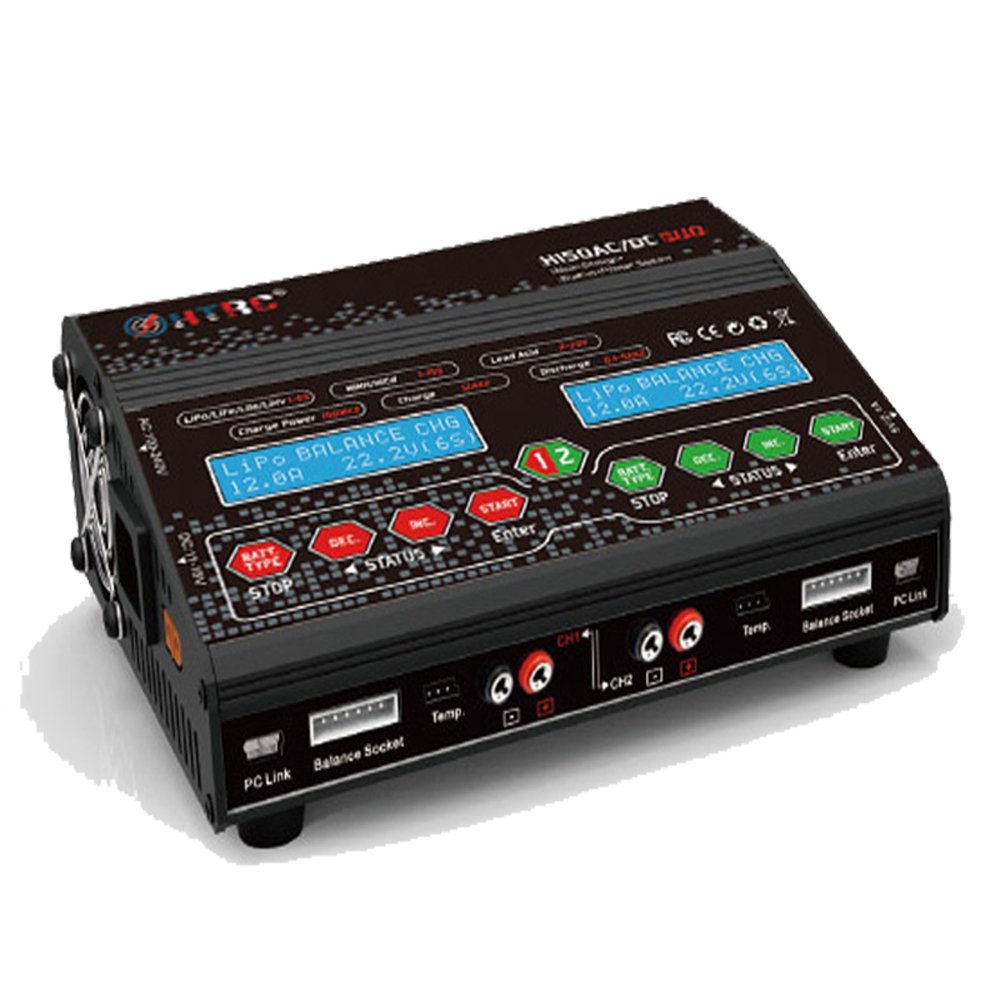
画像: 正面 view of the HTRC H150 Duo. It features two independent LCD displays, each with dedicated control buttons (BAT.TYPE, DEC, INC, STATUS, ENTER, START/STOP) for managing two charging channels simultaneously. Output ports and balance ports are located at the front bottom.

画像: サイド view of the HTRC H150 Duo, illustrating the cooling fans for heat dissipation, PC Link ports, 3-pin output ports, and 6S balance ports. A 5V/2.1A USB output port is also visible.

画像: 背面 view of the HTRC H150 Duo, showing the AC input (100-240V) and DC input (11-28V) ports. The waterproof operation buttons are also highlighted.
4. セットアップ
4.1電源接続
The H150 Duo supports both AC and DC power inputs.
- AC電源(110-240V): Connect the provided AC power cord to the AC input port on the charger and then plug it into a wall outlet.
- DC電源(11~28V): Connect the provided DC power cord to the DC input port on the charger and to a suitable DC power source (e.g., a car battery or a regulated DC power supply).
Once connected, the charger will power on, and the LCD displays will illuminate.
5. 操作手順
5.1 基本的な操作フロー
- バッテリーを接続します: Connect your battery to the appropriate output port and, if applicable, the balance port.
- バッテリータイプを選択: Press the 'BAT.TYPE' button to cycle through and select the correct battery chemistry (e.g., LiPo, NiMH, PB).
- パラメータを設定します: Use the 'DEC' and 'INC' buttons to adjust charging current, cell count, and other relevant parameters according to your battery's specifications.
- 設定を確認: Press the 'ENTER' button to confirm your selections.
- 運用開始: Press and hold the 'START' button for a few seconds to begin the charging or discharging process. The charger will perform a safety check before starting.
- 停止操作: Press the 'STOP' button at any time to halt the current operation.
5.2つの充電モード
- バランスチャージ (LiPo/LiFe/LiIon/LiHV): This mode charges and balances individual cells of lithium-based batteries, ensuring optimal performance and longevity.
- Charge (NiCd/NiMH, PB): Standard charging mode for Nickel-Cadmium, Nickel-Metal Hydride, and Lead-Acid batteries.
- 退院: ユーザーが定義した容量までバッテリーを放電しますtage または容量。
- ストレージ: Charges or discharges lithium batteries to their optimal storage voltage, preserving battery health during periods of inactivity.
5.3 USB DC Output
The charger includes a USB DC output port (5V 2.1A) for charging compatible USB devices. Connect your device to this port while the charger is powered on.
6. メンテナンス
- クリーニング: 充電器の外装を清掃する際は、柔らかく乾いた布をご使用ください。溶剤や研磨剤は使用しないでください。
- ストレージ: 充電器は直射日光や極端な温度を避け、涼しく乾燥した場所に保管してください。
- 検査: Regularly inspect cables and connectors for any signs of damage. Replace damaged components immediately.
7。 トラブルシューティング
- 充電器の電源が入らない: Ensure both AC or DC power cables are securely connected and the power source is active.
- 表示されるエラー メッセージ: Refer to the specific error code displayed on the screen. Common errors relate to incorrect battery settings, connection issues, or internal faults. Double-check all connections and settings.
- バッテリーが充電されない: Verify that the battery type, cell count, and current settings are correct. Ensure the battery is properly connected to both the main output and balance ports (if applicable).
- 過熱: Ensure the charger's cooling fans are not obstructed and the charger is in a well-ventilated area. Reduce the charging current if overheating persists.
8. 仕様
| 特徴 | 仕様 |
|---|---|
| 入力ボリュームtage | AC110~240V / DC11~28V |
| 充電回路電源 | 150W×2 |
| Discharge Circuit Power | 20W×2 |
| 充電電流範囲 | 0.1~12A×2 |
| 放電電流範囲 | 0.1~5A×2 |
| バランシングのための電流ドレイン | 500mA /セル |
| LiPo/LiIon/LiFe/LiHv Cell Count | 1-6 cells x 2 |
| NiCd/NiMHバッテリーセル数 | 1-15 cells x 2 |
| 鉛電池容量tage | 2-20V x 2 |
| スマートバッテリーサポート | I/II/III x 2 |
| USB DC Output | 5V 2.1A |
| 寸法 | 195 x 143 x 70mm |
| 正味重量 | 1.05kg(2.3ポンド) |
9. 保証とサポート
For warranty information or technical support, please refer to the documentation provided with your purchase or contact HTRC customer service through their official webサイトでご確認ください。購入証明として購入レシートを保管してください。