
導入
This manual provides instructions for the proper use and care of your Helios 77M-4 50mm F1.8 vintage lens. Designed for Sony E-mount cameras, this manual focus lens offers a classic photographic experience with its distinct optical characteristics. Please read this manual thoroughly before using the lens to ensure optimal performance and longevity.
レンズ部品
Familiarize yourself with the main components of your Helios 77M-4 lens.
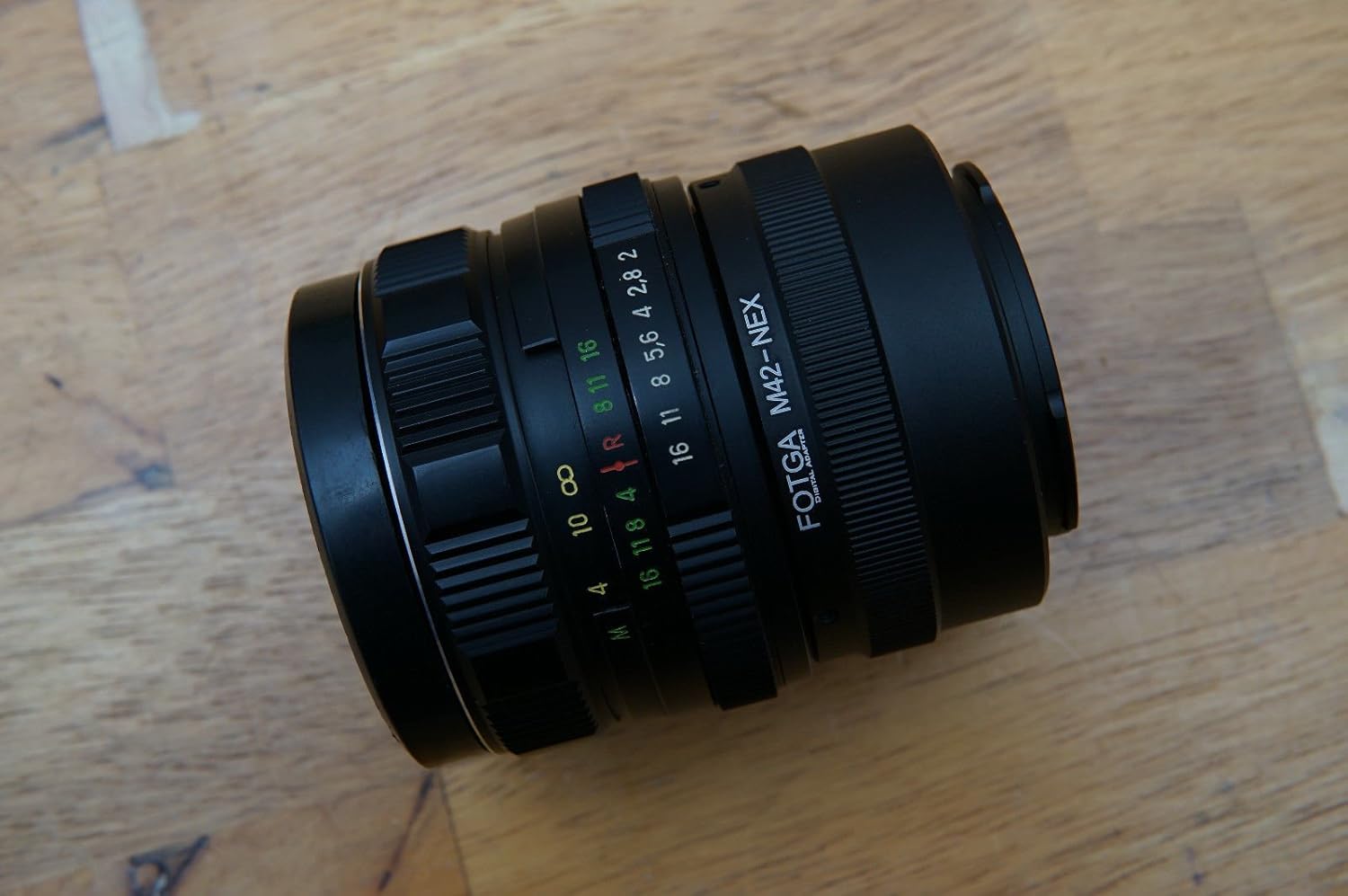
Image: The Helios 77M-4 50mm F1.8 lens, displaying its manual focus ring, aperture ring, and depth of field scale. This view highlights the robust construction and clear markings essential for manual operation.
- フォーカスリング: Used to adjust the focus manually.
- 絞りリング: Used to set the desired aperture (f-stop).
- 被写界深度スケール: Provides an indication of the depth of field at various apertures.
- 取り付けリング: レンズをカメラ本体に接続します。
設定
レンズの取り付け
- カメラの電源がオフになっていることを確認してください。
- Remove the rear lens cap from the Helios 77M-4 lens and the body cap from your Sony E-mount camera.
- Align the white index mark on the lens barrel with the corresponding white index mark on the camera body.
- レンズをカメラマウントに挿入し、カチッと音がするまで時計回りに回してください。レンズを無理に押し込まないでください。
- Once mounted, remove the front lens cap.

Image: The Helios 77M-4 lens securely attached to a Sony E-mount camera body. This illustrates the correct mounting position, ready for use.
カメラ設定
Since this is a manual lens, you will need to adjust your camera settings:
- カメラを次のように設定します マニュアル(M) or 絞り優先(A) モード。
- 有効にする "Release without lens" or "Shoot without lens" in your camera's menu, as the camera will not detect an electronic connection to the lens.
- Consider using "Focus Peaking" そして "Magnified View" features on your camera for easier manual focusing. Refer to your camera's manual for specific instructions on these features.
レンズの操作
絞りの調整
The aperture is controlled directly on the lens using the aperture ring. Rotate the ring to select your desired f-stop. A wider aperture (smaller f-number like F1.8) allows more light and creates a shallower depth of field, ideal for portraits. A narrower aperture (larger f-number) allows less light and creates a deeper depth of field, suitable for landscapes.
手動フォーカシング
To focus, rotate the focus ring on the lens barrel until your subject appears sharp in the viewfinder or on the LCD screen. Utilize your camera's focus peaking and magnification features for precise focusing, especially at wider apertures.
- フォーカスピーキング: 焦点が合った領域を色付きのアウトラインで強調表示します。
- 拡大 View: Zooms in on a portion of the image for critical focus assessment.
メンテナンス
レンズのクリーニング
- Use a soft, lint-free microfiber cloth specifically designed for optical surfaces to clean the front and rear elements.
- 頑固な汚れには、レンズに直接つけずに、布に少量のレンズ洗浄液をつけて拭いてください。
- 傷がつかないように拭く前にブロワーブラシを使用してほこりの粒子を取り除きます。
- 研磨材や刺激の強い化学薬品は絶対に使用しないでください。
ストレージ
- レンズを使用しないときは、必ずレンズの前面と背面のキャップを取り付けてください。
- レンズは直射日光や極端な温度を避け、涼しく乾燥した場所に保管してください。
- If storing for extended periods, consider using a dehumidifying agent to prevent fungus growth.
トラブルシューティング
| 問題 | 考えられる原因 | 解決 |
|---|---|---|
| Camera does not recognize lens / Cannot take photos | Manual lens, no electronic contacts. | Enable "Release without lens" or "Shoot without lens" in camera settings. |
| 画像がぼやけている | Incorrect focus or camera shake. | Ensure proper manual focus using focus peaking/magnification. Use a faster shutter speed or tripod to prevent camera shake. |
| Images are too dark/bright | 露出設定(絞り、シャッタースピード、ISO)が正しくありません。 | Adjust aperture on the lens. Adjust shutter speed and ISO on the camera to achieve desired exposure. |
| Dust or smudges on images | レンズ要素が汚れています。 | Clean lens elements carefully using a blower brush and microfiber cloth. |
仕様
| 特徴 | 詳細 |
|---|---|
| モデル | Helios 77M-4 |
| 焦点距離 | 50ミリメートル |
| 最大絞り | F1.8 |
| レンズタイプ | 標準単焦点レンズ |
| 互換性のある取り付け | Sony E-Mount (NEX, A7 series, 6500, a6300, a6000, a5100, a5000, a3000) |
| フォーカスタイプ | マニュアルフォーカス |
| メーカー | 77M-4 (as per product data) |
保証とサポート
This product is a vintage lens. Specific warranty information may vary depending on the seller and purchase conditions. Please refer to your purchase documentation for details regarding any applicable warranty.
For technical support or inquiries, please contact the retailer or the original manufacturer if contact information is available. As a vintage item, direct manufacturer support may be limited.