
1. 重要な安全情報
Read all instructions carefully before installation and use. Failure to follow these instructions may result in property damage, serious injury, or death. If you do not understand these instructions, or have doubts about the safety of the installation, contact a qualified installer.
- 重量容量: This mount is designed for flat panel displays up to 32 inches. Do not exceed the maximum weight capacity specified by the manufacturer.
- 壁構造: Ensure the mounting surface can safely support the combined weight of the equipment and hardware. Use appropriate fasteners for the wall type (wood stud, concrete, brick, etc.).
- 専門家による設置: For optimal safety, professional installation is recommended.
- 可動部品: Exercise caution when adjusting the tilt mechanism to avoid pinching or injury.
2. パッケージ内容
Verify that all components are present and undamaged before proceeding with installation. If any parts are missing or damaged, do not attempt to install and contact customer support.
- Flat Panel Wall Mount (FTR100)
- Mounting Hardware Kit (screws, washers, anchors - specific contents may vary)
- インストール手順(この文書)
3. セットアップとインストール
This section provides step-by-step instructions for mounting your Chief FTR100 Tilting Hardware Mount.
3.1 インストール前のチェック
- Identify the desired mounting location. Ensure there are no hidden electrical wires or plumbing.
- Confirm the wall type (wood stud, concrete, brick) and select appropriate mounting hardware.
- Measure the VESA mounting pattern on your flat panel display to ensure compatibility with the FTR100 mount.
3.2 壁プレートの取り付け
- Position the wall plate at the desired height and mark the drilling locations. Use a level to ensure accuracy.
- Drill pilot holes according to the recommended drill bit size for your chosen fasteners and wall type.
- Secure the wall plate to the wall using the provided mounting hardware. Ensure all screws are tightened securely.
3.3 Attaching the Display to the Mount
- Attach the display brackets to the back of your flat panel display using the appropriate screws from the hardware kit. Ensure they are securely fastened.
- Carefully lift the display and hook the display brackets onto the wall plate. The FTR100 utilizes a Q-Latch mounting system for secure attachment.
- Engage the Q-Latch mechanism to lock the display onto the wall plate. Refer to the specific latching instructions provided with the hardware kit.
- The mount can be used in either a horizontal or vertical orientation, depending on your display and application.
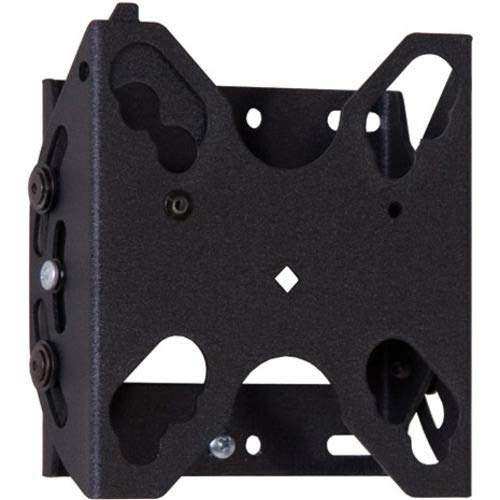
図1: Chief FTR100 Tilting Hardware Mount. This image shows the overall design of the mount, including the wall plate and display brackets, ready for installation.
4. マウントの操作
The Chief FTR100 mount allows for tilting adjustments to achieve optimal view角度を変える。
4.1 Tilting the Display
Once the display is securely mounted, you can adjust its tilt angle. The FTR100 offers a maximum tilt angle of 15 degrees.
- Gently grasp the top or bottom edge of the display.
- Carefully push or pull the display to achieve the desired tilt angle. The mount is designed to hold the position once set.
- Avoid excessive force when tilting. If the display does not move smoothly, check for obstructions or consult the troubleshooting section.
5. メンテナンス
Regular maintenance helps ensure the longevity and safe operation of your mount.
- クリーニング: マウントの清掃には、柔らかく乾いた布をご使用ください。仕上げを傷める可能性のある研磨剤入りの洗剤や溶剤は使用しないでください。
- 定期点検: すべての取り付けネジと接続部がしっかりと固定されているか、定期的に点検してください。必要に応じて締め直してください。
- 可動部品: The tilting mechanism is designed for smooth operation. If it becomes stiff, do not apply lubricants unless specifically recommended by Chief Mfg.
6。 トラブルシューティング
This section addresses common issues you might encounter with your Chief FTR100 mount.
- ディスプレイが水平ではありません:
- Check the wall plate installation. Ensure it was installed using a level.
- Verify that the display brackets are evenly attached to the back of the display.
- ディスプレイを傾けるのが難しい:
- ケーブルが傾斜機構を妨げていないことを確認してください。
- Confirm the display weight is within the specified limits for the mount.
- マウントが緩い感じ:
- Immediately remove the display.
- Re-tighten all wall plate and display bracket screws. If the issue persists, consult a professional installer.
7. 仕様
Detailed technical specifications for the Chief FTR100 Tilting Hardware Mount.
| 特徴 | 仕様 |
|---|---|
| ブランド | チーフ |
| モデル番号 | FTR100 |
| アイテム重量 | 2.66ポンド |
| 製品寸法 | 2.87 x 6.02 x 9.29インチ |
| 取り付けタイプ | 壁掛け |
| 移動タイプ | 傾き |
| 材料 | 金属 |
| 色 | 黒 |
| 最大傾斜角度 | 15度 |
| 対応デバイス | Monitor (Flat Panel Display up to 32") |
| 特集 | Tilting, Q-Latch Mounting System, Horizontal/Vertical Use |
8. 保証とサポート
For warranty information, technical support, or to inquire about replacement parts, please contact Chief Manufacturing directly. Refer to the official Chief website or your purchase documentation for current contact details and warranty terms.
メーカー: チーフ製造
Webサイト: www.legrandav.com/products/chief (これはよくある URL for Chief products, please verify with official documentation)