
1. はじめに
Thank you for choosing the Baseus Encok S16 Neck Hung Bluetooth Wireless In-Ear Earphone. This manual provides detailed instructions for setup, operation, and maintenance to ensure optimal performance and longevity of your device. Please read this manual thoroughly before use.
2. パッケージ内容
パッケージにすべてのアイテムが揃っていることを確認します。
- 1 x Baseus Encok S16 Wireless Earphone
- 充電ケーブル x 1
- ユーザーマニュアル x 1
- 保証カード x 1

Image: Contents of the Baseus Encok S16 earphone package, showing the earphones, charging cable, user manual, and warranty card.
3.製品オーバーview
The Baseus Encok S16 earphones feature a neck-hung design for comfortable and secure wear. Key features include:
- 磁気固定: Earbuds can be magnetically joined when not in use, preventing tangling and loss.
- Adjustable Coils: The earphone line length can be adjusted by sliding for a customized fit.
- ハイファイサウンド: Equipped with a dynamic speaker unit, composite diaphragm, and independent tune trope structure for clear audio.
- 効率的な電力: Utilizes a British CSR chip and 120mAh battery for low power consumption and extended battery life.
- ユニバーサル互換性: Smartly matches with smartphones and tablet PCs, compatible with all Bluetooth 4.0 enabled devices.

Image: Close-up of the Baseus Encok S16 earbuds demonstrating their magnetic connection capability.
4. セットアップ
4.1 イヤホンの充電
- Connect the provided charging cable to the charging port on the earphone's control unit.
- 充電ケーブルのもう一方の端を USB 電源 (コンピューターの USB ポート、USB 壁アダプターなど) に接続します。
- 充電中はインジケーター ライトが点灯し、完全に充電されると消灯するか色が変わります。
- フル充電には通常約 1.5 ~ 2 時間かかります。
4.2Bluetoothペアリング
- イヤホンが完全に充電されていることを確認してください。
- Press and hold the Power button on the control unit until the indicator light flashes red and blue alternately, indicating pairing mode.
- スマートフォンまたは Bluetooth 対応デバイスで、Bluetooth 設定に移動します。
- 検索する available devices and select "Baseus Encok S16" from the list.
- Once connected, the indicator light will flash blue slowly or turn solid blue.
- パスワードの入力を求められた場合は、「0000」と入力してください。
5. 操作手順
5.1 基本的な制御
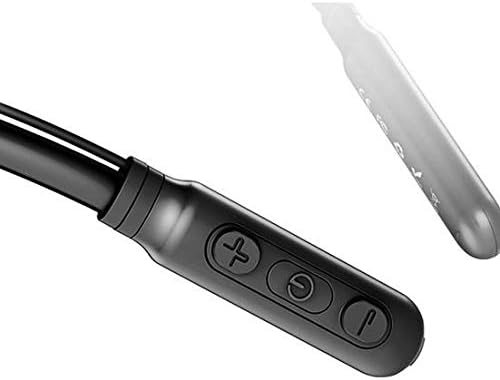
Image: Close-up of the Baseus Encok S16 earphone's inline control unit, showing the power/multi-function button, volume up, and volume down buttons.
| ボタン | 関数 |
|---|---|
| 電源ボタン(中央) |
|
| ボリュームアップ(+) |
|
| ボリュームダウン (-) |
|
5.2 イヤホンの装着
Place the neckband around your neck, ensuring the control unit is easily accessible. Insert the earbuds comfortably into your ears. Adjust the earphone line length using the sliding coils for a secure and comfortable fit.
6. メンテナンス
- イヤホンとコントロールユニットは、定期的に柔らかく乾いた布で清掃してください。
- Avoid exposing the earphones to extreme temperatures, humidity, or corrosive liquids.
- Store the earphones in a cool, dry place when not in use. The magnetic earbuds can help prevent tangling during storage.
- 保証が無効になるため、イヤホンを自分で分解または修理しないでください。
7。 トラブルシューティング
| 問題 | 解決 |
|---|---|
| 電源が入らない | Ensure the earphones are fully charged. Press and hold the Power button for 3 seconds. |
| デバイスとペアリングできません |
|
| 音が出ない、または音量が小さい |
|
| 断続的な接続 |
|
8. 仕様
| 特徴 | 詳細 |
|---|---|
| ブランド | ベースス |
| モデル番号 | FWP-E-S16 |
| 接続技術 | ブルートゥース |
| Bluetoothバージョン | 4.0 (compatible with devices enabling Bluetooth 4.0) |
| フォームファクター | In Ear, Neck Hung |
| コントロールタイプ | 音声コントロール、タッチ(ボタン経由) |
| バッテリー容量 | 120mAh |
| 重さ | 30グラム |
| 含まれるコンポーネント | Wireless Earphone, Charging Cable, User Manual, Warranty Card |
9. 保証とサポート
This product comes with a Limited Warranty. Please refer to the included Warranty Card for detailed terms and conditions regarding coverage and duration.
For technical support or warranty claims, please contact your retailer or visit the official Baseus webカスタマーサービス情報のサイト。
世界貿易識別番号 (GTIN): 06953156264489