
導入
This manual provides detailed instructions for the setup, operation, and maintenance of your A4tech Bloody Light Strike B314 Gaming Keyboard. Please read this manual thoroughly before using the product to ensure optimal performance and longevity.
主な特徴
- Bloody 4 Light Strike Mechanical Switches: Experience ultra-fast response times of 0.2ms with infrared optic switches, providing a competitive edge in gaming.
- 耐久性の向上: Designed for intensive use, featuring A,S,D,W silicon keys with a convex shape for improved control and longevity.
- Neon Glare System LED Backlighting: Customize your gaming environment with vibrant LED backlighting, making keys easy to locate in low-light conditions.
- 9個のプログラム可能なキー: Personalize your gaming experience by assigning custom functions to 9 individually programmable keys.
- Double Secure Water-Resistance: The keyboard is electronically sealed with a water drain hole, protecting it from accidental spills and extending its lifespan.
パッケージ内容
パッケージにすべてのアイテムが揃っていることを確認します。
- Bloody Light Strike B314 Gaming Keyboard
- ユーザーマニュアル(このドキュメント)

Image: The retail packaging for the Bloody Light Strike B314 Gaming Keyboard, showing the keyboard with LED backlighting and key features highlighted.
セットアップガイド
- キーボードを接続します: キーボードの USB コネクタをコンピュータの利用可能な USB ポートに差し込みます。
- ドライバーのインストール: The keyboard is typically plug-and-play. Your operating system should automatically detect and install the necessary drivers. If prompted, follow the on-screen instructions.
- ソフトウェアのインストール(オプション): For advanced customization, including programming keys and managing backlighting, download and install the official Bloody software from the A4tech webサイト。
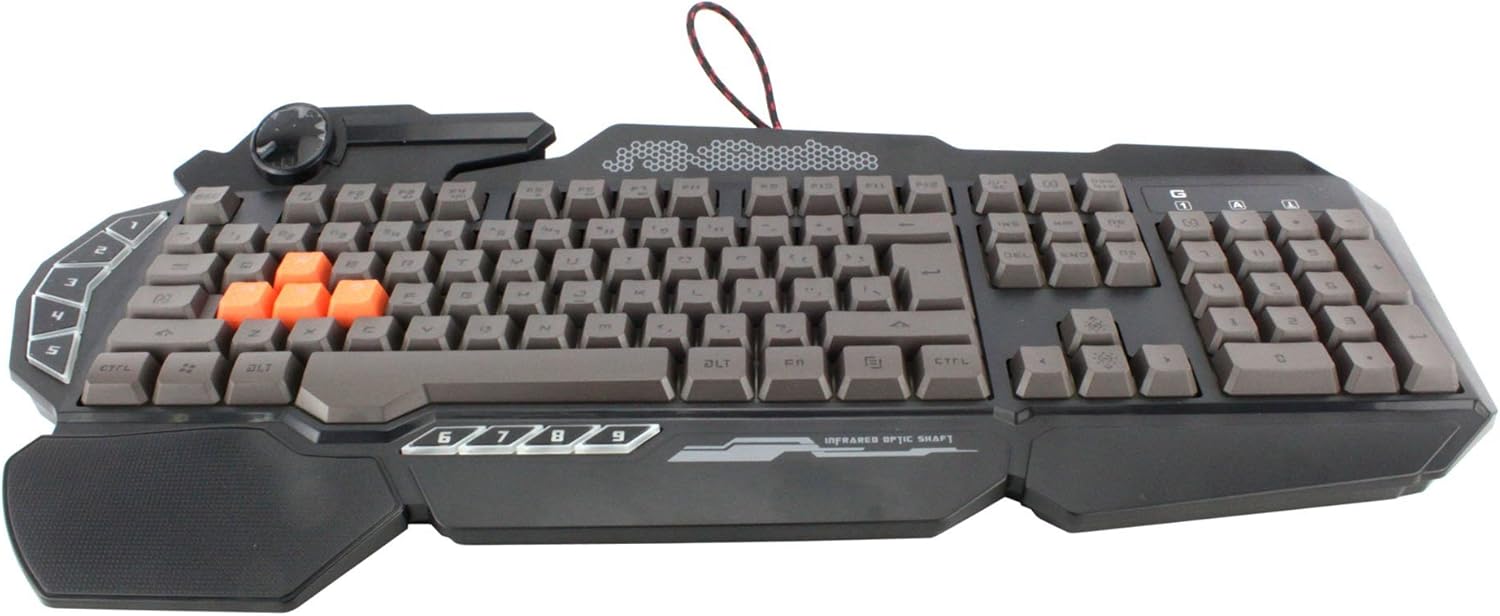
画像: トップダウン view of the Bloody Light Strike B314 Gaming Keyboard, showcasing the full QWERTY layout with orange WASD keys and dedicated macro keys on the left.
操作手順
基本的な使い方
The Bloody B314 functions as a standard QWERTY keyboard for everyday typing and gaming. Its infrared mechanical switches provide a fast and responsive typing experience.
プログラム可能なキー
The keyboard features 9 programmable keys, typically located on the left side. To customize these keys:
- Install the official Bloody software from the A4tech webサイト。
- Launch the software and navigate to the key customization section.
- Select the desired programmable key (e.g., G1-G9 or similar).
- Assign macros, key functions, or multimedia controls as needed.
- プロを保存file 変更を適用します。
LED Backlighting Control
The Neon Glare System LED backlighting can be adjusted using function key combinations:
- Fn + F12: Cycle through different backlighting modes (e.g., static, breathing, off).
- Fn + 上/下矢印: バックライトの明るさを調整します。
- Fn + 左/右矢印: Adjust backlight speed or direction (if applicable to the mode).
ゲームモード
Activate Game Mode to disable the Windows key and prevent accidental interruptions during gameplay.
- Fn + F8: ゲームモードのオン/オフを切り替えます。

画像: 斜めから view of the Bloody Light Strike B314 Gaming Keyboard, highlighting the ergonomic wrist rest and the distinct orange WASD keys.
メンテナンス
クリーニング
- 清掃する前に、キーボードをコンピューターから取り外してください。
- 柔らかくてamp キーボードの表面を拭くときは布を使用してください。刺激の強い化学薬品や研磨剤は使用しないでください。
- キー間のほこりやゴミを取り除くには、圧縮空気を使用してください。
- The water-resistant design helps protect against spills, but it is still recommended to clean up liquids promptly.
ストレージ
キーボードを長期間使用しない場合は、直射日光や極端な温度を避け、涼しく乾燥した場所に保管してください。
トラブルシューティング
キーボードが応答しない
- USB ケーブルがキーボードとコンピューターの両方にしっかりと接続されていることを確認します。
- キーボードを別の USB ポートに接続してみてください。
- コンピュータを再起動します。
- Check if the keyboard is recognized in your computer's Device Manager (Windows) or System Information (macOS).
バックライトが機能しない
- Ensure the backlighting is not turned off using the Fn + F12 combination.
- Adjust brightness using Fn + Up Arrow.
- カスタムプロを使用する場合files, ensure the backlighting settings are correctly configured in the Bloody software.
Programmable Keys Not Working
- Verify that the Bloody software is installed and running.
- Ensure your custom profiles are loaded and active within the software.
- Check for any software updates for the Bloody keyboard utility.
仕様
| 特徴 | 詳細 |
|---|---|
| ブランド | A4テック |
| モデル番号 | A4TKLA45173 |
| 接続技術 | 赤外線 |
| キーボードの説明 | 機械 |
| スイッチタイプ | Mechanical (Light Strike Optic) |
| 特集 | Backlit, Programmable Keys, Water Resistant |
| 色 | 黒 |
| キーボードのバックライト色のサポート | RGB (Neon Glare System) |
| キーの数 | 104 |
| プログラム可能なボタン | 9 |
| 耐水性レベル | 耐水性 |
| アイテム重量 | 2.9 ポンド |
保証とサポート
保証情報および技術サポートについては、A4techの公式ウェブサイトをご覧ください。 web公式サイトをご覧いただくか、カスタマーサービスに直接お問い合わせください。保証請求の際は、購入証明としてレシートを保管してください。
公式A4tech Webサイト: ホームページ