
1.製品オーバーview
The Anker Soundcore Bluetooth Speaker (Model A3102) is a portable wireless speaker designed to deliver superior sound quality and extended playtime. It features robust stereo sound with deep bass, an impressive 24-hour battery life, and IPX5-rated water resistance, making it suitable for various environments.
主な機能は次のとおりです。
- Astonishing Sound: Breathtaking stereo sound with deep bass, delivered with exceptional clarity and zero distortion by two high-sensitivity drivers and a patented bass port.
- 24H Worry-Free Battery Life: Anker's exclusive, long-life battery technology provides up to 24 hours of music playback on a single charge.
- 簡単な接続: Bluetooth ensures instant pairing and maintains a strong connection up to 66 feet (20 meters).
- Designed to Play: Combines a solid, drop-proof build with tactile materials and seamless controls.
- Grab, Go, Listen: Lightweight, yet robust unibody design provides the perfect soundtrack for various settings, including outdoor use.
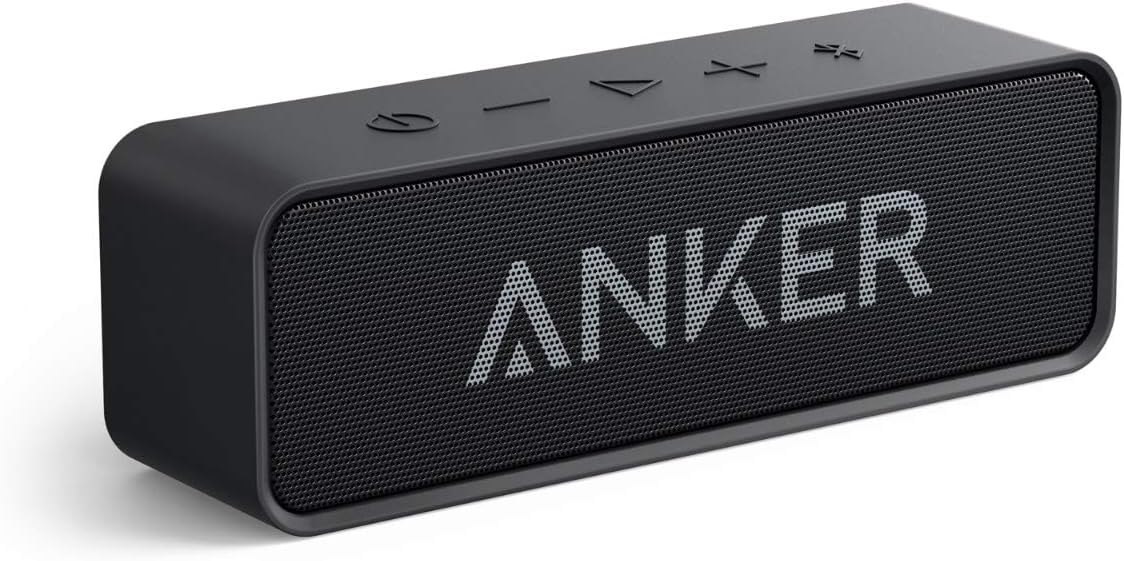
Image: The Anker Soundcore Bluetooth Speaker in black, showcasing its compact and rectangular design with the Anker logo on the front grille.
2. セットアップとペアリング
2.1 箱の中身
開梱したら、すべてのコンポーネントが揃っていることを確認してください。
- Anker Soundcore Bluetooth Speaker
- USB-Micro Cable (for charging)
- クイックスタートガイド
2.2 スピーカーの充電
Before first use, fully charge the speaker. Connect the provided USB-Micro cable to the speaker's charging port and the other end to a USB power adapter (not included) or a computer's USB port. The charging indicator light will illuminate during charging and turn off when fully charged.
フル充電すると最大 24 時間の再生が可能です。
2.3Bluetoothペアリング
Follow these steps to pair your Soundcore speaker with a Bluetooth-enabled device:
- 電源オン: Press and hold the power button on the speaker until the LED indicator light turns blue and flashes rapidly, indicating it is in pairing mode.
- Bluetoothを有効にする: スマートフォン、タブレット、またはラップトップで Bluetooth 設定に移動し、Bluetooth が有効になっていることを確認します。
- デバイスの選択: In the list of available Bluetooth devices, select "Soundcore A3102" (or similar name).
- 接続を確認: Once connected, the LED indicator light on the speaker will turn solid blue. You will also hear an audible confirmation tone.
The speaker will automatically attempt to reconnect to the last paired device when powered on. If connection fails, repeat the pairing steps.

Image: A person holding a smartphone, with the Anker Soundcore speaker in the foreground, illustrating the seamless Bluetooth connection process.
3. スピーカーの操作
3.1コントロールオーバーview
The Anker Soundcore speaker features intuitive controls located on the top panel:
- 電源ボタン: 長押しするとスピーカーの電源がオンまたはオフになります。
- ボリュームダウン (-): 押すと音量が下がります。
- 再生/一時停止ボタン: を押して、オーディオを再生または一時停止します。
- ボリュームアップ(+): 押すと音量が上がります。
- Bluetoothペアリングボタン: Press to enter Bluetooth pairing mode or disconnect from the current device.

Image: A close-up of the Anker Soundcore speaker's top panel, showing a finger pressing one of the control buttons.
3.2 オーディオ再生
Once paired, audio from your connected device will play through the Soundcore speaker. Use the volume buttons on the speaker or your device to adjust the sound level. The speaker delivers clear, powerful stereo sound with enhanced bass.

画像: 爆発した view of the Anker Soundcore speaker's internal components, highlighting the drivers and bass port responsible for its astonishing audio quality.
4. メンテナンスとケア
4.1 防水性能(IPX5)
The Soundcore speaker is rated IPX5 waterproof, meaning it can withstand splashes and light rain. It is protected against low-pressure water jets from any direction. However, it is not designed to be submerged in water. Ensure the charging port cover is securely closed before exposing the speaker to water.

Image: The Anker Soundcore speaker on a rocky shore, with water splashing over it, demonstrating its IPX5 waterproof capability.
4.2 清掃と保管
- スピーカーを掃除するには、柔らかくてamp 布。 刺激の強い化学薬品や研磨剤の入ったクリーナーの使用は避けてください。
- スピーカーを使用しないときは、涼しく乾燥した場所に保管してください。
- スピーカーを極端な温度や直射日光に長時間さらさないでください。
5。 トラブルシューティング
If you encounter issues with your Anker Soundcore speaker, refer to the following common troubleshooting steps:
| 問題 | 考えられる原因 | 解決 |
|---|---|---|
| スピーカーの電源が入りません。 | バッテリー残量が少なくなりました。 | Charge the speaker fully using the provided USB-Micro cable. |
| Bluetooth デバイスとペアリングできません。 | スピーカーがペアリング モードになっていません。デバイスの Bluetooth が無効になっています。デバイスが遠すぎます。 | Ensure speaker is in pairing mode (flashing blue LED). Enable Bluetooth on your device. Move device closer to speaker (within 20 meters). Forget/remove "Soundcore A3102" from your device's Bluetooth list and try pairing again. |
| 音が出ない、または音が歪む。 | 音量が低すぎる、スピーカーが接続されていない、オーディオ ソースに問題がある。 | Increase volume on both speaker and connected device. Ensure speaker is successfully paired. Test with a different audio source or device. |
| Bluetooth接続が不安定です。 | 干渉、デバイスが遠すぎる、障害物。 | Move speaker and device closer. Avoid placing speaker near other wireless devices that may cause interference. Reduce obstacles between speaker and device. |
6. 仕様
Detailed technical specifications for the Anker Soundcore Bluetooth Speaker (Model A3102):
- モデル名: A3102
- 寸法: 奥行き2.1インチ x 幅6.5インチ x 高さ1.9インチ (奥行き5.3 cm x 幅16.5 cm x 高さ4.8 cm)
- 商品の重量: 0.79 Pounds (approximately 12.6 ounces / 357 grams)
- 接続技術: ブルートゥース
- Bluetooth範囲: 最大20メートル(66フィート)
- スピーカータイプ: ポータブル屋外スピーカー
- オーディオ出力モード: ステレオ
- スピーカーの最大出力: 6ワット
- 周波数応答: 50 Hz (最小)
- 電源: 電池式 (リチウムポリマー電池 1 個付属)
- バッテリー容量: 4400mAh
- 充電時間: Approximately 24 hours (Note: This value from specifications likely refers to playtime after a full charge, not the charging duration itself.)
- 耐水性レベル: IPX5(防水)
- 材料: Polycarbonate (PC) or similar thermoplastic
- 対応デバイス: スマートフォン、タブレット、ノートパソコン
- 含まれるコンポーネント: Soundcore Bluetooth Speaker, USB-Micro Cable, Quick Start Guide
7. 保証とサポート
7.1 保証情報
The Anker Soundcore Bluetooth Speaker comes with a Limited Warranty. For specific terms and conditions, please refer to the Quick Start Guide included with your product or visit the official Anker webサイト。
7.2 カスタマーサポート
For further assistance, technical support, or warranty claims, please contact Anker customer service. You can find contact information on the official Anker website or through the provided Quick Start Guide.
追加リソース: