
1. はじめに
This manual provides essential instructions for the proper setup, operation, and maintenance of your SentrySafe Executive Security Safe, Model PLX510487. This safe is designed to protect your valuables with an electronic lock and pry-resistant steel construction. Please read this manual thoroughly before using your safe to ensure optimal performance and security.
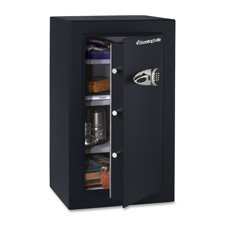
Figure 1: SentrySafe Executive Security Safe (Model PLX510487)
2. 安全情報
- Do not store safe keys inside the safe. Always keep override keys in a secure location away from the safe.
- 不正な取り外しを防止するために、金庫がしっかりと取り付けられていることを確認してください。
- Keep the electronic keypad dry and clean.
- This safe is not water resistant. Do not expose it to water or high humidity.
- Keep children away from the safe and do not allow them to operate the electronic lock.
3. パッケージ内容
パッケージにすべてのコンポーネントが含まれていることを確認します。
- SentrySafe Executive Security Safe (PLX510487)
- オーバーライドキー (2)
- 取り付けボルト(壁取り付け用)
- ユーザーマニュアル(このドキュメント)
4. セットアップ
4.1 開梱
- 金庫を梱包から慎重に取り出します。
- Inspect the safe for any signs of damage. If damaged, contact customer support.
- 必要に応じて将来の輸送に備えて梱包材を保管してください。
4.2 バッテリーの取り付け
The electronic lock requires four (4) AA alkaline batteries (not included).
- 金庫のドアの内側にある電池ボックスを見つけます。
- 電池ボックスのカバーを開きます。
- 正しい極性 (+/-) を確認して、新しい AA アルカリ電池 4 本を挿入します。
- 電池カバーをしっかりと閉じてください。
4.3 金庫の取り付け
For enhanced security, it is recommended to wall mount the safe.
- 金庫の重量を支えることができる堅固な表面であることを確認し、適切な取り付け場所を選択してください。
- Open the safe door and locate the pre-drilled mounting holes on the back panel.
- Position the safe against the wall and mark the drilling points through the mounting holes.
- マークした位置に壁の下穴を開けます。
- 金庫をドリルで開けた穴に合わせ、付属の取り付けボルトで固定します。すべてのボルトをしっかりと締めます。
4.4 初期コード設定
Upon first use, you will need to set your personal electronic access code.
- 金庫の扉を開いた状態で、扉の内側、ヒンジの近くにある赤いリセットボタンを押します。キーパッドの黄色のインジケーターライトが点灯します。
- 5 秒以内に、キーパッドに 3 ~ 8 桁の希望のコードを入力します。
- Press the 'A' or 'B' button to confirm your new code. The yellow light will turn off, and a beep will confirm the code is set.
- ドアを閉める前に、ドアを開いた状態で新しいコードをテストします。
5. 金庫の操作
5.1 Opening the Safe with Electronic Code
- キーパッドに3〜8桁の個人コードを入力します。
- Press the 'A' or 'B' button. The green indicator light will illuminate, and you will hear a beep.
- 5 秒以内にハンドルを時計回りに回して金庫のドアを開けます。
5.2 Opening the Safe with Override Key
In case of forgotten code or battery failure, use the override key.
- キーパッド パネル上のキーホール カバーを見つけます。
- カバーを取り外します。
- Insert the override key and turn it counter-clockwise.
- While holding the key turned, turn the handle clockwise to open the safe door.
- 使用後はキーを取り外し、キーホールカバーを取り付けてください。
5.3 金庫の閉め方と施錠方法
- 金庫の扉をしっかり閉めてください。
- Turn the handle counter-clockwise until it is fully engaged and the door is secured.
- 金庫は自動的にロックされます。
5.4 ユーザーコードの変更
- Open the safe door using your current code or override key.
- Press the red reset button on the inside of the door. The yellow indicator light will illuminate.
- 5 秒以内に、新しい 3 ~ 8 桁のコードを入力してください。
- Press the 'A' or 'B' button to confirm. The yellow light will turn off, and a beep will confirm the new code.
- ドアを閉める前に、ドアを開いた状態で新しいコードをテストします。
6. メンテナンス
6.1 電池の交換
When the batteries are low, the red indicator light will flash when you enter your code. Replace batteries promptly to avoid lock-out.
- 安全ドアを開きます。
- Replace all four AA alkaline batteries as described in Section 4.2.
- Your electronic code will be retained during battery replacement.
6.2 クリーニング
金庫の外側を柔らかくて清潔な布で拭いてください。amp 布で拭いてください。研磨剤入りの洗剤や溶剤は、仕上げや電子部品を損傷する恐れがあるため、使用しないでください。
7。 トラブルシューティング
- コードを入力しても金庫が開かない:
- Ensure batteries are fresh and installed correctly. Replace if necessary.
- Re-enter the code carefully. Ensure no buttons are stuck.
- Try using the override key to open the safe. - Keypad does not respond:
- Check battery installation and replace batteries.
- Ensure no debris is obstructing the buttons. - Forgotten code:
- Use the override key to open the safe.
- Once open, follow the steps in Section 5.4 to set a new user code. - Door does not close/lock properly:
- Ensure no items are obstructing the door or locking bolts.
- Check that the handle is fully turned counter-clockwise to engage the locking mechanism.
8. 仕様
| ブランド | セントリーセーフ |
| モデル番号 | PLX510487 |
| ロックタイプ | 電子、キー |
| 容量 | 6 立方フィート |
| 材料 | 合金鋼 |
| 取り付けタイプ | 壁掛け |
| 含まれるコンポーネント | ボルト、キー |
| アイテム重量 | 241 ポンド |
| 耐水性レベル | 耐水性はありません |
| 製品寸法 | 23.8 x 21.5 x 38.3インチ |
| 欧州連合 | 635665104871 |
9. 保証とサポート
SentrySafe products are manufactured to high-quality standards. For specific warranty information, please refer to the warranty card included with your purchase or visit the official SentrySafe website. For technical support, replacement parts, or further assistance, please contact SentrySafe customer service directly.
SentrySafe Official Webサイト: www.sentrysafe.com