
1. はじめに
This manual provides essential information for the safe and efficient operation of your Philips 40PFL4609/F8 40-inch Full HD LED Smart TV. Please read these instructions carefully before using your television and retain them for future reference.
2. 安全情報
火災、感電、けがのリスクを軽減するために、このテレビを使用するときは常に基本的な安全上の注意事項に従ってください。
- テレビを雨や湿気にさらさないでください。
- キャビネットを開けないでください。すべての修理は資格のある担当者に依頼してください。
- テレビの周囲に適切な換気を確保してください。
- 電源コードが踏まれたり挟まれたりしないように保護してください。
- 雷雨のときや長期間使用しない場合はテレビの電源プラグを抜いてください。
3. パッケージ内容
箱の中にすべてのアイテムが揃っていることを確認します。
- Philips 40PFL4609/F8 40-inch Full HD LED Smart TV
- リモコン(単4電池2本必要、付属)
- 電源コード
- Tabletop Stand and Screws
- クイックスタートガイド(このデジタルマニュアルには含まれていません)
- ユーザーマニュアル(このドキュメント)
4. セットアップ
4.1開梱と配置
Carefully remove the television from its packaging. Inspect the TV for any physical damage. Place the television on a stable, flat surface or mount it on a wall using a compatible VESA 200x200mm wall mount (sold separately).
4.2 スタンドの組み立て
If using the tabletop stand:
- 画面の損傷を防ぐため、テレビを画面を下にして柔らかく清潔な表面に置いてください。
- スタンドをテレビの下部にある取り付け穴に合わせます。
- 付属のネジを使用してスタンドを固定します。
4.3 電源の接続
Connect the power cord to the TV's power input, then plug the other end into a 110 VAC, 60 Hz electrical outlet.
4.4 外部機器の接続
Your Philips TV offers various connection options for external devices.
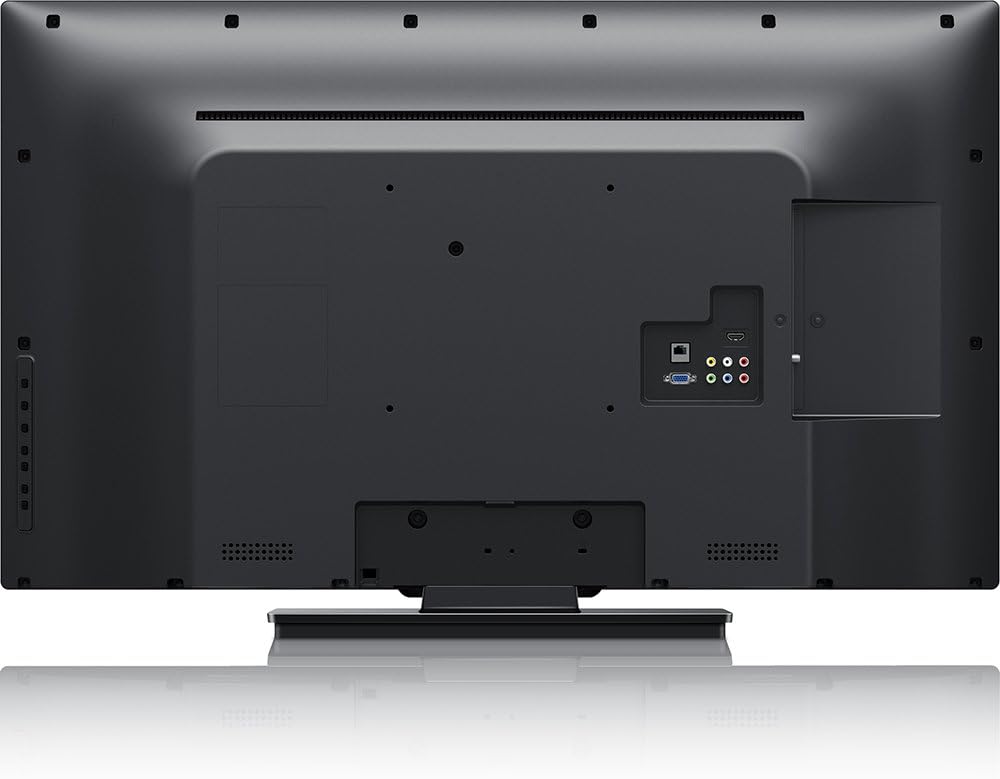
画像: 後方 view of the Philips 40PFL4609/F8 television, highlighting the input ports including HDMI, DVI, and other audio/video connections.
- HDMI: Connect Blu-Ray players, game consoles, or other HDMI-enabled devices. This model has 1 HDMI port.
- DVI: Connect computers or other DVI-enabled devices.
- USB: Connect USB storage devices for media playback. This model has 1 USB 2.0 port.
- アンテナ/ケーブル: Connect an antenna or cable TV signal for broadcast channels.
4.5 初期セットアップウィザード
初めて電源を入れると、テレビが初期設定のプロセスを案内します。
- 言語の選択: お好みの言語を選択してください。
- ネットワーク接続: Connect to your home Wi-Fi network. The TV supports Wi-Fi connectivity.
- チャンネルスキャン: Scan for available broadcast channels (if an antenna or cable is connected).
5. テレビの操作
5.1 リモートコントロールオーバーview
The included remote control allows you to navigate menus, adjust settings, and control playback. Insert two AAA batteries into the remote control, ensuring correct polarity.
5.2 基本機能
- 力: 電源ボタンを押してテレビの電源をオンまたはオフにします。
- 音量: 音量ボタンを使用して音量を調整します。
- チャネル: Use the channel buttons to change TV channels.
- 入力: Press the input button to select connected devices (HDMI, DVI, etc.).
5.3 Smart TV Features (Net TV)
Your Philips TV features Net TV, providing access to online content and applications.
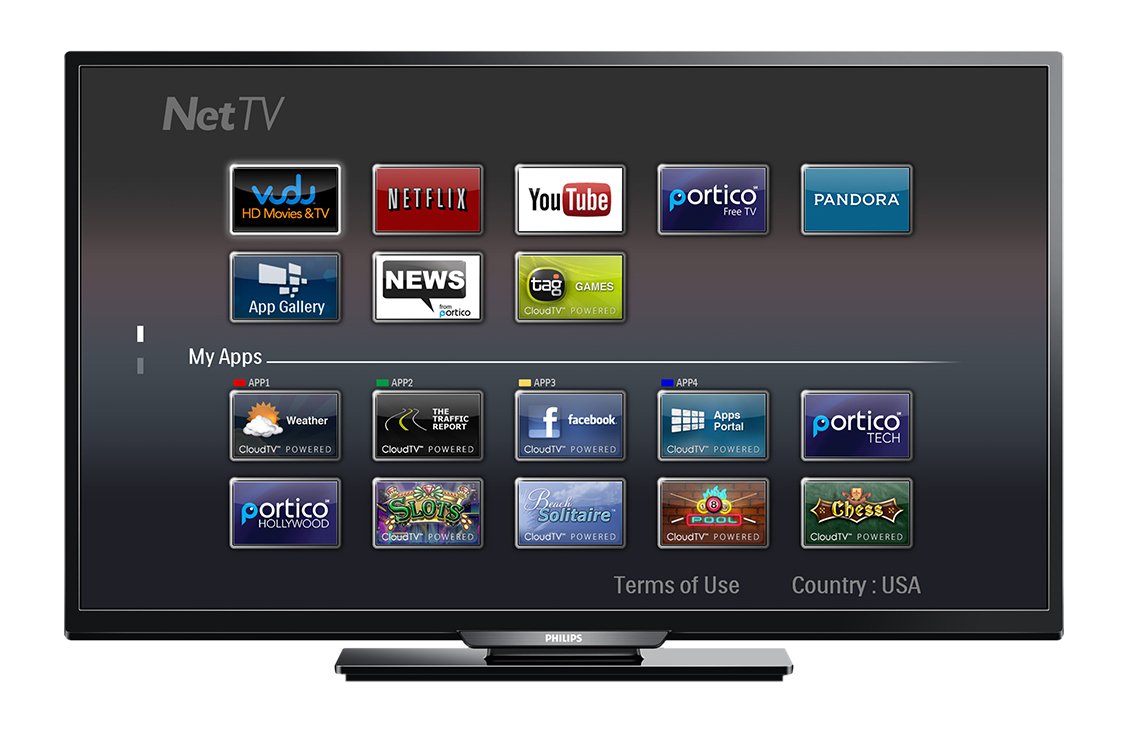
画像: フロント view of the Philips 40PFL4609/F8 television, showing the Net TV interface with various application icons such as Netflix, YouTube, and other streaming services.
- アプリへのアクセス: Use the remote control to navigate to the Net TV menu and select applications like Netflix and YouTube.
- Wi-Fi接続: Ensure your TV is connected to a stable Wi-Fi network for optimal Smart TV performance.
5.4画像設定
Adjust picture settings to enhance your view経験:
- Pixel Plus HD: This video engine enhances detail, depth, and clarity.
- 120Hz PMR (Perfect Motion Rate): Provides sharp images in fast-moving scenes.
- Access the picture menu to adjust brightness, contrast, color, and sharpness.
5.5 サウンド設定
Optimize audio output:
- SRS トゥルーサラウンド: Enjoy immersive sound with this integrated surround sound format.
- Access the audio menu to adjust bass, treble, and sound modes.
5.6 USB経由のメディア再生
Connect a USB storage device to the TV's USB 2.0 port to view 写真を撮ったり、音楽を再生したり、ビデオを視聴したりできます。
6. メンテナンス
6.1 画面のクリーニング
柔らかく糸くずの出ない布で画面を優しく拭いてください。頑固な汚れには、amp布に少量の水、または専用のスクリーンクリーナーを含ませてください。液体をスクリーンに直接吹きかけないでください。
6.2 Cのクリーニングasing
テレビを拭くasin柔らかく乾いた布で拭いてください。研磨剤入りの洗剤や溶剤の使用は避けてください。
6.3ソフトウェアアップデート
This model may not support automatic software updates via the internet. Check the Philips support website for information on manual firmware updates, if available, to ensure optimal performance and access to the latest features.
7。 トラブルシューティング
テレビで問題が発生した場合は、次の一般的な解決策を参照してください。
- 電源なし: Ensure the power cord is securely plugged into both the TV and the electrical outlet. Check the power outlet with another device.
- 画像/音声なし: Verify the correct input source is selected. Check all cable connections (HDMI, DVI, antenna).
- ネットワーク接続なし: Ensure your Wi-Fi router is working correctly. Re-enter your Wi-Fi password if necessary.
- Net TV Limitations: Some users have reported that the Net TV functionality on this model can be basic or limited in terms of additional app installation or software updates. If you find the built-in Smart TV features insufficient, consider connecting an external streaming device.
- 物理的ダメージ: Upon unboxing, carefully inspect the screen and casing for any damage, especially along the edges, which could affect display quality. Contact your retailer immediately if damage is found.
- リモコンが動作しない: 単4電池を交換してください。リモコンとテレビの赤外線センサーの間に障害物がないことを確認してください。
8. 仕様

画像: 側 view of the Philips 40PFL4609/F8 television, illustrating its slim profile and side-mounted connectivity options.
| 特徴 | 説明 |
|---|---|
| モデル名 | フィリップス 40PFL4609/F8 |
| 画面サイズ | 40インチ(100.3センチメートル) |
| ディスプレイ技術 | LED、液晶 |
| 解決 | 1080pフルHD |
| リフレッシュレート | 120 Hz (120Hz PMR) |
| アスペクト比 | 16:9 |
| 接続技術 | Wi-Fi |
| 互換性のあるインターネットサービス | ネットフリックス、ユーチューブ |
| 特集 | Blu-Ray compatible, DVI Input, HDMI Input, Full HD, HD Compatible, Internet, Surround Sound |
| HDMIポート | 1 |
| USB 2.0 ポート | 1 |
| オーディオ出力モード | ステレオ、サラウンドサウンド |
| Integrated Surround Sound Format | SRSトゥルーサラウンド |
| スピーカーの説明 | SRSトゥルーサラウンド |
| 消費電力 | 89ワット |
| 巻tage | AC110V 60Hz |
| アイテム重量 | 8200グラム |
| VESAマウント規格 | 200×200ミリ |
| 色 | 黒 |
| 対応デバイス | Laptop, Tablet, Game Console, Headphones |
| モデル年 | 2016 |
9. 保証情報
This Philips television comes with a 12ヶ月限定保証 provided by the manufacturer. Please retain your proof of purchase for warranty claims. The warranty covers manufacturing defects under normal use conditions.
10. カスタマーサポート
For further assistance, technical support, or warranty inquiries, please contact Philips customer service. Refer to the official Philips webお住まいの地域の連絡先情報については、サイトまたは製品パッケージをご覧ください。