
導入
Welcome to your SoundPEATS S1 Bluetooth Stereo Headphone. This manual provides detailed instructions for setup, operation, and maintenance to ensure optimal performance and longevity of your device. Please read this manual thoroughly before using the product.
製品終了view
パッケージ内容
The SoundPEATS S1 Bluetooth Stereo Headphone package includes:
- SoundPEATS S1 Bluetooth Stereo Headphone
- USB Charging Cable (non-standard)
- イヤークッション(プリインストール)
- クイックスタートガイド
ヘッドフォンのコンポーネントとコントロール
Familiarize yourself with the main components and control buttons of your S1 headphone.
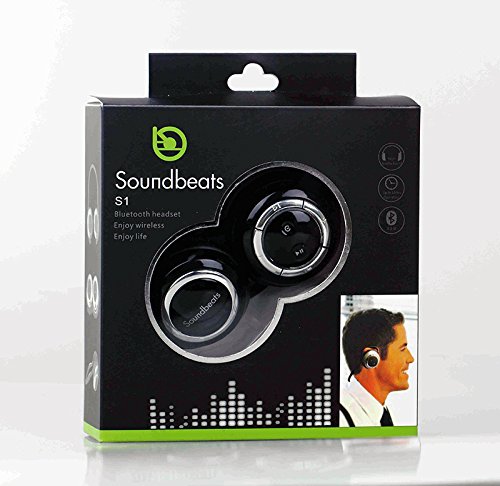
Image: SoundPEATS S1 Headphone (Folded View)
This image displays the SoundPEATS S1 Bluetooth Stereo Headphone in a folded configuration, viewed from the top. The black earcups feature silver-ringed control panels. The right earcup clearly shows the power/multi-function button, play/pause, and volume/track navigation controls. The 'Soundbeats' logo is visible on the left earcup.
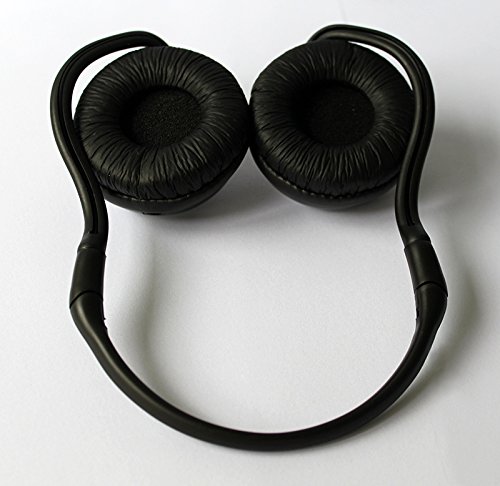
Image: SoundPEATS S1 Headphone (Earcup View)
This image shows the underside of the SoundPEATS S1 Bluetooth Stereo Headphone, highlighting the soft, black ear cushions. The flexible headband connecting the two earcups is also visible, designed for comfortable wear.
初期設定
ヘッドホンの充電
Before first use, fully charge your SoundPEATS S1 headphone. A full charge typically takes approximately 2 hours.
- Locate the charging port on the headphone.
- 付属のUSB充電ケーブルをヘッドフォンの充電ポートに接続します。
- USB ケーブルのもう一方の端を互換性のある USB 電源 (コンピューターの USB ポート、USB 壁アダプタなど) に接続します。
- 充電中はLEDインジケーターが赤く点灯します。
- Once fully charged, the LED indicator will turn blue. Disconnect the cable.
重要: The S1 uses a non-standard USB charging cable. Please retain the original cable for future charging. Using an incompatible cable may damage the device.
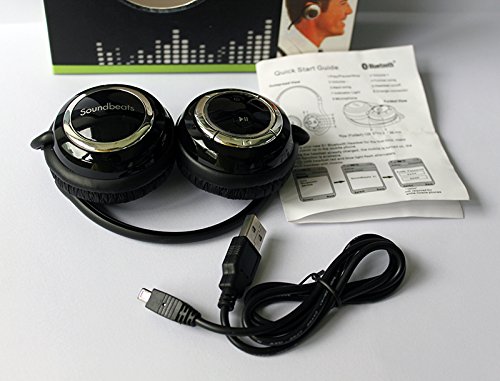
Image: SoundPEATS S1 Headphone with Accessories
This image shows the SoundPEATS S1 Bluetooth Stereo Headphone laid out with its accompanying accessories: the unique USB charging cable and a quick start guide. This illustrates the components included in the product package.
電源のオン/オフ
- 電源オン: Press and hold the Multi-function button (often marked with a power icon) for approximately 3-5 seconds until you hear an audible "Power On" prompt and the LED indicator flashes blue.
- 電源を切る: Press and hold the Multi-function button for approximately 4 seconds until you hear an audible "Power Off" prompt and the LED indicator turns off.
Bluetoothペアリング
To connect your SoundPEATS S1 headphone to a Bluetooth-enabled device for the first time:
- ヘッドフォンの電源がオフになっていることを確認します。
- Press and hold the Multi-function button for approximately 5-7 seconds. The LED indicator will flash red and blue alternately, indicating the headphone is in pairing mode.
- On your Bluetooth-enabled device (e.g., smartphone, tablet), go to the Bluetooth settings and enable Bluetooth.
- 検索する available devices. "Soundbeats S1" should appear in the list.
- Select "Soundbeats S1" to connect. If prompted for a PIN, enter "0000".
- Once successfully paired, the LED indicator will flash blue slowly, and you will hear a "Connected" voice prompt.
注記: ヘッドフォンは、デバイスの Bluetooth がアクティブで範囲内にある場合、電源を入れると最後にペアリングしたデバイスに自動的に再接続しようとします。
操作手順
音楽再生コントロール
- 再生/一時停止: 多機能ボタンをXNUMX回押します。
- 次のトラック: 「音量アップ」ボタンを長押しします。
- 前のトラック: 「音量ダウン」ボタンを長押しします。
- ボリュームアップ: Briefly press the "Volume Up" button.
- ボリュームダウン: Briefly press the "Volume Down" button.
注意: The headphone's system prompts (e.g., "Power On", "Connected") can be loud. Avoid having the headphones on your ears when powering on or connecting.
通話管理
- 着信に応答: 多機能ボタンをXNUMX回押します。
- 通話終了: Press the Multi-function button once during an active call.
- 着信を拒否する: マルチファンクションボタンを約2秒間押し続けます。
- 最後の番号にリダイヤル: 通話中でないときに、マルチファンクションボタンを 2 回押します。
注記: Call performance may vary based on your mobile device, network coverage, and environmental factors.
LEDインジケーターステータス
- 赤一色: 充電
- 青一色: フル充電
- Alternating Red and Blue: ペアリングモード
- ゆっくり点滅する青: Connected / Standby
- Rapid Flashing Blue: 着信
メンテナンス
お手入れと保管
- Clean the headphones with a soft, dry, lint-free cloth. Do not use liquid cleaners, aerosols, or harsh chemicals.
- ヘッドフォンは、直射日光、極端な温度、過度の湿気を避け、涼しく乾燥した場所に保管してください。
- If not used for extended periods, charge the headset at least once a month to maintain battery health.
- ヘッドホンを落としたり、強い衝撃を与えたりしないでください。
- Protect the charging port and cable from damage.
トラブルシューティング
よくある問題と解決策
- Headphone does not power on:
Ensure the headphone is fully charged. Connect it to a power source and check the charging indicator. If the battery is completely depleted, it may take a few minutes for the indicator to appear.
- デバイスとペアリングできません:
Make sure the headphone is in pairing mode (LED indicator flashing red and blue alternately). Ensure Bluetooth is enabled on your device and it is within the typical Bluetooth range (up to 10 meters). Try restarting both the headphone and your device. If you have many previously paired devices, try clearing some from your device's Bluetooth list.
- 音が出ない、または音量が低い:
Check the volume levels on both the headphone and your connected device. Ensure the headphone is properly paired and connected. Try playing different audio sources to rule out an issue with the media file.
- 通話品質が悪い:
Ensure you are in an area with good cellular signal strength for your phone. Reduce background noise if possible. Ensure the microphone on the headphone is not obstructed. Bluetooth connection can be affected by interference from other wireless devices.
- バッテリー寿命が予想より短い:
Battery performance can naturally degrade over time with usage. Ensure the headphone is fully charged before each use. High volume usage significantly reduces battery life. Extreme temperatures can also affect battery performance.
仕様
| 特徴 | 詳細 |
|---|---|
| モデル | S1 |
| 接続技術 | ブルートゥース |
| Bluetoothプロfileサポートされている | A2DP1.2, AVRCP1.0, HFP 1.5 |
| RF周波数範囲 | 2.402-2.480GHZ、2.4G ISMバンド |
| 音楽/通話時間 | Up to 10 hours (actual time may vary based on usage) |
| フォームファクター | オーバーイヤー |
| コントロールタイプ | メディアコントロール |
| アイテム重量 | 約10g |
| 材料 | プラスチック |
| 含まれるコンポーネント | Ear Cushions, USB Charging Cable |
保証とサポート
SoundPEATS products are manufactured with quality and reliability in mind. For specific warranty details regarding your S1 Bluetooth Stereo Headphone, please refer to the warranty information provided in your product packaging or visit the official SoundPEATS webサイト。
For technical assistance, troubleshooting, or any other inquiries, please contact SoundPEATS customer support through their official channels. Contact information can typically be found on the SoundPEATS webサイトまたは製品ドキュメントに記載されています。
免責事項: Product specifications and features are subject to change without prior notice. Always refer to the latest information available from the manufacturer.