
1. はじめに
The CyberPower BRG1500AVRLCD Intelligent LCD UPS System is designed to provide reliable battery backup and surge protection for desktop computers, workstations, networking devices, and home entertainment systems. This Uninterruptible Power Supply (UPS) system utilizes line interactive topology and simulated sine wave output to safeguard your valuable electronics from power interruptions and fluctuations.
Key features include Automatic Voltage Regulation (AVR) to correct minor power fluctuations without switching to battery power, thereby extending battery life. It also offers two USB charge ports (2.1 Amps shared) for portable devices.

Figure 1: CyberPower BRG1500AVRLCD UPS System in a typical office environment, providing power protection to connected devices.
2. 安全上の注意
UPSを設置または操作する前に、すべての安全に関する指示をよく読んで従ってください。指示に従わない場合、UPS本体、接続機器の損傷、または人身事故につながる可能性があります。
- Do not install the UPS in direct sunlight, near heat-emitting appliances, or in areas with excessive humidity.
- UPS が接地されたコンセントに接続されていることを確認します。
- UPSを開けないでください。asing. 内部にはユーザーが修理可能な部品はありません。修理は資格のあるサービス担当者にご依頼ください。
- UPS を医療機器や生命維持装置に使用しないでください。
- Ensure proper ventilation around the UPS. Do not block any ventilation openings.
- In case of fire, use a powder fire extinguisher. Do not use water.
3. パッケージ内容
パッケージにすべてのアイテムが揃っていることを確認します。
- UPSユニット
- ユーザーマニュアル
4.製品オーバーview
4.1フロントパネル

図2: 前面 view of the CyberPower BRG1500AVRLCD UPS, highlighting the Intelligent LCD panel and USB charging ports.
The front panel features the Intelligent LCD display, control buttons (Display, Mute, Enter, Setup), and two USB charge ports (USB-A and USB-C) for convenient charging of portable devices.
4.2 背面パネル
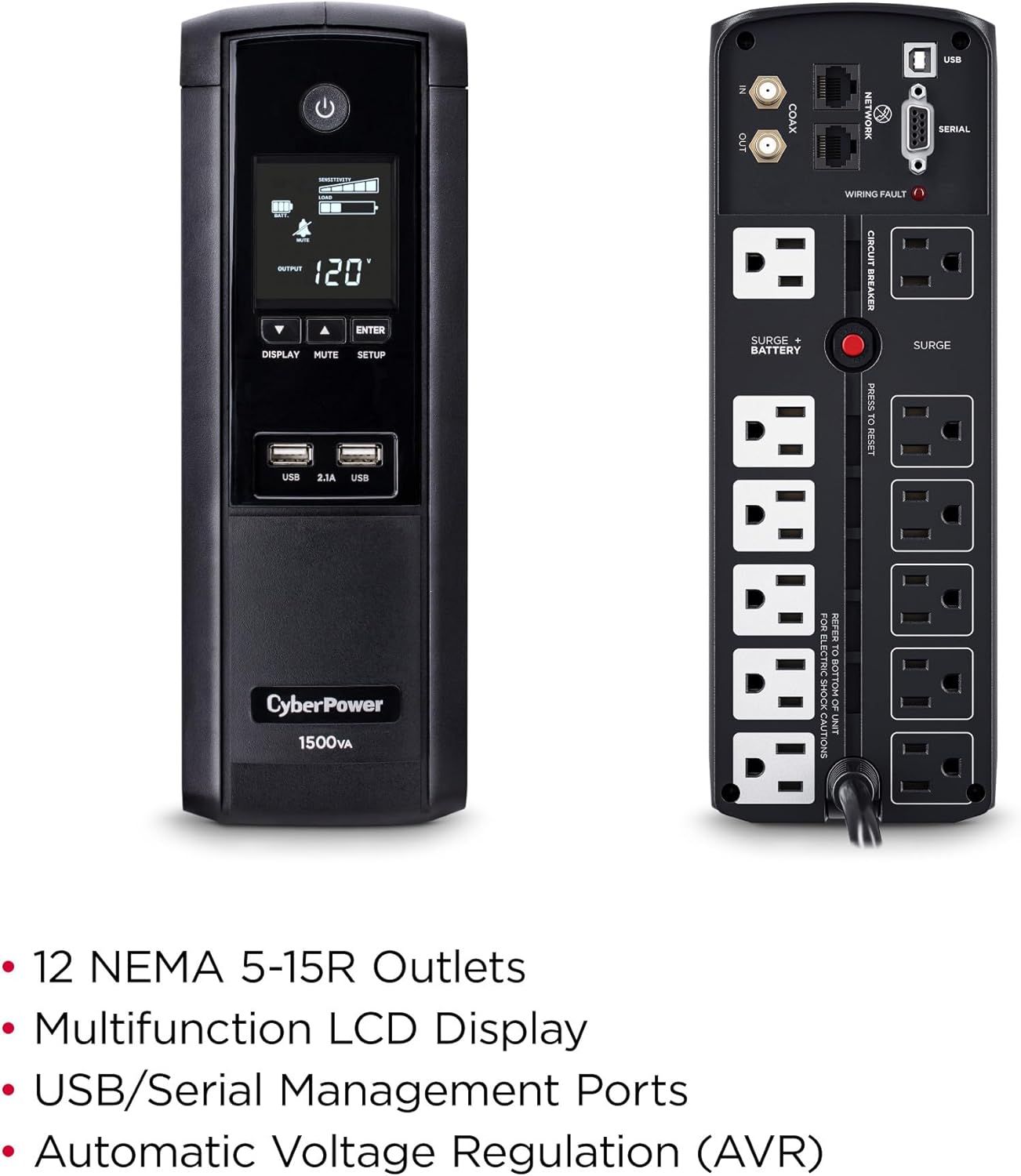
図3:背面 view of the CyberPower BRG1500AVRLCD UPS, detailing the NEMA 5-15R outlets, network, cable, and serial ports.
The rear panel includes 12 NEMA 5-15R outlets: six battery backup & surge protected outlets and six surge protected outlets. It also features network (RJ45) and cable (Coax) surge protection ports, a serial port, and a USB port for management software connectivity. A circuit breaker reset button is also located on the rear panel.
5. セットアップ
5.1 初期充電
Before initial use, plug the UPS into a grounded wall outlet and allow it to charge for at least 8 hours to ensure maximum battery runtime. The unit will automatically turn on when connected to mains power.
5.2 接続機器
- バッテリーバックアップとサージ保護コンセント: パソコン、モニター、外付けハードドライブなどの重要な機器をこれらのコンセントに接続してください。これらの機器は停電時にUPSバッテリーから電力供給を受けます。tage.
- サージ保護アウトレット: Connect non-critical equipment that still requires surge protection, such as printers or scanners, to these outlets. These devices will not receive battery backup power.
- USB充電ポート: Use the front USB-A and USB-C ports to charge mobile phones, MP3 players, and cameras.
- データライン保護: Connect your network cable (RJ45) and coaxial cable (Coax) through the designated IN/OUT ports on the rear panel to protect against surges.
6. 操作手順
6.1 UPSのオン/オフ
- スイッチをつける: Press and hold the Power button on the front panel for approximately 2 seconds. The LCD display will light up.
- 電源を切るために: Press and hold the Power button for approximately 2 seconds. The LCD display will turn off.
6.2 LCD 表示機能
The multifunction LCD panel displays immediate, detailed information on battery and power conditions. Use the 'Display' button to cycle through various screens:

図4:例amples of information displayed on the Intelligent LCD panel, including input/output voltage、負荷、およびバッテリーの状態。
- 入力ボリュームtage: 現在のボリュームを表示しますtag公益事業電源からの電力。
- 出力巻tage: 巻を表示しますtage supplied by the UPS to connected equipment.
- バッテリー容量: 内部バッテリーの現在の充電レベルを示します。
- 耐荷重: パーセンを表示しますtag接続された機器によって使用されている UPS 容量の割合。
- 推定実行時間: Provides an estimate of how long the UPS can supply power during an outage based on the current load.
- イベントログ: ouなどの電力イベントを記録しますtages、サージ、およびボリュームtage変動。
6.3自動巻tage規制(AVR)
UPSには自動ボリューム機能が搭載されていますtage Regulation (AVR), which automatically corrects minor power fluctuations (sags and overvoltages) without switching to battery power. This extends the life of the battery by reducing the number of times it needs to discharge and recharge.
6.4 PowerPanel Personal Edition Management Software
The UPS comes with FREE PowerPanel Personal Edition Management Software (Download). This software allows for advanced power management features, including scheduled shutdowns, remote monitoring, and customizable alerts. Refer to the software's documentation for installation and usage instructions.
7. メンテナンス
7.1 電池の交換
The CyberPower BRG1500AVRLCD uses two 12V batteries. The batteries are designed to last approximately 3-5 years under normal operating conditions. When the batteries reach the end of their service life, they should be replaced by qualified personnel. For battery replacement, contact CyberPower Systems customer support or a certified technician.
7.2 クリーニング
UPSの外装は定期的に乾いた布で清掃してください。適切な空気の流れを維持し、過熱を防ぐため、通気口に埃やゴミが詰まっていないことを確認してください。
8。 トラブルシューティング
If the UPS is not functioning correctly, refer to the following common issues:
- UPS がオンにならない: Ensure the power cord is securely plugged into a grounded wall outlet and the UPS. Check the circuit breaker on the rear panel and reset if tripped.
- UPS が継続的にビープ音を鳴らしています: This usually indicates the UPS is operating on battery power during an outage or a low battery condition. Save your work and shut down connected equipment if the outage が延長されます。
-
Ask a question about this manual
Ask about setup, troubleshooting, compatibility, parts, safety, or missing instructions. Manuals+ will review the question and use this page’s manual context to help answer it.