
1. はじめに
This manual provides comprehensive instructions for the installation, operation, and maintenance of your Swann SWDVK-163208S-US 3200S 16-Channel 960H DVR Security System. Please read this manual thoroughly before using the product to ensure proper setup and functionality. Keep this manual for future reference.
The system includes a 16-channel 960H Digital Video Recorder (DVR) with a pre-installed 1TB hard drive and eight 700TVL security cameras designed for both indoor and outdoor use. It supports continuous recording, motion detection, and remote viewing 機能。
2. 安全情報
- すべての電源接続が安全であり、デバイスに対して適切な定格であることを確認します。
- Do not expose the DVR or cameras to water or excessive moisture.
- DVR を直射日光の当たる場所や熱源の近くに置かないでください。
- システムに付属の電源アダプタのみを使用してください。
- Do not attempt to open or service the DVR or cameras yourself. Refer all servicing to qualified personnel.
- Keep cables organized to prevent tripping hazards and ensure proper ventilation.
3. パッケージ内容
Verify that all items listed below are present in your package. If any items are missing or damaged, contact Swann customer support.
- Swann SWDVK-163208S-US 16-Channel 960H DVR with 1TB HDD
- 8 x 700TVL Security Cameras
- 8 x BNC Cables (60ft/18m)
- DVRおよびカメラ用電源アダプター
- イーサネットケーブル
- HDMIケーブル
- USBマウス
- 取り付けネジとプラグ
- クイックスタートガイド
- 盗難防止ステッカー
4.システムオーバーview
4.1 DVR Front Panel
The front panel of the DVR provides access to essential controls and indicators.
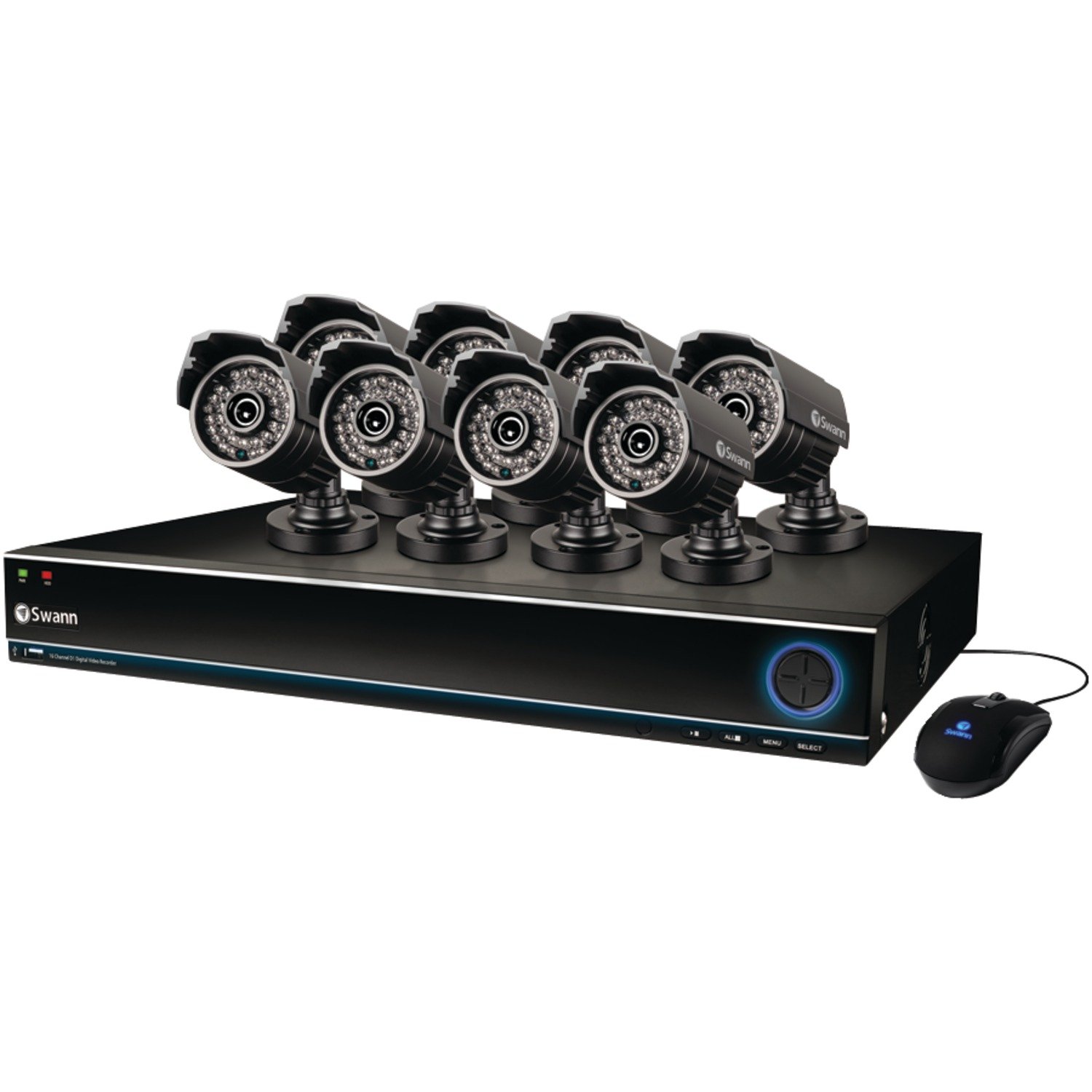
Image: The Swann SWDVK-163208S-US security system, showing the DVR unit and several cameras. The DVR features a blue-lit front panel with control buttons and status indicators.
- 電源インジケーター: DVR の電源がオンになると点灯します。
- HDDインジケーター: ハードドライブがアクティブなときに点滅します。
- ネットワークインジケーター: ネットワーク接続を示します。
- USBポート: USBマウスの接続やデータのバックアップに使用します。
- コントロールボタン: Navigate menus and control playback.
4.2 DVR Rear Panel
The rear panel contains all the necessary ports for connecting cameras, monitors, and network cables.
- ビデオ入力(BNC): 16 ports for connecting security cameras.
- ビデオ出力(HDMI/VGA): For connecting a monitor or TV.
- オーディオ入力/出力(RCA): For connecting microphones and speakers (if supported).
- イーサネットポート (RJ45): ネットワーク接続用。
- USB ポート: 周辺機器用の追加 USB ポート。
- eSATAポート: For connecting an external hard drive for expanded storage.
- 電源入力: For connecting the DVR power adapter.
4.3 カメラの機能
The included 700TVL cameras offer clear video surveillance with night vision capabilities.
- 解決: 700TVL (Television Lines) for detailed images.
- ナイトビジョン: Infrared LEDs provide visibility up to 82ft (25m) in low light or complete darkness.
- 耐候性: Designed for both indoor and outdoor installation.
- 取り付け: Adjustable brackets for flexible positioning.
5. セットアップ
5.1 DVRの接続
- Connect the included USB mouse to one of the USB ports on the DVR.
- Connect the HDMI cable from the DVR's HDMI output to an HDMI input on your TV or monitor. Alternatively, use a VGA cable for VGA connections.
- リモート用 viewing, connect an Ethernet cable from the DVR's Ethernet port to your router or network switch.
5.2 カメラの接続
- Mount each camera in your desired location using the provided screws and plugs. Ensure the camera has a clear field of view 直接的な衝撃から保護されます。
- Connect one end of the BNC cable to the camera's video output.
- Connect the other end of the BNC cable to a video input port on the DVR (e.g., Video In 1, Video In 2, etc.).
- Connect the camera's power input to the power splitter cable, then connect the power adapter to the splitter and a power outlet.
5.3電源オン
- Connect the DVR power adapter to the DVR's power input and then to a power outlet.
- DVRは自動的に電源が入ります。前面パネルの電源インジケーターライトが点灯します。
- Wait for the system to boot up. The Swann logo will appear on your connected monitor, followed by the live view 画面。
5.4初期構成
Upon first boot-up, the DVR will guide you through an initial setup wizard.
- 言語の選択: お好みの言語を選択してください。
- 日時: Set the correct date, time, and time zone. This is crucial for accurate recording timestamps.
- ネットワーク設定: Configure network settings (DHCP is usually sufficient for automatic setup).
- パスワードの設定: Create a strong password for the administrator account to secure your system.
- ハードドライブのフォーマット: The system may prompt to format the hard drive. Confirm to proceed.
6. システムの操作
6.1 ライブ View
初期設定後、DVRはライブ映像を表示します。 view from all connected cameras. You can switch between single-camera view, multi-camera grids (e.g., 4-channel, 8-channel, 16-channel), and sequence modes using the on-screen menu or front panel controls.
6.2 録音モード
DVR はさまざまな録画モードをサポートしています。
- 連続記録: 24時間7日記録し、古いものを上書きしますtagハードドライブがいっぱいになったとき。
- 動き検出記録: カメラの動きが検知されたときのみ録画します view. This conserves hard drive space. Sensitivity and detection areas can be configured for each camera.
- スケジュールされた記録: 一日または週の特定の時間帯に記録します。
- 手動録音: Start and stop recording manually from the DVR interface.
Access recording settings via the DVR's main menu: Menu > Record > Record Schedule.
6.3 再生
再するためにview 記録されたfootage:
- ライブから view, right-click with the mouse to open the main menu.
- 選択 再生.
- Choose the desired date and camera channel(s).
- Use the timeline to navigate through recorded events. Different colors on the timeline indicate different recording types (e.g., continuous, motion).
- 再生コントロール(再生、一時停止、早送り、巻き戻し)を使用して、view フーtage.
バックアップしない
You can back up important video footage to a USB flash drive or external hard drive.
- Insert a USB storage device into a USB port on the DVR.
- へ移動 Menu > Backup.
- Select the camera channel, date, and time range for the footagバックアップしたいもの。
- Choose the backup device and file format (e.g., AVI).
- クリック 始める to begin the backup process.
6.5リモート Viewing (SwannLink & SwannView)
The SwannLink and SwannView applications allow you to view your cameras remotely from a smartphone or tablet.
- Ensure your DVR is connected to the internet via the Ethernet port.
- Download the SwannView デバイスのアプリ ストアからアプリをダウンロードします。
- Open the app and follow the on-screen instructions to add your DVR. This typically involves scanning a QR code displayed on the DVR's monitor (Menu > Network > SwannLink) or manually entering the device ID.
- Enter the DVR's username and password when prompted.
- あなたは今できるはずです view ライブfootage and access playback remotely.
7. メンテナンス
7.1 ハードドライブ管理
1TBハードドライブは自動的に最も古いファイルを上書きしますtage when full. To ensure optimal performance, it is recommended to periodically check the hard drive status via Menu > HDD > Disk Manage. You can also connect an external hard drive to the eSATA port for additional storage capacity.
7.2 カメラのクリーニング
カメラのレンズは定期的に柔らかくてきれいな布で拭いてください。amp 布で埃や汚れ、水滴などを取り除き、 view. Do not use harsh chemicals or abrasive materials.
7.3ファームウェアアップデート
Swann may release firmware updates to improve system performance or add new features. Check the Swann support website for the latest firmware for your model. Follow the instructions provided with the firmware update carefully to avoid damaging the DVR.
8。 トラブルシューティング
| 問題 | 考えられる原因 | 解決 |
|---|---|---|
| モニターに画像が表示されない | ビデオ ケーブルが緩んでいる、モニターで間違った入力が選択されている、DVR の電源がオンになっていない。 | HDMI/VGAケーブルの接続を確認してください。モニターの入力が正しいことを確認してください。DVRの電源を確認してください。 |
| カメラ画像なし | Loose BNC cable, camera power issue, faulty camera. | Check BNC and power connections for the specific camera. Test camera with a known working cable/power supply. |
| DVRが録画されない | Recording schedule not set, hard drive full or faulty, motion detection not configured. | Check recording schedule. Verify hard drive status. Ensure motion detection is enabled and configured correctly. |
| できません view 遠隔的に | No network connection, incorrect network settings, app configuration error. | Verify DVR has internet access. Check network settings (DHCP). Reconfigure the DVR in the SwannView アプリ。 |
| Purple image on camera | IR filter stuck, camera malfunction. | Power cycle the camera. If the issue persists, the camera may be faulty and require replacement. |
9. 仕様
- モデル番号: SWDVK-163208S-US
- ビデオ入力: 16 Channels BNC
- ビデオ出力: HDMI、VGA
- ディスプレイ解像度: Up to 1080p (HDMI)
- 記録解像度: 960H (960x576/960x480)
- ハードドライブ: 1TB SATA HDD (expandable via eSATA)
- 圧縮形式: 264 形式
- ネットワークインターフェース: RJ45 イーサネットポート
- USBインターフェース: USB 3 ポート x 2.0
- カメラ解像度: 700TVL
- Camera Night Vision: 最大82フィート(25メートル)
- Camera Weatherproof Rating: IP66(屋外用)
- Dimensions (DVR): 22.5 x 15.3 x 8.1インチ(約)
- Weight (DVR): 14ポンド(おおよそ)
- 電源: DC12V
10. 保証情報
Swann products are covered by a limited warranty. The specific terms and duration of your warranty may vary by region and product. Please refer to the warranty card included with your product or visit the official Swann web保証に関する詳細情報と登録手続きについては、ウェブサイトをご覧ください。保証請求の際は、購入証明書を保管してください。
11. サポート
For technical assistance, product support, or to download the latest software and manuals, please visit the official Swann support website. You can typically find FAQs, troubleshooting guides, and contact information for customer service there. Have your product model number (SWDVK-163208S-US) ready when contacting support.
スワンサポート Webサイト: https://www.swann.com/us/support