
1. はじめに
This manual provides essential instructions for the safe and efficient operation, setup, maintenance, and troubleshooting of your Hobart N50-60 5-Quart Commercial Countertop Planetary Stand Mixer. Designed for heavy-duty commercial use, this mixer features a robust gear-driven transmission and three fixed speeds, making it suitable for a wide range of mixing applications. Please read this manual thoroughly before operating the mixer.

Figure 1: Hobart N50-60 Commercial Planetary Stand Mixer. This image shows the complete mixer unit with the stainless steel bowl and a whisk attachment.
2. 安全に関する注意事項
WARNING: To reduce the risk of serious injury, always follow these safety precautions.
- ミキサーを操作する前にすべての説明書をお読みください。
- Ensure the mixer is placed on a stable, level, and dry surface to prevent tipping.
- Always unplug the mixer from the electrical outlet before cleaning, assembling, disassembling parts, or performing any maintenance.
- Keep hands, hair, clothing, and utensils away from moving parts during operation to prevent injury. Never use your hands to scrape the bowl while the mixer is running.
- Do not immerse the mixer base in water or other liquids. Clean with a damp 布のみ。
- メーカーが推奨するアタッチメントおよびアクセサリのみを使用してください。
- Do not operate the mixer with a damaged cord or plug, or after the appliance malfunctions or has been dropped or damaged in any manner. Contact qualified service personnel.
- いかなる機器も、子供が使用したり、子供の近くで使用したりする場合には、厳重な監視が必要です。
- 電源がボリュームと一致していることを確認してくださいtage specified on the mixer's rating label (100-120V/2.9A or 230V/1.4A).
- Never attempt to bypass safety interlocks or modify the mixer.

図2:背面 view of the mixer, highlighting the power cord connection and a warning label. Always ensure the power cord is in good condition and properly connected.
3. パッケージ内容
パッケージにすべてのアイテムが揃っていることを確認します。
- Hobart N50-60 Planetary Stand Mixer Unit
- 5クォートステンレススチールミキシングボウル
- "D" Wire Whip (Balloon-shaped)
- "B" Flat Beater (Cast Aluminum)
- "ED" Dough Hook (Cast Aluminum)
4. セットアップ
- 開梱: すべての部品をパッケージから慎重に取り出してください。将来の輸送や保管のために、パッケージは保管しておいてください。
- 配置: Position the mixer on a sturdy, level, and dry countertop or work surface capable of supporting its weight (approximately 55 lbs). Ensure adequate clearance around the mixer for ventilation and operation.
- ボウルの取り付け:
- Lower the bowl support by pulling the hand lever located on the side of the mixer downwards.
- Place the 5-quart stainless steel mixing bowl onto the bowl support, aligning the pins on the support with the slots on the bowl.
- Raise the bowl support by pushing the hand lever upwards until it locks securely into place.
- アタッチメントの取り付け:
- Ensure the mixer is OFF and unplugged.
- Slide the desired attachment (wire whip, flat beater, or dough hook) onto the agitator shaft until it clicks into place. Rotate the attachment slightly if needed to engage the pin.
- Gently pull down on the attachment to ensure it is securely locked.
- 電源接続: Plug the mixer's power cord into a grounded electrical outlet that matches the mixer's voltag要件。

図3: 前面 view of the mixer with the whisk attachment and stainless steel bowl correctly installed. Note the bowl lift lever on the right side.

図 4: 拡大図 view of the 5-quart stainless steel bowl and the whisk attachment, showing how they connect to the mixer head.
5. 操作手順
- 材料を追加します: With the mixer OFF and the bowl in the raised position, add your ingredients to the 5-quart stainless steel mixing bowl.
- 速度を選択します: The N50-60 features a three-speed transmission. Use the speed selector lever (typically labeled 1, 2, 3) to choose the desired mixing speed. It is generally recommended to start at a lower speed and gradually increase as needed.
- ミキサーを起動: Press the large ON button to start the mixer.
- モニターミキシング: Observe the mixing process. If necessary, stop the mixer, scrape down the sides of the bowl, and restart.
- ミキサーを停止: Press the large OFF button to stop the mixer.
- ボウルとアタッチメントを取り外す: Once mixing is complete, ensure the mixer is OFF. Lower the bowl support using the hand lever. Carefully remove the attachment by pushing it upwards and then sliding it off the agitator shaft. Then, remove the mixing bowl.
- 手動リセットスイッチ: In case of an overload or electrical issue, the mixer may automatically shut off. Locate the manual reset switch (often a small button on the mixer body) and press it to reset the circuit. If the issue persists, unplug the mixer and contact service.
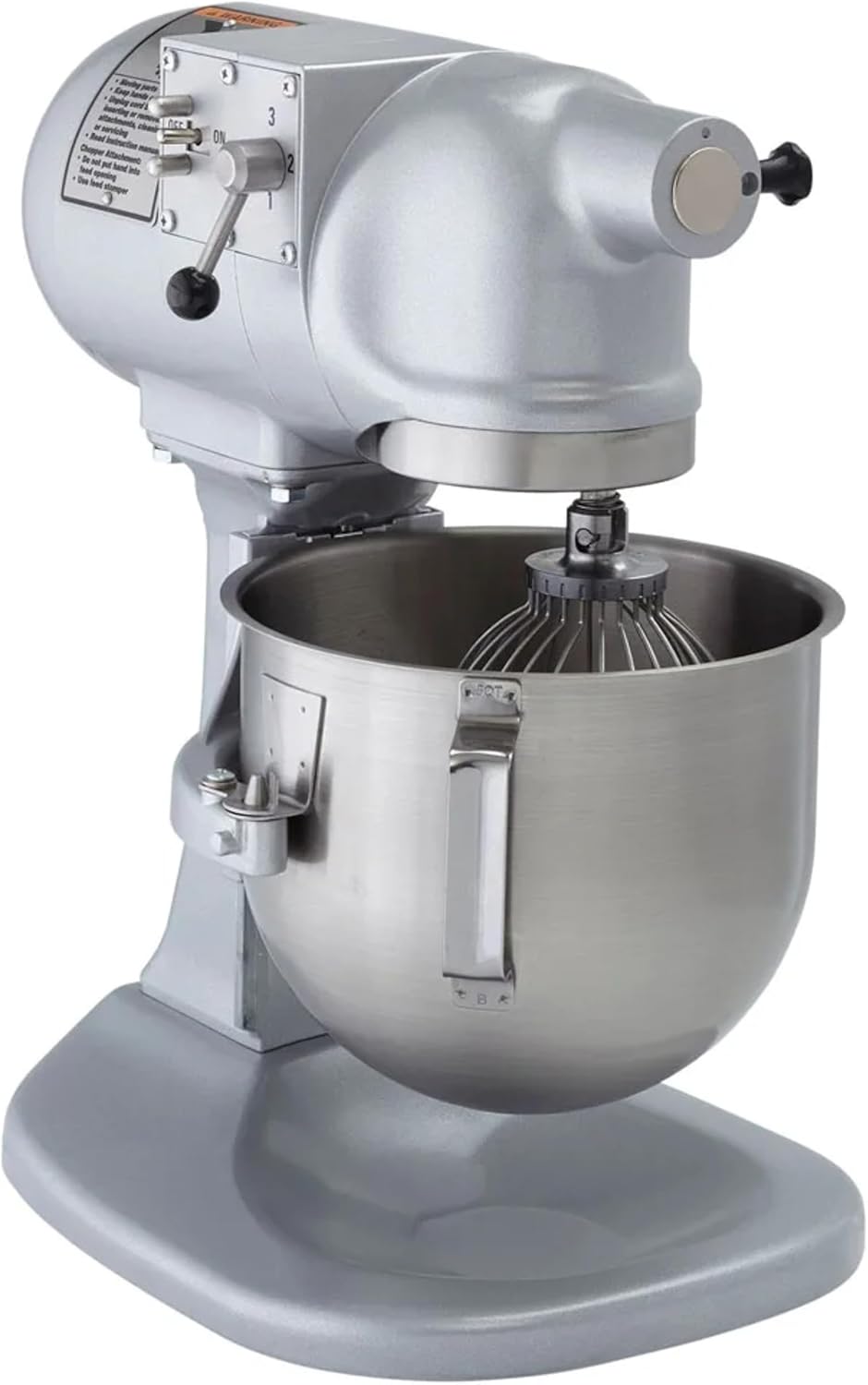
図5:側面 view of the mixer, illustrating the location of the speed selector lever (1, 2, 3) and the prominent ON/OFF buttons for easy operation.
6. メンテナンスと清掃
Regular cleaning and maintenance will ensure the longevity and optimal performance of your Hobart N50-60 mixer.
6.1毎日の清掃
- 掃除する前に必ずミキサーのプラグを抜いてください。
- ミキシングボウルと付属品: The 5-quart stainless steel mixing bowl and the included attachments (wire whip, flat beater, dough hook) are dishwasher safe. Alternatively, wash them with warm, soapy water, rinse thoroughly, and dry immediately.
- ミキサー本体: ミキサーの外側を洗剤で拭き取りますamp cloth. For stubborn stains, use a mild detergent. Avoid abrasive cleaners or scouring pads, as these can damage the Hobart gray hybrid powder enamel finish. Ensure no water enters the motor housing or electrical components.
- アタッチメントハブ: Clean the attachment hub area to prevent food buildup.
6.2 一般的なメンテナンス
- Periodically inspect the power cord for any signs of damage. If damaged, it must be replaced by a qualified technician.
- Ensure all moving parts operate smoothly. Do not attempt to lubricate internal components unless specified by the manufacturer.
- Keep the mixer in a clean, dry environment when not in use.
7。 トラブルシューティング
This section addresses common issues you might encounter with your Hobart N50-60 mixer.
| 問題 | 考えられる原因 | 解決 |
|---|---|---|
| ミキサーがオンになりません。 |
|
|
| 運転中にミキサーが停止します。 |
|
|
| アタッチメントの取り付け/取り外しが難しい。 |
|
|
| 異常な騒音や振動。 |
|
|
8. 仕様
| 特徴 | 詳細 |
|---|---|
| モデル名 | N50-60 |
| ブランド | ホバート |
| 容量 | 5クォート |
| 製品寸法(奥行き×幅×高さ) | 奥行き15インチ x 幅11インチ x 高さ17インチ |
| 材料 | アルミニウム、ステンレス |
| 色 | Gray (Hybrid Powder Enamel Finish) |
| 速度の数 | 3つの固定速度 |
| 巻tage | 100-120 Volts / 230 Volts |
| ワットtage | 348ワット |
| コントロールタイプ | Button (On/Off), Toggle (Speed) |
| 容器材質 | ステンレス鋼 |
| Dishwasher Safe (Bowl) | はい |
| 含まれるコンポーネント | Mixer, 5-Qt Bowl, Wire Whip, Flat Beater, Dough Hook |
| 認定資格 | UL listed, NSF certified |

Figure 6: Dimensional diagram of the Hobart N50-60 mixer, showing its height (17"), width (11"), and depth (15").
9. 保証情報
Warranty details for the Hobart N50-60 Commercial Planetary Stand Mixer are typically provided with your purchase documentation or can be obtained directly from the manufacturer's official webサイトでご確認ください。保証請求のために購入証明書を保管してください。
10. サポート
For technical assistance, spare parts, or service inquiries, please contact Hobart customer support. You can typically find contact information on the official Hobart webサイトまたは正規販売店を通じてご購入いただけます。
Visit the official Hobart Store for more information: Hobart Store