
YONGNUO YN560-III-USA
YONGNUO YN560-III-USA スピードライトフラッシュ ユーザーマニュアル
Model: YN560-III-USA
1. はじめに
This manual provides detailed instructions for the safe and effective use of your YONGNUO YN560-III-USA Speedlite Flash. Please read this manual thoroughly before operating the device to ensure optimal performance and to prevent damage.
2. 安全情報
Always observe the following safety precautions to prevent injury or damage to the flash unit:
- フラッシュユニットを分解したり改造したりしないでください。
- Keep the flash unit away from water and moisture.
- 特に近距離では、フラッシュの光が目に直接当たらないようにしてください。
- 指定された電池(単三電池4本)のみを使用してください。
- Do not operate in environments with flammable gases or liquids.
3. パッケージ内容
パッケージにすべてのアイテムが含まれていることを確認します。
- YONGNUO YN560-III-USA Speedlite Flash
- Protecting Bag
- ミニスタンド
- ユーザーマニュアル(このドキュメント)
4 製品の特徴
The YONGNUO YN560-III-USA Speedlite Flash offers advanced features for versatile lighting control:
- Integrated 2.4G Wireless Receiver: Supports ultra-long-range wireless flash with a triggering distance of up to 100 meters.
- 互換性: Can receive signals from RF-603 and RF-602 wireless transmitters, supporting 16 channels for flexible wireless flash setups.
- 複数のトリガーモード: Can be triggered via camera hot shoe, 2.4G radio, S1 (optical slave), and S2 (pre-flash cancel optical slave) modes.
- ズーム機能: Flash coverage can be adjusted manually from 24mm to 105mm.
- 外部電源ポート: Equipped with a charging socket for an external power pack to reduce recycle time.
- PC同期ポート: Provides a PC port for synchronous flash triggering.
- 大型液晶画面: Features a clear and intuitive display for easy operation and setting adjustments.
- 自動設定保存: Automatically saves your current settings for convenience.
5. セットアップ
5.1 バッテリーの取り付け
- フラッシュユニットの背面にある電池ケースのカバーを開きます。
- 電池ボックス内の極性表示(+/-)に従って単3電池4本を挿入します。
- 電池カバーをしっかりと閉じてください。
5.2 フラッシュの取り付け
The YN560-III-USA can be mounted on a camera's hot shoe or used off-camera with the included mini stand.

フロント view of the YN560-III-USA Speedlite Flash on its mini stand.
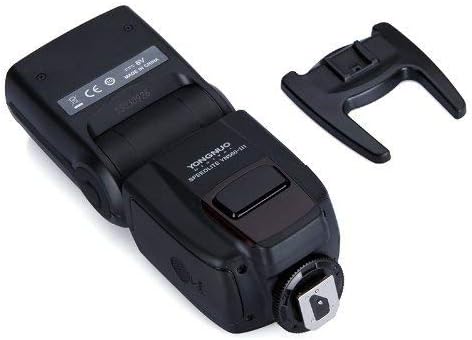
底 view showing the hot shoe mount and external ports.
カメラへの取り付け:
- フラッシュのホットシューをカメラのホットシューマウントに差し込みます。
- フラッシュユニットのロックリングを締めてカメラに固定します。
カメラ外への取り付け:
- Attach the flash unit to the included mini stand.
- Place the mini stand on a flat, stable surface or mount it onto a light stand/tripod.
5.3 Connecting External Power
For faster recycle times, an external power pack can be connected.

Close-up of the external power port (left) and PC sync port (right).
- Locate the external power port on the side of the flash unit.
- Connect the compatible external power pack cable to this port.
6. 操作手順
6.1 電源オン/オフ
を押し続けます オン/オフ button for approximately 2 seconds to power the flash on or off.

Back panel with LCD screen and control buttons.
6.2 モード選択
を押す モード 利用可能なフラッシュ モードを切り替えるボタン:
- M(手動モード): フラッシュ出力を手動で設定します。
- マルチ(ストロボモード): 連続して高速の閃光を発射します。
- S1 (Optical Slave Mode): Triggers the flash when it detects another flash firing.
- S2 (Pre-flash Cancel Optical Slave Mode): Triggers the flash when it detects another flash firing, ignoring the camera's pre-flash.
6.3 パワー調整
In Manual (M) mode, use the directional buttons (up/down) to adjust the flash output power from 1/1 (full power) to 1/128 in 1/3 stop increments.
6.4 ズーム調整
を押す ズーム button to adjust the flash head's coverage. Use the directional buttons to select a focal length from 24mm, 28mm, 35mm, 50mm, 70mm, 80mm, to 105mm.

Flash head tilted with wide-angle diffuser and bounce card extended.
6.5 Wireless Operation (2.4G)
The YN560-III-USA has an integrated 2.4G wireless receiver. To use this feature:
- Ensure the flash is in a wireless slave mode (indicated by a wireless icon on the LCD).
- Set your compatible YONGNUO 2.4G wireless transmitter (e.g., RF-603, RF-602, YN560-TX) to the same channel as the flash unit.
- The flash will trigger wirelessly when commanded by the transmitter.
6.6 PC Sync Port Usage
Connect a PC sync cable from your camera's PC sync terminal to the flash's PC sync port for wired synchronization.
7. メンテナンス
- フラッシュユニットは柔らかく乾いた布で拭いてください。溶剤や研磨剤は使用しないでください。
- フラッシュを長期間使用しない場合は、液漏れを防ぐために電池を取り外してください。
- フラッシュは直射日光や極端な温度を避け、涼しく乾燥した場所に保管してください。
8。 トラブルシューティング
| 問題 | 考えられる原因 | 解決 |
|---|---|---|
| フラッシュが電源オンになりません。 | 電池が切れているか、正しく挿入されていません。 | 電池を交換するか、極性を確認してください。 |
| フラッシュは発光しません。 | Flash is not fully charged. Incorrect mode selected. Hot shoe connection is loose. | Wait for recycle indicator. Select appropriate mode (M, S1, S2). Re-mount flash securely. |
| ワイヤレストリガーが失敗します。 | Channels do not match. Transmitter is out of range. Interference. | Ensure flash and transmitter are on the same channel. Reduce distance. Change channels. |
| フラッシュ出力が一貫していません。 | バッテリー残量が少なくなっています。 | Replace batteries or connect external power pack. |
9. 仕様
| 特徴 | 詳細 |
|---|---|
| ガイドナンバー | GN58(ISO100、105mm) |
| フラッシュモード | M, Multi, S1, S2 |
| ズームレンジ | 24, 28, 35, 50, 70, 80, 105mm |
| 垂直回転角 | -7 ~ 90 度 |
| 水平回転角 | 0~270度 |
| 電源 | 4 x AA size batteries (Alkaline or Ni-MH) |
| リサイクル時間 | Approx. 3 seconds (with new AA alkaline batteries) |
| 色温度 | 5600K |
| フラッシュ期間 | 1/200秒~1/20000秒 |
| 寸法 | 3.25×3.75×8.25インチ(約) |
| 重さ | 1.06ポンド(電池なし) |
| 互換性のある取り付け | Canon, Nikon, Pentax, Olympus (standard hot shoe) |
| フラッシュ同期速度 | 1/200 または 1/250(カメラのモデルによって異なります) |
10. 保証とサポート
This product comes with a limited warranty. Please refer to the warranty card included in your product packaging for specific terms and conditions. For technical support or service inquiries, please contact your local YONGNUO distributor or visit the official YONGNUO web連絡先情報のサイト。
Ask a question about this manual
Ask about setup, troubleshooting, compatibility, parts, safety, or missing instructions. Manuals+ will review the question and use this page’s manual context to help answer it.