
XTAR MP1S
XTAR MP1S インテリジェント USB バッテリー充電器 ユーザーマニュアル
モデル: MP1S
1. はじめに
The XTAR MP1S Intelligent USB Battery Charger is designed for charging various 3.7V Li-ion batteries, including 14650, 17670, 18650, 18700, and with the use of spacers, also 10440, 14500, 15270, 16340, and 18350 types. It features an advanced TC.CC.CV (Trickle Current, Constant Current, Constant Voltage) charging algorithm that continuously monitors battery status for safe and automatic charging. The charger is equipped with a protection circuit and intelligent temperature monitoring to ensure optimal performance and safety.
2. 安全上の注意
Please read and understand all safety warnings before using the charger.
- 屋内使用のみ: 本体を水や湿気から遠ざけてください。
- バッテリー互換性: Only charge 3.7V Li-ion batteries. Charging other battery types may cause damage or injury.
- 分解禁止: Disassembly or modification of the charger is strictly prohibited.
- ショートを避ける: Short circuits are strictly prohibited and can cause severe damage to the charger and battery.
- 動作温度: Ensure the charger is used within the recommended operating temperature range of 0~40℃.
3 製品の特徴
- Intelligent Charging Algorithm: Utilizes TC.CC.CV charging system for efficient and safe charging.
- 自動監視: Monitors battery status continuously throughout the charging process.
- Low Current Standby: Automatically enters a low current status (below 4uA) when the input voltage is removed, minimizing battery discharge.
- 充電メンテナンス: Continuously monitors the battery after charging is complete and restarts charging if the battery's voltage drops to 4.0V or below, maintaining a full charge.
- 温度制御: The charging management chip monitors its own temperature. If the detected temperature is too high, the charge current will automatically lower to protect the charger.
- 保護回路: Incorporates a robust protection circuit for enhanced safety.
4. はじめに(セットアップ)
Follow these steps to set up your XTAR MP1S charger:
- 接続電源: Connect the USB cable to the charger's USB input port and then to a 5V USB power source (e.g., computer USB port, USB wall adapter, or car charger).
- 電池を挿入します: Carefully insert the 3.7V Li-ion battery into the charging slot, ensuring the correct polarity (+ and - ends) aligns with the markings on the charger. The positive (+) end of the battery should align with the positive contact on the charger, and the negative (-) end with the negative spring contact.
- 充電表示: The charger will automatically begin charging. Refer to the operating section for details on charging status.
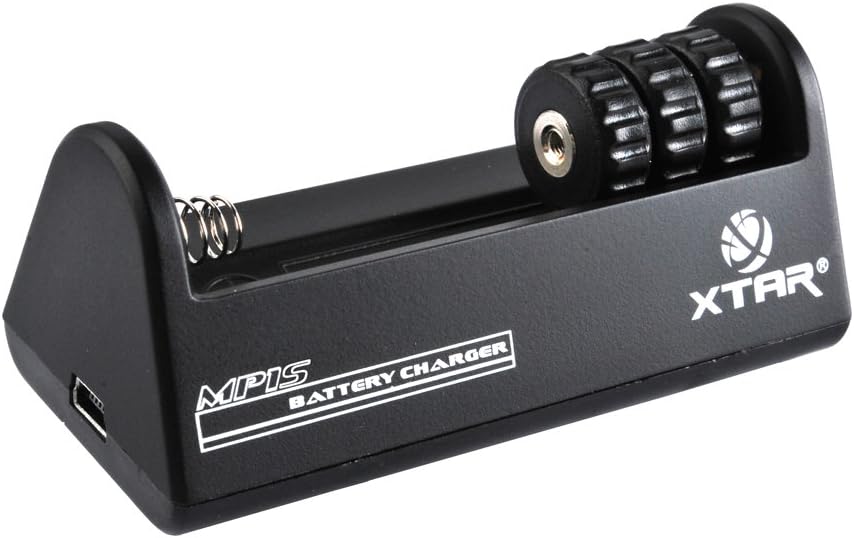
図1: 前面 view of the XTAR MP1S Charger, showing the battery slot and USB input.
5. 操作
The XTAR MP1S charger operates automatically once a compatible battery is inserted and power is connected.
- 充電プロセス: 充電器はマルチsを採用tage TC.CC.CV charging method. It starts with a trickle current, then moves to constant current, and finally constant voltage to safely and efficiently charge your battery.
- バッテリー互換性: This charger is designed for 3.7V Li-ion batteries. It supports 14650, 17670, 18650, 18700, and with the use of spacers, also 10440, 14500, 15270, 16340, 18350 battery sizes.
- 自動リチャージ: To ensure your battery remains fully charged, the charger will automatically restart charging if the battery voltage drops below 4.0V after a full charge.

Figure 2: Bottom and side views of the XTAR MP1S Charger, showing ventilation and USB port.
6. メンテナンス
適切なメンテナンスを行うことで、充電器の寿命が長くなり、最適なパフォーマンスが確保されます。
- 乾燥を保つ: Always keep the charger in a dry environment. Avoid exposure to water or high humidity.
- 清潔なコンタクト: Periodically clean the charging contacts on the charger and your batteries with a dry, soft cloth to ensure good electrical connection.
- ストレージ: 使用しないときは、充電器を直射日光や極端な温度を避け、涼しく乾燥した場所に保管してください。
- 衝撃を避ける: 充電器を落としたり、強い衝撃を与えたりしないでください。
7。 トラブルシューティング
If you encounter issues with your XTAR MP1S charger, consider the following:
- 充電器の電源が入らない:
- USB ケーブルが充電器と電源の両方にしっかりと接続されていることを確認します。
- Verify that the USB power source (e.g., wall adapter, computer port) is functional and providing 5V output.
- バッテリーが充電されていません:
- Check that the battery is a 3.7V Li-ion type and is compatible with the charger (refer to compatible battery list).
- バッテリーが正しい極性で挿入されていることを確認してください。
- Inspect the battery and charger contacts for dirt or damage. Clean if necessary.
- Check for any signs of short circuit on the battery or within the charger slot.
- Charging is Slow or Stops Prematurely:
- The charger's internal temperature control may reduce charging current if it detects overheating. Allow the charger to cool down in a well-ventilated area.
- Ensure the USB power source can provide sufficient current (500mA recommended).
8. 仕様
| 仕様 | 価値 |
|---|---|
| モデル番号 | MP1S |
| 入力ボリュームtage /現在 | DC 5V / 500mA |
| 出力巻tage /現在 | DC 4.2V ±0.05% 500mA ±10% |
| 動作温度 | 0〜40℃ |
| 製品寸法 | 7.09 x 9.84 x 1.97インチ |
| アイテム重量 | 2.82オンス(80グラム) |
| メーカー | エクスター |
| 初回利用可能日 | 3年2013月XNUMX日 |
9. 保証とサポート
For warranty information and technical support, please contact XTAR customer service or visit the official XTAR webサイトでご確認ください。購入証明として購入レシートを保管してください。
You can visit the official XTAR store on Amazon for more information: XTAR公式ストア
Ask a question about this manual
Ask about setup, troubleshooting, compatibility, parts, safety, or missing instructions. Manuals+ will review the question and use this page’s manual context to help answer it.