
導入
This manual provides instructions for the proper use and handling of Protech 455067 Wire & Cable Ties. These ties are designed for securing wires and cables, ensuring organization and safety in various applications. They are made from durable nylon and come in a natural color, measuring 7-1/2 inches in length.
安全情報
この製品を使用する前に、すべての安全情報を読んで理解してください。
- 小児の手の届かない場所に保管: 小さな部品は窒息の危険を引き起こす可能性があります。
- 適切なツールを使用します。 When trimming excess tie material, use a suitable cutting tool to avoid injury.
- 締めすぎを避けてください。 Do not overtighten cable ties around sensitive wires or cables, as this may cause damage.
- 使用前に点検してください: Ensure ties are free from defects before application.
設定
The Protech 455067 Wire & Cable Ties are ready for immediate use upon removal from the packaging. No assembly or special preparation is required.
- 開梱: Carefully remove the desired number of cable ties from the bag.
- 検査: Briefly check each tie for any visible damage or manufacturing defects. Discard any damaged ties.
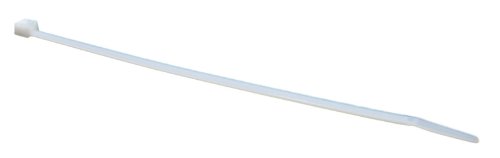
Image 1: Protech 455067 Wire & Cable Ties, showing a bag of 100 ties and a single tie.
操作手順
Follow these steps to effectively use the Protech 455067 Wire & Cable Ties:
- Gather Wires/Cables: Collect the wires or cables you wish to bundle or secure. Ensure they are neatly arranged.
- Position the Tie: Wrap the cable tie around the bundle of wires or cables. The smooth side of the tie should be against the bundle.
- Insert the Tail: Feed the pointed end (tail) of the cable tie through the head (locking mechanism) of the tie.
- 締める: Pull the tail of the tie until the bundle is secured to the desired tightness. Avoid excessive force to prevent damage to the wires or the tie itself. The locking mechanism will prevent the tie from loosening.
- Trim Excess (Optional): If there is a significant amount of excess tail, use a pair of flush cutters or scissors to trim it close to the head for a neat finish. Be careful not to cut any wires or cables.
メンテナンス
Protech 455067 Wire & Cable Ties require minimal maintenance. To ensure their longevity and performance:
- ストレージ: Store unused cable ties in their original packaging or a sealed container in a cool, dry place, away from direct sunlight and extreme temperatures. This helps prevent material degradation.
- クリーニング: If ties become dirty, wipe them with a damp 布。刺激の強い化学物質は避けてください。
- 廃棄: Dispose of used or broken cable ties according to local waste disposal regulations.
トラブルシューティング
発生する可能性のある一般的な問題に対する解決策は次のとおりです。
| 問題 | 考えられる原因 | 解決 |
|---|---|---|
| Tie does not lock securely. | Debris in locking mechanism, tie is damaged, or incorrect insertion. | Ensure the locking mechanism is clear. Inspect the tie for damage and use a new one if necessary. Confirm the tail is inserted correctly into the head. |
| Tie breaks during tightening. | Excessive force, tie material degradation, or tie is too small for the bundle. | Reduce tightening force. Check storage conditions for unused ties. Use a larger tie if the bundle is too thick for the 7.5-inch tie. |
| Bundle is not tight enough. | Tie not pulled sufficiently, or bundle is too small for the tie. | Pull the tie tail further through the head until the desired tightness is achieved. For very small bundles, consider a smaller tie if available. |
仕様
- モデル番号: 455067
- ブランド: プロテック
- 材料: ナイロン
- 色: 自然
- 長さ: 7-1/2インチ(7.5インチ)
- 量: 100のバッグ
- UPC/GTIN: 662766265774
- 商品の重量: Approximately 0.5 Pounds (for the bag of 100)
保証とサポート
Protech 455067 Wire & Cable Ties are manufactured to high-quality standards. For specific warranty information or technical support, please refer to the official Protech web公式サイトをご覧いただくか、カスタマーサービス部門にお問い合わせください。保証請求のために購入時のレシートを保管してください。
さらにサポートが必要な場合は、メーカーの webサイト: www.protech.com (Note: This is a placeholder link as no specific support link was provided.)