
1. はじめに
The iRobot Roomba 552 Pet Series is an advanced robotic vacuum cleaner designed to efficiently clean carpets and hard floors. Utilizing iAdapt Responsive Technology, it navigates your home, cleaning multiple times and reaching areas under and around obstacles. The AeroVac technology optimizes airflow for effective debris and pet hair collection. This manual provides essential information for setting up, operating, and maintaining your Roomba 552 Pet Series to ensure optimal performance.
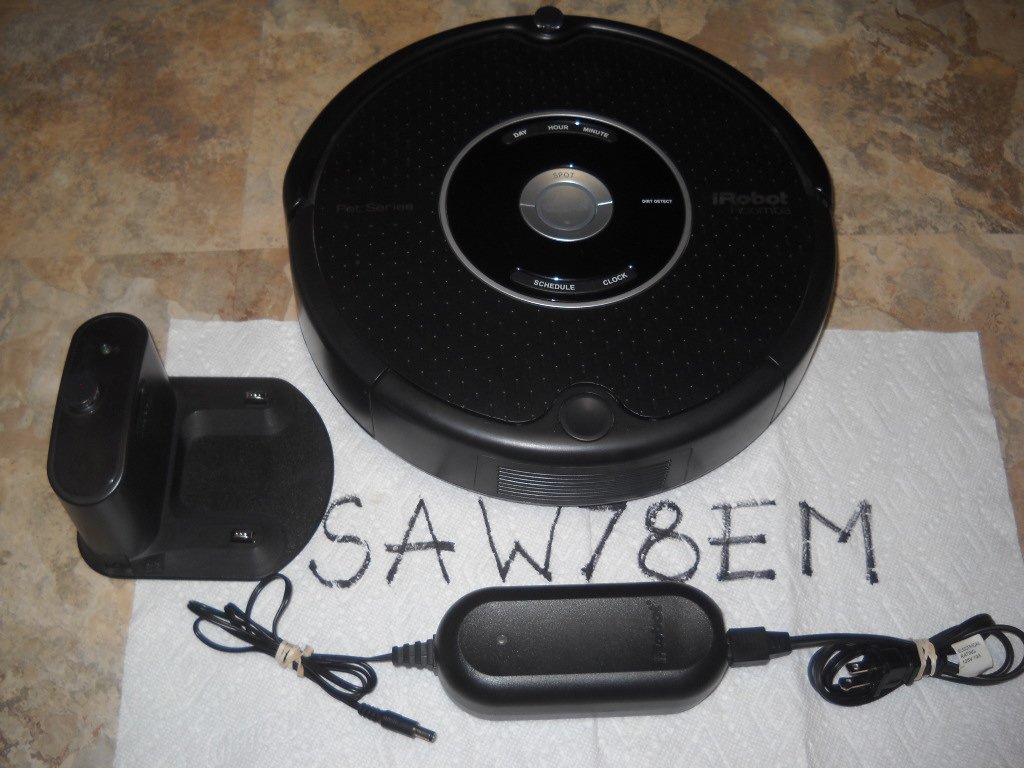
Image 1.1: The iRobot Roomba 552 Pet Series robotic vacuum, its Home Base charging station, and a Virtual Wall barrier device. The Roomba features a central control panel with 'CLEAN', 'SPOT', 'CLOCK', 'SCHEDULE', 'DAY', 'HOUR', and 'MINUTE' buttons. The Home Base is connected via a power cord.
2. 安全情報
Before using your Roomba, please read all safety instructions. Failure to follow these instructions may result in electric shock, fire, or serious injury.
- この機器は、安全に責任を負う人物による機器の使用に関する監督または指示がない限り、身体的、感覚的、または精神的能力が低下している人、あるいは経験と知識が不足している人(子供を含む)による使用を想定していません。
- Do not handle the Roomba or Home Base with wet hands.
- Do not use the Roomba on wet surfaces or in areas with standing water.
- 髪の毛、ゆったりとした衣服、指、および体のすべての部分を開口部や可動部分から遠ざけてください。
- Do not operate the Roomba in rooms where infants or children are sleeping.
- Ensure the power cord for the Home Base is not damaged. If damaged, it must be replaced by the manufacturer or a qualified service agent.
- メーカーが提供した充電器のみを使用してください。
3. パッケージ内容
Your iRobot Roomba 552 Pet Series package includes the following items:
- 1 iRobot Roomba 552 Pet Robotic Vacuum (with 1 Robot battery, 1 AeroVac Filter, 1 Side Brush, 1 Bristle Brush, 1 Beater Brush installed)
- 2 Virtual Walls (4 C Batteries included)
- 1 Self-charging Home Base
- 1 Brush Cleaning Tool
- 1 Flat Cleaning Tool
- 予備サイドブラシ2個
- 2 Extra Beater Brushes
- 2 Extra Bristle Brushes
- 3 Additional AeroVac Filters
4. セットアップ
4.1 Charging the Home Base
- Place the Home Base on a hard, level surface against a wall. Ensure there is at least 3 feet (1 meter) of clear space on either side of the Home Base and 4 feet (1.2 meters) in front of it.
- Plug the Home Base power cord into a standard wall outlet. The power indicator light on the Home Base will illuminate.
4.2 Initial Roomba Charge
- Place your Roomba onto the Home Base, ensuring the metal charging contacts on the Roomba align with those on the Home Base.
- The Roomba will emit a tone, and the 'CLEAN' button will pulse amber, indicating it is charging.
- Allow the Roomba to charge for a full 16 hours before its first use. The 'CLEAN' button will turn green when fully charged.
4.3 Setting up Virtual Walls
Virtual Walls create an invisible barrier that Roomba will not cross, allowing you to confine it to specific rooms or areas.
- Insert the included C batteries into each Virtual Wall device.
- Place a Virtual Wall in the doorway or area you wish Roomba to avoid. Ensure the arrow on top of the Virtual Wall points in the direction of the area you want to block.
- Turn on the Virtual Wall. The indicator light will glow steadily.
5. 操作手順
5.1 クリーニングサイクルの開始
- Ensure Roomba is fully charged and on a flat surface.
- 大きく押す クリーン button in the center of the control panel. The button will illuminate, and Roomba will begin its cleaning cycle.
- To pause Roomba, press the クリーン button once. To resume, press it again.
- To end a cleaning cycle and send Roomba back to its Home Base, press and hold the クリーン button until Roomba emits a tone and the Home Base icon illuminates.
5.2 Scheduling Cleaning Times
You can schedule Roomba to clean up to seven times per week.
- を押す クロック button to set the current time. Use the 日, 時間、 そして 分 調整するボタン。 プレス クロック もう一度保存します。
- を押す スケジュール ボタン。 つかいます 日, 時間、 そして 分 buttons to set your desired cleaning time.
- プレス スケジュール again to save the schedule. Roomba will beep to confirm.
5.3 スポットクリーニング
For concentrated cleaning of a small area, use the Spot Clean feature.
- Place Roomba in the center of the area you want to clean.
- を押す スポット button. Roomba will clean in a spiral pattern, covering an area of approximately 3 feet (1 meter) in diameter.
6. メンテナンス
Regular maintenance ensures your Roomba 552 Pet Series operates at peak performance.
6.1 Emptying the AeroVac Bin
Empty the AeroVac bin after each cleaning cycle, especially when cleaning pet hair.
- Press the bin release button on the back of Roomba and pull out the bin.
- ゴミ箱のドアを開けて、すべてのゴミをゴミ箱に捨てます。
- ゴミ箱にビンを軽くたたきつけて、残っているゴミを取り除きます。
- Reinsert the bin until it clicks into place.
6.2 Cleaning Brushes (Weekly)
Remove and clean the main brushes and side brush weekly, or more often if you have pets.
- Turn Roomba over. Open the brush guard by lifting the two yellow tabs.
- Remove the bristle and beater brushes. Use the included cleaning tool to remove hair and debris.
- Remove the side brush by unscrewing the center screw. Clean any hair or debris wrapped around it.
- Reinstall all brushes, ensuring they are properly seated.
6.3 Cleaning Filters (Weekly)
Clean the AeroVac filter weekly by tapping it against a trash can to remove dust. Replace filters every 2-3 months, or as needed.
6.4 Cleaning Sensors (Monthly)
Wipe the cliff sensors (located on the bottom of Roomba) and the bumper sensor window (on the front bumper) with a clean, dry cloth to remove dust and debris.
7。 トラブルシューティング
If your Roomba encounters an issue, it will often play a sound and speak a message. Refer to the following common issues:
| 問題 | 考えられる原因 | 解決 |
|---|---|---|
| ルンバが充電されない | Poor contact with Home Base; Home Base unplugged | Ensure Roomba is properly seated on Home Base. Check Home Base power connection. Clean charging contacts on Roomba and Home Base. |
| ルンバが頻繁に詰まる | Cords, carpet fringe, or tassels; uneven surfaces | Clear obstacles from the cleaning area. Use Virtual Walls to block problematic zones. Clean brushes to prevent entanglement. |
| 洗浄性能が悪い | Full bin; dirty brushes or filters; dirty sensors | Empty the AeroVac bin. Clean or replace brushes and filters. Wipe all sensors. |
| Roomba makes unusual noises | Debris in brushes or wheels; worn parts | Inspect and clean brushes, wheels, and front caster wheel. If noise persists, contact customer support. |
8. 仕様
- ブランド: アイロボット
- モデル番号: 552
- 表面の推奨事項: カーペット、ハードフロア
- 特別な機能: Bagless, Cordless, Pet Hair Optimized
- 色: 黒
- コントローラタイプ: ボタンコントロール
- フィルタータイプ: Disk (AeroVac)
- 電源: 電池駆動
- フォームファクター: ロボット
- 国際コード: 885155002273
9. 保証とサポート
For warranty information and technical support, please refer to the documentation included with your product or visit the official iRobot webサイトでご確認ください。保証請求の際は購入証明として領収書を保管してください。