
1. はじめに
This manual provides essential information for the safe and efficient operation of your Datalogic PowerScan M8300-AR910RB Handheld Laser Bar Code Reader. Please read this manual thoroughly before using the device to ensure proper setup, operation, and maintenance. Keep this manual for future reference.
2. 安全情報
怪我やデバイスの損傷を防ぐために、常に次の安全上の注意事項を守ってください。
- レーザーの安全性: This device emits a laser beam. Do not stare directly into the laser beam or point it at others. Avoid direct eye exposure.
- バッテリーの安全性: Use only Datalogic-approved batteries and charging accessories. Do not expose batteries to extreme temperatures, puncture, or disassemble them. Dispose of batteries according to local regulations.
- 環境条件: Do not operate the device in explosive atmospheres or near flammable materials. Keep the device dry and away from extreme temperatures.
- メンテナンス: Refer all servicing to qualified service personnel. Do not attempt to open or modify the device.
3. パッケージ内容
パッケージにすべてのアイテムが揃っていることを確認します。
- Datalogic PowerScan M8300-AR910RB Handheld Laser Bar Code Reader
- 取り外し可能なバッテリー
- Charging/Communication Cradle (may be sold separately depending on configuration)
- USB or Serial Cable (for cradle connection, may be sold separately)
- Power Supply (for cradle, may be sold separately)
- クイックスタートガイド
4.製品オーバーview
The Datalogic PowerScan M8300 is a robust, cordless handheld laser bar code reader designed for industrial applications. It features a durable casing and a 910MHz radio for reliable wireless communication.
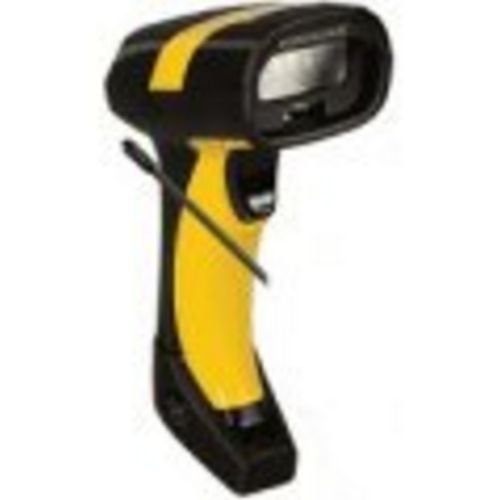
画像1: Datalogic PowerScan M8300 Handheld Laser Bar Code Reader. This image displays the front view of the scanner, highlighting its ergonomic design, scan window, and trigger button.
主要コンポーネント:
- スキャンウィンドウ: Located at the front, where the laser beam exits to read barcodes.
- トリガー: スキャン用のレーザーをアクティブにします。
- インジケーターライト: Provide feedback on scan status, battery level, and communication.
- バッテリーコンパートメント: Located at the base of the handle, housing the removable battery.
- 通信インターフェース: For wireless data transmission via the 910MHz radio.
5. セットアップ
5.1. バッテリーの取り付け
- スキャナーの電源がオフになっていることを確認してください。
- ハンドルの下部にある電池ボックスのカバーを見つけます。
- Open the cover and insert the removable battery, ensuring correct polarity.
- 電池カバーをしっかりと閉じてください。
5.2. バッテリーの充電
- Place the scanner into its charging cradle. Ensure the contacts on the scanner align with those on the cradle.
- Connect the power supply to the charging cradle and plug it into an electrical outlet.
- スキャナーのインジケータ ライトは充電状態を示します (通常、充電中はオレンジ色、完全に充電されている場合は緑色)。
- 初めて使用する前に、バッテリーを完全に充電してください(約 4 時間)。
5.3. Connecting to a Host System
The PowerScan M8300 uses a 910MHz radio for wireless communication. It typically connects to a host system (e.g., PC, laptop) via a base station or cradle connected by a USB or serial cable.
- Connect the communication cable (USB or serial) from the charging/communication cradle to your host system.
- Connect the power supply to the cradle and plug it in.
- Place the scanner in the cradle. The scanner and cradle will automatically establish a wireless link.
- Install any necessary drivers or software on your host system as prompted or as instructed by Datalogic documentation for your specific cradle model.
6. 操作手順
6.1.電源のオン/オフ
- 電源を入れるには: The scanner typically powers on automatically when removed from the cradle or when the trigger is pressed.
- 電源を切るには: The scanner will enter a low-power sleep mode after a period of inactivity. To fully power off, remove the battery.
6.2. バーコードのスキャン
- Aim the scan window at the barcode you wish to read.
- Press and hold the trigger button. A laser line will appear.
- レーザーラインをバーコード全体に配置します。
- Once the barcode is successfully read, the scanner will emit an audible beep and/or an indicator light will illuminate.
- Release the trigger. The scanned data will be transmitted to the connected host system.
6.3。 データ送信
The PowerScan M8300 transmits scanned data wirelessly to its paired base station/cradle. Ensure the scanner is within range of its base station for successful data transfer. Out-of-range scanning capabilities may vary by configuration; refer to advanced programming guides for details.
7. メンテナンス
7.1.デバイスのクリーニング
- 柔らかく清潔な布を使用してください。amp水または中性洗剤で洗浄してください。
- 研磨剤入りの洗剤、溶剤、または刺激の強い化学薬品は使用しないでください。
- Gently wipe the scan window and the exterior of the scanner.
- デバイスの開口部に液体が入らないようにしてください。
7.2. バッテリーのお手入れ
- バッテリーを定期的に充電してください。
- バッテリーを頻繁に完全に放電することは避けてください。
- Store the scanner and spare batteries in a cool, dry place when not in use.
7.3. ストレージ
When storing the scanner for extended periods, ensure the battery is partially charged (around 50%) and remove it from the device if possible. Store in a temperature-controlled environment.
8。 トラブルシューティング
If you encounter issues with your PowerScan M8300, refer to the following common problems and solutions:
| 問題 | 考えられる原因 | 解決 |
|---|---|---|
| スキャナーの電源が入りません。 | バッテリーが切れているか、正しく取り付けられていません。 | Check battery installation. Charge the battery. Replace battery if necessary. |
| スキャナーがバーコードを読み取りません。 | Barcode damaged or poorly printed; scan window dirty; incorrect symbology enabled. | Try scanning a different barcode. Clean the scan window. Refer to the programming guide to enable/disable symbologies. |
| ホストにデータが送信されません。 | Scanner out of range; base station not connected; communication issue. | Move scanner closer to the base station. Verify base station connection to host. Check base station power. |
| バッテリー寿命が短いです。 | Battery nearing end of life; frequent use; improper charging. | Replace battery. Ensure full charges. Reduce backlight/power settings if configurable. |
If the problem persists, contact Datalogic technical support.
9. 仕様
The following specifications apply to the Datalogic PowerScan M8300-AR910RB model:
- モデル番号: PM8300-AR910RB
- 製品寸法: 2.72 x 4.49 x 8.15インチ
- 商品の重量: 13.9オンス
- メーカー: Datalogic ADC
- 電源: 電池駆動
- 接続技術: 無線(910MHz)
- 対応デバイス: デスクトップ、ラップトップ
- 国際コード: 053926383351
10. 保証情報
Datalogic products are covered by a limited warranty against defects in materials and workmanship. The specific terms and duration of the warranty may vary by region and product. Please refer to the warranty card included with your product or visit the official Datalogic web詳細な保証情報および登録手順については、こちらのサイトをご覧ください。
11. サポート
For technical assistance, product inquiries, or to report issues, please contact Datalogic customer support:
- Webサイト: Visit the official Datalogic webサポート リソース、FAQ、およびドライバー ダウンロードのサイト。
- 接触: Refer to the 'Contact Us' section on the Datalogic webあなたの地域に固有の電話番号と電子メールアドレスについては、こちらのサイトをご覧ください。
When contacting support, please have your product model number (PM8300-AR910RB) and serial number ready.