1. はじめに
Welcome to the user manual for your HP EliteBook 2560p laptop. This document provides essential information for setting up, operating, maintaining, and troubleshooting your device. Please read this manual thoroughly to ensure proper use and to maximize the lifespan of your laptop.
2. 安全情報
To prevent injury, damage to the product, or loss of data, observe the following safety precautions:
- ノートパソコンに付属の電源アダプターのみを使用してください。
- ノートパソコンを極端な温度、湿度、直射日光にさらさないでください。
- ノートパソコンの上に重い物を置かないでください。
- デバイスに液体を近づけないでください。
- ノートパソコンをご自身で分解したり修理したりしないでください。資格のあるサービス担当者にご相談ください。
- 過熱を防ぐために適切な換気を確保してください。
3. パッケージ内容
パッケージにすべてのアイテムが含まれていることを確認します。
- HP EliteBook 2560p Laptop
- AC電源アダプターと電源コード
- バッテリーパック
- ドキュメント(このマニュアル、保証情報)
4.製品オーバーview
Familiarize yourself with the components of your HP EliteBook 2560p.
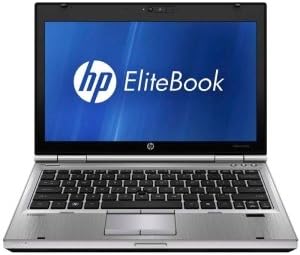
図4.1: フロント view of the HP EliteBook 2560p laptop. This image shows the laptop open, revealing the 12.5-inch display, keyboard, and touchpad. The screen displays the "HP EliteBook" logo.
4.1. フロントおよびトップコンポーネント
- 12.5-inch HD Anti-Glare LED Display: For visual output.
- キーボード: Standard QWERTY layout for text input.
- タッチパッド: For cursor control and navigation.
- Webカム: Integrated for video conferencing and imaging.
- Fingerprint Reader (FPR): セキュリティ強化のため。
4.2. Side and Rear Components
- USB 2.0ポート: 周辺機器の接続用。
- DVD+/-RW Optical Drive: CD/DVD の読み取りと書き込み用。
- 電源コネクタ: ACアダプターを接続します。
- イーサネットポート: 有線ネットワーク接続用。
- ディスプレイポート: 外部モニターを接続します。
- オーディオジャック: ヘッドフォンとマイク用。
5. セットアップ
5.1. 電源アダプタの接続
- AC 電源コードを AC アダプターに接続します。
- AC アダプターをアースされた電源コンセントに差し込みます。
- Connect the DC output plug of the AC adapter to the power connector on your laptop.
- Allow the battery to charge fully before initial use, or use the laptop while connected to power.
5.2. 初期起動とオペレーティングシステムのセットアップ
- ノートパソコンの蓋を開けます。
- Press the power button, typically located above the keyboard.
- 画面上の指示に従って、言語の選択、ユーザー アカウントの作成、ネットワーク構成などの Windows 7 Professional セットアップを完了します。
6. 操作手順
6.1. 電源のオンとオフ
- 電源を入れるには: 電源ボタンを押します。
- シャットダウンするには: Click the Start button, then select "Shut Down."
- 再起動します: [スタート] ボタンをクリックし、[再起動] を選択します。
- 眠るには: Close the lid or click the Start button and select "Sleep."
6.2. タッチパッドの使用
The touchpad allows you to control the cursor on the screen.
- タップ: シングルタップでクリック、ダブルタップでダブルクリックします。
- ドラッグ: Tap and hold, then drag your finger across the touchpad.
- スクロール: 2 本の指を使って垂直または水平にスクロールします。
6.3. ワイヤレスネットワーク(Wi-Fi)への接続
- システム トレイ (画面の右下隅) にあるネットワーク アイコンをクリックします。
- リストから希望の Wi-Fi ネットワークを選択します。
- 「接続」をクリックし、プロンプトが表示されたらネットワーク セキュリティ キー (パスワード) を入力します。
6.4. 光学ドライブの使用
The integrated DVD+/-RW drive allows you to read and write CDs and DVDs.
- ドライブの取り出しボタンを押してトレイを開きます。
- Place a disc gently onto the tray, label side up.
- Push the tray back into the laptop until it clicks shut.
7. メンテナンス
7.1. ノートパソコンの掃除
- 掃除する前に必ずノートパソコンの電源をオフにして、プラグを抜いてください。
- 柔らかく糸くずの出ない布で軽く拭き取ってください。amp水またはディスプレイ専用のスクリーンクリーナーで拭いてください。
- キーボードとシャーシのお手入れには柔らかい布をご使用ください。刺激の強い化学薬品は使用しないでください。
- 圧縮空気を使用して、通気口やキーボードの隙間からほこりを取り除きます。
7.2. バッテリーのお手入れ
- バッテリーを頻繁に完全に放電することは避けてください。
- 長期間使用しない場合は、ノートパソコンを涼しく乾燥した場所に保管してください。
- If the battery is removable, ensure it is securely seated.
7.3. ソフトウェアの更新
HPサポートからオペレーティングシステムのアップデート(Windows Update)とドライバーのアップデートを定期的に確認してインストールしてください。 web最適なパフォーマンスとセキュリティを確保するためにサイトを更新します。
8。 トラブルシューティング
| 問題 | 考えられる解決策 |
|---|---|
| ノートパソコンの電源が入りません。 | Ensure the AC adapter is securely connected and the power outlet is functional. Check battery charge. |
| Wi-Fi接続がありません。 | Verify Wi-Fi is enabled (check physical switch or function key). Restart router and laptop. Re-enter Wi-Fi password. |
| 画面が空白です。 | Connect an external monitor to check if the display is faulty. Adjust brightness settings. Restart the laptop. |
| システムが遅い、または応答しない。 | Close unnecessary applications. Check for malware. Ensure sufficient free disk space. Restart the laptop. |
より複雑な問題については、HPサポートを参照してください。 webサイトをご覧いただくか、カスタマーサービスにお問い合わせください。
9. 仕様
| 特徴 | 詳細 |
|---|---|
| モデル | HP EliteBook 2560p (LJ467UT#ABA) |
| プロセッサ | インテルCore i5-2520M |
| 画面 | 12.5-inch HD Anti-Glare LED (1366 x 768 pixels) |
| ラム | 4 GB DDR3 (1333 MHz) |
| ストレージ | 320GBハードディスク |
| 光学ドライブ | DVD+/-RW |
| グラフィックス | 統合されたIntelグラフィックス |
| 無線 | 802.11a/b/g/n、ブルートゥース |
| ポート | USB 2.0 (x1), DisplayPort, VGA, Ethernet, Audio Jacks |
| オペレーティング·システム | Windows 7 プロフェッショナル 64 ビット |
| Webカム | 統合された Webカム |
| 安全 | 指紋リーダー |
| バッテリー寿命 | 最大8.5時間(平均) |
| 寸法(長さx幅x高さ) | 16.5 x 13.5 x 4.5インチ |
| 重さ | 6.8ポンド |
10. 保証とサポート
For information regarding your product's warranty, please refer to the warranty document included with your purchase or visit the official HP support webサイト。
HP provides various support resources, including online documentation, driver downloads, and customer service contact options.
- HPサポート Webサイト: www.hp.com/support
- サポートへのお問い合わせ: HP参照 website for regional contact numbers and chat options.


